In early 2024, I was looking for a community platform to help more people build proven workflows in Notion.
I wanted something simple. But not just simple for me to set up.
I also wanted the platform to be stress-free enough for our members to instantly understand where to click, what to do next, and how to join the conversation. Yes, without needing to sit through a 20-minute onboarding tutorial.
At first, my shortlist came down to two options: Circle vs Skool.
Circle looked more flexible. It had more customization options and that polished community platform feel.
Skool, on the other hand, felt almost too simple.
But that simplicity was exactly the point.
After all, if people find your community confusing, they won’t engage. And when members don’t engage, even the best-looking community can turn into a ghost town.
So, I chose Skool.
That was over 3 years ago!
In this Skool review for 2026, I’ll walk you through what it’s actually like to use Skool today, which capabilities stand out, and where it still feels limited.
Let’s start with a quick backdrop.
What is Skool, and what does it do exactly?
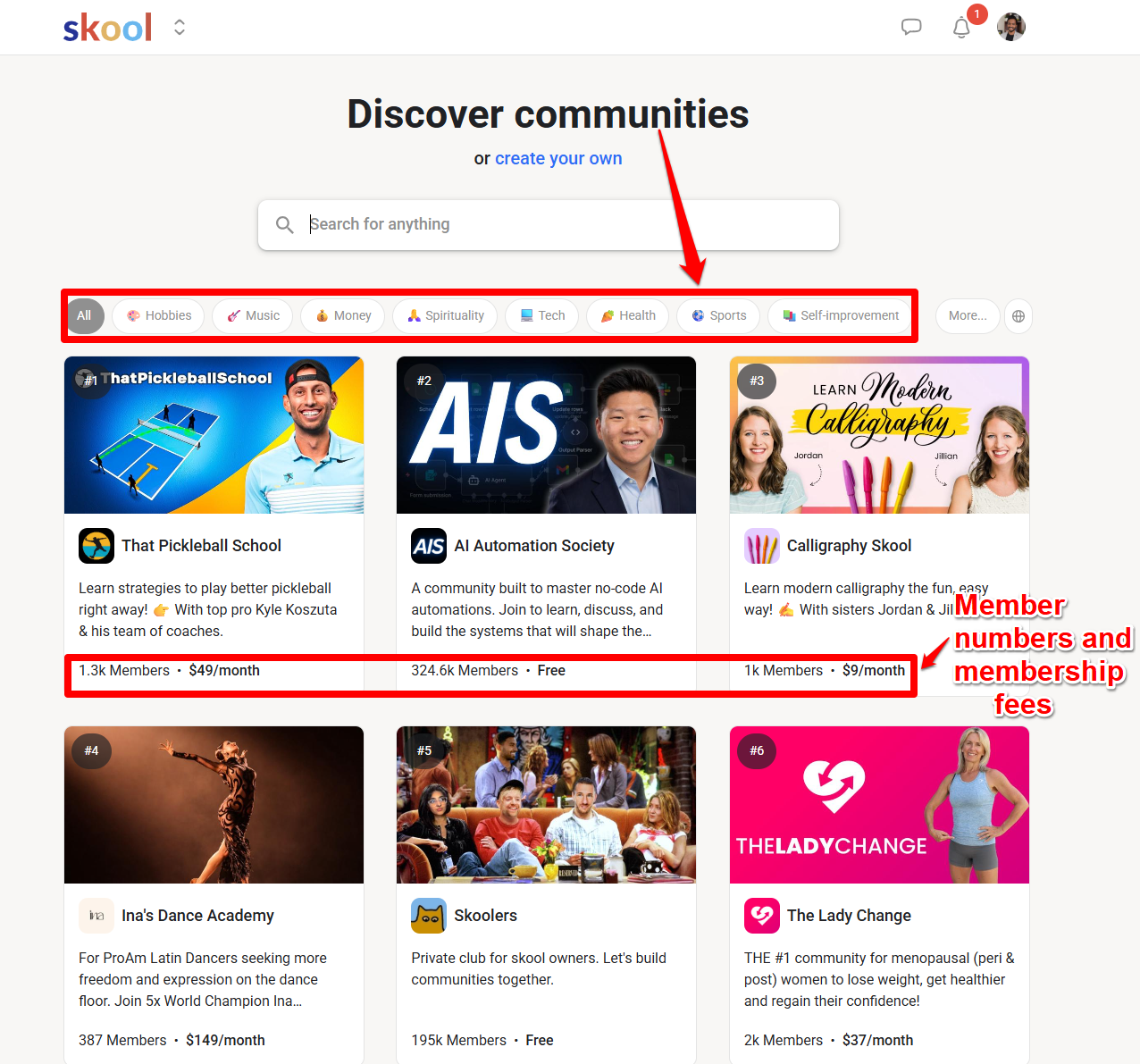
The Skool online community platform is excellent if your main goal is getting your community members to show up and participate.
For me, it also didn’t hurt that Skool was founded by Sam Ovens. I had followed Sam for years.

Skool has gained even more attention over the years after Alex Hormozi got involved with the platform. But hype is one thing. Daily use is another.
I do like, though, that the team at Skool implements numerous growth flywheels and other mental models, such as network effects and feedback loops, to elevate the platform to the next level.
But is Skool still worth it for community building nowadays?
👍 Skool pros: What I like about Skool?
- Clean, intuitive interface: Skool is refreshingly easy to navigate. The easier it feels from day one, the more likely people are to participate.
- Built-in discovery: This “search engine for communities” can help you get found by people already looking for communities around specific topics. I’ve personally found some great membership sites to join this way.
- Top-notch gamification system: One of my favorites, you get points, levels, leaderboards, and streaks to encourage members to keep showing up. You can also unlock perks or content based on member levels, which gives people a clear reason to contribute instead of just lurking.
- Unlimited live streaming: Even on the $9/month plan, Skool includes unlimited live streaming. Great for hosting webinars, Q&A sessions, office hours, workshops, or live community calls without paying extra for a separate live event tool.
- Simple course creation: Skool lets you host courses inside your community, drip content, and unlock lessons based on member levels. Great for lightweight training.
- Community calendar: This makes it easy to schedule calls, workshops, webinars, or cohort events.
- Solid mobile apps: Skool’s iOS and Android apps make it easy for members to learn, participate, upload videos, and keep up with your community on the go.
👎 Skool cons: What I don’t like about Skool
- Limited course features: Skool works well for simple course delivery. Course creators shouldn’t expect more advanced learning tools like quizzes, certificates, assignments, or detailed student progress tracking.
- No built-in marketing features: You won’t get advanced checkout page customization, order bumps, upsells, email marketing, or landing page tools built in.
- No native automation builder: Unlike platforms such as Circle or Kajabi, Skool does not give you built-in automation workflows for triggers, actions, tagging, onboarding, or member segmentation.
- Limited native integrations: Skool does not connect directly with many popular email marketing, CRM, and automation tools. In most cases, you’ll need Zapier or another third-party connector to build a more complete workflow.
Upfront bottom line✨: So, is Skool worth it?
Consider this:
| Skool is best for | Online coaches, course creators, paid communities, masterminds, accountability groups, free and paid membership sites |
| Not best for | Community owners who want an all-in-one online business platform with advanced course tools |
| Biggest advantage | Gamified community learning platform encourages participation and action, including Skool Games (inside Skooler Community) |
| Biggest limitation | Lacks proper marketing and sales automation tools, white label options, and integrations |
| Pricing | Starts at $9/month |
While it’s not Facebook Groups, Skool isn’t the most advanced community-building platform. Yet, I find that Skool can drive more visible community engagement than more feature-heavy platforms because it keeps things simple and easy to find.
I think that’s why Skool is having a “ClickFunnels moment” for online community-building tools.
That said, Skool is not for everyone. If you want an all-in-one, online business platform for courses, funnels, automations, email marketing, and deep customization, Skool may feel too simple.
👉 For that, I recommend you check out Circle for more course depth and customization options, or Kajabi for a truly all-in-one course and community platform with email marketing automation and sales funnels. Both are rich in community management features.
And considering how much hype Skool has received recently, to tell what’s real and what’s not, I’d recommend testing Skool yourself. Risk-free, of course.

Try Skool Free for 14 Days
Build a community that members actually engage with. Test Skool's gamification features risk-free for 14 days.
Verified
That said, you’ll want to read on for more details about Skool in 2026. That includes how Skool pricing works and what the gamification system is really like.
Skool’s community building experience is clean
Skool’s user interface is a big reason I chose it.
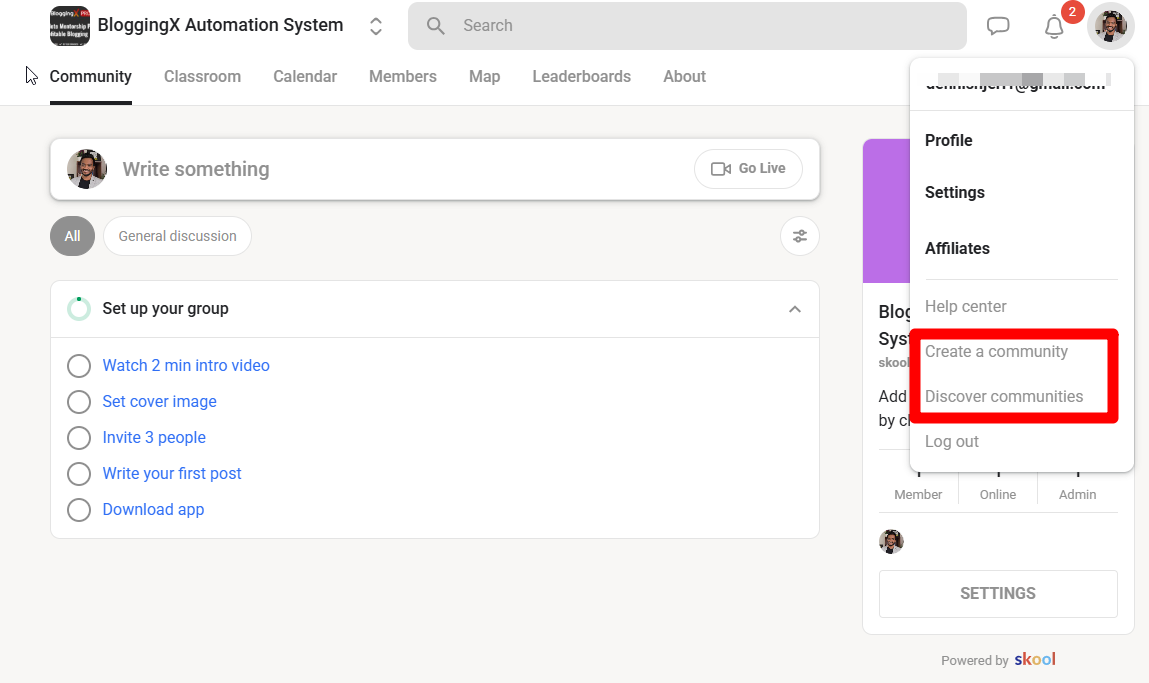
After all, if members can’t quickly find where to post, learn, or join calls, the confusion would kill engagement.
It is clean, minimal, and easy to understand.

For that, the Skool platform keeps the core experience simple with six main tabs:
- Community is where members join interactive discussions and ask questions.
- Classroom: This is where your courses, lessons, and training content live.
- Calendar: It’s where members can see upcoming Skool calls, live events, webinars, or workshops. Calendar management, basically.
- The directory is where members can find and connect with each other.
- Leaderboards: Where active members are ranked based on engagement.
- About: Here’s where your visitors and members can quickly understand what the community is about.
These tabs are themed around the five essential aspects of every community: engagement, learning, events, connecting, and gamification.
I also like that discussions within a community can be organized into different topics or channels.
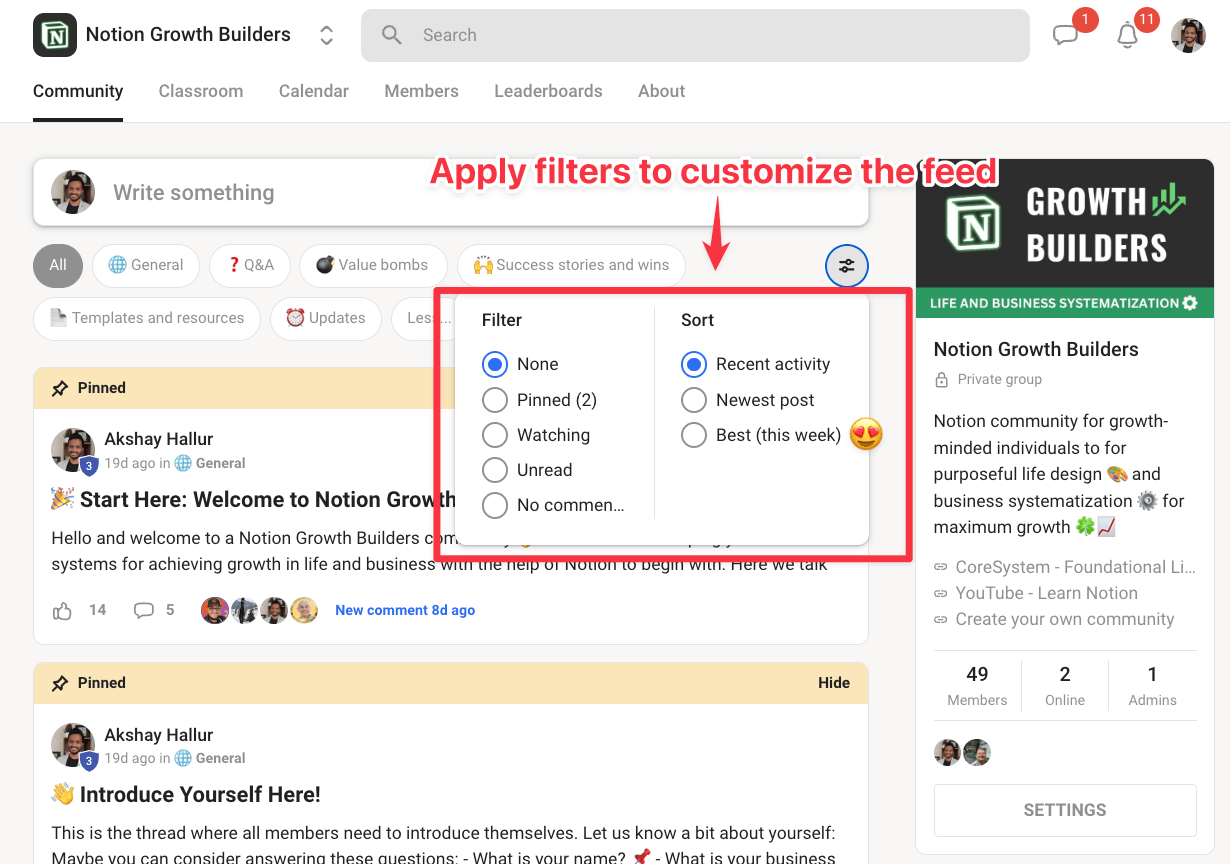
Among all the filtering and sorting, I find the ability to sort content by “Best (this week)” really useful. For example, irregular members can use it to catch up on the latest developments in the community, hassle-free.
Now, Skool also makes it fairly simple to bring people into your community.
You can do that via email invite, invitation link, or by CSV import.
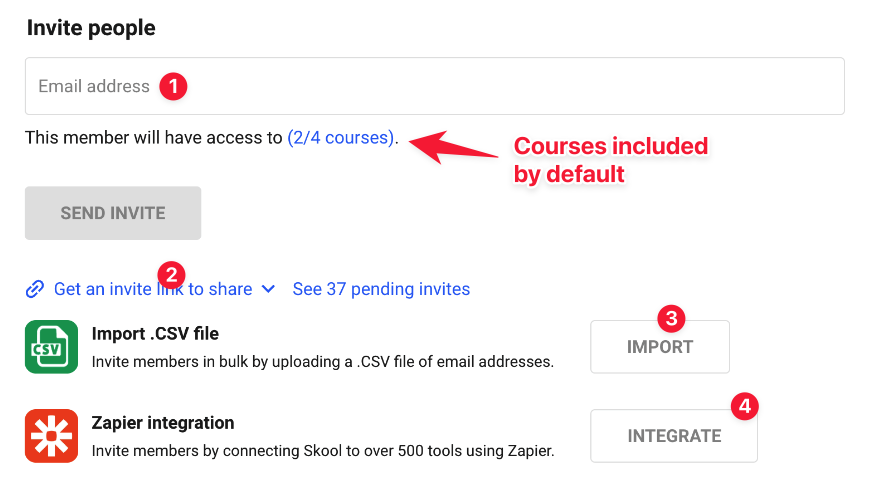
There’s also through Zapier. For example, I use ThriveCart for checkout, then Zapier to add buyers to Skool.
👎 However, Skool only accepts one column of email addresses when importing members via CSV. I’d prefer Skool allow creators to assign imported members to specific courses, access levels, or groups during the upload process.
For actual content creation, the community editor feels familiar and simple, as well.
I could write posts, add links, attach files, run polls, upload native videos, and embed external videos in a breeze.
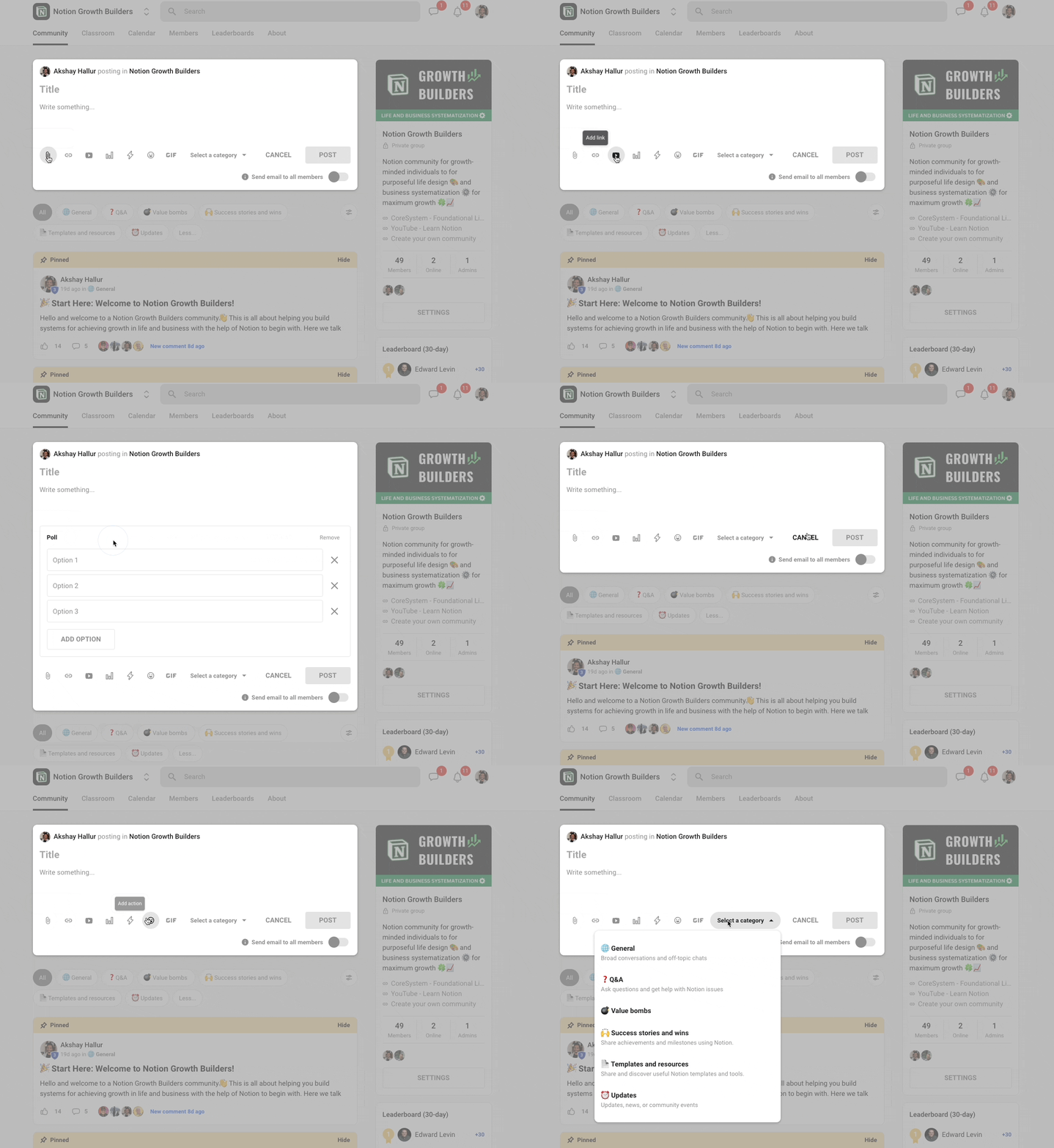
👎 The biggest drawback here is that it is not a rich-text editor. So, you can’t easily bold or italicize text inside regular community posts.
Some creators work around this by using Unicode bold and italic text generators, but that feels like a hack rather than a polished writing experience.
👉 Bottomline: Overall, Skool’s user interface, forum, and community feed are clean. Whenever new people join your community, they instantly understand what to do and where.
Helpful Resource: How to Build an Online Community from Zero (Step-by-Step)
Skool’s gamification boosts engagement 🚀
Skool is built around gamification.
And honestly, this is one of the main reasons Skool communities can feel more active than traditional community platforms.
For example, members earn points when other members like their posts and comments.
The points system counts 1 like = 1 point.
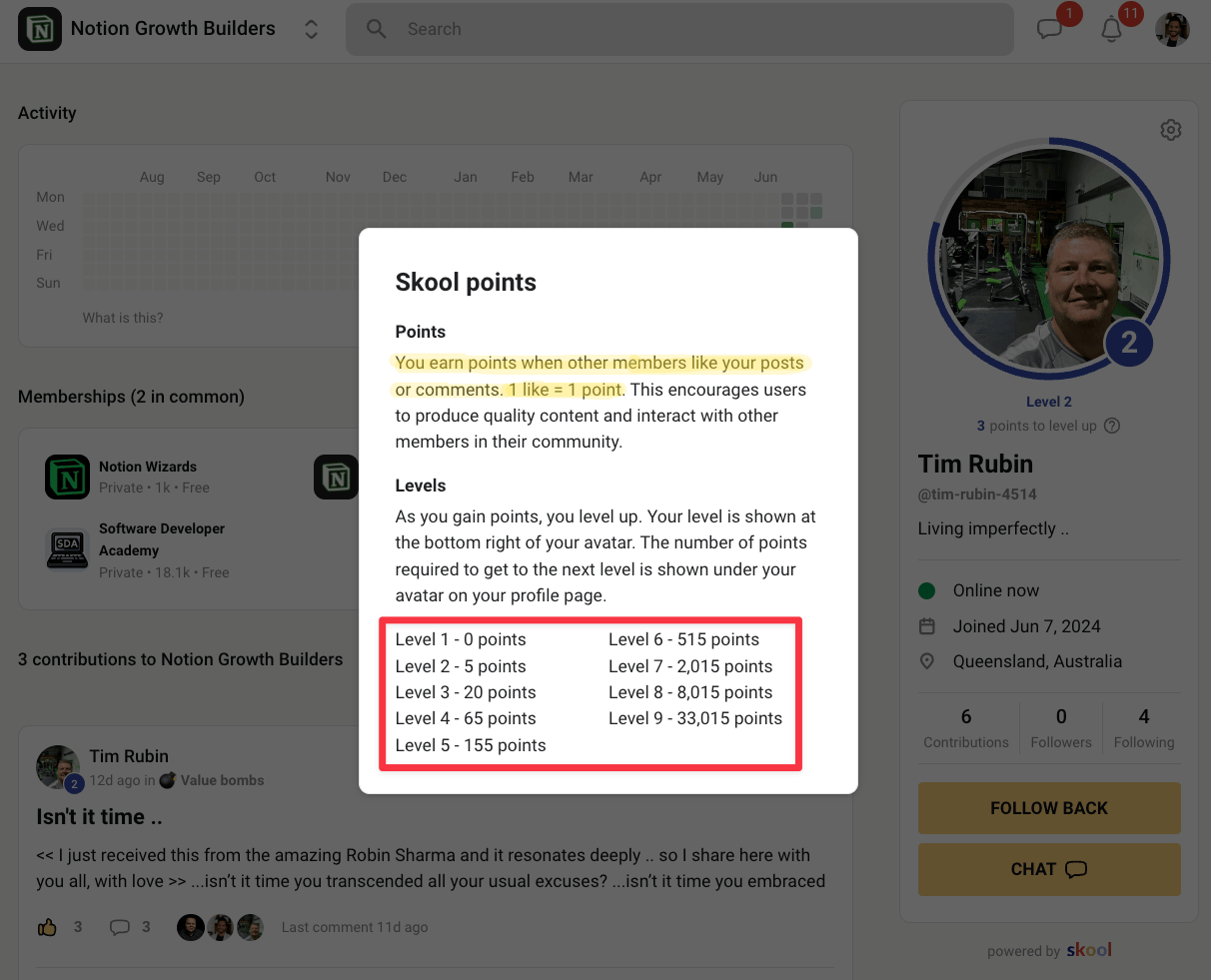
Members contribute. Other members react. Active members earn points. Then they move up levels and unlock new perks.
As a course builder, coach, or brand, this gives you a built-in way to reward participation without manually tracking who is showing up.
You can also decide which course content, resources, or products members unlock as they level up.
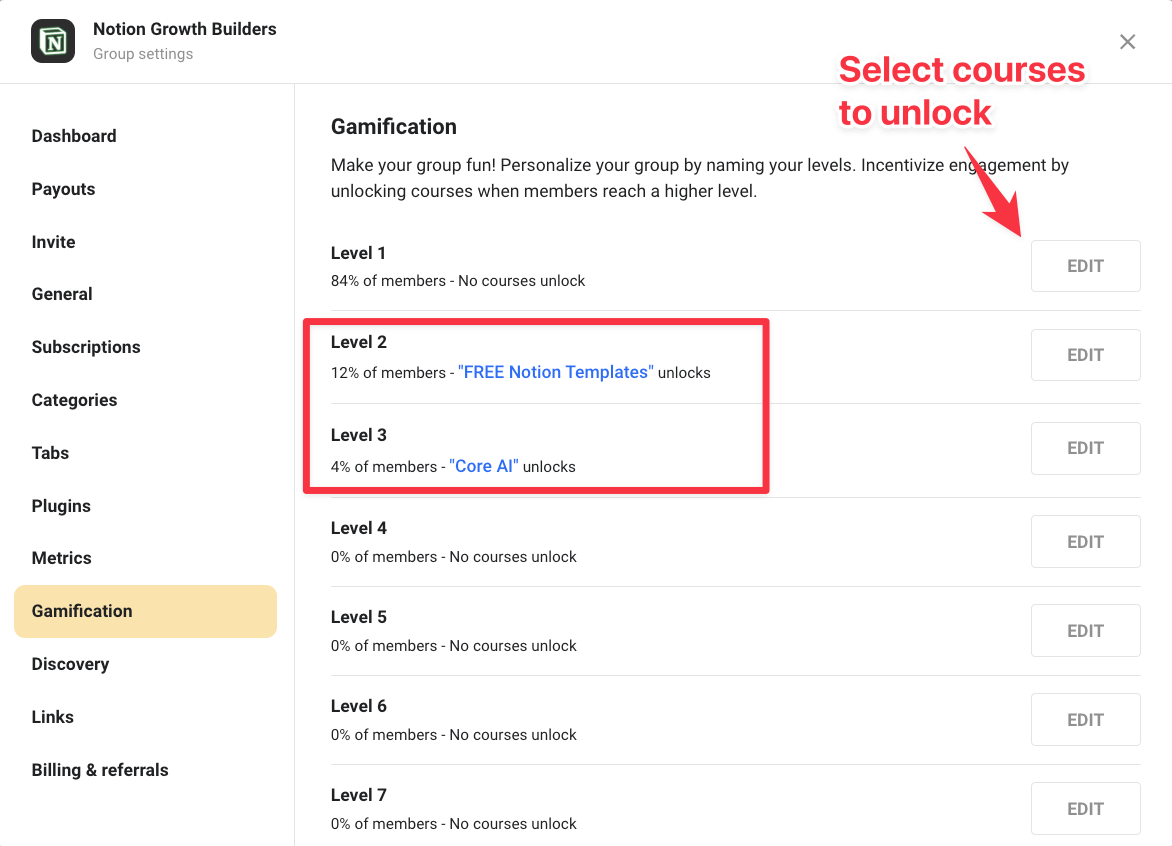
For example, you might unlock:
- A bonus course at Level 2
- A private Q&A call at Level 3
- A template library at Level 4
- A premium workshop or mastermind room at Level 5
Yes, that turns community engagement into a progression system.
A good example I saw before I built mine was the Synthesizer School community. Their members at higher levels could unlock perks like weekly accountability calls and profile templates.
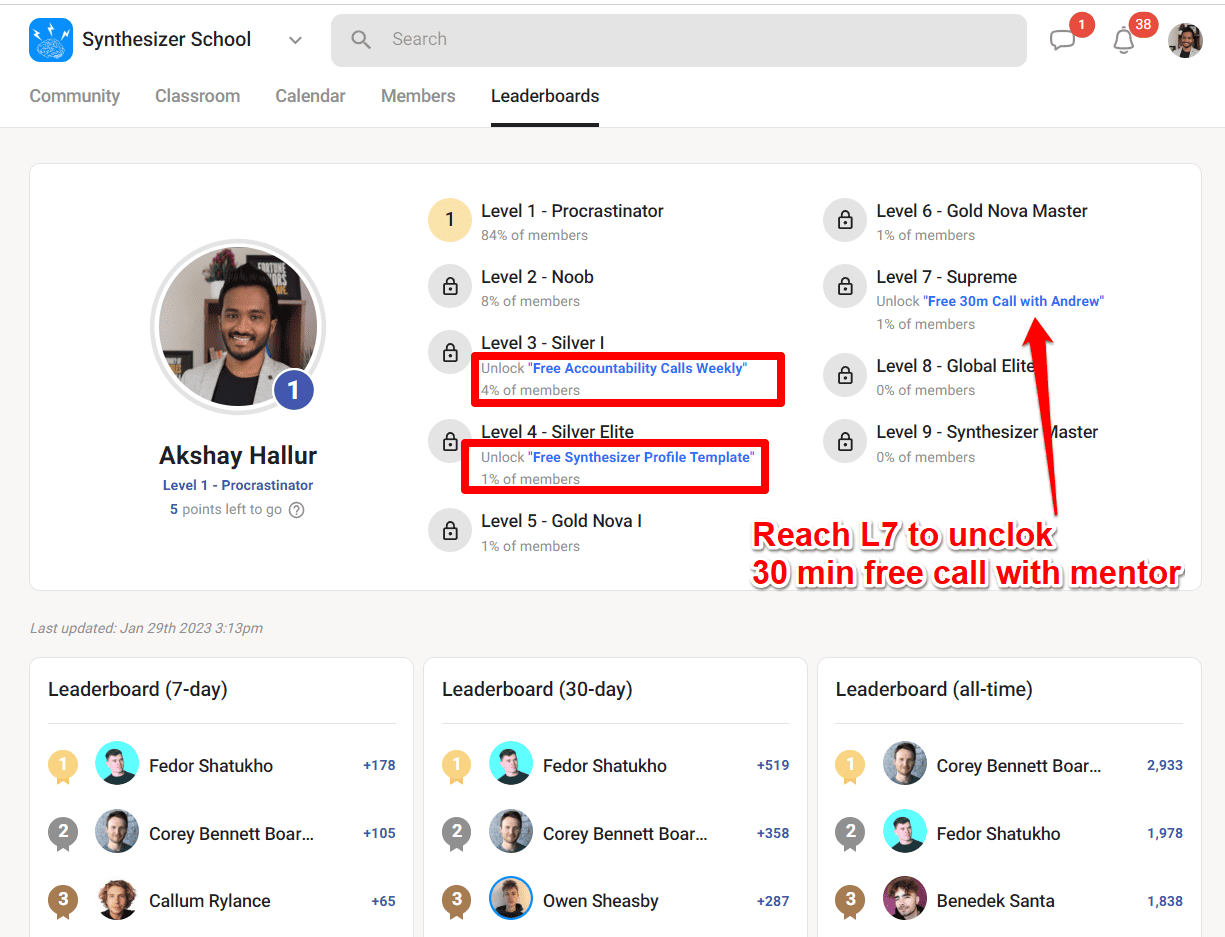
Here’s something else I found interesting.

What you are seeing there is that you can restrict direct chat access until members reach a certain level.
This is a small but smart tool for reducing spam, encouraging new members to participate first, and protecting the quality of member-to-member conversations.
To top it all off, Skool’s member profiles are surprisingly useful.
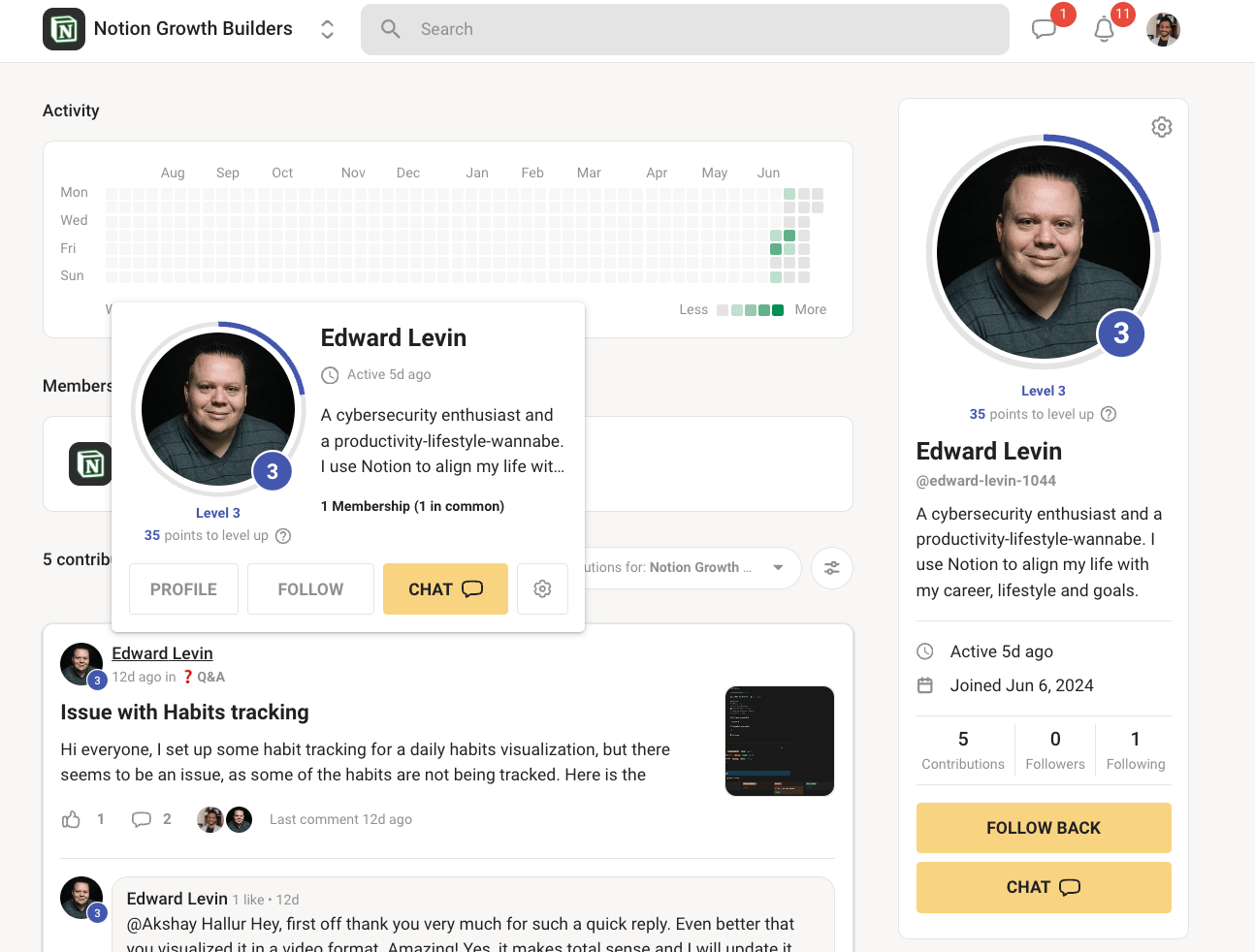
Also, Skool highlights each member’s level and points right on their profile. That makes progress publicly visible.
This creates subtle social pressure. When members see others climbing the leaderboards and earning status through activity, they’re more motivated to participate, post, and engage consistently to avoid falling behind.
Better yet, Skool makes engagement more habit-forming through streaks and daily activity tracking.

The daily activity chart helps members see their consistency over time.
And as the online coach, you can use this to incentivize (reward system) consistent participation in the community forum.
💝 For example, I’ve considered rewarding members with strong contribution streaks using custom T-shirts, gift vouchers, or other perks they would actually feel proud to earn.
Live streaming on even the $9 plan
Instead of sending members to Zoom, Google Meet, or another external tool every time you want to host coaching calls, you can schedule events directly inside the Skool calendar.
Native live streaming!
Yes, that works even on the $9/month plan.
Your members will be able to see upcoming calls, webinars, workshops, Q&A sessions (with live messaging), office hours, or accountability sessions right from the community calendar.
That makes it easier for them to remember what is happening and actually show up.
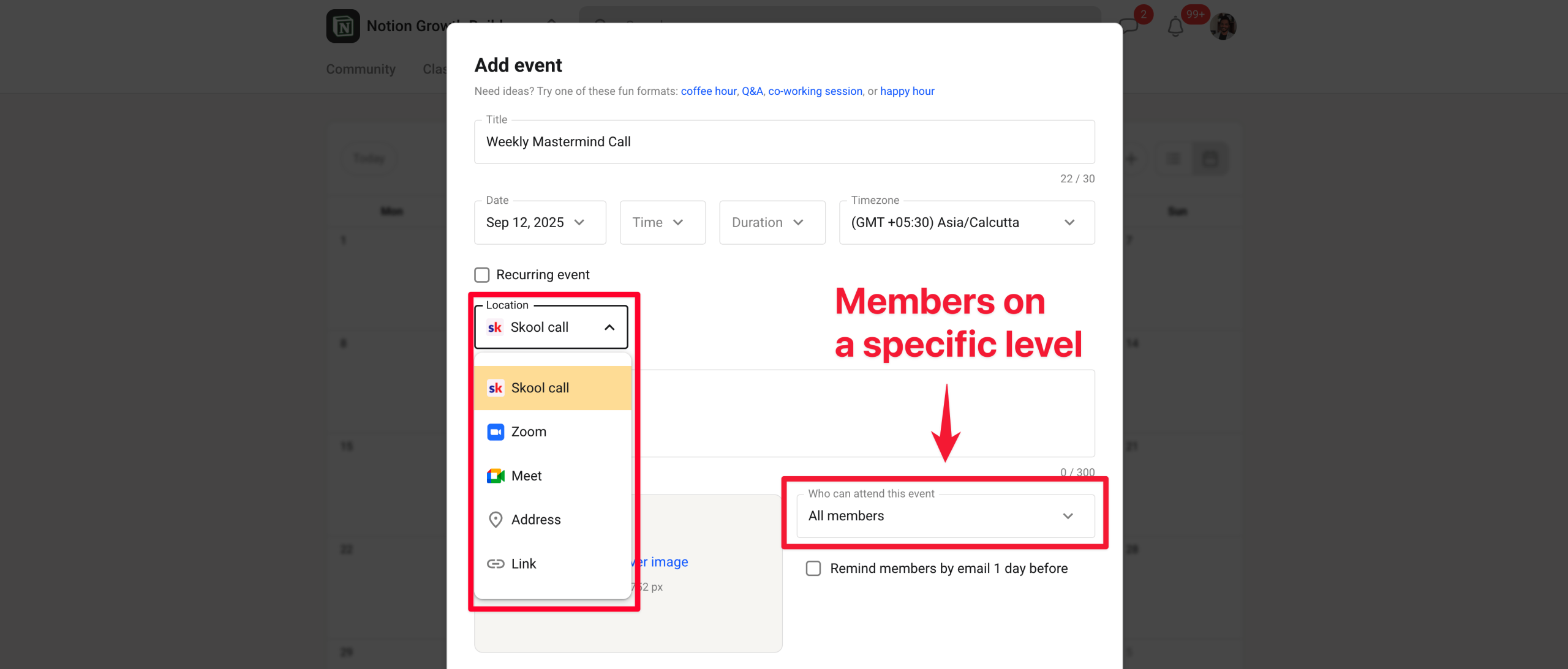
The cool part is that you can now schedule live event streams directly through this calendar management approach.
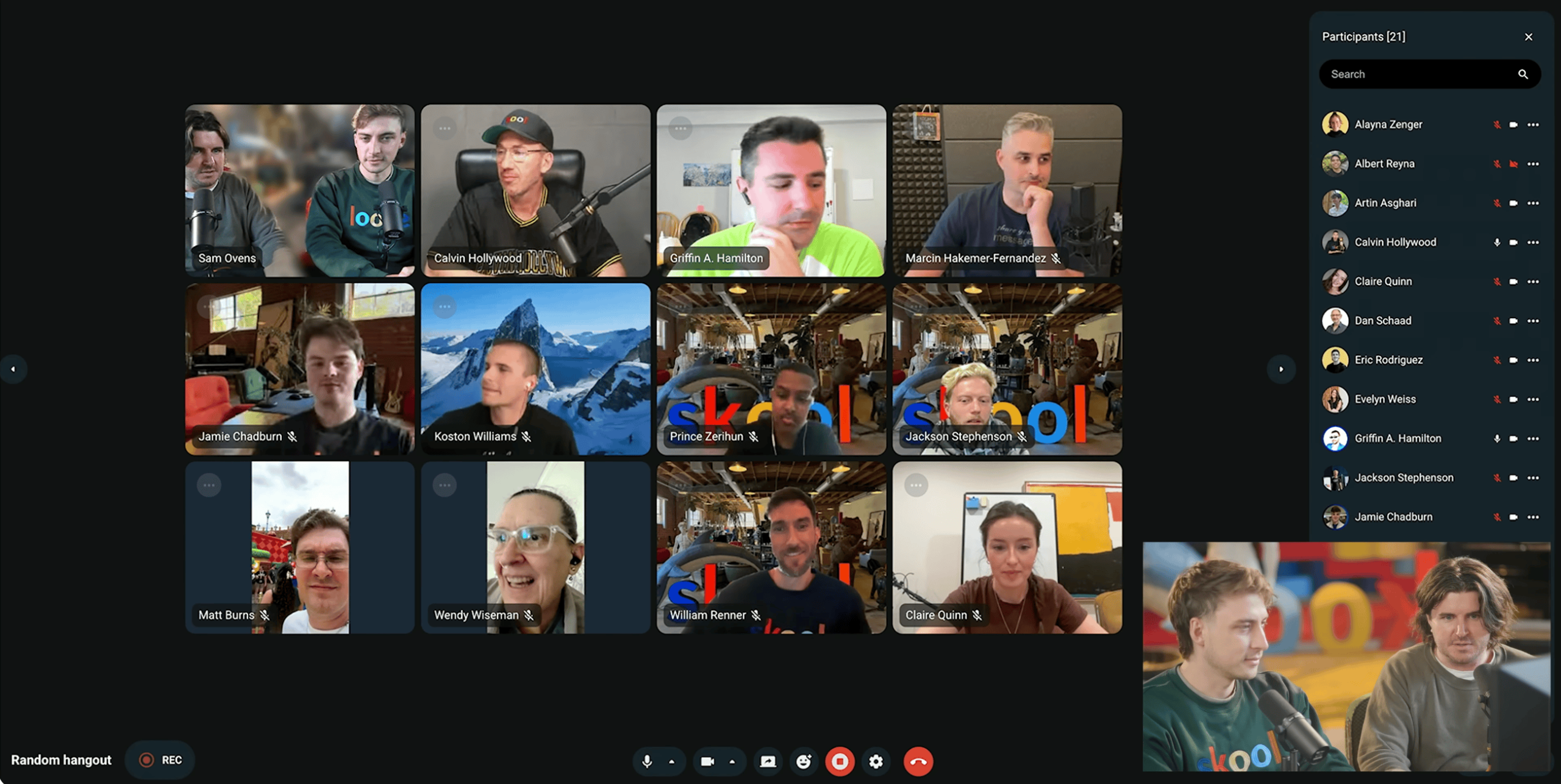
The live streaming feature is similar to Google Meet. You get camera background effects (though they’re a bit glitchy compared to Google Meet, but not a dealbreaker) and all the core features you’d expect.
There’s even a random hangout option for spontaneous sessions.
Here’s what else you can do:
- Call recording: Save replays for later
- Add or remove people: Manage participants during calls
- Disable audio: Mute participants when needed
- Host leaving option: You can leave the call but let members keep hanging out
This makes sense coming from Sam Ovens, who knows webinar marketing pretty well.
Just note that the live features are not trying to become a full enterprise Skool webinar platform. Instead, they are built to help you keep your members connected.
Skool live streaming can’t do 👎:
- One-to-one sessions: No private individual calls
- Calendly integration: Not available yet
👉 Bottom line: I would not say Skool completely replaces a Zoom subscription or Google Meet…yet. But for regular group calls, member hangouts, workshops, Q&A sessions, and community warm-up events, Skool’s native live streaming works well.
Skool online courses are meant to be simple
Here is the thing. Skool is not a dedicated LMS like LearnWorlds or Thinkific. It is not one of the all-in-one course tools, either.
Instead, the Skool platform gives you a simple way to host course content within your community.
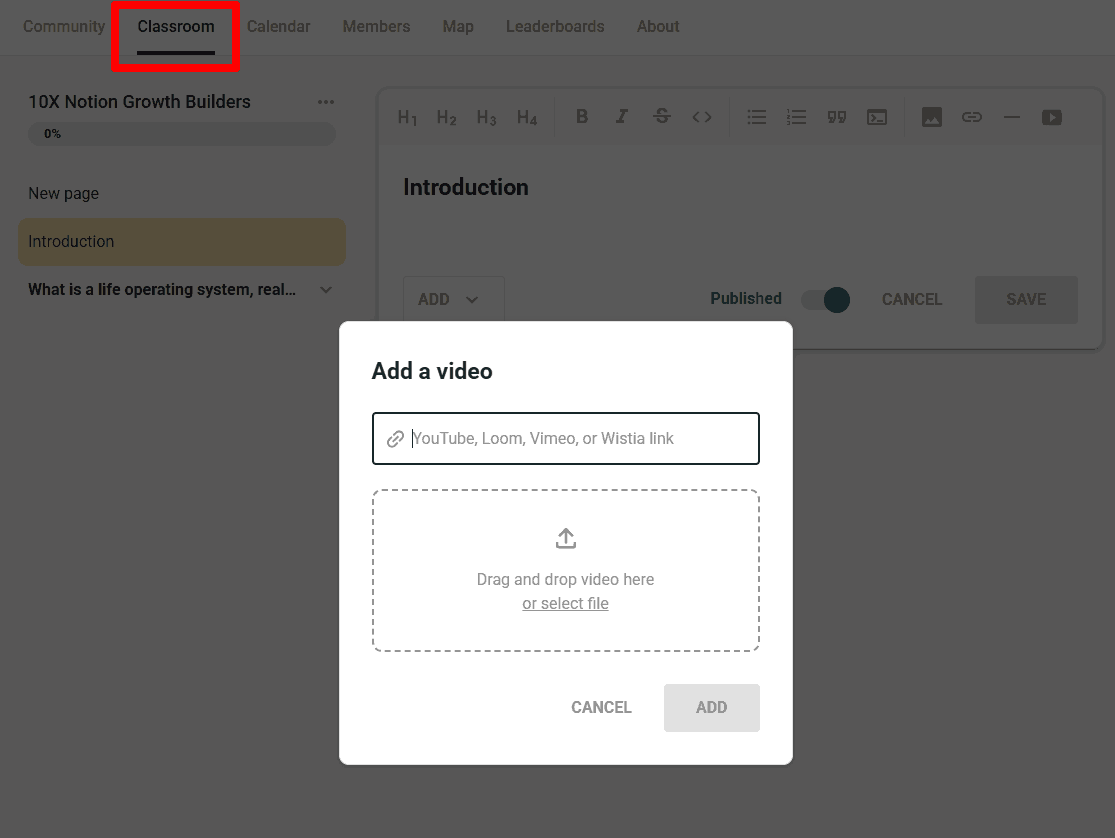
Inside Skool, you organize your course content using folders and pages.
Skool calls lessons “pages,” not “lessons,”. And that makes sense because these pages can include more than just videos.
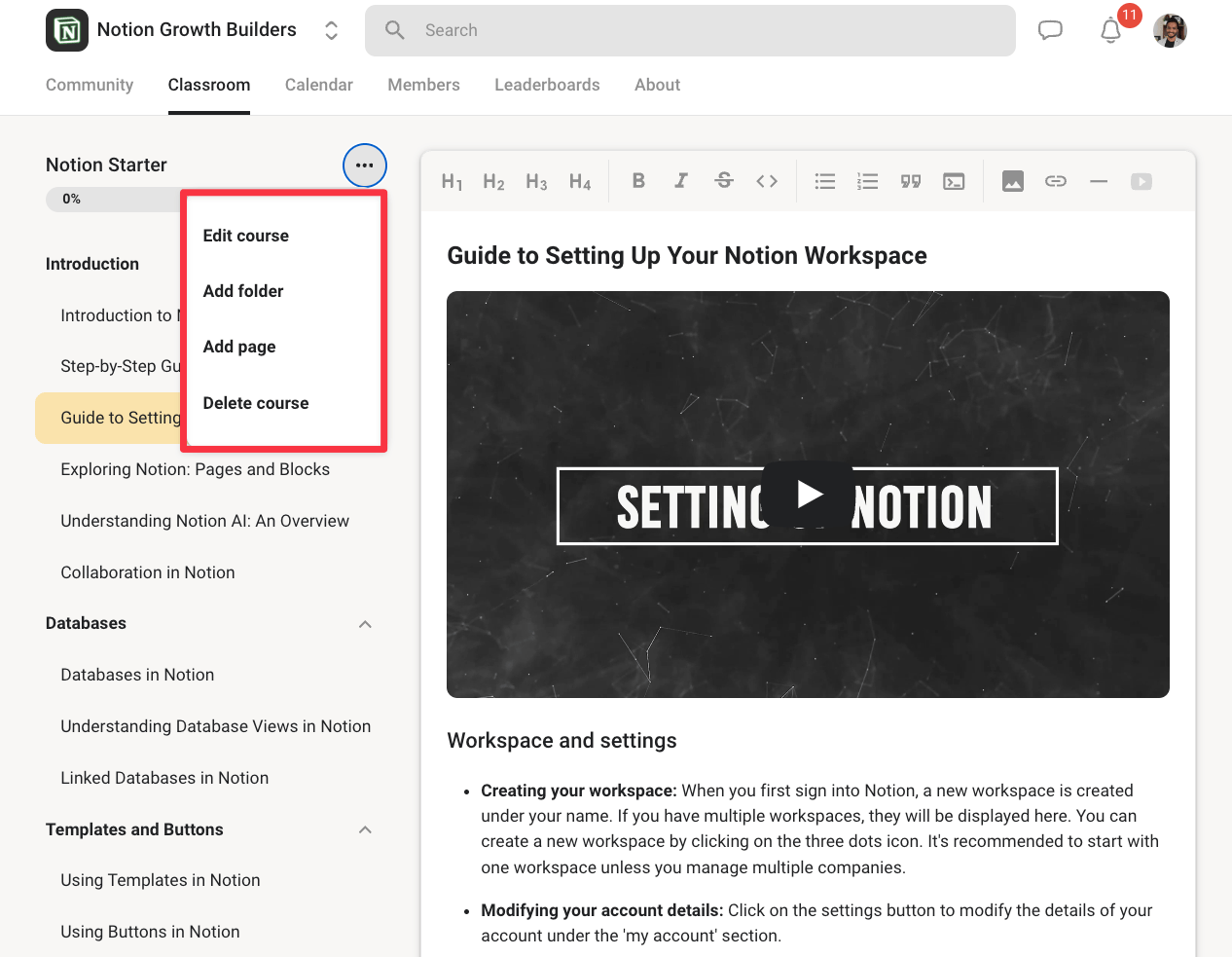
You can also add descriptions, action items, transcripts, embedded content, and discussions tied to specific lessons.
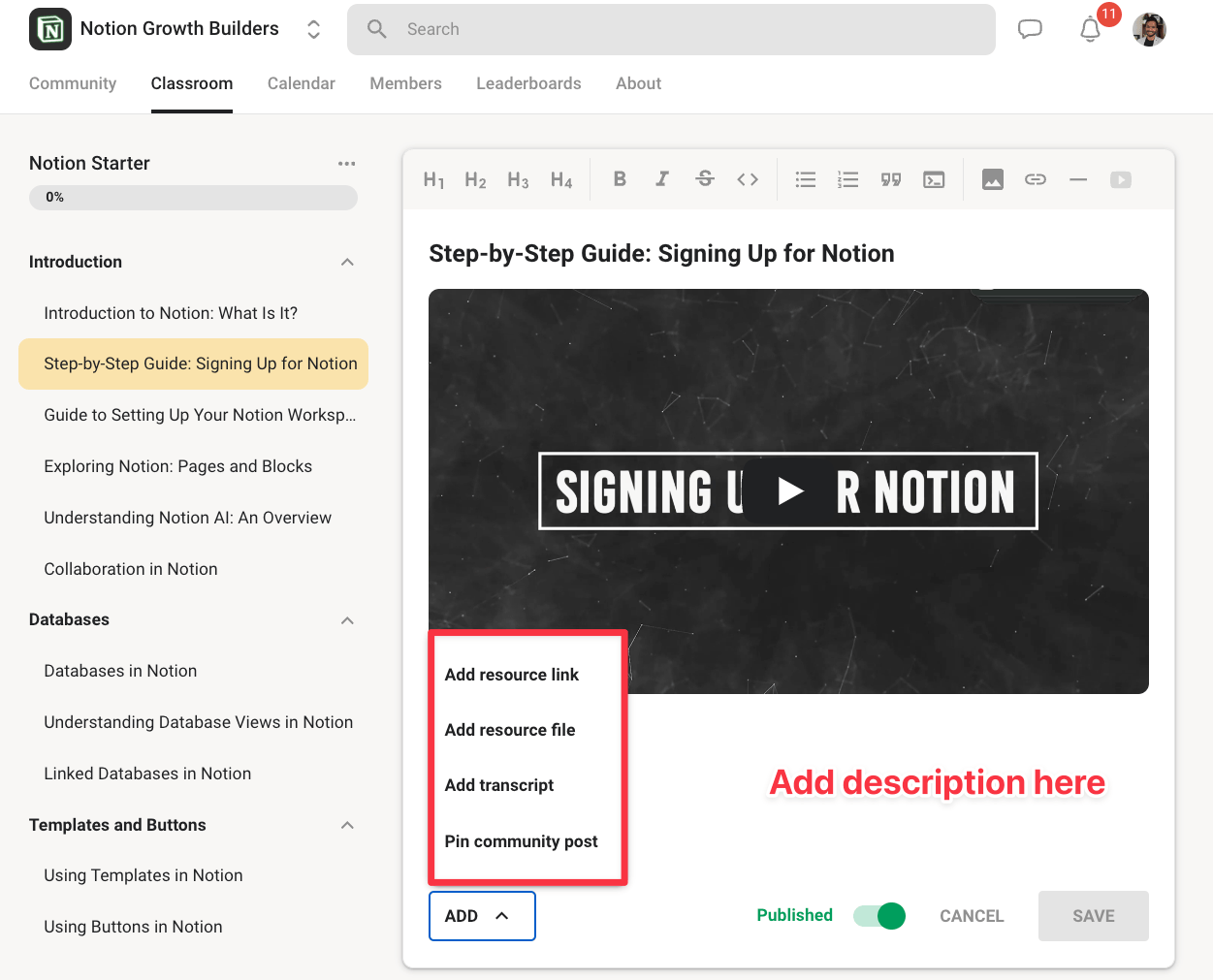
The native video hosting is surprisingly solid, too. You get native video uploads with auto-captions, timestamps, playback speed controls, and full HD quality.
There’s even a thumbnail picker to give things that professional feel.
This works on both the $9 and $99/month plans.
And if you prefer not to use Skool’s native video hosting, you can still embed videos from other platforms instead.
Skool’s online course builder also gives you flexible ways to control who can access your training (a.k.a. membership tiers):
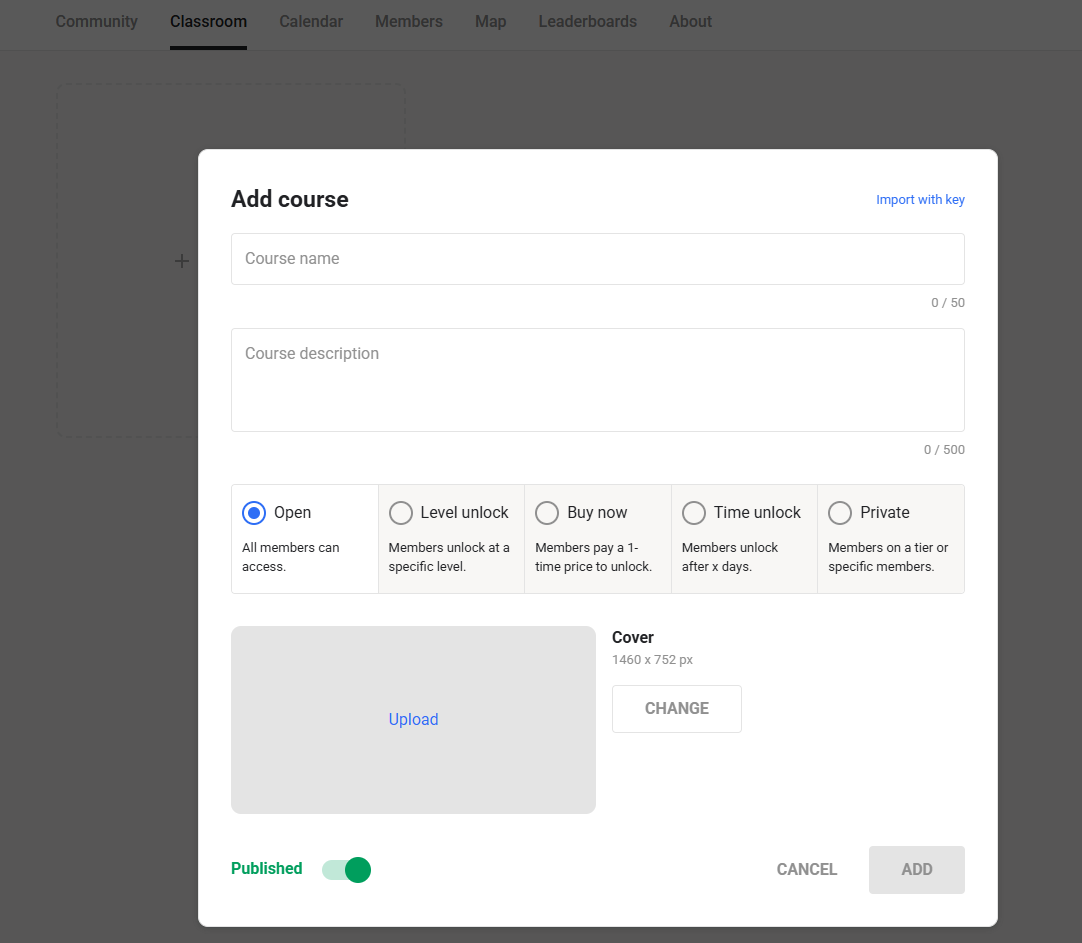
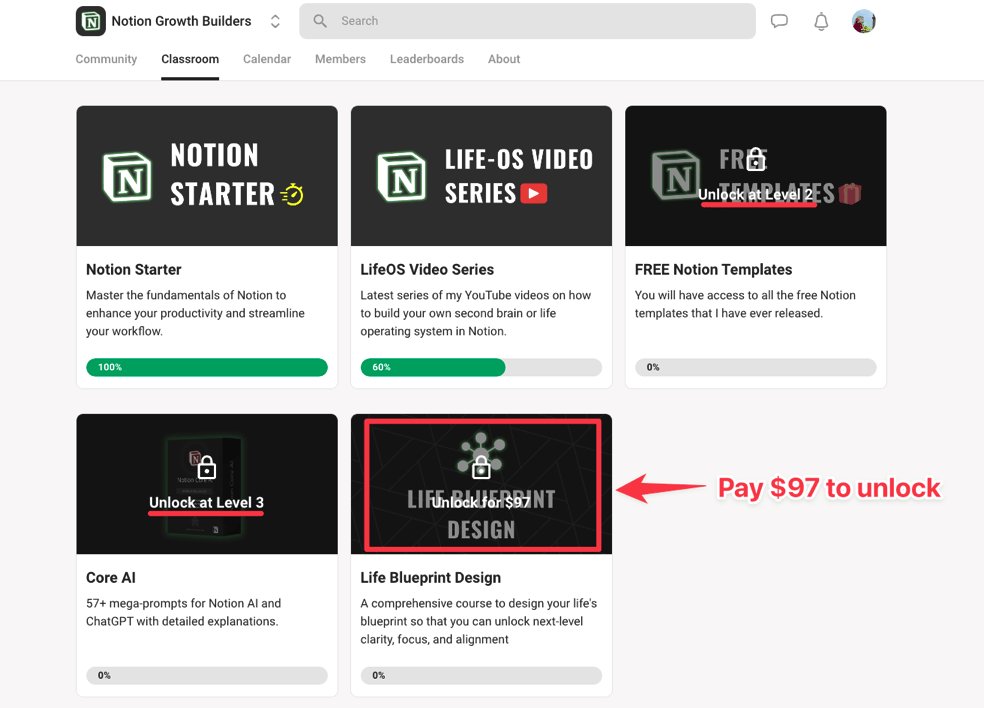
- Open (all members): Everyone gets instant access when they join. I use this for my Notion Starter course and LifeOS video series.
- Level-Based: Here, members need to engage and level up to unlock cool stuff, such as my free templates and Core AI prompt library.
- Buy Now: Members can buy direct access to specific courses right inside the platform.
- Private: You can keep certain courses private and grant access manually or through an external checkout workflow. For example, if you sell through ThriveCart, you can connect the purchase flow to Skool using Zapier or another automation tool.
That’s something I do.
This gives online course builders and coaches a couple of useful ways to package their content.
For example, you can make some courses available to everyone, reserve bonus content for active members, or sell premium training via membership tiers.
👉 For example, someone could access a free starter course immediately, unlock templates after reaching Level 2, and pay a one-time fee for a deeper course or premium program. As you can see above, that’s what I’ve done with my Life Blueprint Design course for a one-off $97.
From the student side, Skool’s course player is clean and easy to use as well:
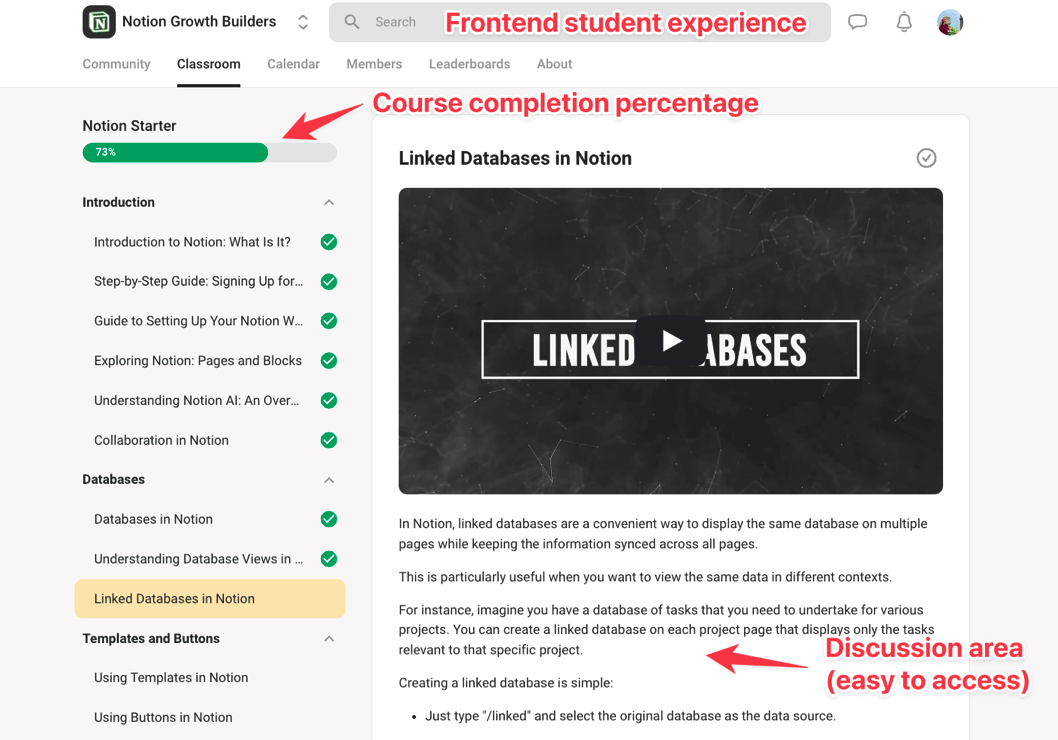
The interface is simple, with the course content on one side and the lessons organized clearly for students to move through.
There’s also this:
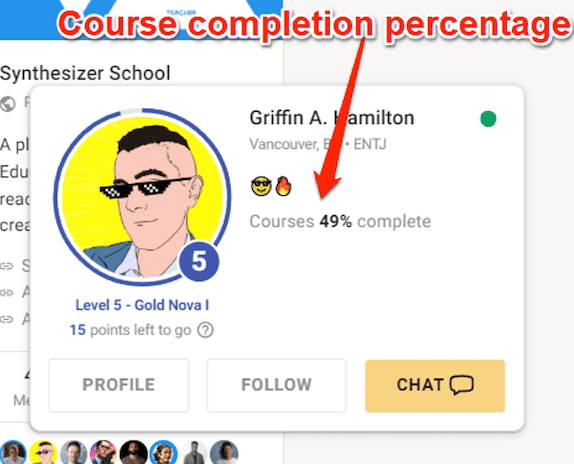
This progress also appears on the user profile, which gives you helpful context as a community owner.
For example, if a member is active in the community but has barely started the course, you can nudge them toward the training.
Another thing to note here.
Skool does not let members leave comments directly under lessons.
Instead, they need to create a community post tied to that lesson.
This keeps course-related questions and discussions visible to the whole community, rather than buried under individual lessons.
👉 Bottom line: Skool’s course builder is best for creators who want simple, community-first training, not a full LMS. You won’t get quizzes, certificates, assignments, deep progress tracking, or an analytics dashboard. And no, there are no AI recommendations to build your online course content faster.
Helpful Resource: [Course Creation Bootcamp] How to Structure an Online Course for Higher Completion Rates
Skool’s page design options are limited
Skool is not the most customizable community platform.
Skool alternatives like Circle or Mighty Networks, or Kajabi, certainly do better there.
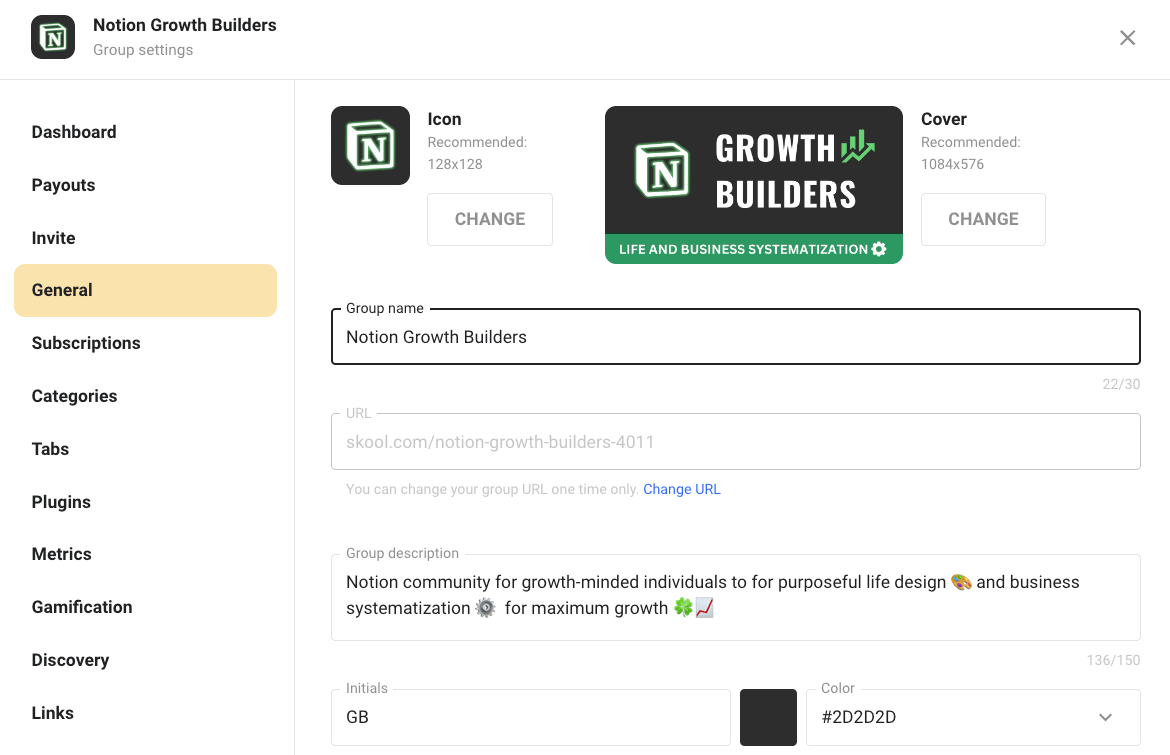
You can still personalize the basics, such as your community logo, cover image, description, pricing, and thumbnails.
You just cannot heavily customize the layout, choose from multiple themes, or use custom CSS to make your landing pages hit different from other Skool communities.
👉 And not only that, but Skool also does not support custom domains. That means your community will be hosted on a Skool subdomain, such as: www.skool.com/[community-name]
And that means if you want a fully branded member experience, custom pages, advanced landing page design, or complete control over the checkout flow, Skool will not give you that out of the box.
You’ll likely need external tools like ThriveCart, Kajabi, WordPress with Elementor, or another landing page builder.
But I also think Skool keeps customization limited on purpose.
👍 This. Every Skool community feels easy to understand because the structure is mostly the same. So, once someone learns how one Skool community works, they can quickly navigate another without much of a learning curve.
It is a bit like Facebook Groups in that sense of consistency across communities.
But if your brand experience matters a lot, Skool will feel limiting.
Yet, it’s not all lost. According to user experiences, Skool’s community about page converts surprisingly well with cold Meta ads.
Skool integrations are seriously limited
That same simplicity we just mentioned can become a limitation when you want to connect Skool with the rest of your business tools.
Unlike community platforms like Mighty Networks or Circle.so, Skool does not offer much in native integrations.
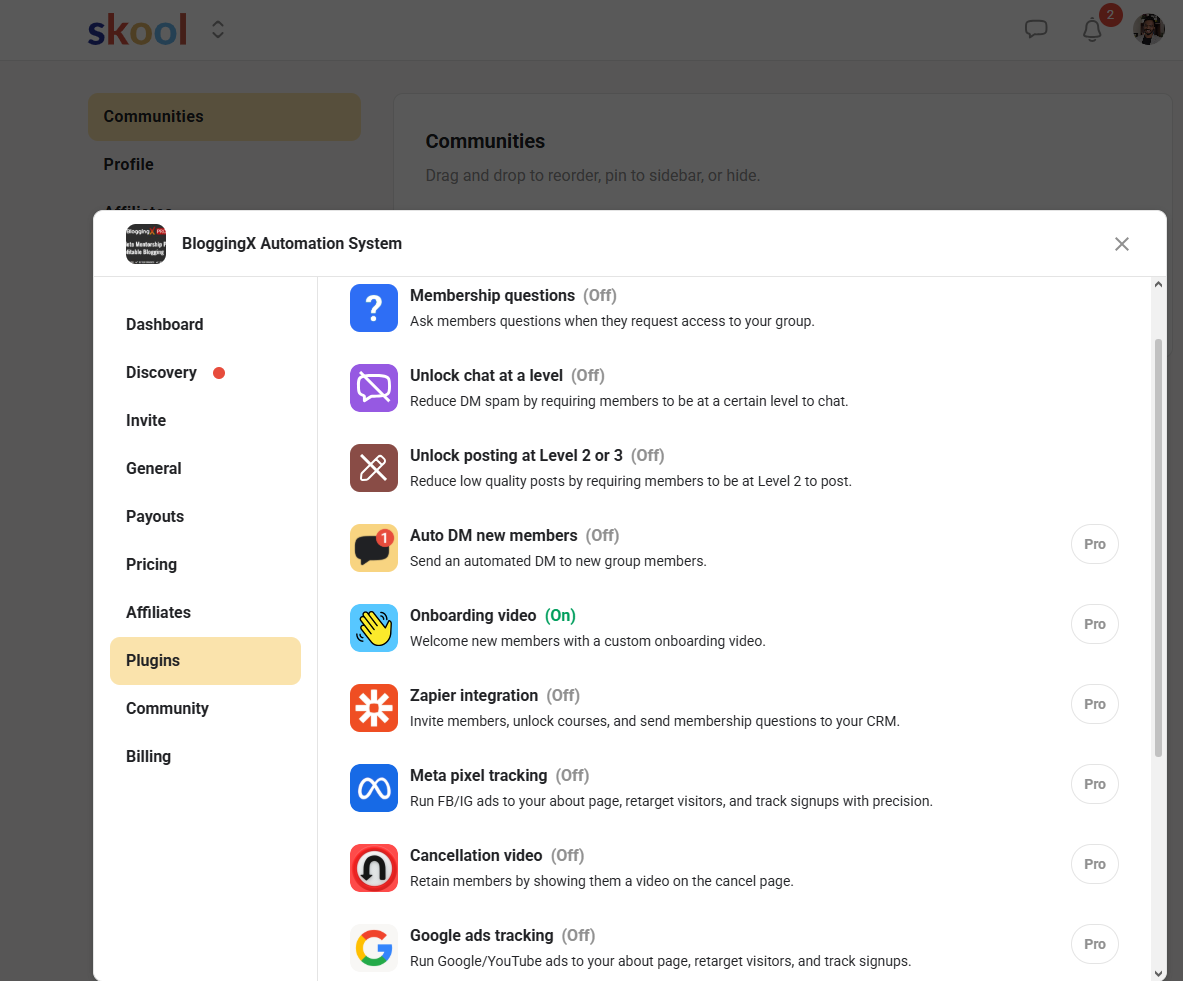
Instead, Skool mainly relies on Zapier and webhooks to connect with external tools.
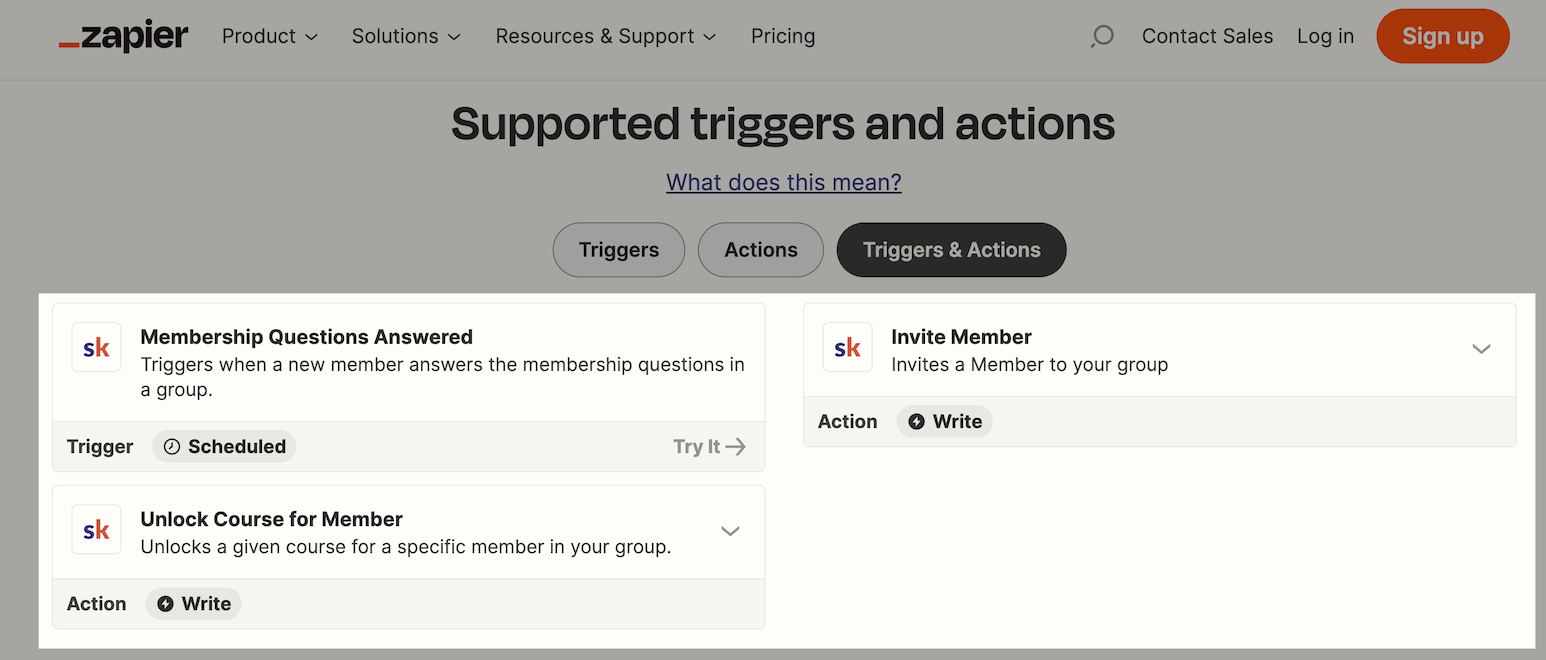
That means if you want Skool to talk to your CRM, checkout tool, email marketing software, or automation stack, you will usually need to set up those workflows through a third-party connector.
Yes, this works, but it also adds another layer to your setup.
If you are a creator or coach running a simple community, this may not bother you much.
👉 But if you are building a more advanced business with multiple products, segmented onboarding, email sequences, upsells, customer tagging, and behavior-based automations, Skool will feel limited fast.
The good news is that Skool also supports webhooks.
For example, if you use Thrivecart as your payment solution, its webhooks can automatically add your learners to Skool upon checkout. That eliminates the need for Zapier.
👉 Bottom line: Skool gives you enough flexibility to connect the basics. But it does not give you a deep automation system inside the platform.
Skool mobile apps are actually useful now
Skool also comes with mobile apps for both iOS and Android.
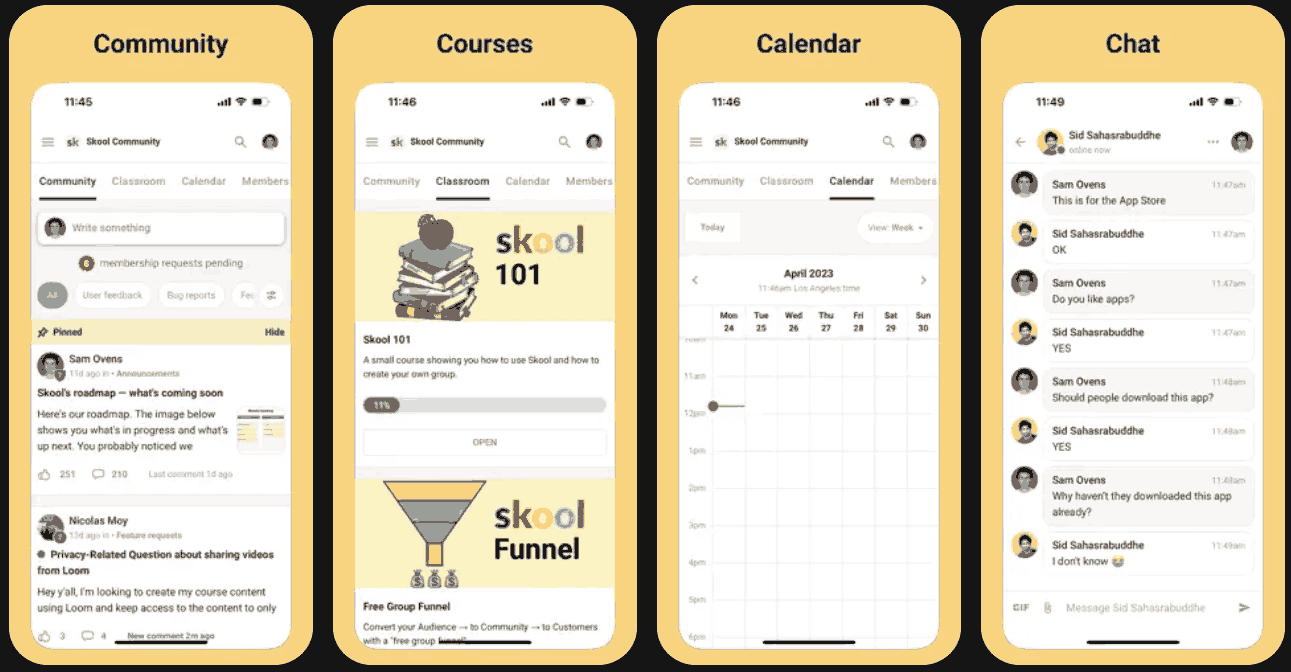
And for a modern community platform, this is a must-have.
See, most members will not log in from a desktop every time they want to check a discussion, watch a lesson, reply to a message, or see when the next event is happening.
They’ll do it from their phones.
And mobile access often means more consistent engagement.
👉 Skool also supports push notifications. That’s a good thing because it can help bring members back into the community when something relevant happens.
For example, members can get notified about comments, mentions, likes, followed members, thread updates, admin announcements, and event reminders depending on their notification settings.
That said, I would not treat push notifications as guaranteed reach.
Here’s why:
Members can manage their notification preferences, so you won’t want to annoy them with too many alerts. Instead, I recommend you use Skool notifications to create timely prompts around useful conversations, upcoming calls, and important community updates.
👉 Bottom line: In my experience, Skool’s mobile app can help keep your community close enough for members to check in regularly, but still simple enough that they do not feel like they are opening a bloated social network.
Skool is affordable, except for the transaction fees
Skool keeps its pricing simple with two plans: Hobby ($9/month, making it very easy to try) and Pro ($99).
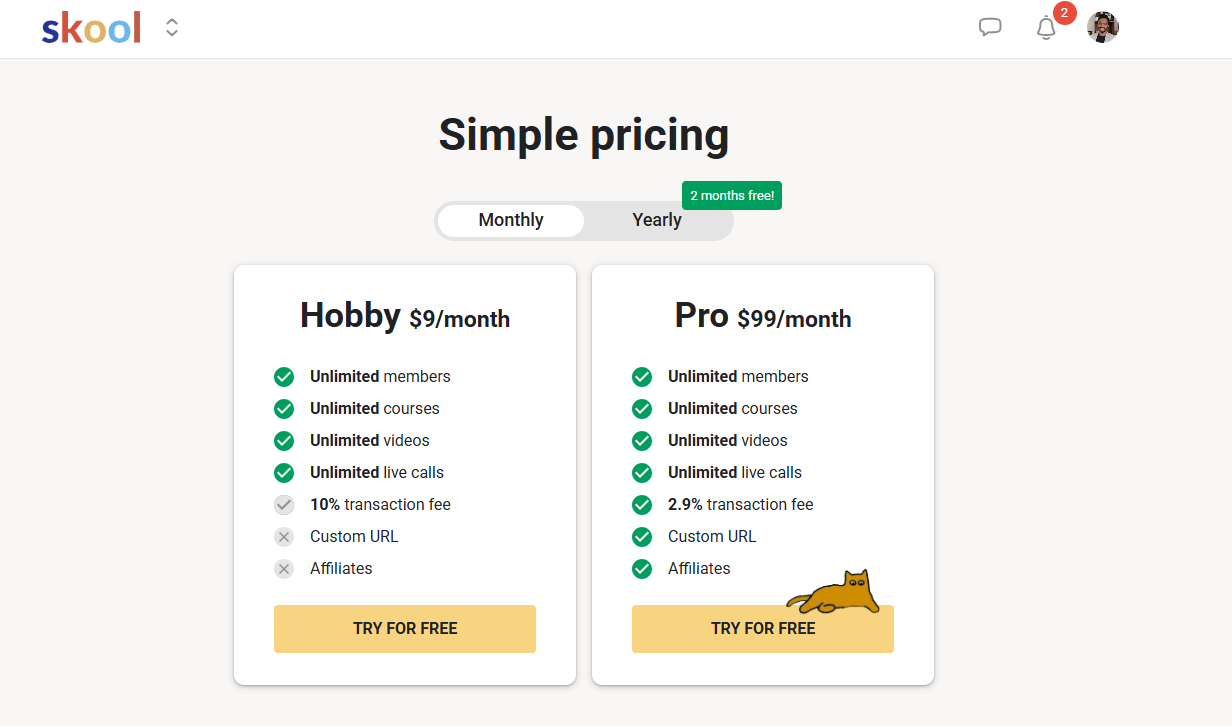
Compare that to Skool’s annual pricing.
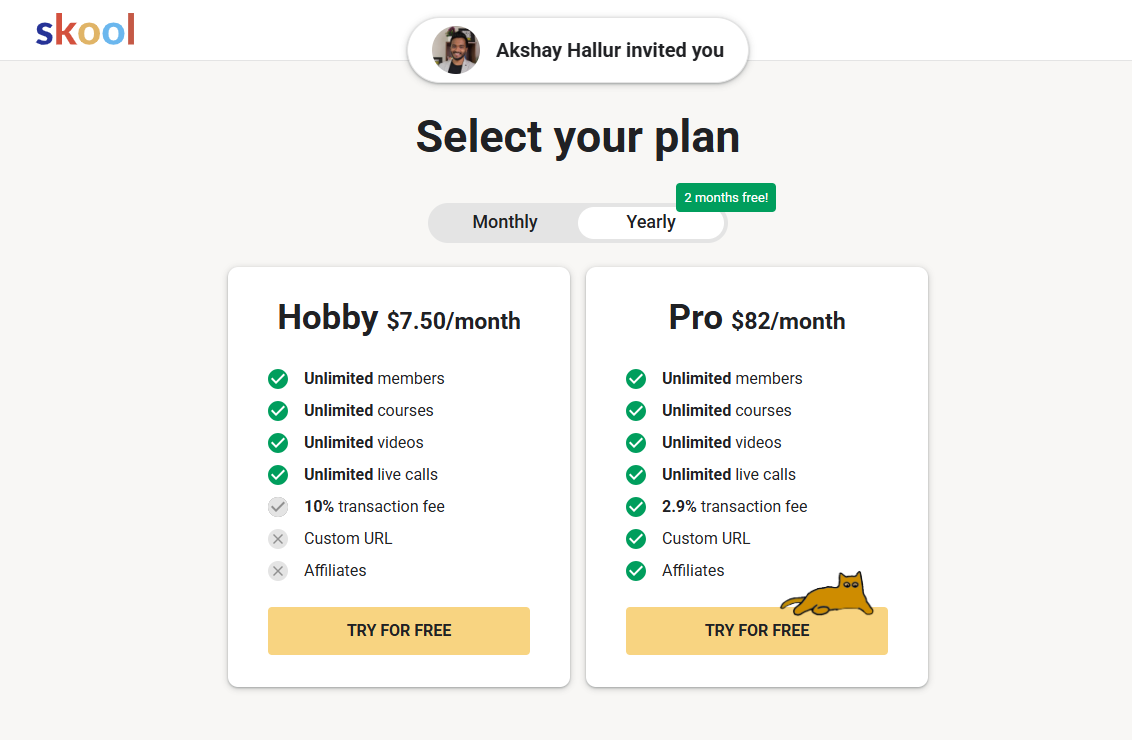
The Hobby plan offers the core Skool experience. Think of unlimited members, unlimited courses, unlimited videos, and unlimited live calls.
Yes, I’ve found it one of the lowest-cost ways to start a paid or free online community today.
But there is a catch.
👎 The Hobby plan comes with a 10% + $0.30 transaction fee on every paid transaction.
So, if your community starts generating meaningful revenue, the transaction fees can add up quickly.
👉 With Pro, Skool’s transaction fee drops to 2.9% + $0.30 per transaction for payments up to $899. For transactions above $900, the fee is 3.9% + $0.30.
Pro also unlocks more serious business tools. That includes more than one admin, custom URL, Zapier, webhooks, AutoDM, affiliate marketing support, Google Ads tracking, and other plugins.
👉 Bottom line: Choose Hobby if you are testing Skool, running a small free community, or starting with low revenue. Or, choose Pro if you have a paid community, need lower transaction fees, work with a team, want a custom URL, or need automation and tracking features.
Skool’s customer support was knowledgeable and fast
When it comes to support, Skool has the Skooler Community and public Help Center with articles for admins and members. You can also contact Skool support directly if you need help with your account, such as a subscription surcharge.
And I did.
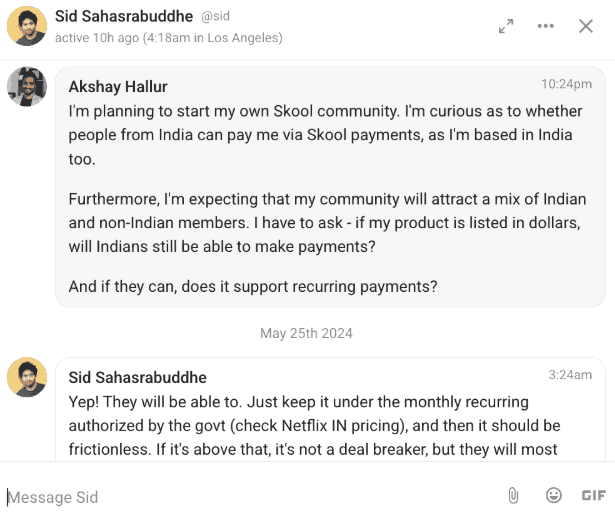
I tried chatting with Sid, who handles support at Skool. His responses took a few hours, but they felt quick compared to some platforms I’ve tried.
It also felt more like a friendly, knowledgeable conversation with someone who actually understands the Skool platform. Yes, instead of some stiff, artificial intelligence replies.
That said, one important thing to get here is that Skool supports the platform side of things.
💡 If you run a paid Skool community, you are still responsible for supporting your own members. Skool encourages members to contact group admins through DMs or the support email attached to the community.
The best Skool alternatives if the platform is too limited
When I was deciding which platform to use, I tested out a couple of other community platforms.
So, here are my views on how they compare to Skool.
Skool vs Circle
I’ve used both Circle and Skool, and the biggest difference is the member experience.
Circle gives you more customization, more structure, and more advanced community features. But that flexibility also makes Circle feel more complex.
Skool, on the other hand, is much easier to understand from day one. And that simplicity is a big reason Skool can feel more active.
Skool is also much cheaper to start with at $9/month, while Circle starts at $89/month, making Skool the more accessible option.
Skool vs Mighty Networks
Mighty Networks is more feature-rich than Skool. So, if you want a more customizable community platform with more built-in structure, Mighty Networks may be worth considering. But Mighty Networks can feel clunky after you use Skool’s clean interface.
But if you want members to understand the platform quickly and start engaging without much hand-holding, Skool feels easier. Skool’s biggest advantage here is that it is not trying to do everything.
Skool vs Kajabi
If you want one platform to run nearly your entire creator business model, Kajabi is much stronger than Skool for email marketing, sales funnels, and automations.
But Kajabi is also more expensive (starts at $179/month) and more complex.
Skool is not trying to replace Kajabi’s full marketing stack. Instead, it is much more focused on engaging communities and simple course content hosting in one place.
Skool vs Whop
Whop is great if your business is built around selling access to digital products, paid groups, subscriptions, or Discord community feeds. But it feels more commerce-first.
Skool feels more community-first. With Skool, the main experience is the community itself (posts, comments, courses, events, member profiles, and leaderboards), learning, and staying engaged over time.
Seen enough? Try Skool free for 14 days and see if it’s the right home for your community.
Skool FAQs
- Is Skool worth it in 2026? Yes, Skool is worth it in 2026 for various business models, like coaching, courses, and membership websites. But Skool will feel limited if you need advanced course features, email marketing, automation workflows, or deep branding control.
- Is Skool better than Circle? Skool is better than Circle if you prioritize simplicity, gamification, and community engagement. Circle, on the other hand, is better if you need more customization options, email marketing workflows, and deeper community management features.
- Can you sell online courses on Skool? Yes, you can sell online courses on Skool. It works best for simple course delivery connected to an active community. But Skool is not a full LMS, so no advanced assignments, compliance training, or detailed student analytics.
- Does Skool have a free plan? No, Skool does not have a permanent free plan, but it is affordable to test with its 14-day free trial before paying.
- Does Skool have email marketing? No, Skool does not have full email marketing capabilities like Kajabi, ConvertKit, Mailchimp, or ActiveCampaign. You will need a separate email platform for that.
- Is Skool good for beginners? Yes, Skool is one of the best online community platforms for beginners. The interface is simple, the setup process is not overwhelming, and it costs just $9/month to start.
- What are the best Skool community alternatives? The best Skool alternatives are Circle, Mighty Networks, Kajabi, Whop, and Discord. See my hands-on reviews for each to make an informed decision.
- What is the biggest downside of Skool? The biggest downside of Skool is that its simplicity can become limiting as your business grows. For example, it lacks email marketing and sales funnels.
- What are Skool Games on Skool? Skool Games is a quarterly competition on Skool where community owners compete to grow the most new monthly recurring revenue. Theyre’ll be leaderboards track progress, and winners can earn prizes like a trip to Skool HQ, a mastermind with Alex Hormozi, and trophies.
Skool Review 2026: What next?
After using and reviewing Skool, I’m still optimistic about where the platform is heading.
I’ve followed Sam Oven’s work for several years, and one thing that stands out is his focus on results, not just features.
Likewise, Skool is focused on improving the core things that matter most to community owners: participation, retention, and recurring revenue.
And for many creators, coaches, and small brands, that is exactly what they need.
I’d still like to see Skool improve its course features, support more native integrations, and offer better built-in tools for email marketing.
But if your biggest priority is getting members to show up, participate, and keep coming back, Skool is one of the best community platforms to try in 2026.
Don’t just take my word for it, though.