Passion.io is a no-code app builder built for coaching businesses.
It lets you deliver your programs through an app, add accountability, and keep clients engaged between sessions.
In this review, I’ll cover what Passion.io does well, where it feels limiting, and whether it’s worth the price.
Check out this breakdown in the table below:
| Features | Passion.io |
| Type | No code LMS app builder |
| Pricing | Starts from $119/mo – See all the pricing details |
| Native live streaming | Available. (YouTube Live integration) |
| Community features | It is pretty basic. It just has threads, posts, and members. |
| Payment gateway | Has its own gateway – Passion Payments. Or you can use Stripe integration |
| Explore all features | Explore more on Passion.io |
Quick decision
What do we like about Passion.io? 👍
- Simple to use: You don’t need any coding skills. The interface is easy to understand and you get templates to start with.
- No course limits: Create as many courses and coaching programs as you want.
- Multi-platform apps: Your app works on iOS, Android, laptops, TV, desktop, and the web. No device restrictions.
- Keeps students engaged: Group challenges and progress tracking help students stay motivated and finish your courses.
- Motion-based exercises with sequences: The “sequences” feature lets you make motion-based exercises. Perfect for fitness and yoga courses.
- Push notifications: Send targeted messages through PassionMessaging. These get better open rates than emails.
- Whitelabeling: The apps you make are completely white-labeled.
What we don’t like about Passion.io? 👎
- Limited design options: You don’t get many choices for customizing pages. The welcome and sales pages feel basic.
- No certificates: Passion.io can’t automatically give out course completion certificates. You’ll need Zapier to do this manually.
- Few integrations: Only works with Zapier and ClickFunnels. No direct connections to email tools, webinars, or CRMs. Get ready to pay for Zapier 💸
- Expensive and restrictive: Basic plan ($97/mo) takes 3.9% of sales and limits you to 100 students, 100 videos, and 1,000 notifications monthly. Want no limits? That’s $297/month. It’s costly.
- Not great value: You don’t get many features for the price. No funnels, no email marketing, few integrations. Other platforms like Kajabi and Podia offer more. Kajabi even has better community features with games and leaderboards, plus better mobile apps.
Bottom line ✨
If you want an app-first coaching platform that pushes students to actually take action, Passion.io is worth it.
Its biggest strength is accountability: challenges, goal tracking, and sequences make it a great fit for fitness, wellness, and habit-change programs.
But go in with your eyes open.
Passion.io is restrictive in a few key ways:
- You’re limited to 1 app per subscription
- Customization is basic, so you can’t design every pixel your way
- Integrations are limited, so you’ll likely lean on Zapier
- There are no built-in certificates, which is a dealbreaker for some course businesses
- Pricing is premium, especially if you want full features and remove branding
So here’s the call: choose Passion.io if you’re building an app-centered coaching offer and engagement matters more than advanced marketing features. If you want a more complete, flexible “course business” platform, look at alternatives like Kajabi or Teachable instead.

Try Passion.io Today!
Build engaging mobile apps for your coaching business without any coding.
Verified
App builder
Let me break down what Passion really is – it’s a platform for coaches to build mobile apps.
You can create apps with courses, community features, and ways to track activities.
They give you a simple drag and drop builder with different modules.
Building your app is pretty straightforward.
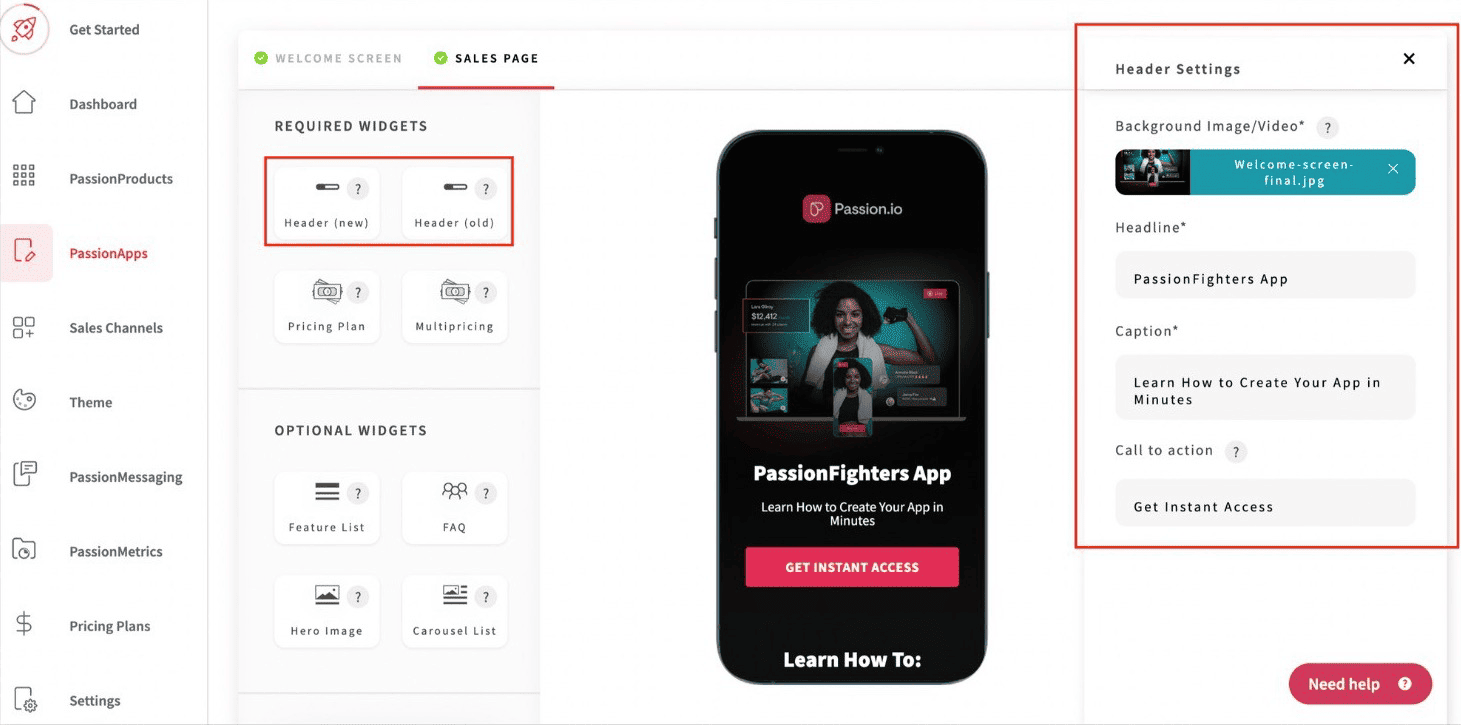
Here’s what you can make with the app builder:
- The landing page that shows up in the app’s discover tab
- Courses in the learn tab
- Community stuff (threads, posts, and member messaging)
Sure, there aren’t tons of modules to choose from.
But that’s actually good – they’ve kept it simple on purpose. You won’t get lost in too many options, and you can start building without any tech skills.
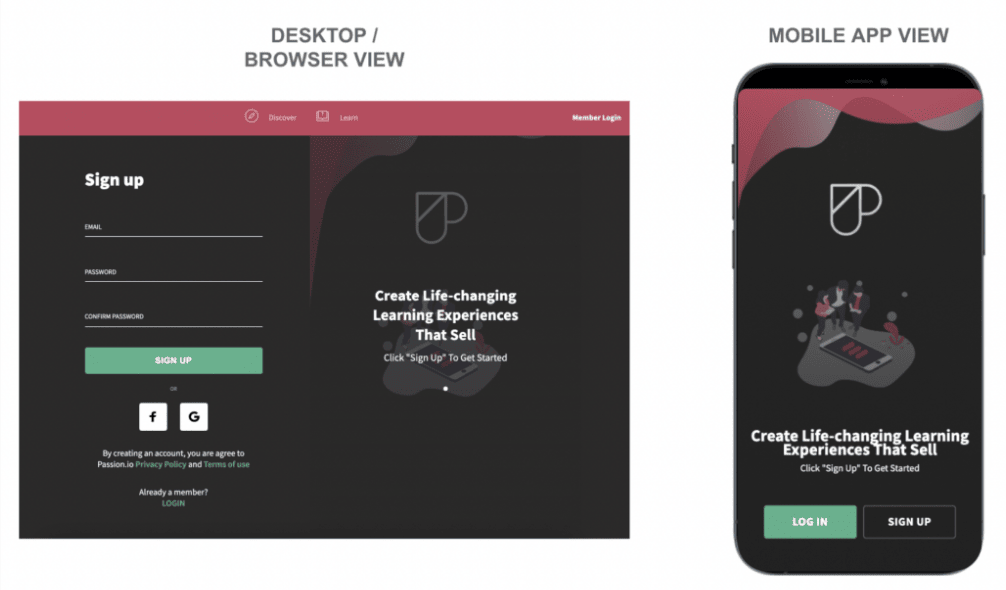
When building your app, you can easily switch between mobile and desktop views.
This helps you make sure everything looks good on all devices.
This flexibility matters because your app works everywhere – not just on phones, but also on the web through any desktop browser.
🏆 Bottom line: Passion.io’s app builder is straightforward with a clean interface that works across devices. While the options are limited, this simplicity makes it easier for non-technical users to create functional apps.
Sales page building
You’ll get a simple landing page builder to create the sales page that shows up after app install.
It comes with basic widgets like feature lists, FAQs, and image carousels.
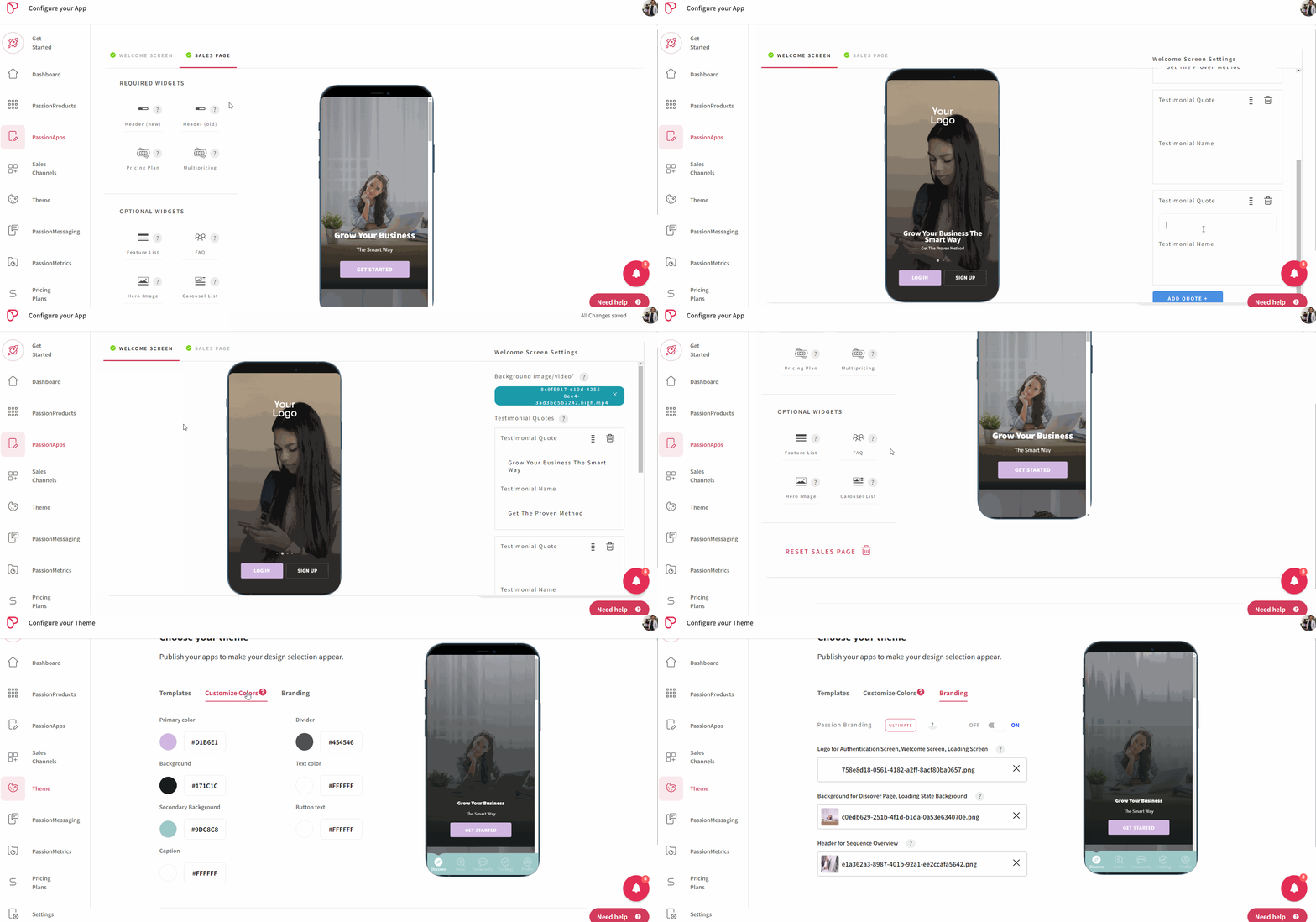
They’ve kept it simple on purpose since most people will view your landing page on their phones.
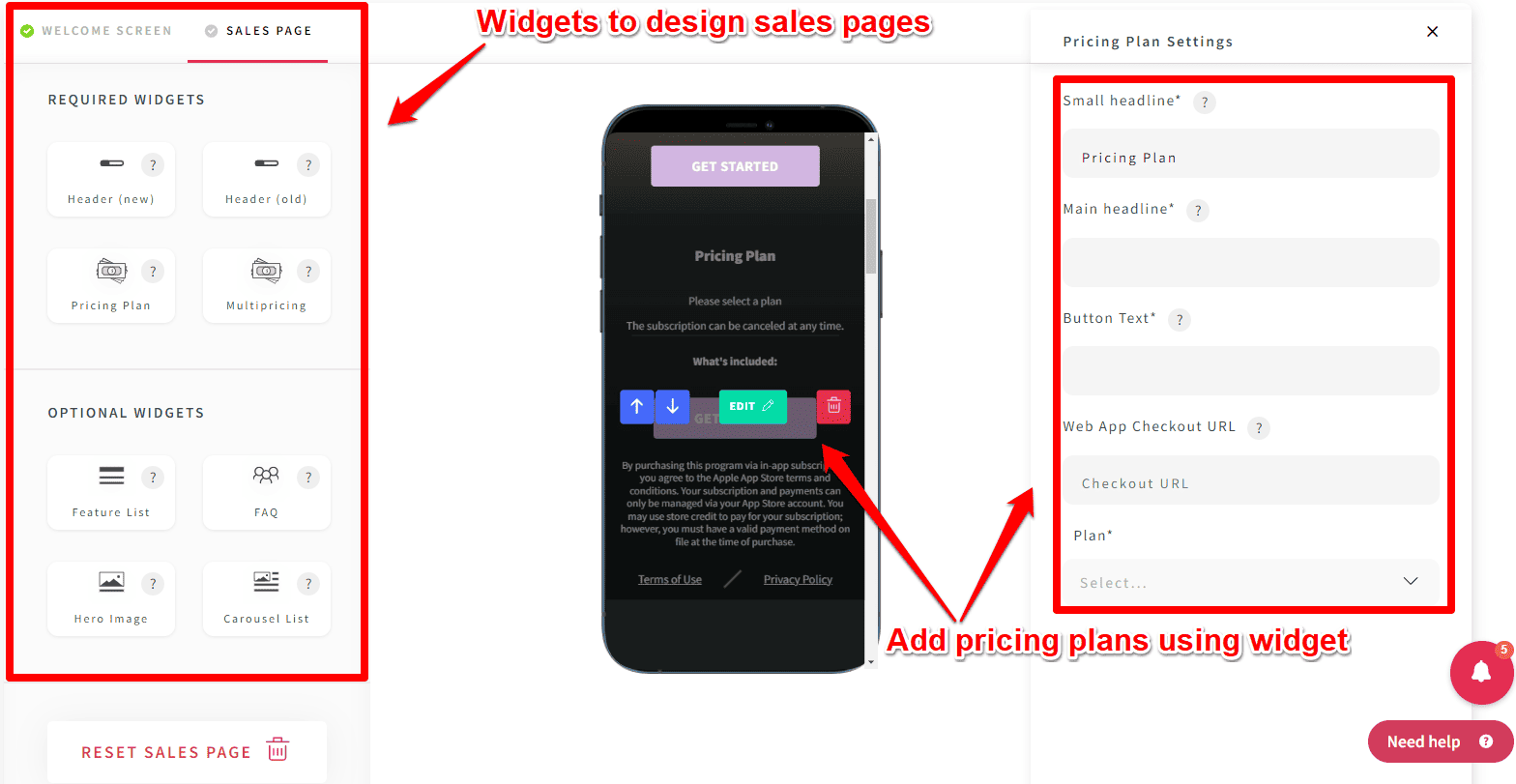
One thing missing: there aren’t any widgets for testimonials or countdown timers.
Also, you can’t add custom HTML to your sales page. This means you can’t embed external tools, which is a big limitation.
But here’s a solution: You can use your own checkout pages instead of Passion’s basic ones. Try tools like ThriveCart, SamCart, or ClickFunnels.
Here’s the catch though – you’ll need Zapier for these integrations since Passion.io doesn’t connect directly with these tools.
Passion.io keeps things simple on purpose. Some people might like this basic approach!
🏆 Bottom line: Passion’s sales page builder is minimalist but functional. While it lacks advanced features like custom HTML and testimonial widgets, you can work around limitations using external checkout tools.
Online courses (LMS apps) in Passion
Let’s look at what course features you get:
| LMS features | Availability |
|---|---|
| Unlimited courses, lectures & lessons | ✔ |
| Supported lesson types | Images, Audio/video, Text files, PDF, Quiz, Surveys, Etc |
| Offline or download mode | ✔ |
| Drip scheduling | ✔ |
| Live streaming | ✔ |
| Course completion certificates | ❌ |
| Course pricing options | Recurring/one-time/free |
| Embedding custom codes inside lessons | ❌ |
Let me show you how to start creating a course.
First, pick a template.
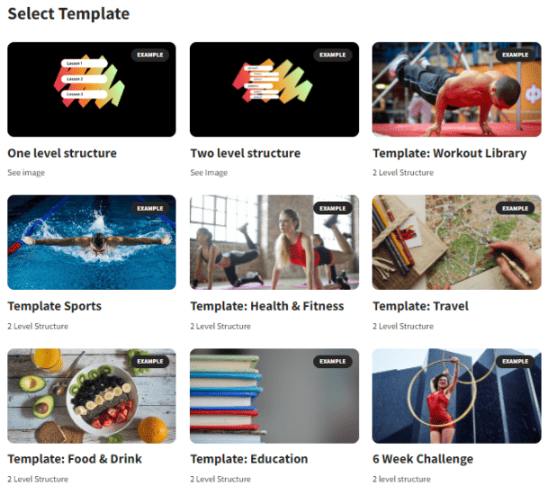
Here are your options:
- One-level structure (for mini-courses).
- Two-level structure (best for online courses), and
- Weekly live Q&A templates for niches like health & fitness, travel, sports, etc.
Just like other course builders out there, you’ll need to put your lessons inside modules or sections in Passion.
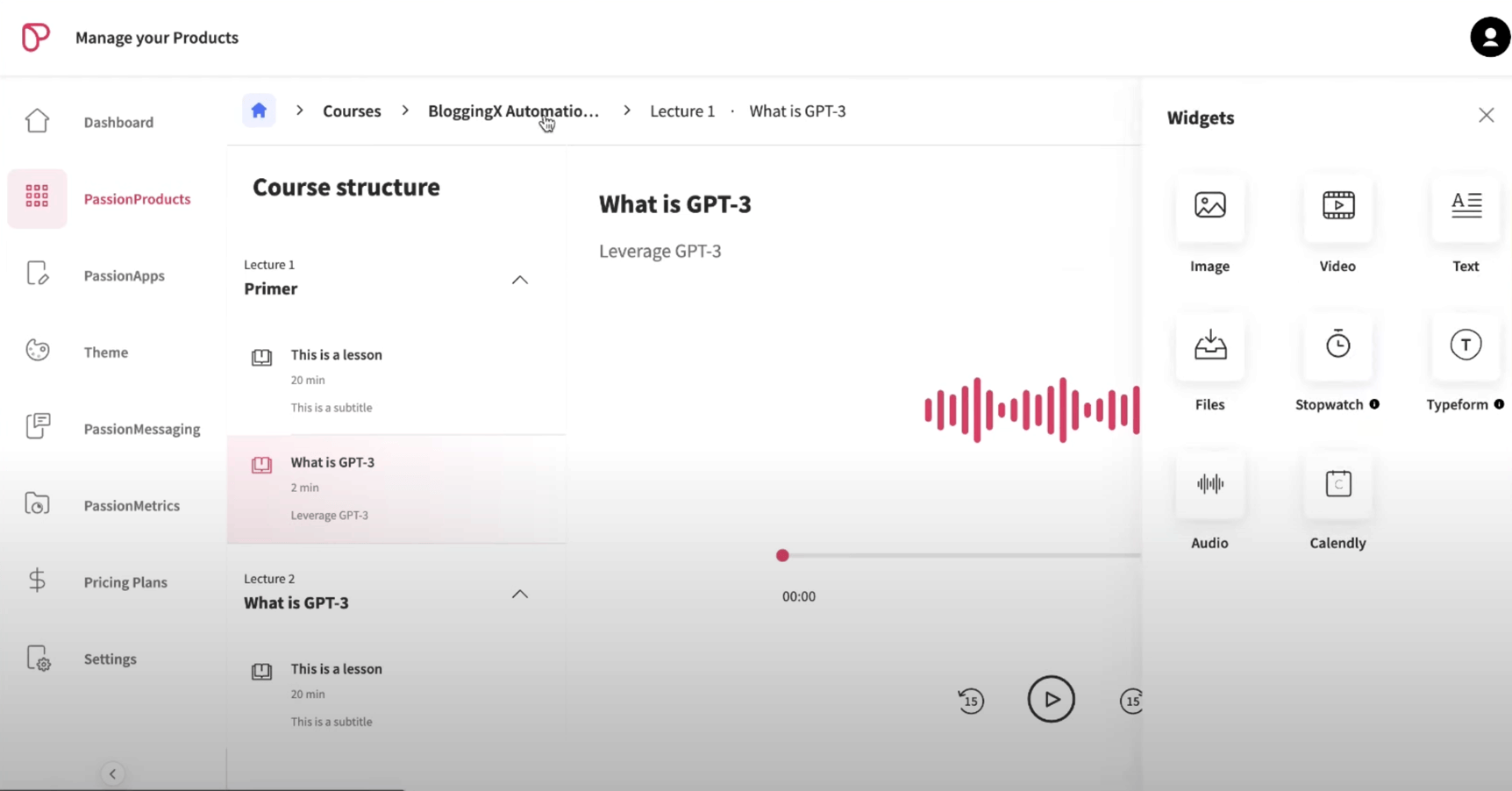
Each lesson can include different types of content.
Let’s look at what you can add:
Besides the usual stuff like videos, text, audio (great for meditation), and files, here’s what else you can do:
- Stopwatch: Add a timer so students complete lessons in a set time. This works really well for fitness demos, exercises, and yoga sessions – it keeps students active and learning.
- Buttons: Add clickable buttons that get students to take action right away.
- Typeform: Add forms, surveys, and quizzes. You can make graded tests and multiple-choice questions to keep students engaged.
- Calendly: If you do one-on-one or group coaching, add a calendar right in the app so students can book sessions easily.
I really like what they did with Typeform.
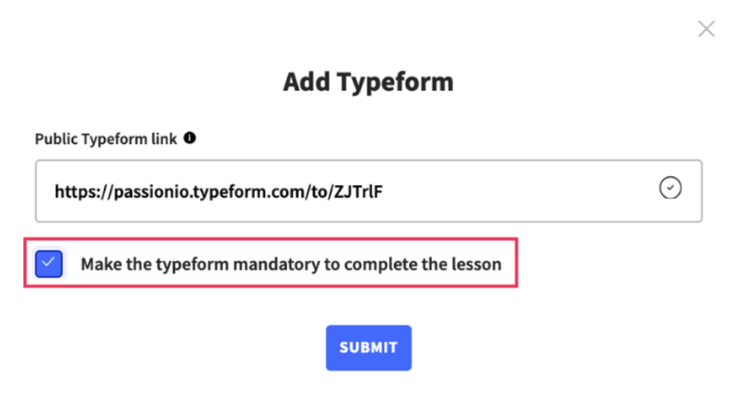
It’s more than just embedding forms – you can make students fill them out before they can finish a lesson.
That’s great for keeping students accountable!
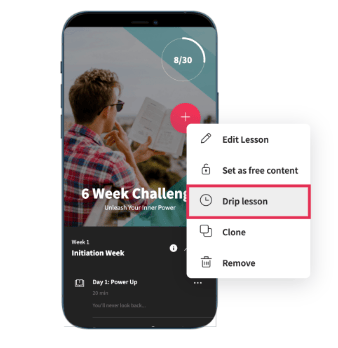
Let me share 3 super helpful features I really like about the lessons:
- Free content preview: Want to try before you buy? You can mark any lesson as free. This lets people check out your content before spending money – great for building trust!
- Drip feeding lessons: You control when lessons unlock after someone joins. This keeps students from getting overwhelmed and helps them learn step by step.
- Downloadable lessons: Students can save lessons to watch offline – just like YouTube. Perfect for when internet is spotty!
Also beyond regular lessons, Passion has something special called Sequences.
With sequences, you can string together different exercises for students to follow.
Just mark a new lesson as a “Sequence”.
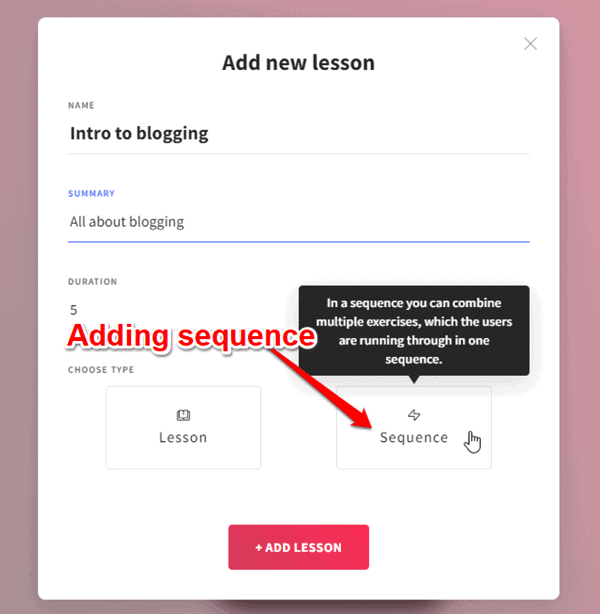
Here’s an example: If you’re a fitness coach, you can guide students through workout reps step by step.
There are two types you can pick from:
- Interactive sequences: These come with a stopwatch. Students can practice as long as they want before moving on.
- Timed interactive sequences: These use a countdown timer. Students have to finish the full time before continuing.
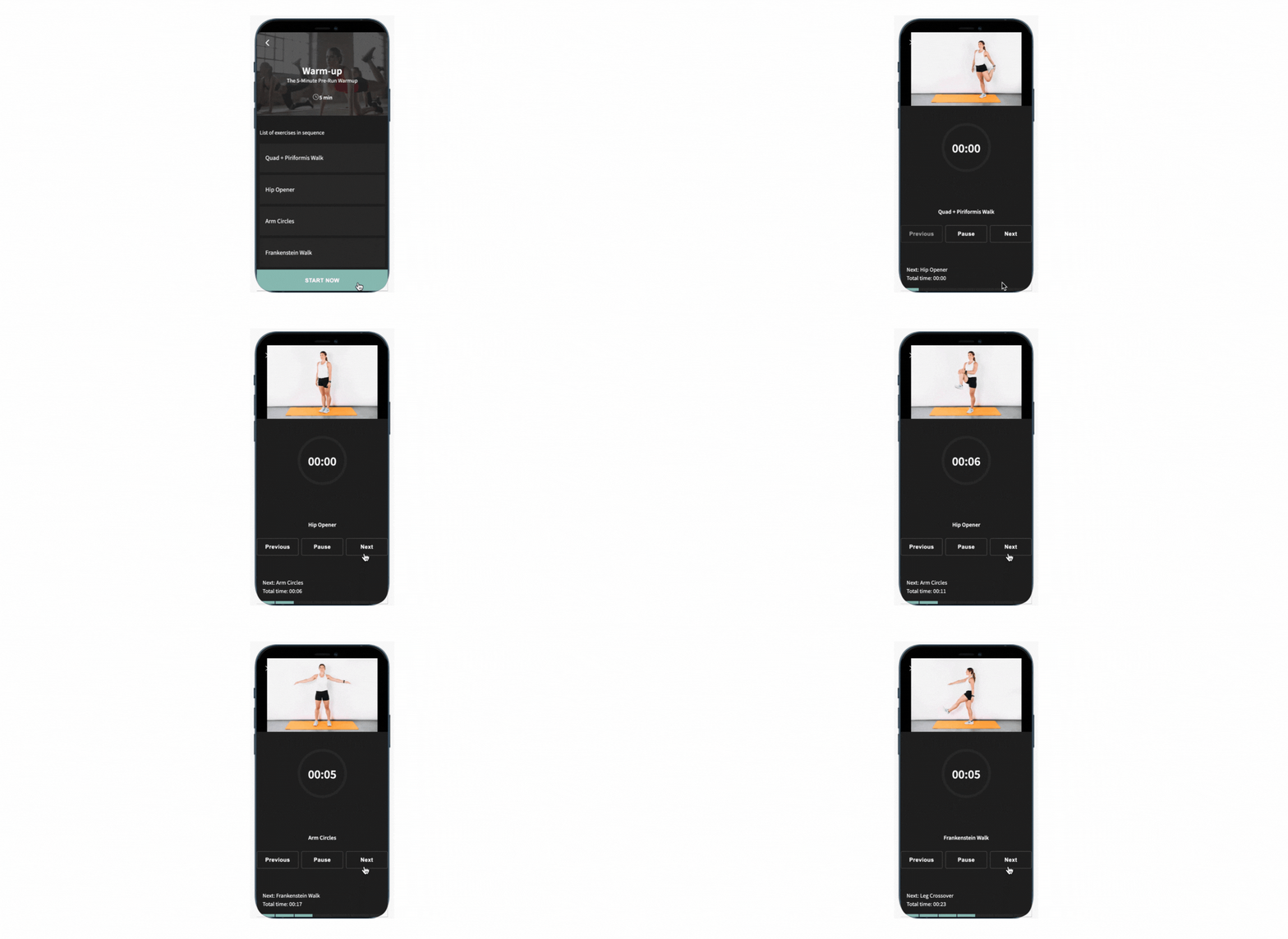
With interactive sequences, you get a stopwatch ⌚ setup.
Students can practice at their own pace and move forward when ready.
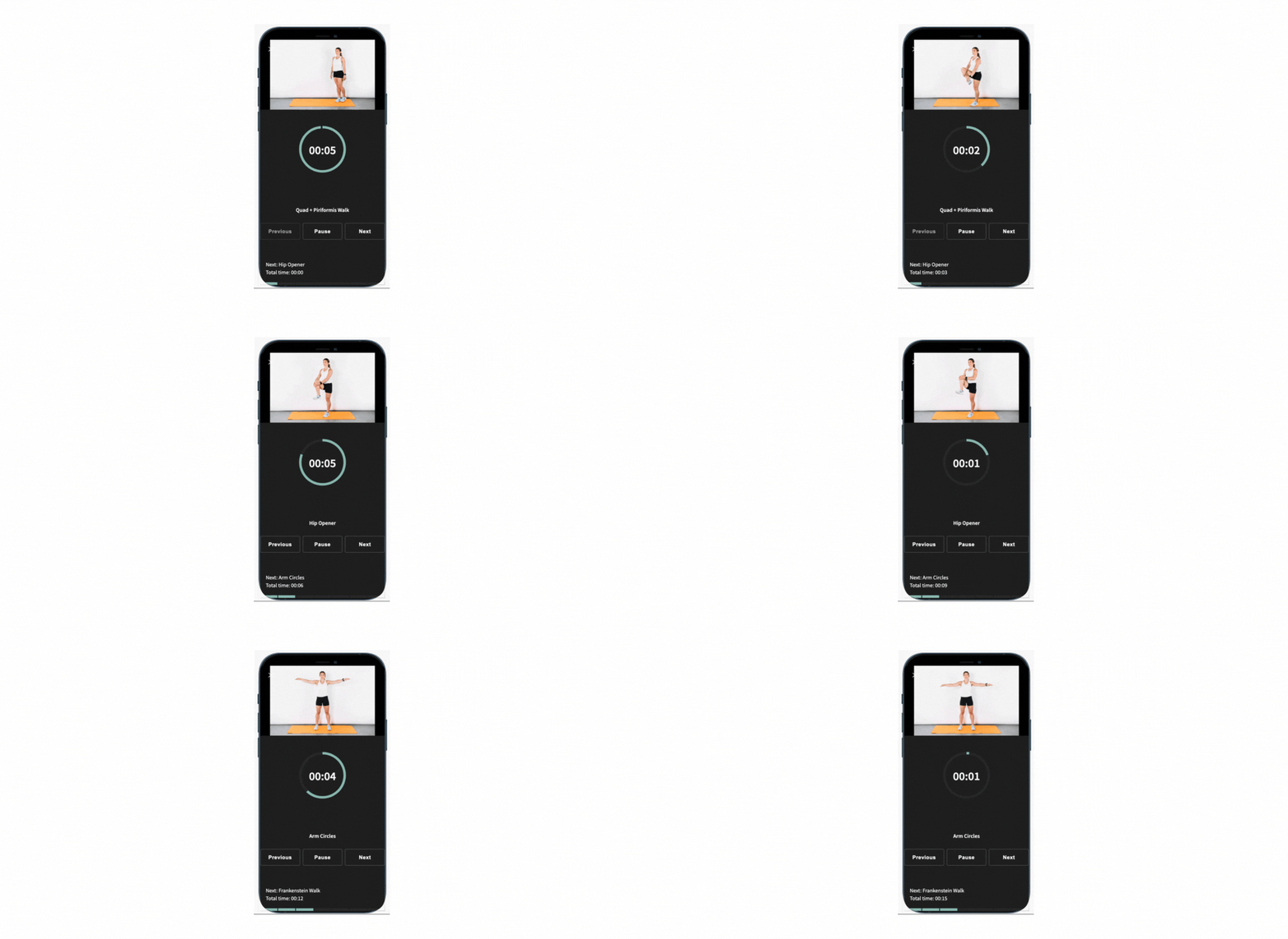
When you use timed interactive sequences, there’s a countdown timer that keeps students on track.
They can’t skip ahead – they have to complete the full time for each exercise, making sure everyone gets the full workout benefit.
It works really well for things like:
- Workout videos
- Dance lessons
- Music practice
- Cooking classes
Fitness trainers love these!
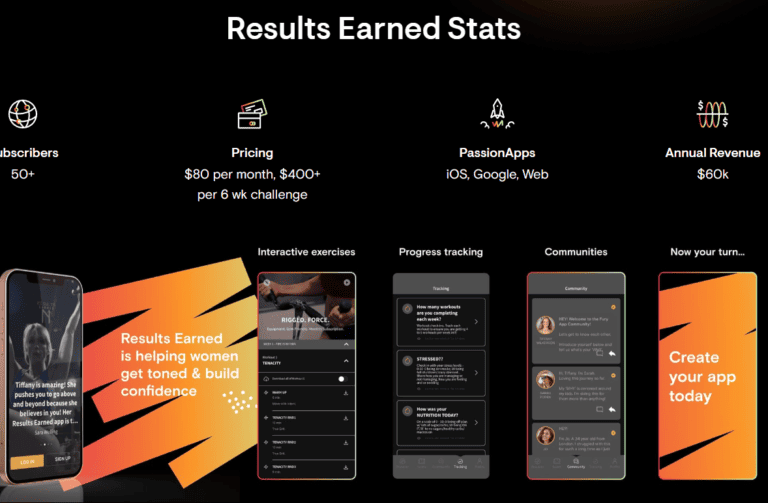
Let me share a real example: Tiffany Wilkerson, a fitness trainer, made $60k yearly by selling a 6-week fitness challenge to just over 50 people using Passion.io.
She used timed exercises and custom-branded apps to guide her clients step-by-step.
Want more inspiration?
Check out 10+ other success stories here from coaches making money with their own apps.
🏆 Bottom line: While Passion isn’t mainly for creating courses, it has some really useful features for keeping students engaged especially in fitness and self-dev space. Things like Sequences, Calendly, and Typeform help you track progress and hold students accountable right in the app. But if you need more features like gamification (points and challenges) and a solid mobile app, Kajabi may be the better choice for you.
Communities in Passion.io
Now let’s look at the community features. They’re basic.
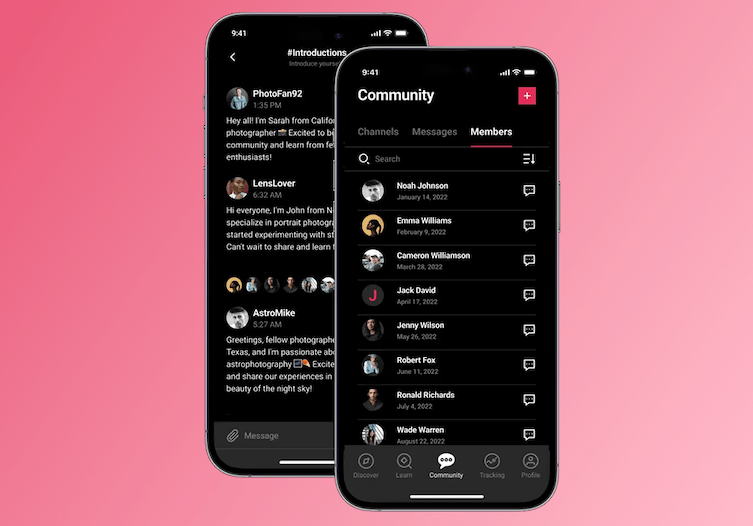
Here’s what you get: channels to organize topics (like groups), posts, comments, member tagging, and private messages.
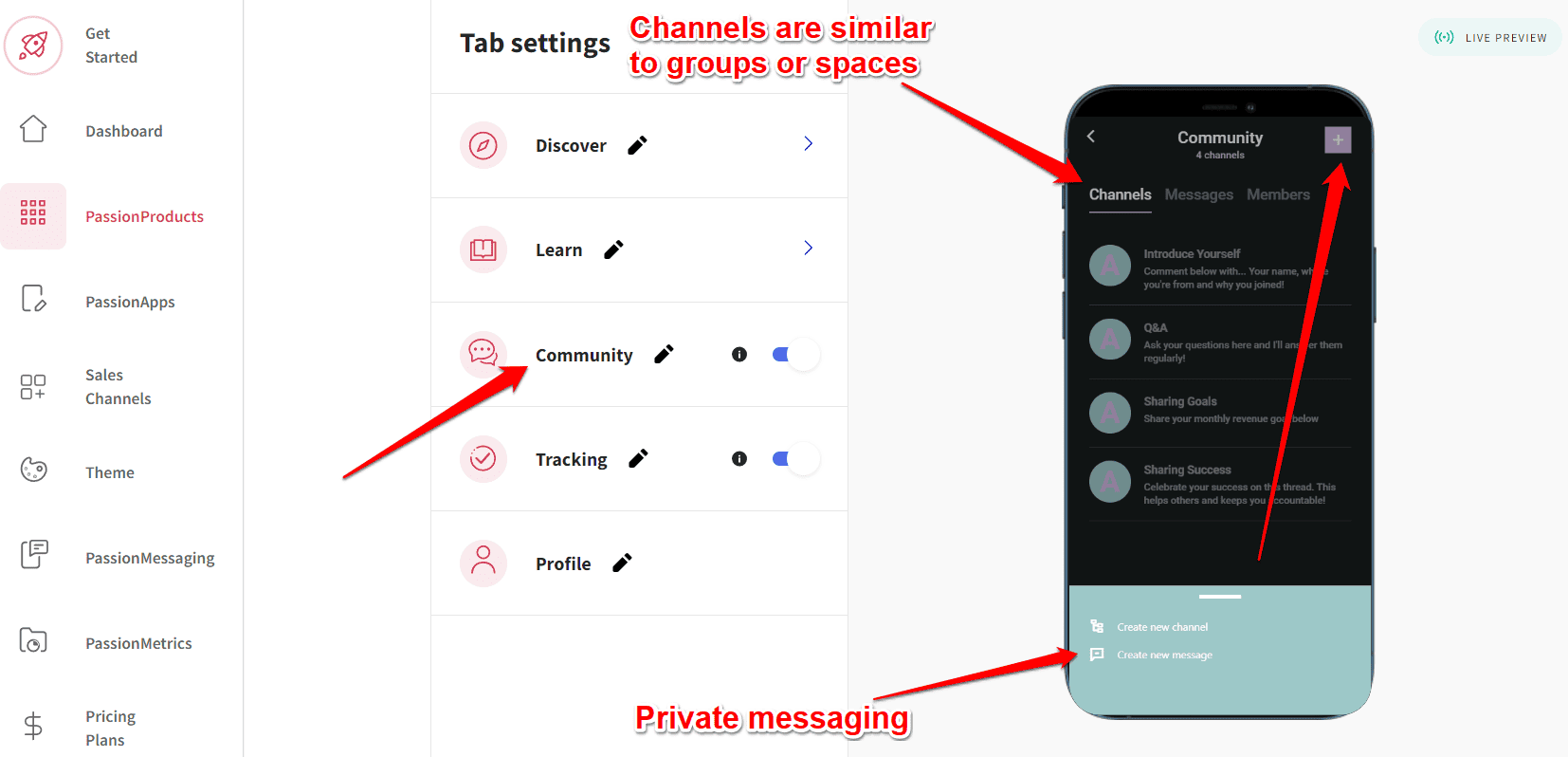
Passion’s community features are pretty basic.
Here’s what you won’t find:
- Rich member profiles.
- Matchmaking features.
- Gamification features like points, rankings, achievements, and leaderboards.
- Member tags and segmentation.
But wait!
Passion does have some basic gamification features like: Each member gets a simple profile page showing their lesson progress, streaks, and time spent in the app.
If you need more advanced community features, check out dedicated community platforms like Circle.so or Mighty Networks.
Or if you want everything in one place – courses and community with good gamification – try Kajabi instead.
🏆 Bottom line: While Passion offers basic community features, it lacks advanced tools like rich profiles and proper gamification.
Goal tracking
Here’s something I really like about Passion – the goal tracking makes the app way more interactive.
Users can track their progress and stay motivated.
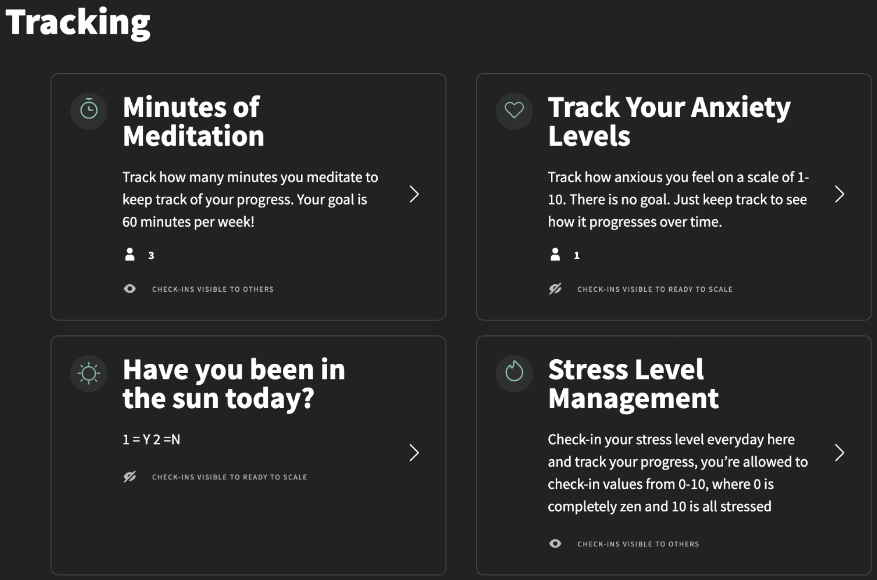
Users can log their progress and track check-ins through goal-tracking challenges. They can view other members’ logs for motivation and learning.
The platform combines timed exercises with goal tracking, ensuring members complete full workouts before progressing.
This tracking system helps identify struggling students who may need additional support.
🏆 Bottom line: The goal tracking features in Passion.io make it easy to monitor student progress and provide personalized support. It’s effective for keeping students accountable and motivated.
Customization features
Passion lets you customize your branding and white-label your app.
But heads up – the design options are pretty basic.
You get to pick from ready-made color templates, set your own brand colors, and add your logo in the branding section.
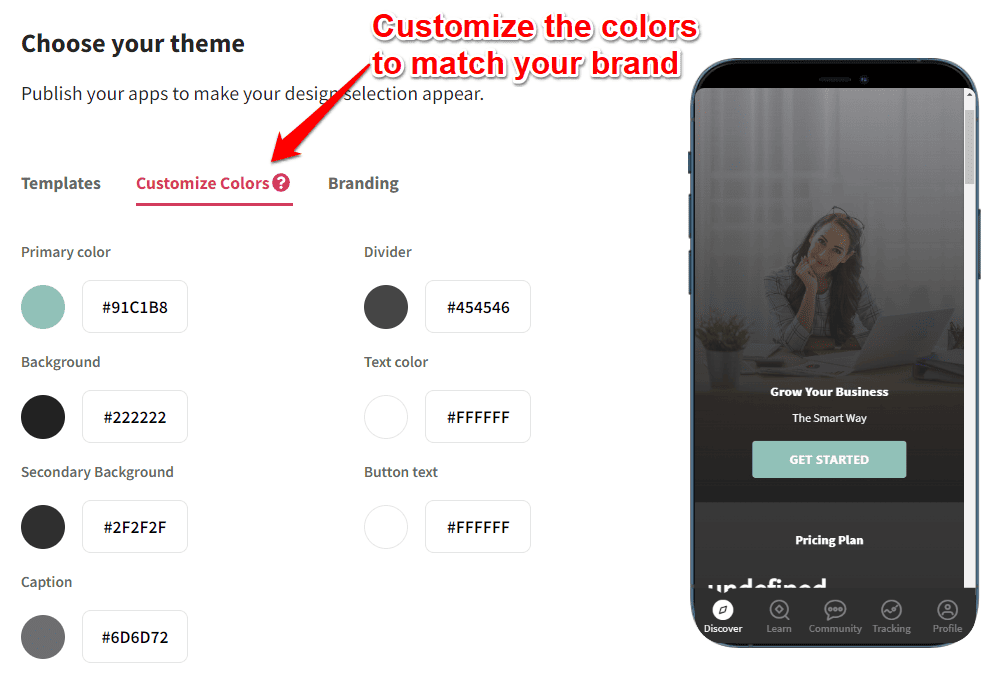
But, you’ll need the Ultimate ($297/mo) or Ultimate Plus plan to remove the Passion branding from your app.
🏆 Bottom line: Passion.io’s customization is pretty basic – you get templates, brand colors, and logo options. But removing Passion branding requires their pricier plans, which might be a dealbreaker for some.
PassionMessaging
Want to keep your users engaged?
You can send push notifications to their phones (both iOS and Android apps).
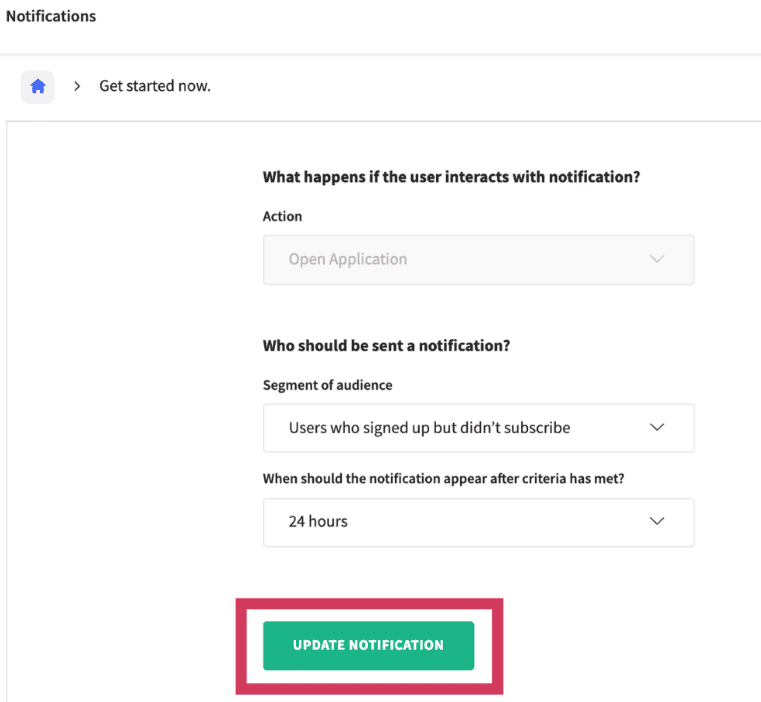
Here are some ways you can use notifications:
- Convert trial signups into paid subscribers
- Follow up with inactive students
- Bring back users who’ve stopped using the app
But, you can only use the pre-made notification scenarios in the app.
You can also use Zapier to set up your own automation if you need more options.
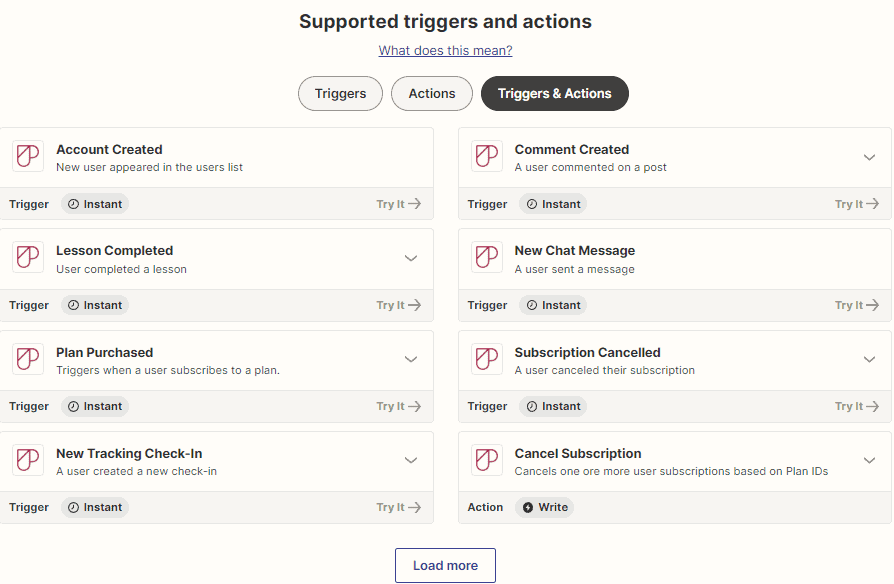
Zapier’s triggers and actions make it super easy.
Here’s what you can set up:
- Send congratulatory emails after lesson completion
- Offer post-purchase discounts
- Enable chat notification alerts
- Send re-engagement coupons to cancelled users
- Plus many other automation options
🏆 Bottom line: Passion’s messaging system offers basic push notifications with pre-made scenarios, but Zapier integration adds powerful automation options for better user engagement and retention.
Integrations
Passion doesn’t have many built-in integrations.
Let’s look at what you get:
- YouTube Live: Stream your coaching sessions live to connect with students in real-time
- Stripe: Take payments safely from your students
- Typeform: Add forms, surveys and quizzes to your courses
- Calendly: Make it easy to schedule coaching calls (perfect for high-ticket offers)
- Zapier: Connect to thousands of other apps
When it comes to taking payments, you have 3 options:
- PassionPayments – Connect with Stripe. They charge 3.9% per transaction. Students can pay by card on the web app.
- In-app purchases (iOS/Android) – Apple and Google handle the payments based on how users set up their store accounts.
- External checkout – Use Zapier to connect payment tools like ClickFunnels, ThriveCart, or PayPal. This lets you automate subscriptions using Zapier triggers.
🏆 Bottom line: The limited integrations are frustrating. You’ll need to use Zapier a lot to connect with other tools. Plus, you can’t add custom HTML code to your lessons or sales pages, which is a real pain.
Passion.io pricing
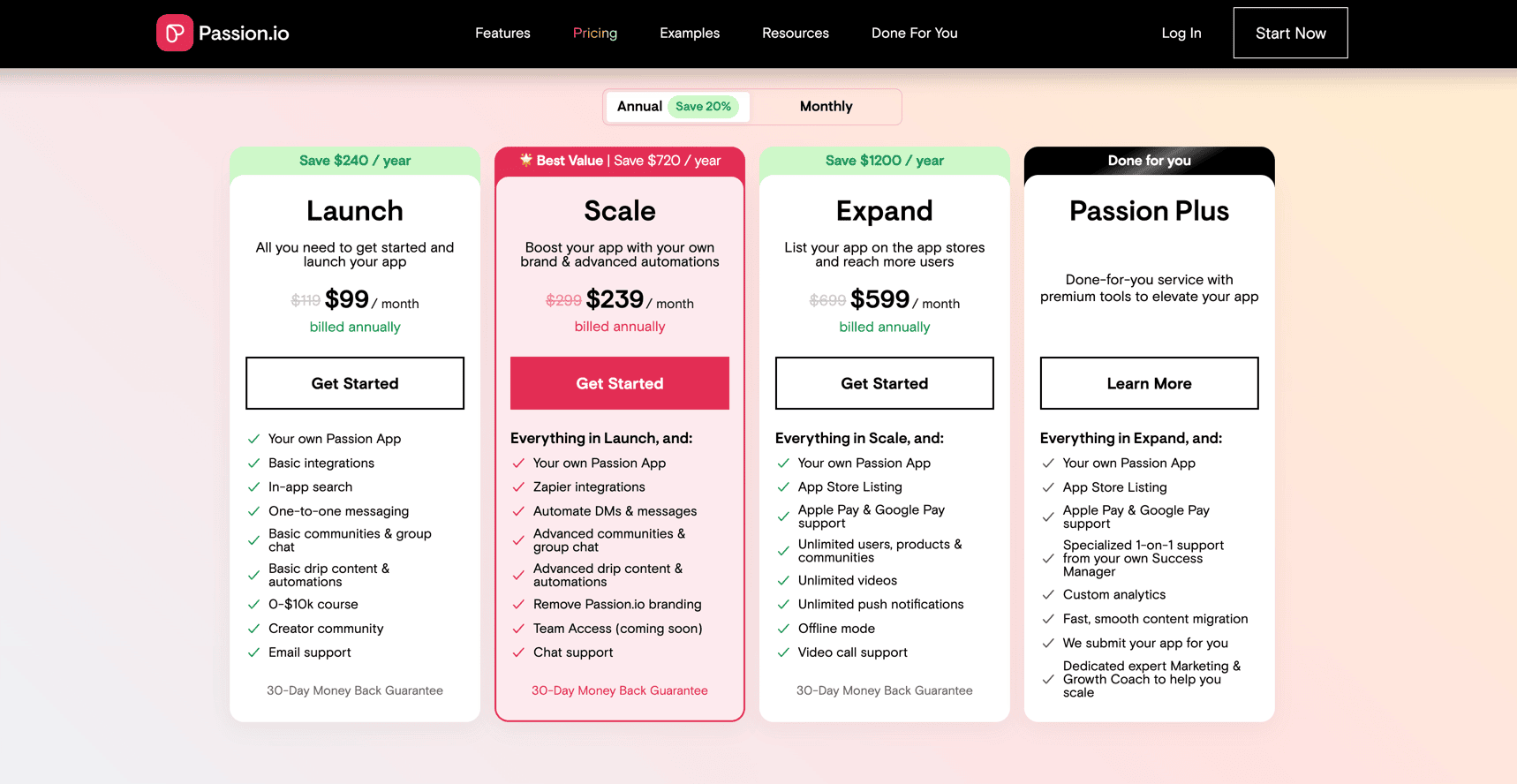
Most of the people, if they need all the features that Passion has got to offer, including the ability to remove Passion.io branding, they will go with the Scale plan at $299 when paid month.
On the other hand, the Expand plan offers unlimited users, products, unlimited videos and even offline mode.
If you’re planning to buy, it’s also worth checking whether there’s an active Passion.io Black Friday deal before signing up.
Passion.io review – FAQs❓
- What is Passion.io? It’s a platform that lets you build your own coaching apps for iOS, Android, and web.
- How many apps can I create with Passion.io? You get one app per subscription – that’s the limit.
- Are there any limitations on the courses I create? No limits here – create as many courses as you want.
- Do they have a free trial? Yes – you get 14 days to try it out. Just use this link to get started.
- Does it have a money-back guarantee? Yes – if you’re not happy, you can get your money back within 30 days.
Wrap up
If your #1 goal is getting students to take action (not just watch videos), Passion.io is a solid pick.
It’s easy to use, built for coaching, and the engagement features (like challenges, progress tracking, and sequences) are where it truly shines.
But it’s also pricey for what you get, customization is limited, and you’ll miss essentials like built-in certificates and deeper integrations.
So here’s the decision for this Passion.io review: choose Passion.io if you’re a fitness/wellness (or habit-change) coach who wants an app-first experience and you’re OK paying premium pricing for accountability features.
On the other hand, if you need a more complete “all-in-one” course + marketing setup, you’ll be happier with alternatives like Kajabi or Teachable.