So, I’ve been using Kajabi for the past 2 to 3 years, and recently, I started exploring Circle too.
In the past, choosing between these tools was relatively simple. However, now it’s more challenging than ever before.
Why?
Kajabi has significantly stepped up their community features (adding gamification).
And Circle?
They’ve introduced automation workflows and their marketing hub.
| Features | Circle | Kajabi |
| Starting price | $89/mo | $179/mo |
| Transaction fees | Hidden transaction fees (2%) not shown on pricing – costs you extra money | 0% |
| Mobile apps | iOS and Android | iOS and Android |
| Courses | Yes | Yes (more features) |
| Communities | Yes (gamifified) | Yes (gamifified) |
| Explore 👉 | 🔗 Explore Circle | 🔗 Explore Kajabi |
Quick decision
What do I like about Kajabi over Circle 👍?
- All-in-one platform: Kajabi really does it all – courses, communities, websites, funnels, email automation, the whole package.
- Stronger Automation Engine: Circle has automation too, but Kajabi’s is on another level. With all the features they’ve packed in, you can automate pretty much anything.
- Specialist course and reporting features: This is where Kajabi shines. You get assessments, certificates, detailed progress tracking with heatmaps and retention graphs – all the advanced stuff course creators actually need.
- Sales and marketing: Kajabi’s marketing tools are seriously powerful. We’re talking email marketing, sales funnels, pipelines, landing pages, user segmentation, automation rules, A/B testing – the works.
- Community gamification: After acquiring Vibely, Kajabi went all-in on engagement. Points, leaderboards, challenges, live rooms, events – it’s all built right in. They’re ahead of Circle here.
- Zero transaction fees: Unlike Circle’s hidden 2% transaction fees not shown on pricing pages
- More native integrations: Kajabi connects directly with more tools (like email marketing tools). Circle makes you use Zapier or buy their email marketing add-on that costs extra money.
- Better value: Kajabi gives you more features with real depth to them. Plus, unlimited email marketing is built into their plans. Circle? They charge you extra $99/month (for 10k subs) for their email marketing add-on.
What do I like about Circle over Kajabi 👍?
- Intuitive UI/UX: Honestly, Circle’s interface just feels right. If you’ve used Slack or Notion before, you’ll know exactly what to do.
- Superior live streaming capacity: Circle supports up to 1,000 participants in live streams vs Kajabi’s 200-person limit
- Embed community widget: Here’s something cool – you can drop Circle spaces right into your WordPress site or even Teachable courses. Makes it super easy to get people into your community.
- Community moderation: Circle’s got your back with keyword blockers and profanity filters. Trust me, these are lifesavers when your community grows.
- All-in-one focus (in progress): Circle just rolled out their Marketing Hub with email marketing. But here’s the catch – it’ll cost you an extra $99/month (for 10k subs) on top of what you’re already paying!
Similarities ⚖️
- Email automation: Both let you send broadcasts and automated sequences based on triggers and filters. No need for external email tools.
- Automation features: Both platforms have solid automation engines. Set up triggers, add actions, and watch your workflows run themselves.
- Premium platforms: Let’s be real – neither is cheap. If you want the full automation features, you’re looking at around $200/month with either platform.
Upfront verdict – Circle vs. Kajabi
Kajabi is honestly the Swiss Army knife of creator platforms.
Website building, landing pages, email marketing, courses, community – it’s all there, working together.
The automation engine ties everything together. You can build workflows that genuinely save hours of manual work.
What impressed me most isn’t just the breadth of features – it’s the depth.
Take their gamification features, for example. They’re genuinely well-thought-out and actually drive engagement – Like they have challenges, gamification, points. It’s focused more on a transformative approach.
Now, Circle has come a long way from being just a community platform.
Their email marketing launch (as part of their marketing-hub) shows they’re gunning for that all-in-one space too. But Circle locks their Automation Workflows behind a $199/month plan, plus you’re paying extra for email marketing.
Meanwhile, Kajabi includes all this in their standard pricing. Ironically, the “premium” platform ends up being more cost-effective for serious creators.
But after using both extensively, here’s my honest take:
Kajabi delivers better value in 2026.
👉 Ready to get started? Check out the special offers for BloggingX readers: Try Kajabi with an extended 30-day free trial or Get 20% off your first year with Circle
Overview – Kajabi vs. Circle

Kajabi was founded in 2010 by Kenny Rueter.
Now, it offers various features:
- Selling online courses
- Coaching
- Host podcasts
- Communities
- Email marketing
👉 One of the strongest features of Kajabi is its automation engine, which allows you to seamlessly integrate all the provided features in one platform, similar to having Zapier within Kajabi.
Over the years, Kajabi has raised significant funds and is currently valued at around $2 billion.
They are sitting on cash! 💰

Get Kajabi 30-day free trial
Test Kajabi free for 30 days. Access courses, communities, email marketing, and funnels all in one platform.
Verified

On the other hand, Circle is an all-in-one community platform founded in 2019 by Sid Yadav, who was Teachable’s first designer.
It was later backed by Ankur Nagpal (Teachable’s founder!), when Teachable was sold to HotMart in 2020. Whaaat?
Circle has gained significant traction due to its track record and is currently valued at $200 million.
It is a modern wanna-be all-in-one tool that’s super easy to use
Unlike other conventional community platforms such as Mighty Networks, Circle places extreme emphasis on UI/UX, integrations, and automations.

Try Circle with 20% OFF!
Get 20% off your first year with Circle. Build your community with modern tools and gamification features.
Verified
Community
Community organization

In Kajabi, you get to pick between two different setups for your “Circles/Spaces”:
- Feed layout: Works like a forum where people can have longer discussions
- Chat layout: This one’s more like Slack or Discord
So yeah, Kajabi’s circles give you that perfect mix of community vibes and casual chat feels.
🚫 I’m not a fan of the “chat” space feature. When you add it, members tend to “crowd in” there instead of engaging in other community spaces.
Now, Circle takes a different approach.

Each community can comprise multiple groups, and these groups can further include numerous spaces, such as posts, chat, events, and courses.
Circle integrates courses as a “space type”, and this can clutter the sidebar as both courses and discussion areas end up in the sidebar.
Community gamification
Kajabi, with its acquisition of Vibely, has implemented a lot of gamification features.
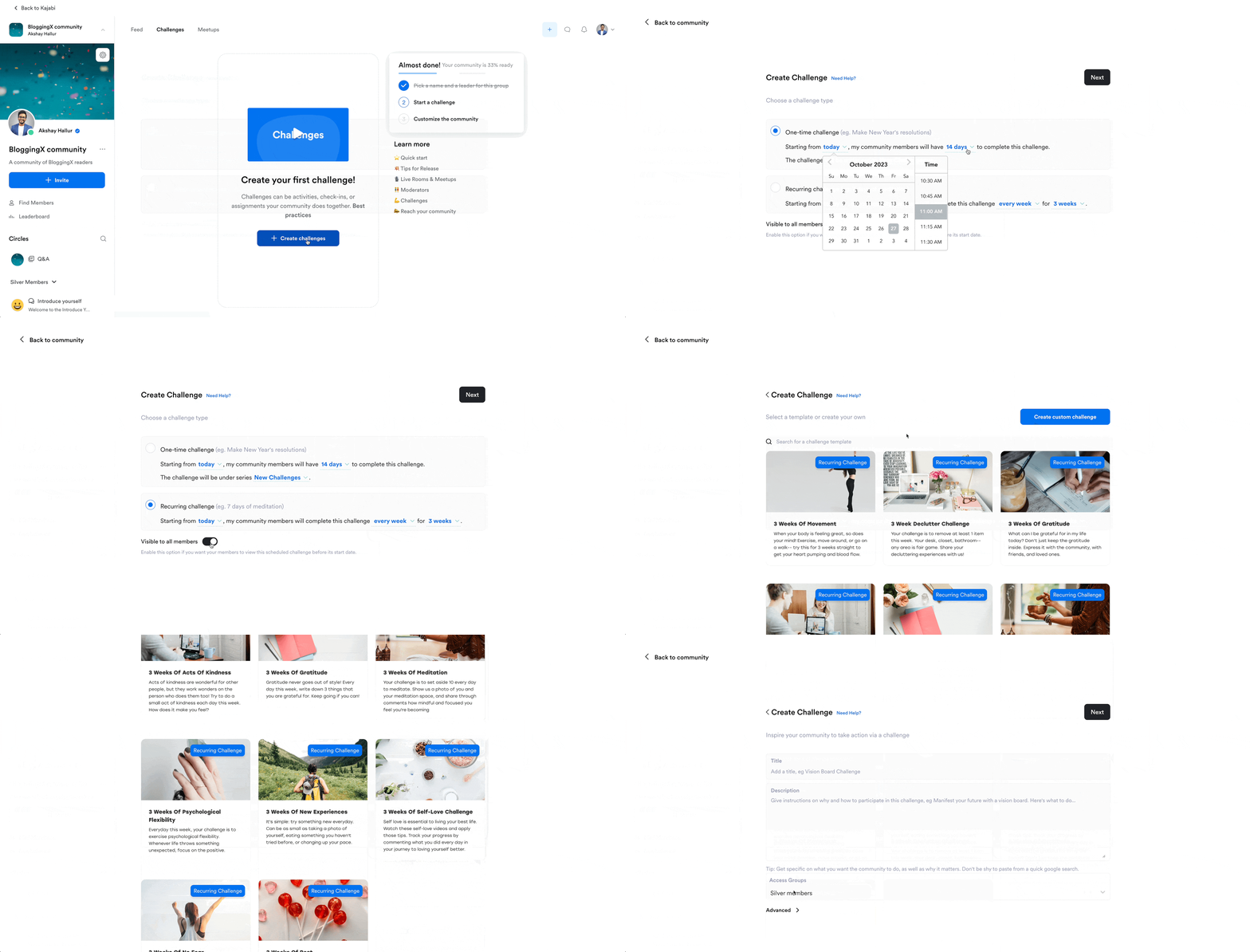
It includes a feature for creating activity-based “Challenges” for specific groups.
Members can upload proof of completion and earn points based on their interactions.

Also, based on the points they get, you can provide them with badges and feature them on the leaderboards.
Their challenges feature is a game changer, especially in the age of creating online challenges in transformation communities.
Now with Circle:
Circle also has rolled out a game-changing gamification system with their 3.0 update.
The system has:
- Points and rewards: Members collect points for active participation that actually matter. Like foranswering posts, showing up at events, or finishing course assignments.
- Leaderboards: Shows who’s most engaged, creating friendly competition
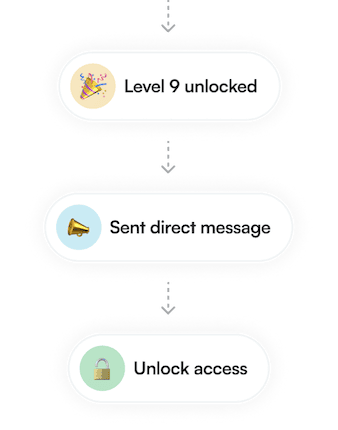
And as a community admin, you can set up custom rewards and trigger automated workflows when members hit certain achievements.
There’s also their “Activity Scores” feature that measures engagement quality.
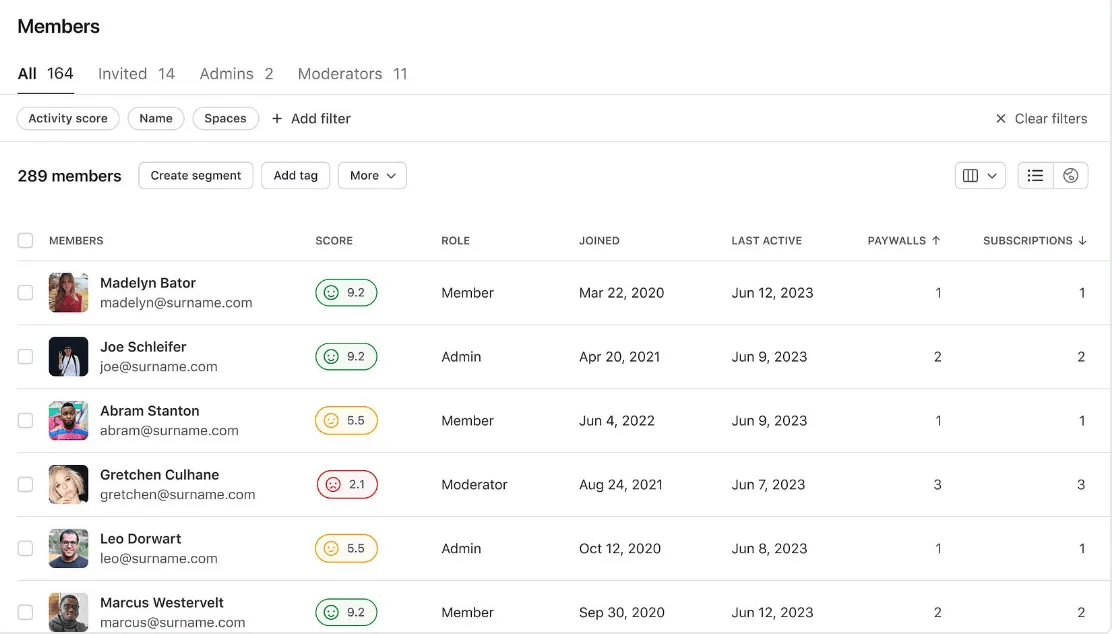
What makes this really useful is that these scores, they’re benchmarked against data from other Circle communities, so you know exactly how your engagement stacks up.
🏆 Winner: It’s a tie! Kajabi excels with Vibely’s robust engagement features, while Circle dominates moderation tools for larger communities. Choose based on your specific needs.
Course creation 📚
Kajabi has good course creation features and is more comprehensive compared to Circle.
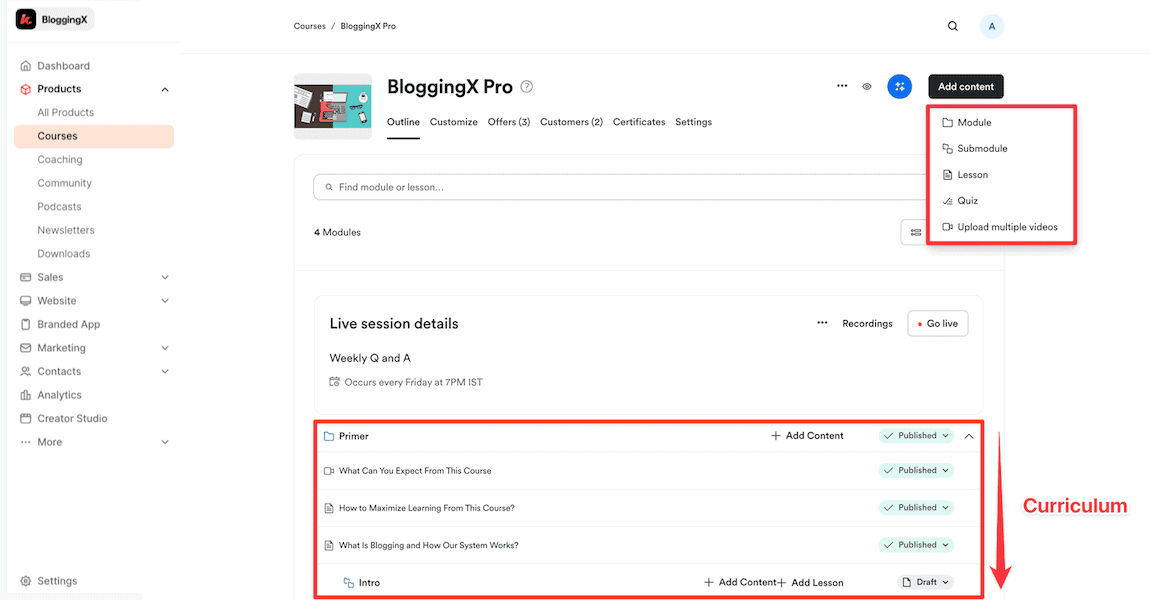
When it comes to organizing your course material, you have modules, sub-modules, and the ability to have lessons/quizzes under them.

When you create a lesson in Kajabi, it can either be a video lesson, audio lesson, or an assessment.
For any lesson that you create, you can upload a checklist or any downloadable to accompany it.
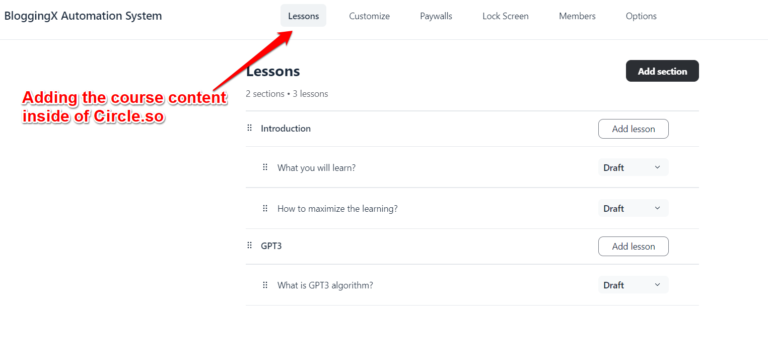
Also, Circle allows you to create different sections and lessons within them.
When it comes to adding course content, both support text, images, audio/video, and files.
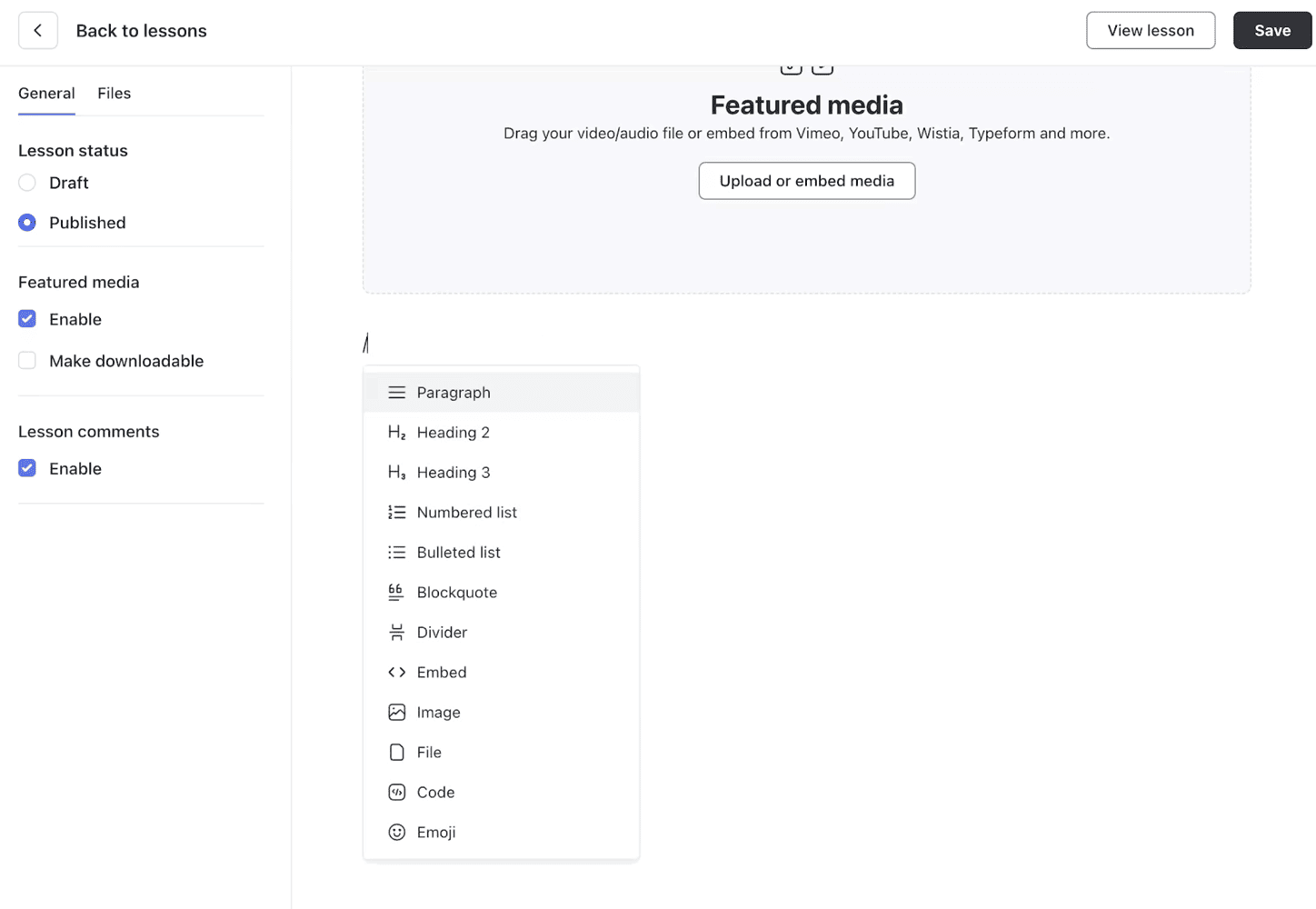
Circle lets you add any content block type to your lessons, including custom HTML.
Both platforms support content drip-feeding to control when students access new material.
But Kajabi includes several advanced features:
- Completion certificates: Reward students when they finish your course
- Content locking: Students must complete each module before advancing
- Graded assessments: Use quizzes as checkpoints that students must pass
- Live coaching: Run coaching sessions directly in the platform
- Progress analytics: Track detailed student performance data
Course completion certificate is such a basic feature, especially for educational or career-oriented creators!
🏆 Winner: Kajabi. Kajabi has advanced course builder features, including certificates, content locking, assessments, video analytics, and AI content creation. Circle’s course features are roughly half as comprehensive as of now.
Live streaming
Looking for a platform that handles live events?
Let’s break down how Circle and Kajabi stack up.
Circle nails the live streaming game with good flexibility!
You can host up to 1,000 participants in a live stream and up to 30 people in interactive rooms.
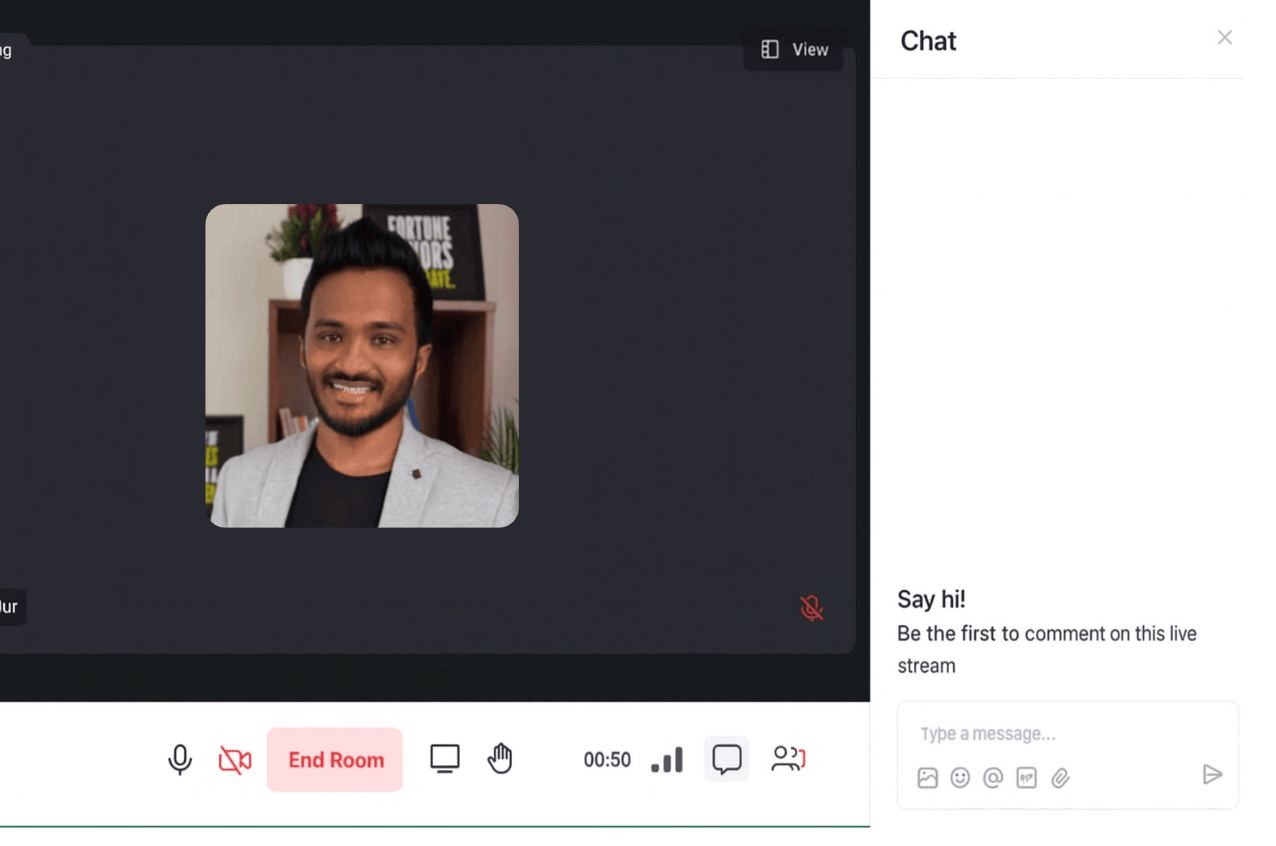
What makes Circle stand out is how many ways you can go live:
- Native streaming: Run everything directly in Circle without jumping to other tools
- Third-party options: Prefer Zoom or YouTube Live? No problem – Circle plays nice with these tools
Also, the audience can conveniently join the events from their mobile.
Now let’s talk about Kajabi.
Kajabi takes a different approach with its “Live Rooms” feature. These rooms come packed with useful tools:
- Video recording: Save your sessions for members who couldn’t attend
- Screen sharing: Perfect for demonstrations and presentations
- Breakout groups: Split large sessions into smaller discussion groups
- Video chat with emojis: Adds a fun interactive element
The big limitation?
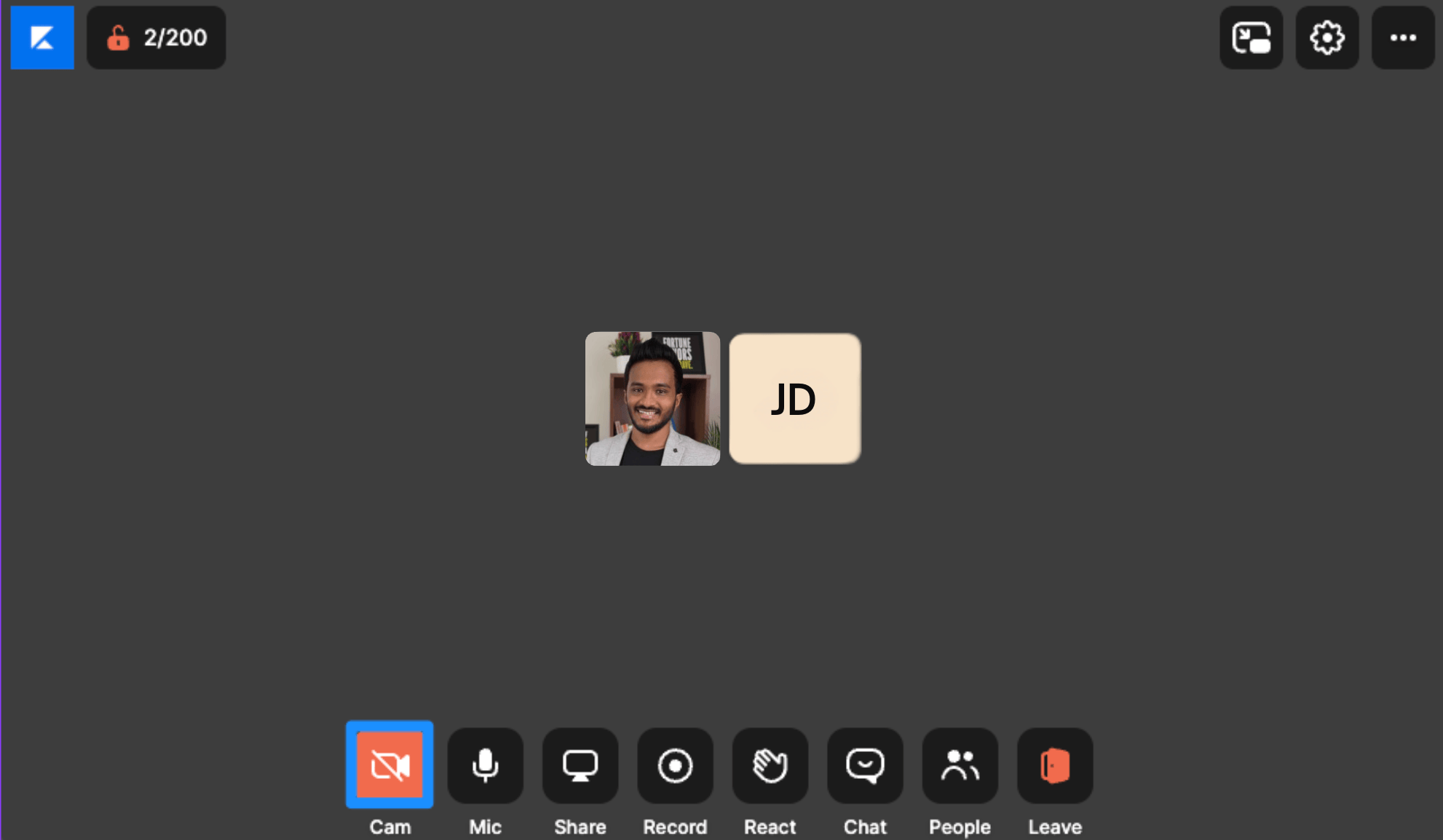
Kajabi caps attendance at 200 participants. That’s fine for most coaching sessions but might not work for larger webinars.
You can schedule live events directly inside your courses. This feature is actually pretty unique and boosts attendance since members can register while going through course content.
🏆 Winner: If you need to host large-scale events (1,000+ people) with flexible setup options, Circle is your best bet. But if you’re primarily teaching courses and want seamlessly integrated live sessions with features like breakout rooms, Kajabi has the edge – even with its 200-person limit.
Email marketing
Kajabi allows you to set up either email broadcasts or follow-up sequences.
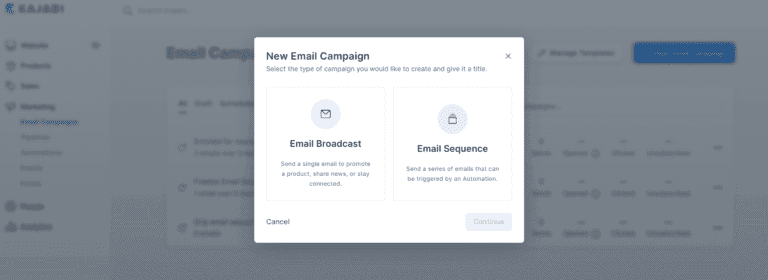
When you create a broadcast or a sequence, there are various email templates from which you can choose.

Additionally, Kajabi email marketing offers a visual drag-and-drop email builder. This tool includes a variety of building blocks, such as text, images, buttons, and conversion-friendly widgets like videos, countdown timers, and social icons.
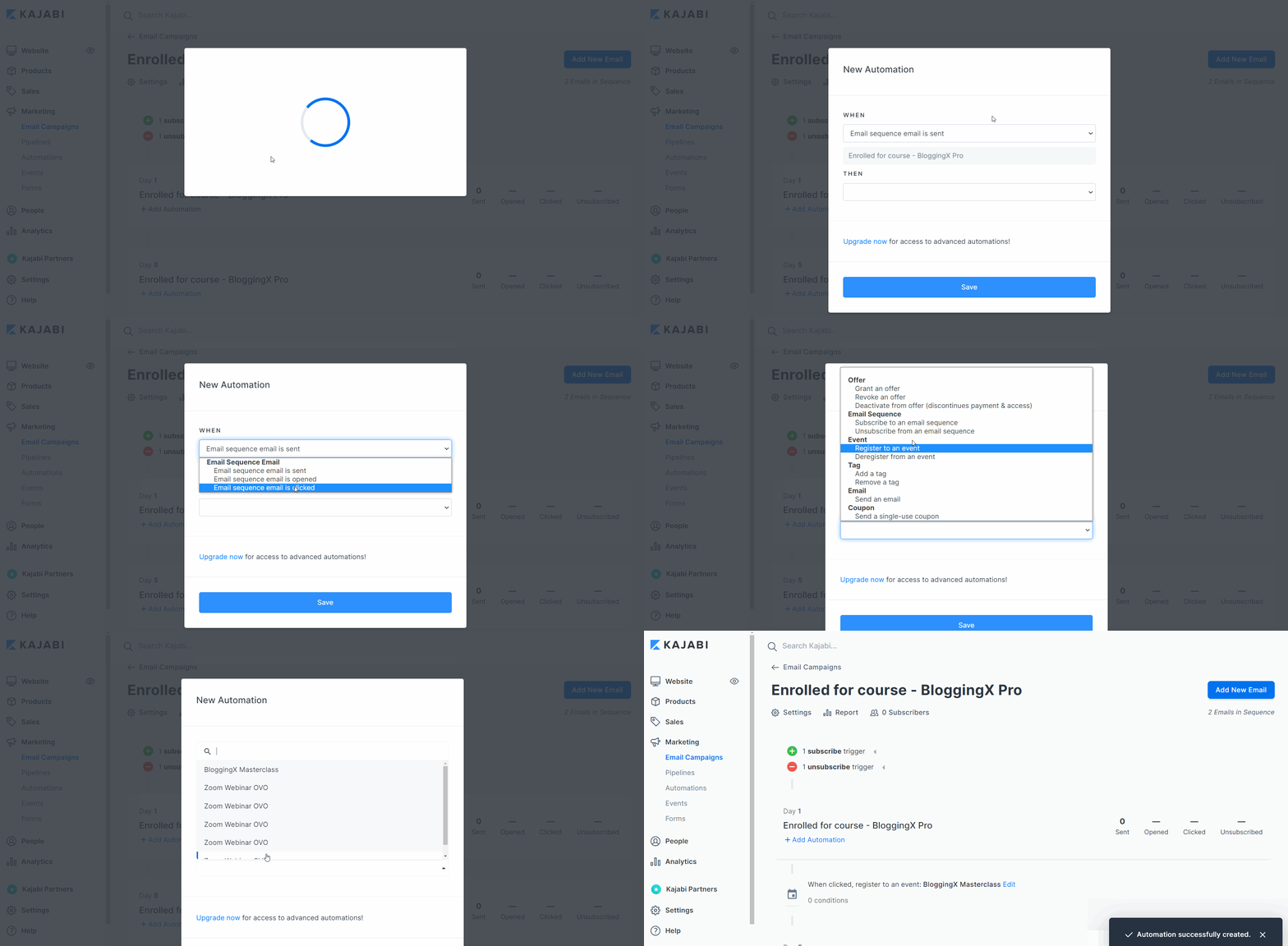
The best part is that Kajabi, as an all-in-one platform, also comes with an automation engine. You can set various automation rules.
For example, when a specific email link is clicked, you can automatically register your users for a webinar, thus enabling a one-click webinar registration functionality.
Now:
Circle recently introduced email marketing capabilities with the introduction of Circle Marketing Hub.
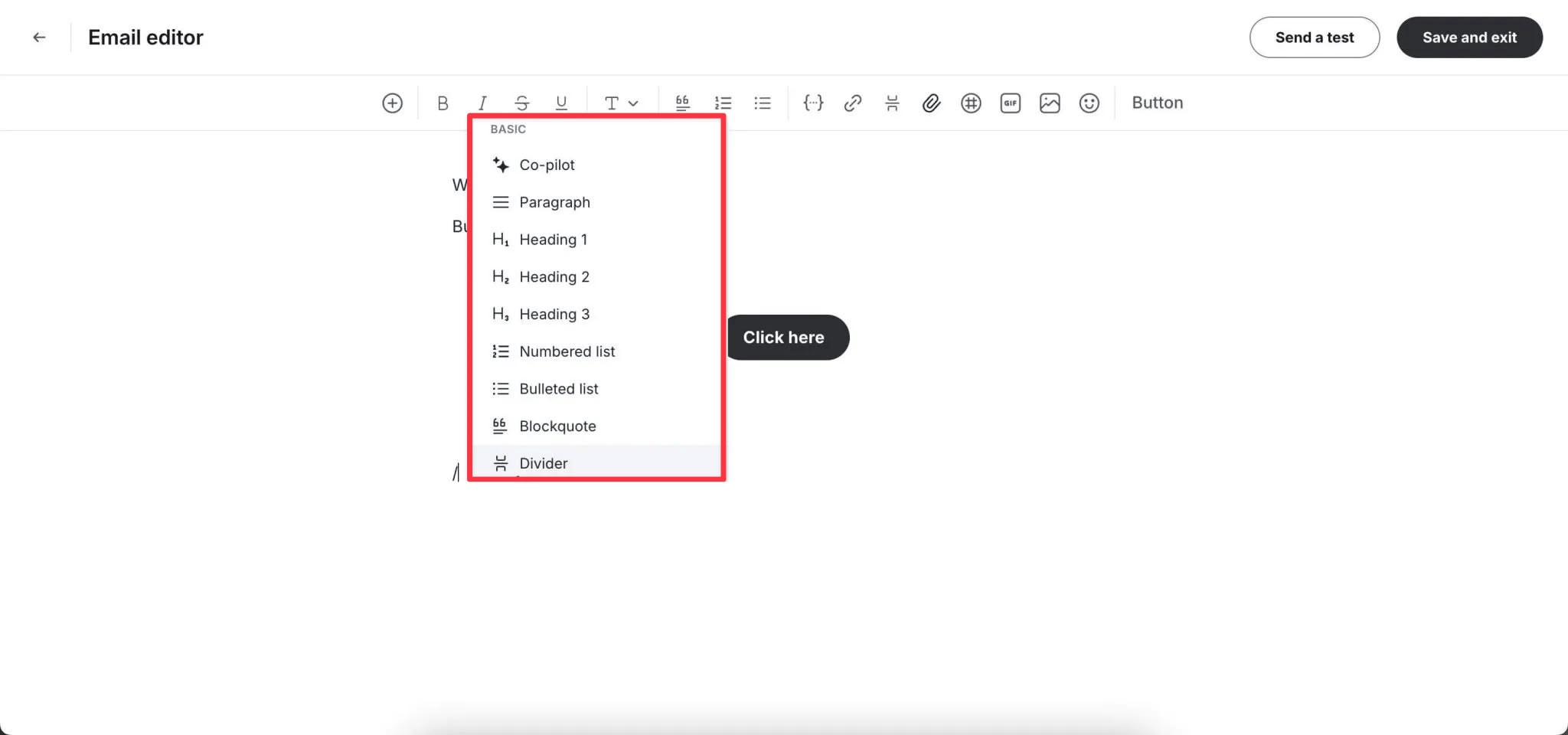
As of now, it comes with features like:
- Email broadcasts
- Marketing automations based on triggers from member actions
- Multi-step email journeys with timed delays
- Triggers based on user behavior
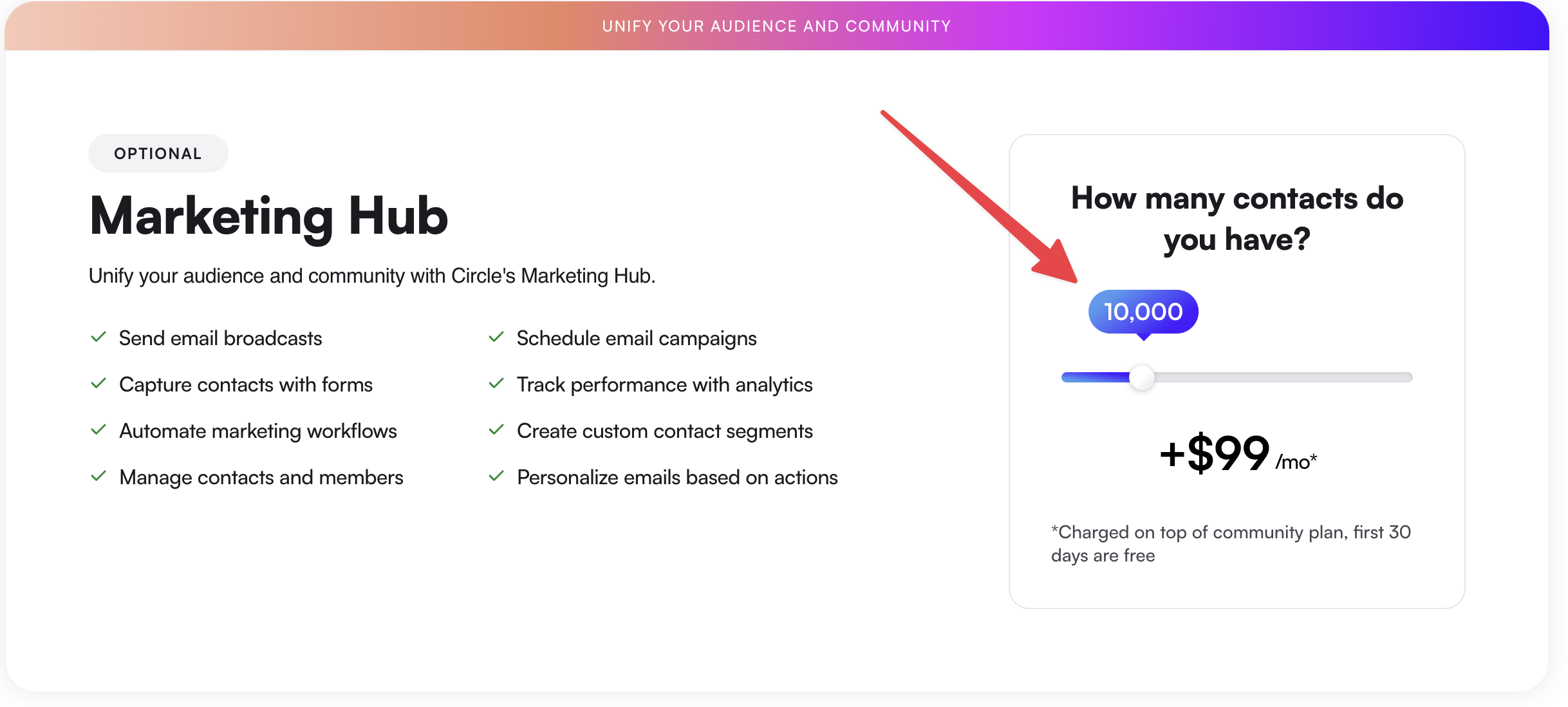
When it comes to pricing, for 10,000 subscribers, it costs $99 (cheaper than ConvertKit though).
If you are looking to hook circle with your other existing email marketing software, the sad thing with Circle is that it integrates only with Zapier.
🏆 Winner: Kajabi. It offers a complete email marketing solution with advanced automations built-in, while Circle’s Marketing Hub requires additional fees based on subscriber count.
Automations
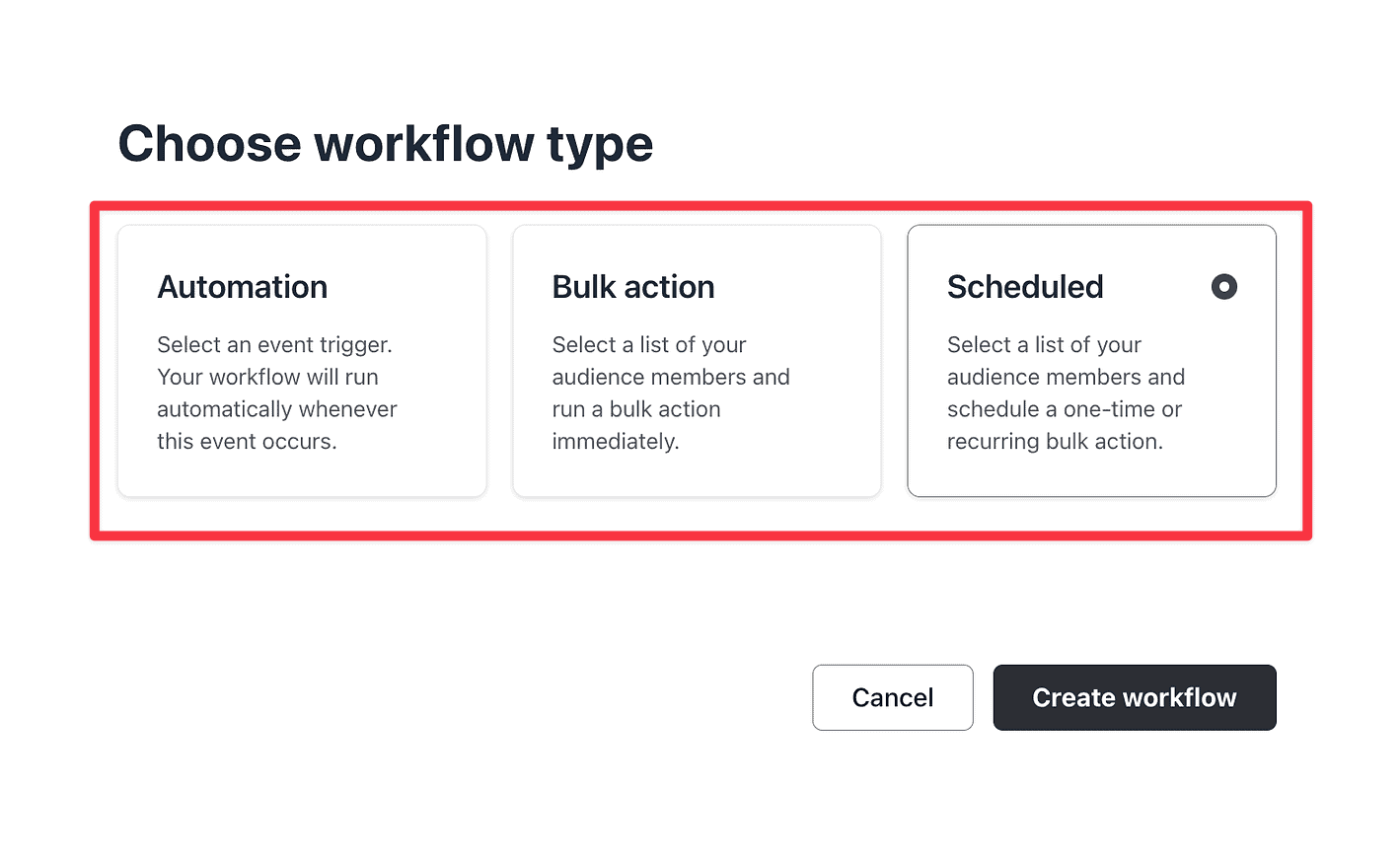
Circle recently introduced the automation workflows feature in their business plan.

This feature enables you to run triggered automation, perform bulk actions, and schedule various bulk actions on your site.
For example, if a particular person completes a specific course, then you can automatically send them a direct message.

It also provides different templates for creating automation workflows, similar to Zapier.
Kajabi, as an all-in-one platform, has an automation engine that connects all its functionalities.

In the above screenshot, you can see that when BloggingX Gold Membership offer is purchased, I can do actions like:
- Grant an offer
- Sending an email.
- Registering for an event (maybe onboarding webinar).
- Add a tag.
- Subscribe to the sequence
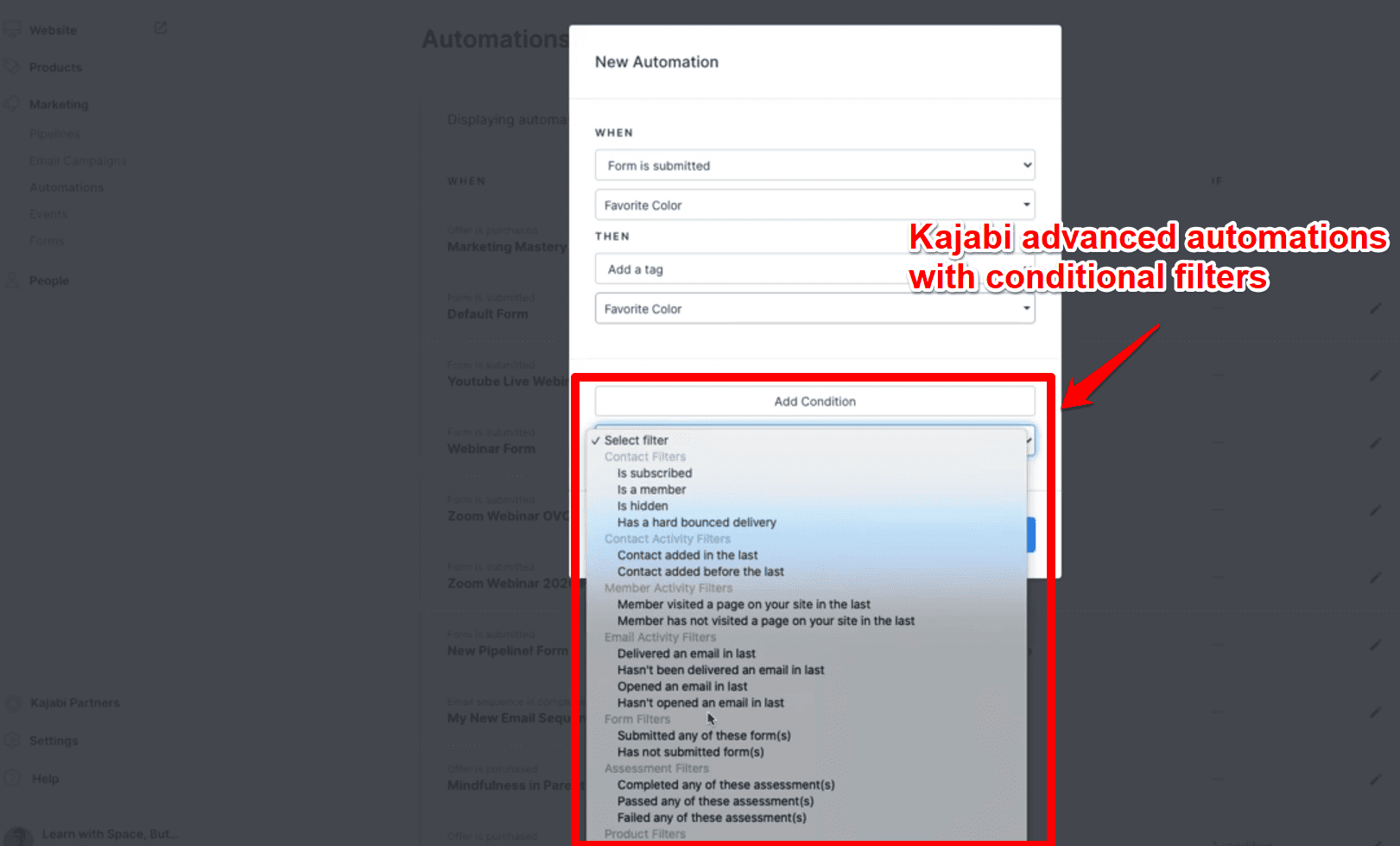
On its higher plans, Kajabi gives access to advanced automations. These come with an additional “conditional” filter to further specify the rules.
🏆 Winner: Kajabi, hands down. It comes with more numbers of triggers and actions and even conditional filters. It offers more features compared to Circle’s recently rolled out automation features.
Website and page builder
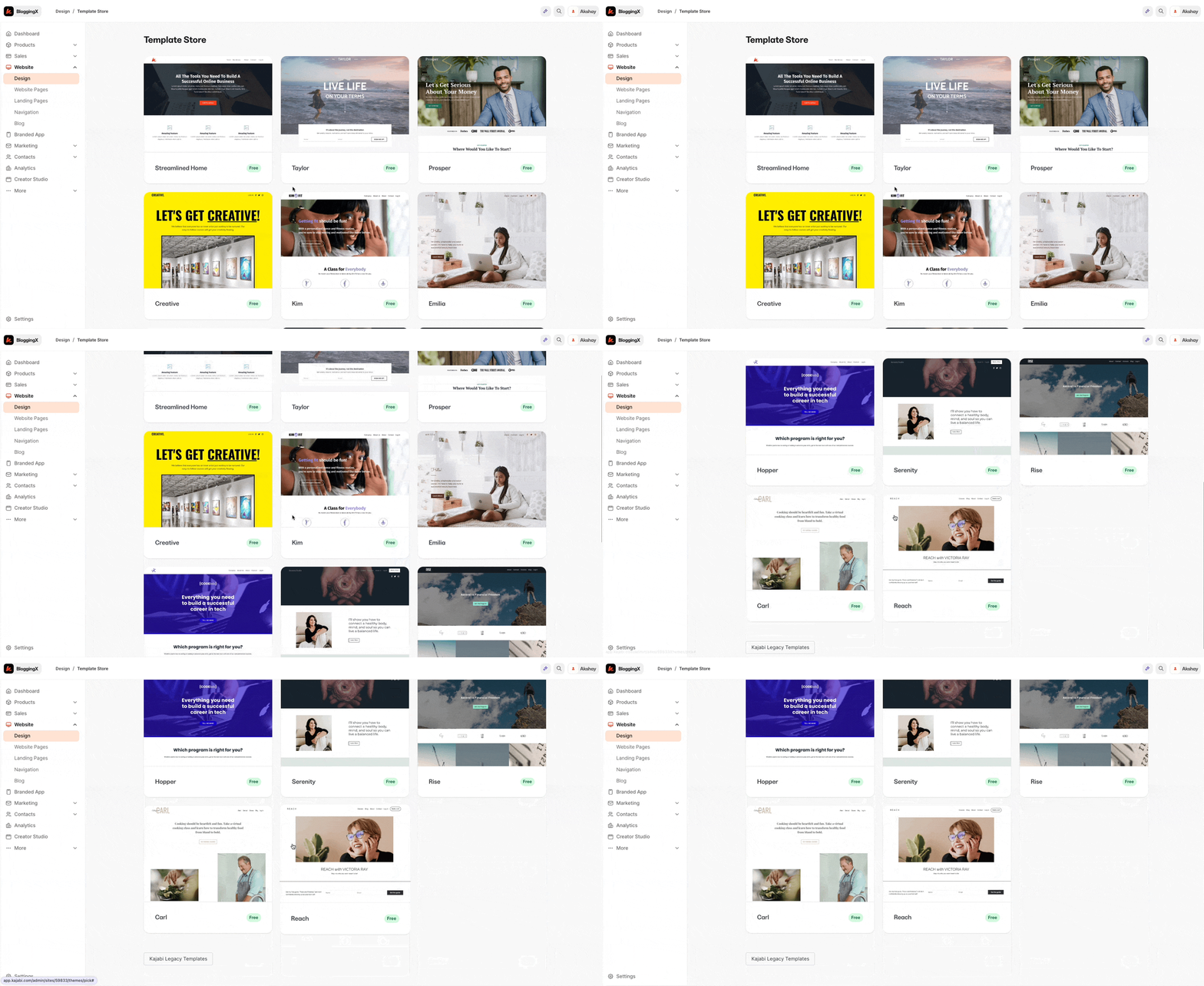
With Kajabi, you can build your entire website using their 10+ different course and site themes that have a professional and modern look.
Additionally, Kajabi provides a feature-rich page builder with over 40+ different modules to design your pages.
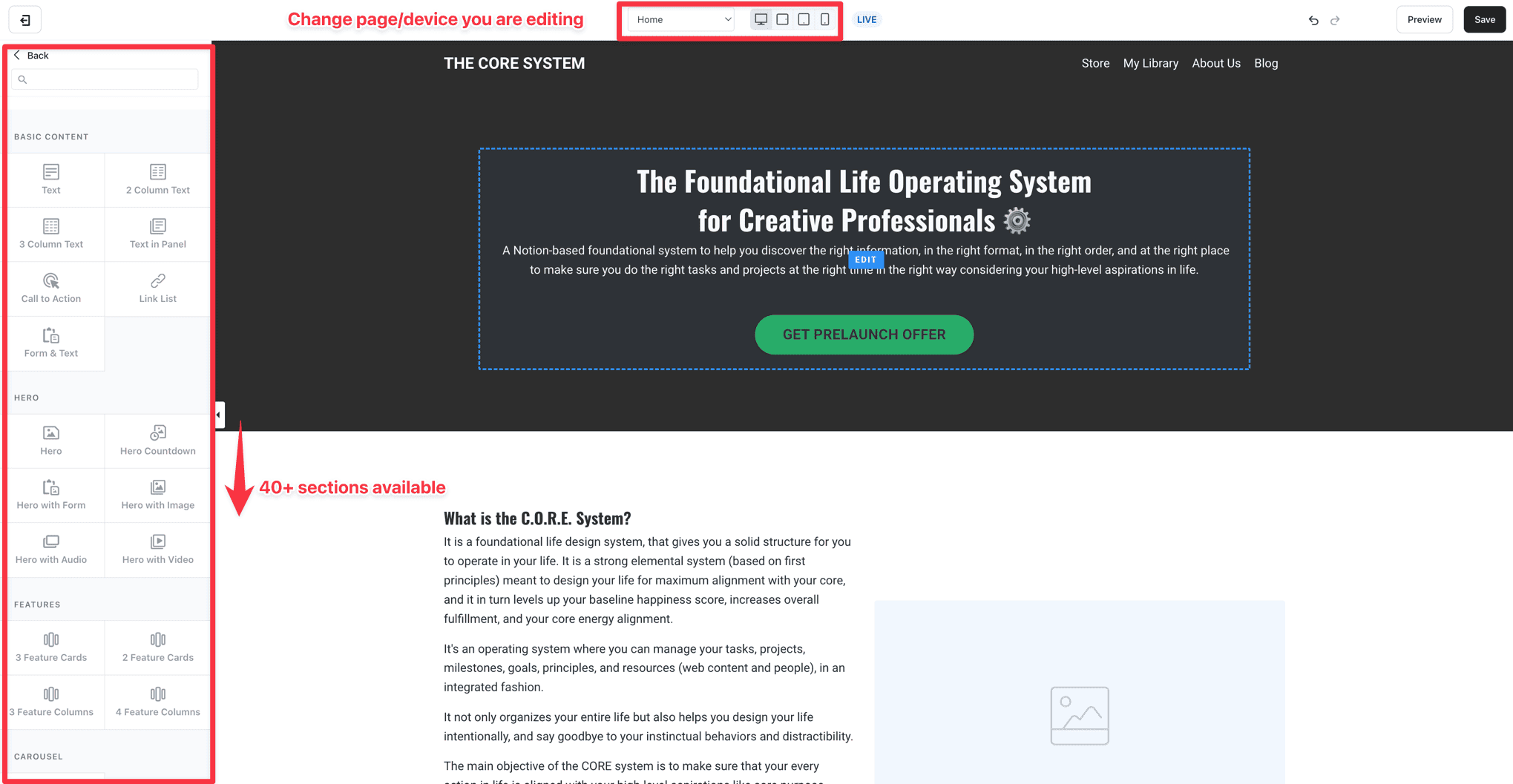
While Kajabi’s page builder is more powerful, some may find it lacking in flexibility. However, for non-developers, it offers more than enough customization options.
Now, Circle!
With their recent 3.0 update, it now has its own website builder.
You can create landing pages and simple websites right inside the platform.

They give you templates for different niches to choose from. After picking one, you can customize sections using pre-made blocks.
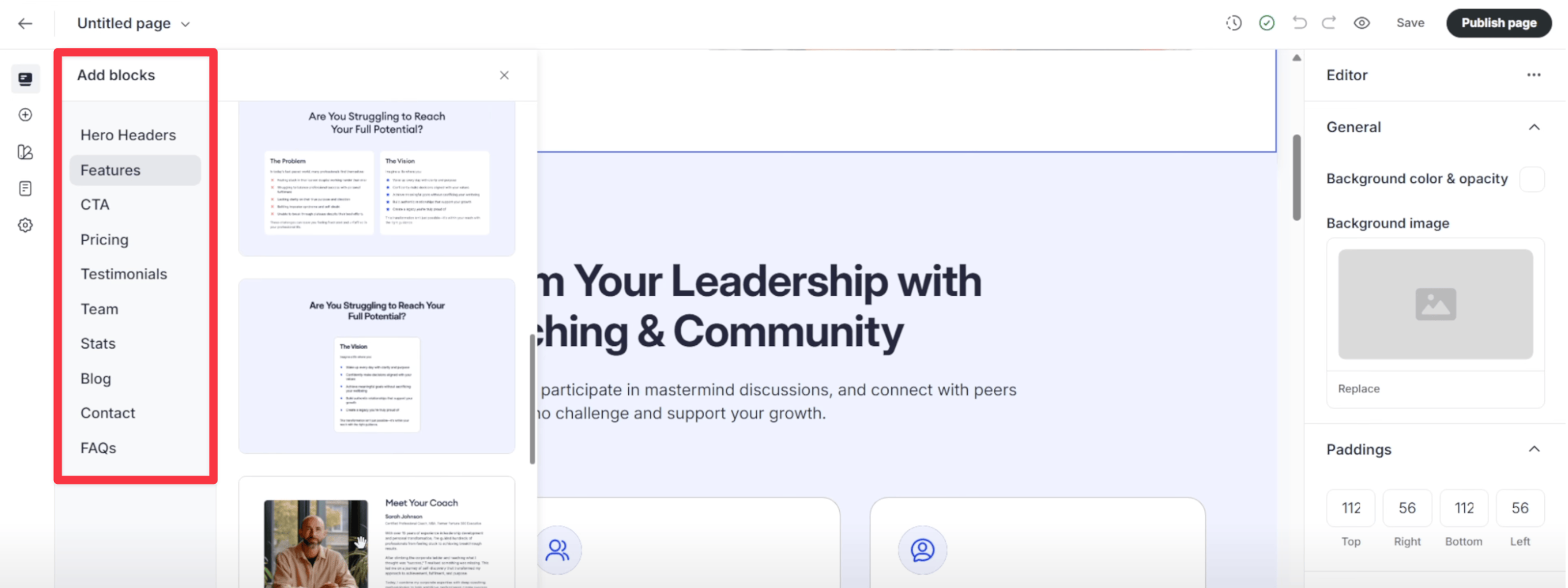
The builder is pretty basic though. You get simple elements like paragraphs, headings, links, and buttons.
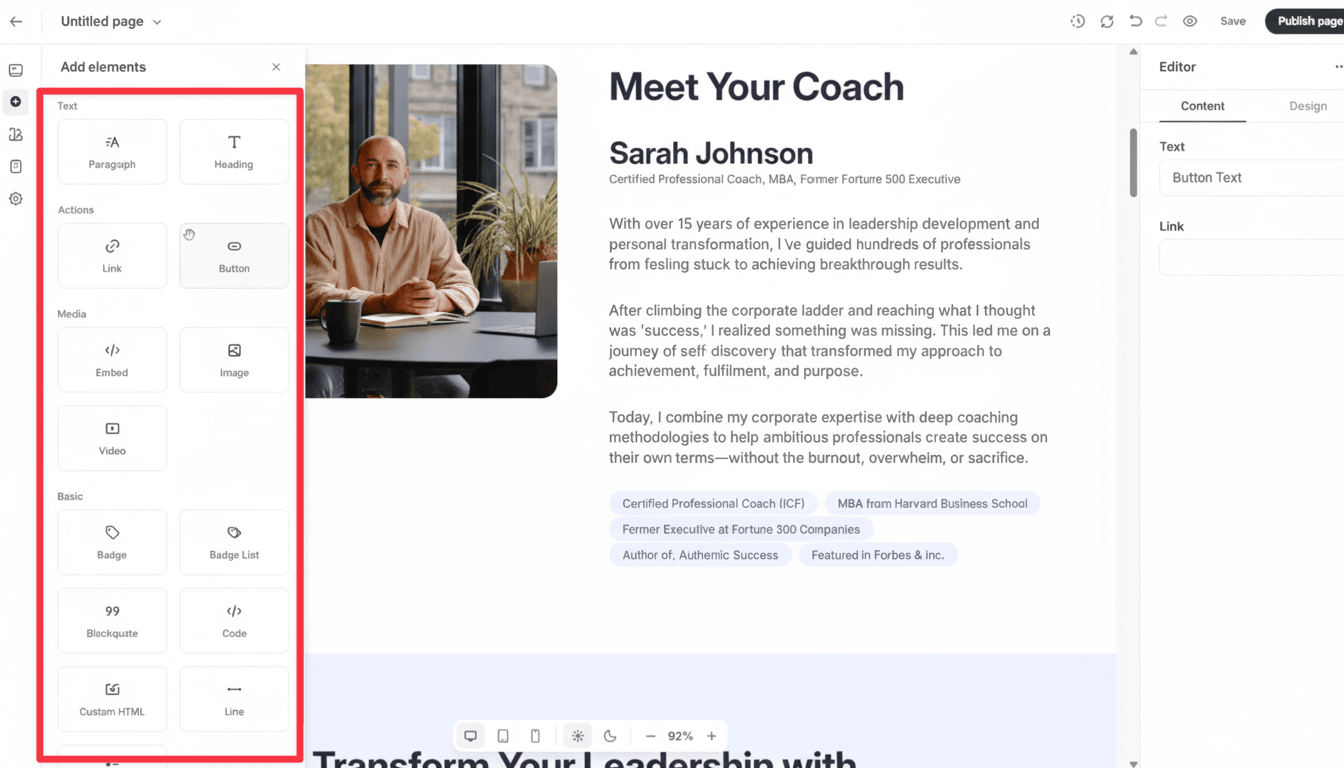
Good news is they included a Code widget so you can add custom HTML for things like opt-in forms.
🏆 Winner: Kajabi. It offers a more robust website builder with more elements, blocks, and design options. While Circle’s recently launched website builder is functional for basic needs, it’s still limited compared to Kajabi’s more comprehensive solution that provides greater customization options.
Funnels
Also, as Kajabi comes with a landing page and website builder, you can create entire funnels inside it.
For example, when you create a new funnel, you will be presented with a blank canvas in which you can link various landing pages, offers, and emails together, similar to how you do in any email marketing software like ConvertKit or Active Campaign.
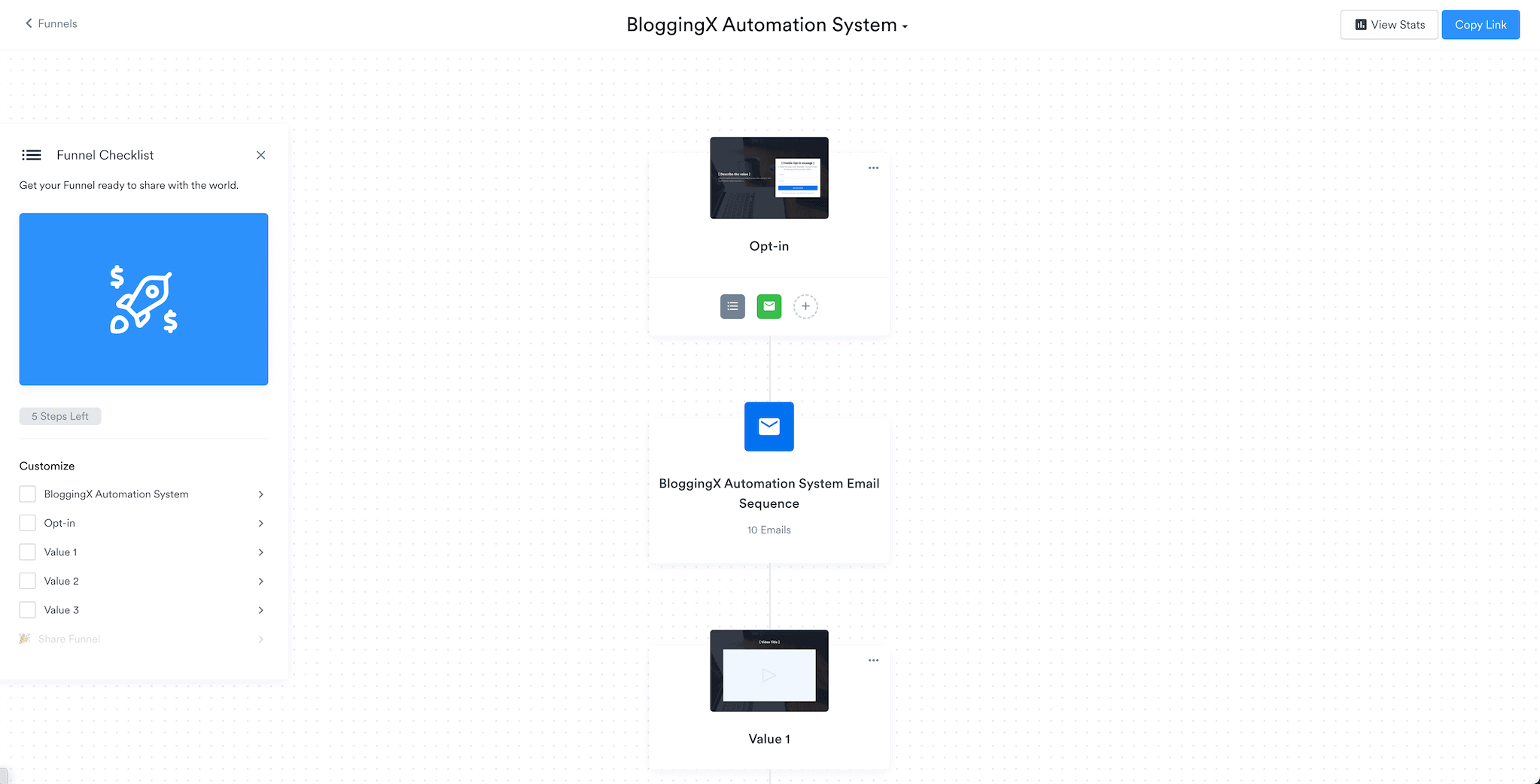
For instance, in the above screenshot, you can see that whenever a person opts into my email list, they will automatically be sent an email sequence delivering my course content.
Then, they will be redirected to the thank you page to nurture them further down in the funnel.
To accomplish the same with Circle:
You need to connect it with other funnel builder platforms like ClickFunnels, WordPress (with CartFlows and Elementor), or preferably Thrivecart, which I personally use.
Then, whenever a purchase occurs in your funnel, you need to use Zapier to add them to Circle.
🏆 Winner: Kajabi. It offers built-in funnel creation tools with visual workflow builders, while Circle requires third-party integrations and Zapier connections to achieve similar functionality.
Sales and checkout options 💲
With Circle, you can easily charge your community and accept payments instantly using paywalls.
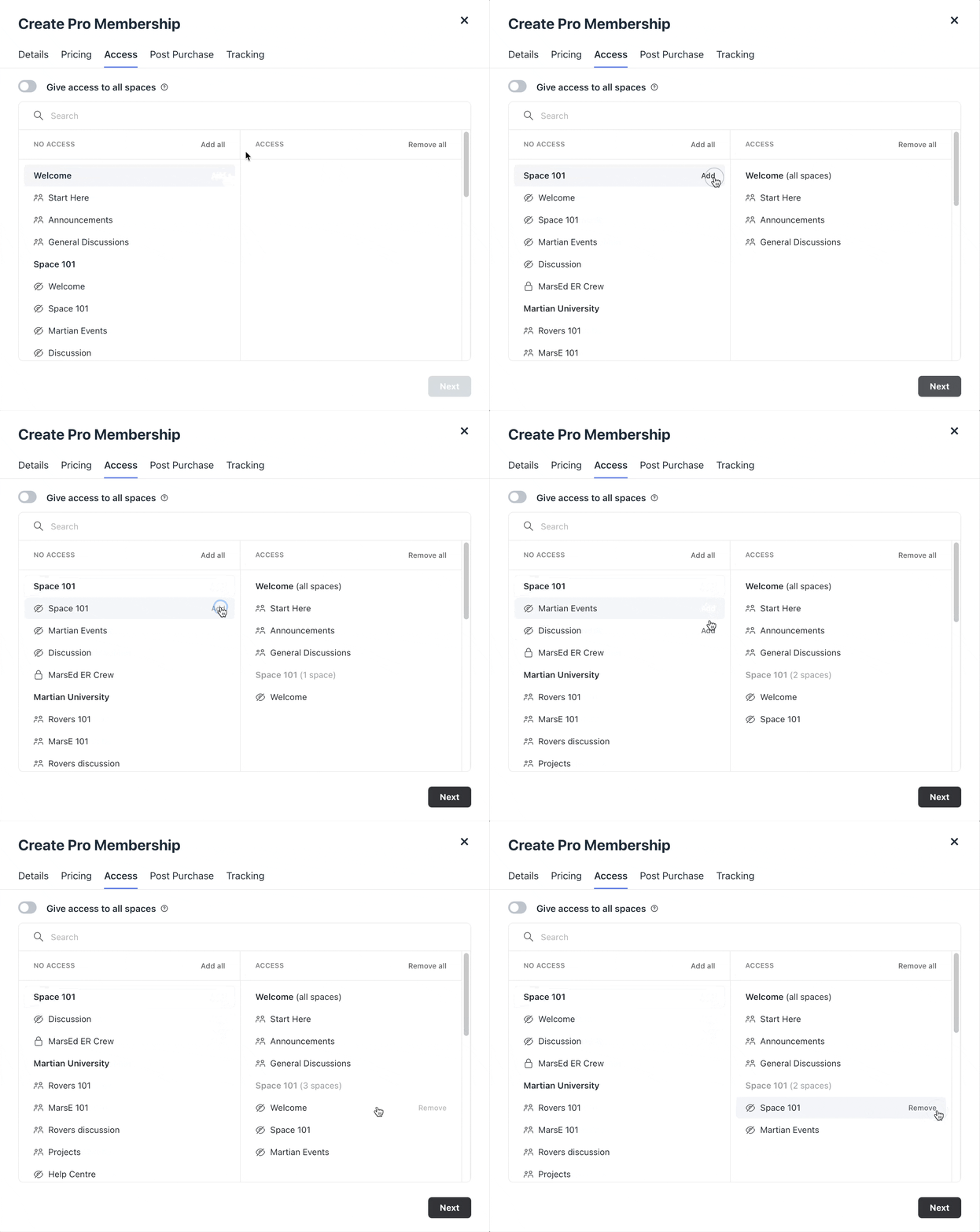
With Paywalls you can:
- Charge bi-weekly, monthly, quarterly, or annual subscriptions.
- Offer various membership tiers with different pricing plans.
- Charge for private spaces and accept one time payments.
When it comes to checkout, Circle keeps things super basic – just a one-step checkout that only works with Stripe. No PayPal, no other payment options. That’s it.
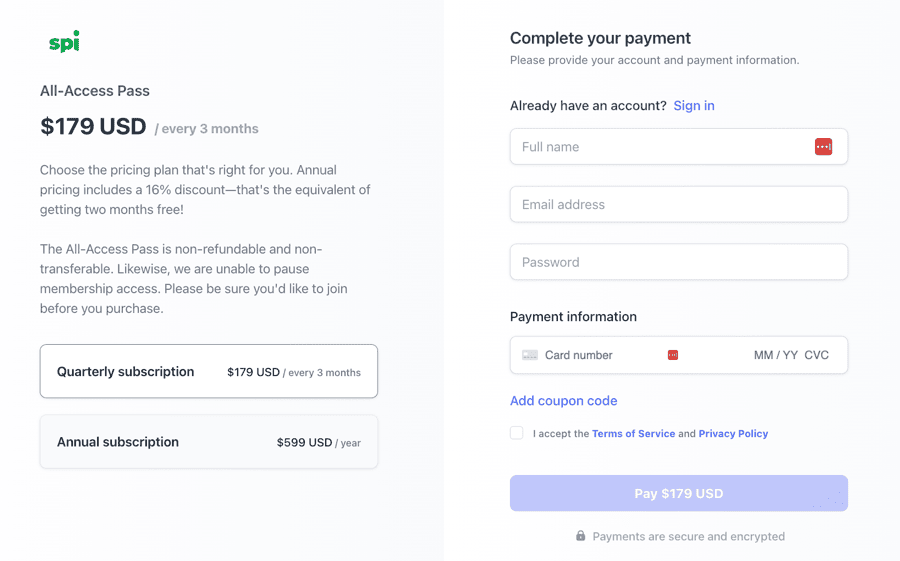
Here’s the thing – Circle’s checkout is pretty basic.
You can’t add order bumps or upsells to make more money from each sale. And unlike Kajabi, you can’t even add social proof like testimonials to convince people to buy.
👉 Want better checkout features? You’ll probably need to use dedicated platforms like Thrivecart or SamCart. These give you more payment options and better conversion features.
Now, Kajabi keeps things simple with a built-in checkout that just works:

What’s cool is that you can make your checkout pages look exactly how you want them. Their page builder lets you drag and drop different elements to create something that matches your style.
Here’s where it gets really good – Kajabi lets you add upsells, downsells, and order bumps to make more money from each sale.
Circle?
Well, they’re missing the order bump feature, which is kind of a bummer if you’re serious about maximizing your sales.
🏆 Winner: Kajabi. With better checkout experiences, multiple payment gateways, and conversion-focused features like order bumps and upsells, Kajabi clearly outperforms Circle’s basic checkout system.
Mobile app 📲
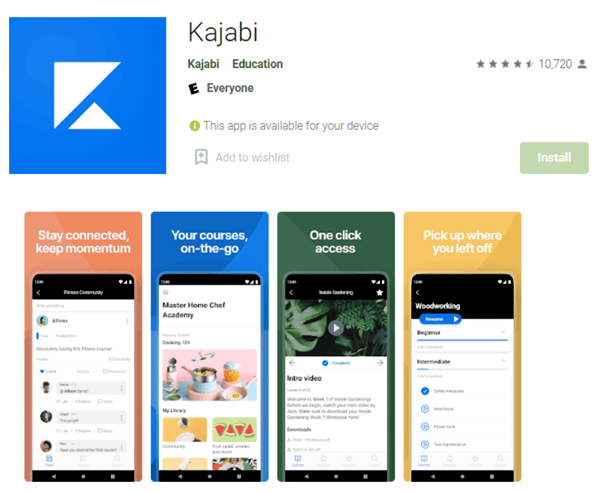
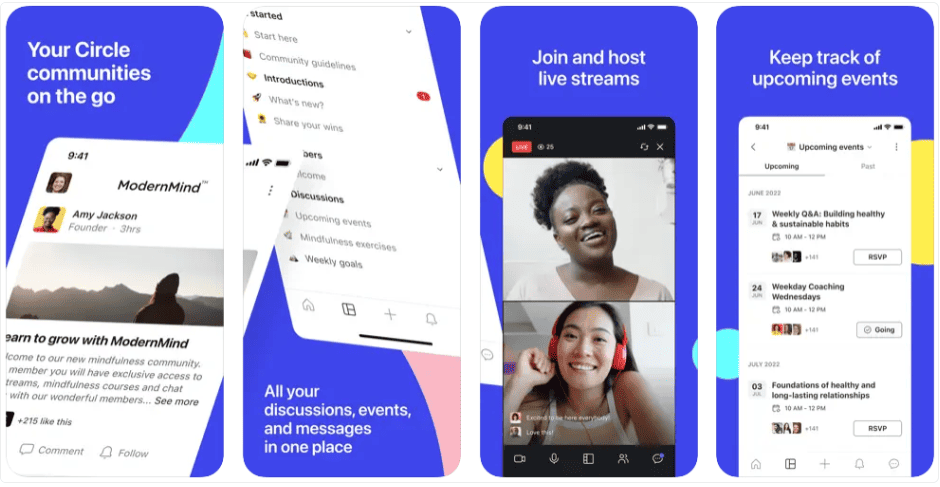
Kajabi and Circle both have well-rated mobile apps for Android and iOS.
The apps aren’t white-labeled, unlike Mighty Networks.
With these apps, students can:
- Consume courses on the go.
- Access communities and memberships.
- See all the product updates.
- Take quizzes, assessments, and download the attachments.
To increase conversions, both support in-app purchases and push notifications.
As an added advantage, Kajabi also has an app for especially creators. You can manage your entire business on the go.
🏆 Winner: Kajabi. Apps support in-app purchases. There is also a creator app available to manage your business on the go.
Integrations
Circle’s integration options are limited. They mainly work through Zapier.
However, Circle does support single sign-on with platforms like MemberStack, MemberSpace, WordPress, and Teachable.
Kajabi offers way more direct integrations.
You can connect it with payment processors like PayPal and Stripe. Plus, it integrates directly with email tools like ActiveCampaign, Drip, ConvertKit, MailChimp, and Typeform.
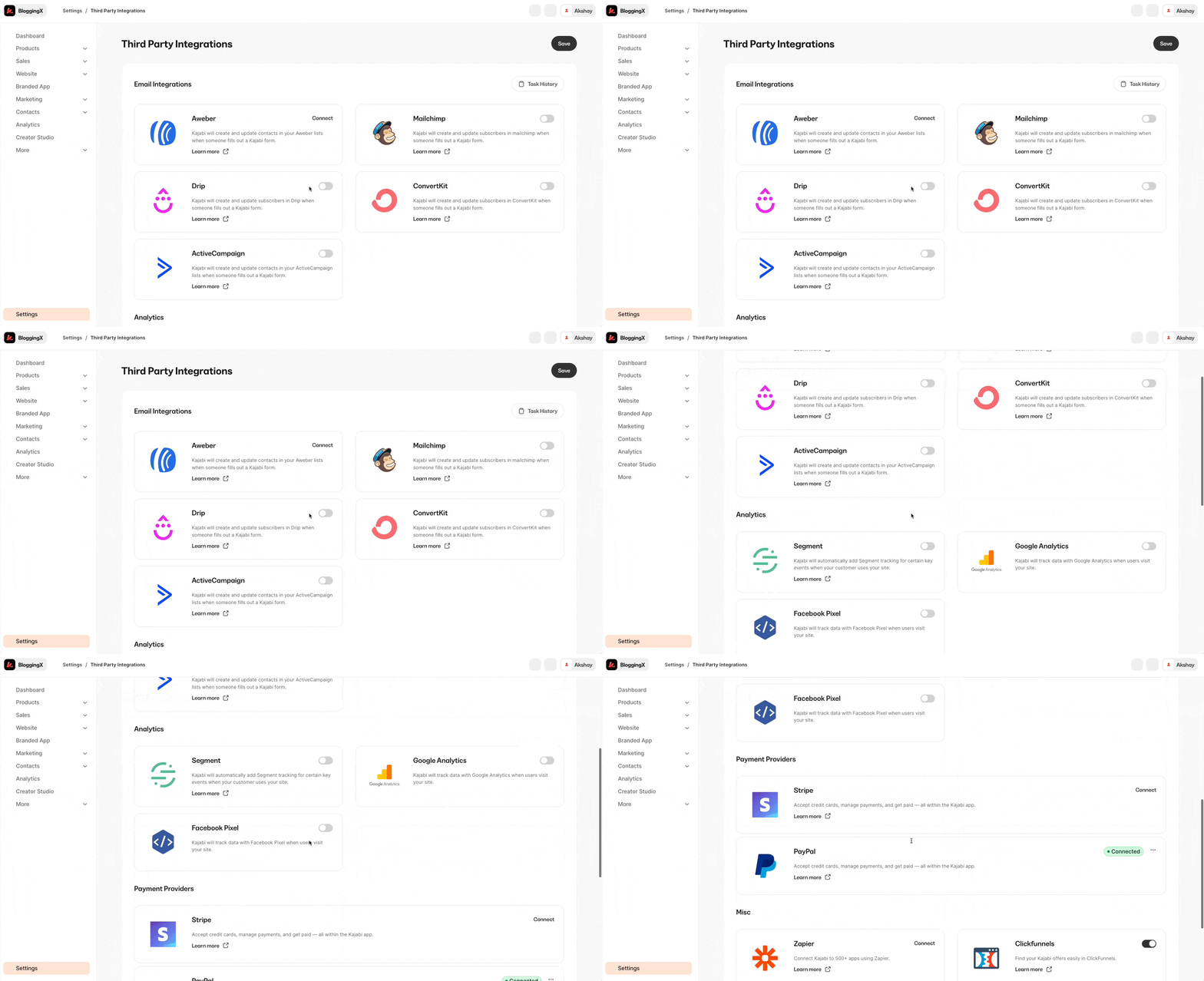
🏆 Winner: Kajabi. It has more native integrations compared to Circle.
Pricing
Let’s look at Kajabi:
Its premium pricing starts at $179/month.
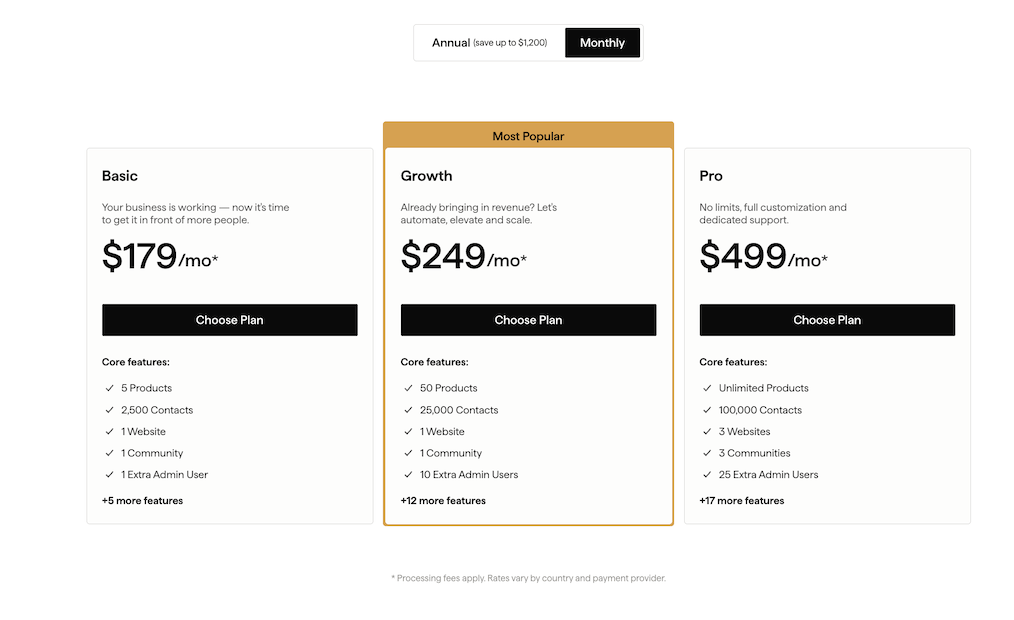
Their basic plan only supports 5 products and funnels. That’s why most people go for the Growth plan at $249/mo instead.
With this plan, you can create up to 50 products and funnels – perfect for most users.
Need a code editor because you’re a developer? You’ll want to pick their Pro plan at $499/month.
Now:
Circle’s pricing starts at $89/month – a solid deal if you just need the community features.
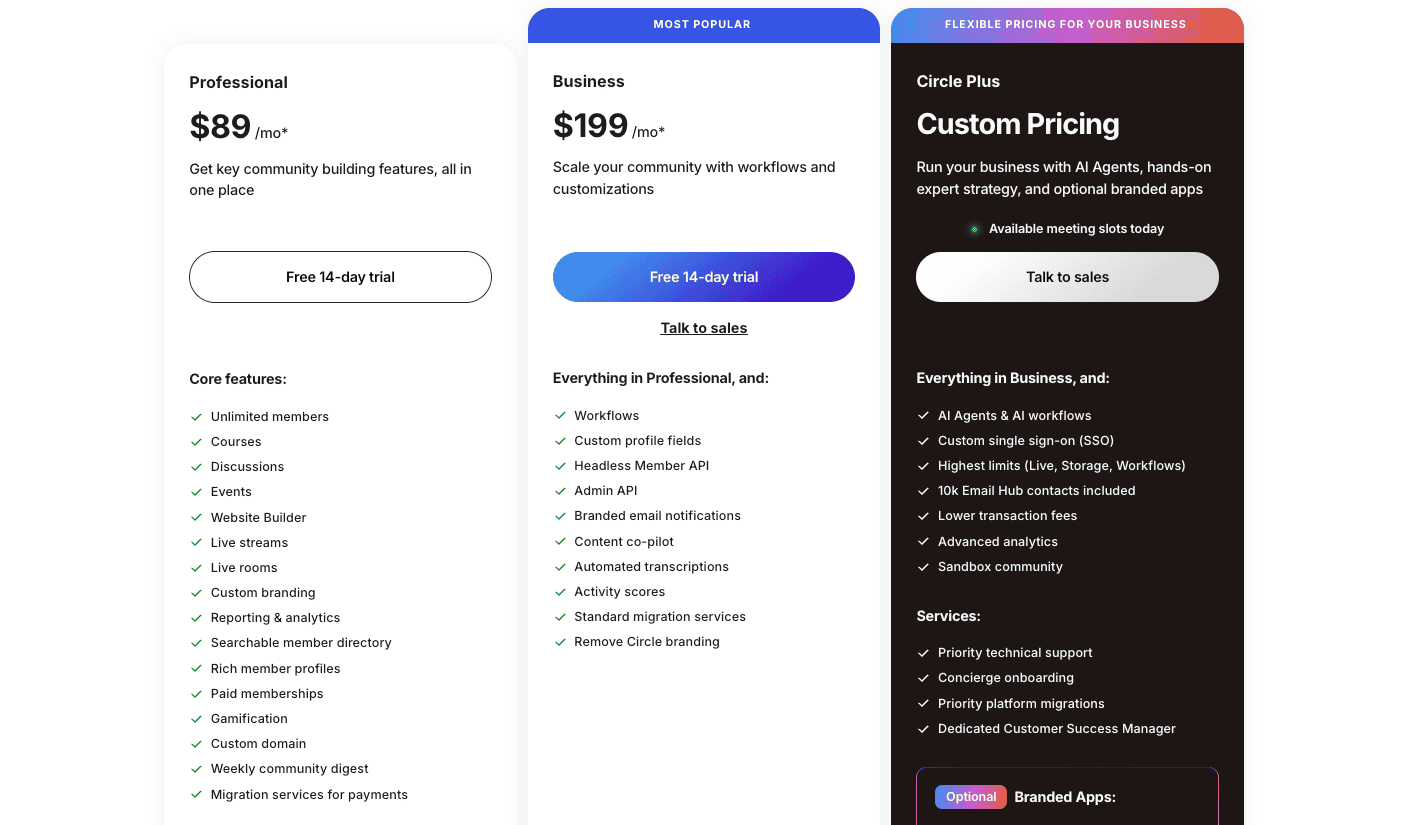
If you want all the good stuff like workflows and API access? You’ll need the $199 Business plan.
3 shady things:
- All their plans are billed annually (see the asterisk *)
- The transaction fee is not disclosed in the pricing page.
- They don’t clearly mention how many workflows you actually get with their Business plan.
⚠️ Both of the platforms come with email marketing abilities. However, with Circle based on the number of contacts you have, you need to shell out additional money. For example, if you have 10,000 contacts, it costs you $99 per month.
Conclusion – Circle vs. Kajabi
After using both platforms extensively, here’s what I found:
If you want to build a strong community and you already have your course and marketing tools sorted, Circle is perfect. It’s modern, simple to use, and cheaper to get started.
The community features are excellent, but you’ll need to connect other tools to run everything.
But Kajabi is a complete all-in-one solution with courses, community, email marketing, and funnels all built in.
It has built-in marketing tools like upsells and order bumps, powerful automation, and tons of direct integrations. It’s made for serious business owners who want everything under one roof.
Another major advantage: Kajabi includes unlimited email marketing at no extra cost, while Circle charges additional fees based on your contact list size (for example, $99/month for 10,000 contacts).