When it comes to hosting your online courses, you have two of the most popular choices – Teachable and Thinkific.
As someone who has been using both of these platforms for over 5+ years, as a course and instructional designer, I can tell you that they are both good platforms.
But.
Teachable is not like it used to be before. I can’t recommend it now.
In this post, I’ll compare Thinkific vs. Teachable.
Quick decision
👍 What do I like about Thinkific over Teachable?
- Cost-effective: No transaction fees (unlike Teachable which charges 7.5% fee even on their paid plans) and no limits on courses on all plans. Their lowest plan starts at just $49/month.
- Better assessments: Native surveys, randomized question banks, graded and non‑graded quizzes, and stricter compliance controls for prerequisites and progression.
- Better specialist lesson formats: Live sessions, assignments, surveys and presentations out of the box.
- Better page builder: Thinkific comes with a better page builder (with more elements) for creating your school’s website.
- Better integrations: Stronger native integrations across the app ecosystem (including popular email tools), reducing reliance on Zapier for basics. Teachable often needs Zapier for even common email marketing connections.
👍 What do I like about Teachable over Thinkific?
- Marketing tools: Teachable offers some additional marketing features like the ability to email your students, bulk coupon generator, and ability to add upsells in the training courses.
- Granular content dripping: With Teachable, you can drip content chapter-wise vs. only module-wise. It helps a lot for say 30-day challenge like courses!
- Student note-taking on videos: Students can take personal notes directly on videos at specific timestamps (similar to Udemy), a feature not available in Thinkific.
- Automatic tax handling (huge benefit): Teachable automatically calculates, collects, and remits sales taxes to tax authorities, saving significant time and eliminating complex manual tax compliance work.
Teachable vs Thinkific – Upfront bottomline
If you’re deciding between these two platforms in 2026, here’s my honest take:
- Choose Thinkific if you want unlimited courses with zero transaction fees. At $49/month, you get solid value without the limitations that plague Teachable’s pricing tiers.
- Go with Teachable only if automatic tax handling is critical to your business. Teachable automatically calculates and remits taxes to authorities, saving significant back-office work (though services like Quaderno can handle this for Thinkific users).
However, Teachable has fundamentally changed since its 2020 Hotmart acquisition:
- The founding team shifted focus to Circle after selling to Hotmart
- Teachable removed unlimited products from beginner plans, now limiting users to just publish only 5 products on the $39/month Starter plan and 10 products on the Builder plan
- They still charge a 7.5% transaction fee even on paid plans
For most people, Thinkific at $49/month is the recommended choice. With it, you get unlimited courses, no transaction fees, and better overall value.

Try Thinkific Free for 30 days
Build unlimited courses with zero transaction fees. Get full control over your content with no hidden costs.
Verified
Pricing – Thinkific gets it right!
Thinkific offers flexible pricing plans to suit your needs.
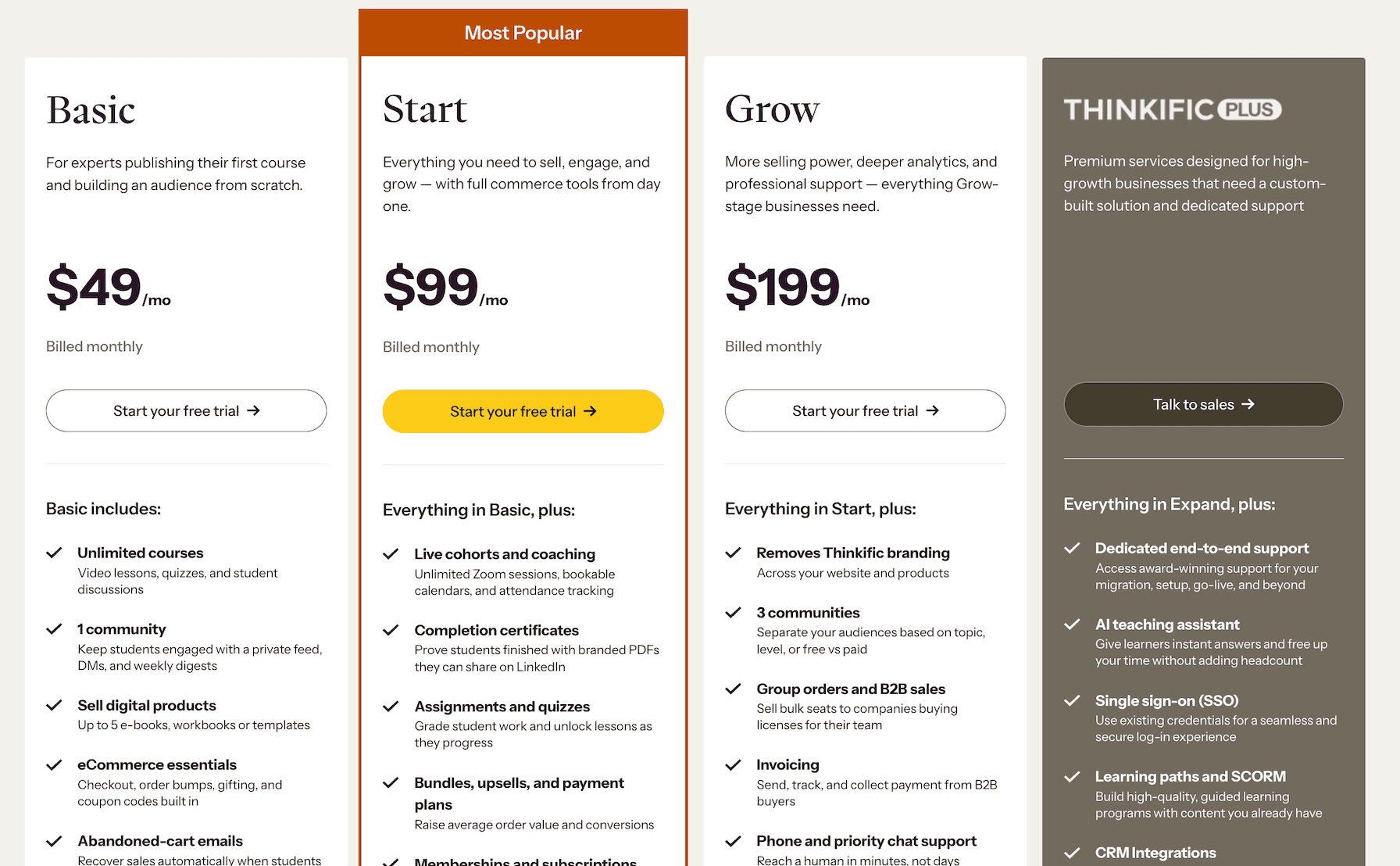
You can have unlimited courses under each plan and THERE ARE NO TRANSACTION FEES
Teachable hits you with a HUGE 7.5% transaction fee on their Starter plan ($39/mo).
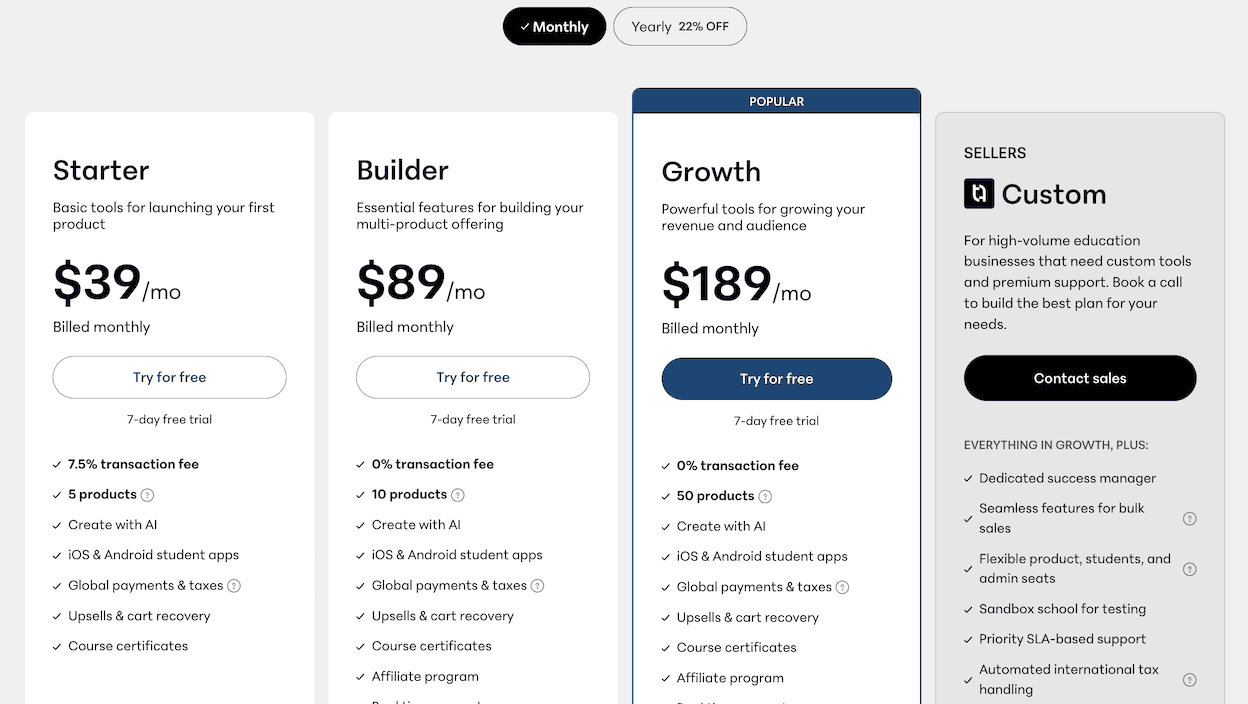
Want to get rid of that fee?
You’ll need to upgrade to their pricier plans.
And also with Teachable you have huge product creation limitations:
- Starter plan, even at $39/m, allows you to publish only 5 products.
- Builder plan at $89/month allows you to publish only 10 products.
👉 Earlier (before Teachable’s Hotmart acquisition), they used to have a plan where you could publish multiple products. Those plan holders were forced to pay a ransom or move out of the platform.
When you compare the two, Thinkific provides more value for your money as it supports unlimited courses even in their most basic plan with 0% transaction fee.
User interface – Teachable has a bit of edge
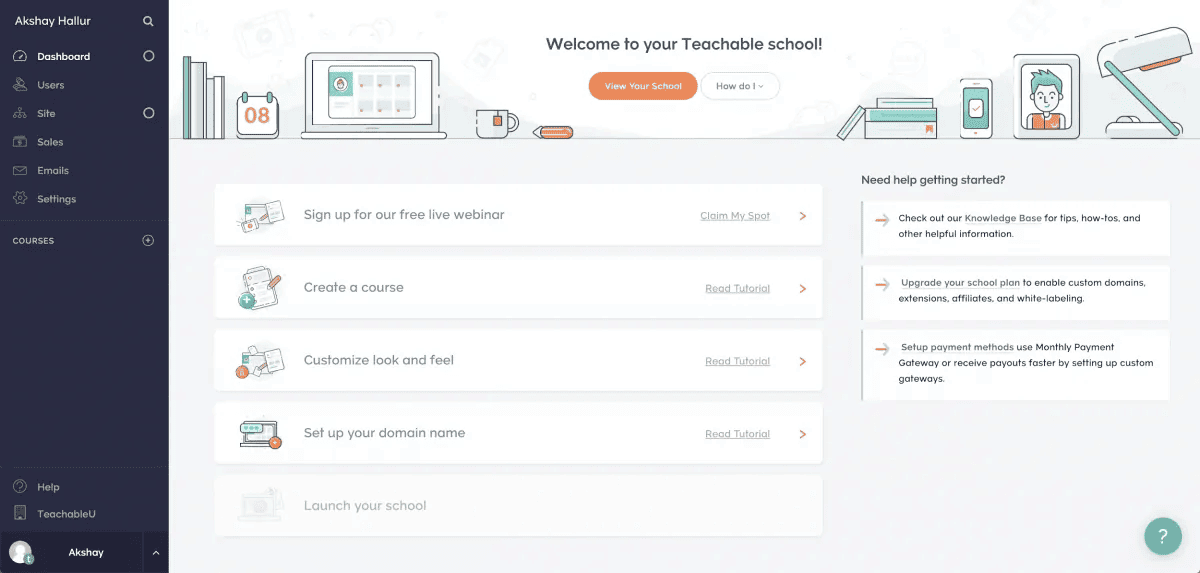
When it comes to the interface, both of these platforms have a sidebar-centric interface where you can access all features.
On the other hand, Thinkific’s interface is also very refined and intuitive to navigate.
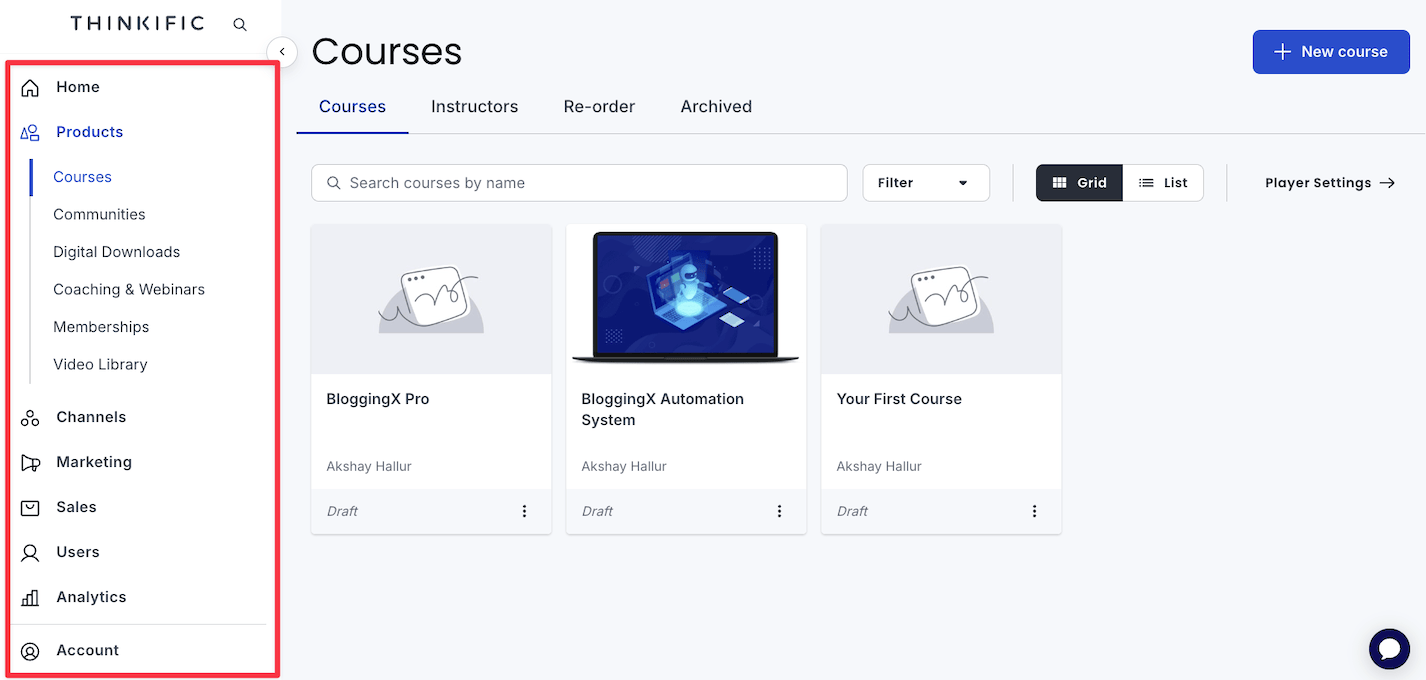
Traditionally, it had a difficult interface to easily wrap your head around, but things have improved a lot recently.
🏆 Winner: Thinkific. Feels more streamlined
Course creation – Teachable has a slight edge (for most)
When it comes to each of these platforms, you have all the basic functionalities, like courses, modules, lessons, and also drip features.
With Teachable, things are pretty straightforward.
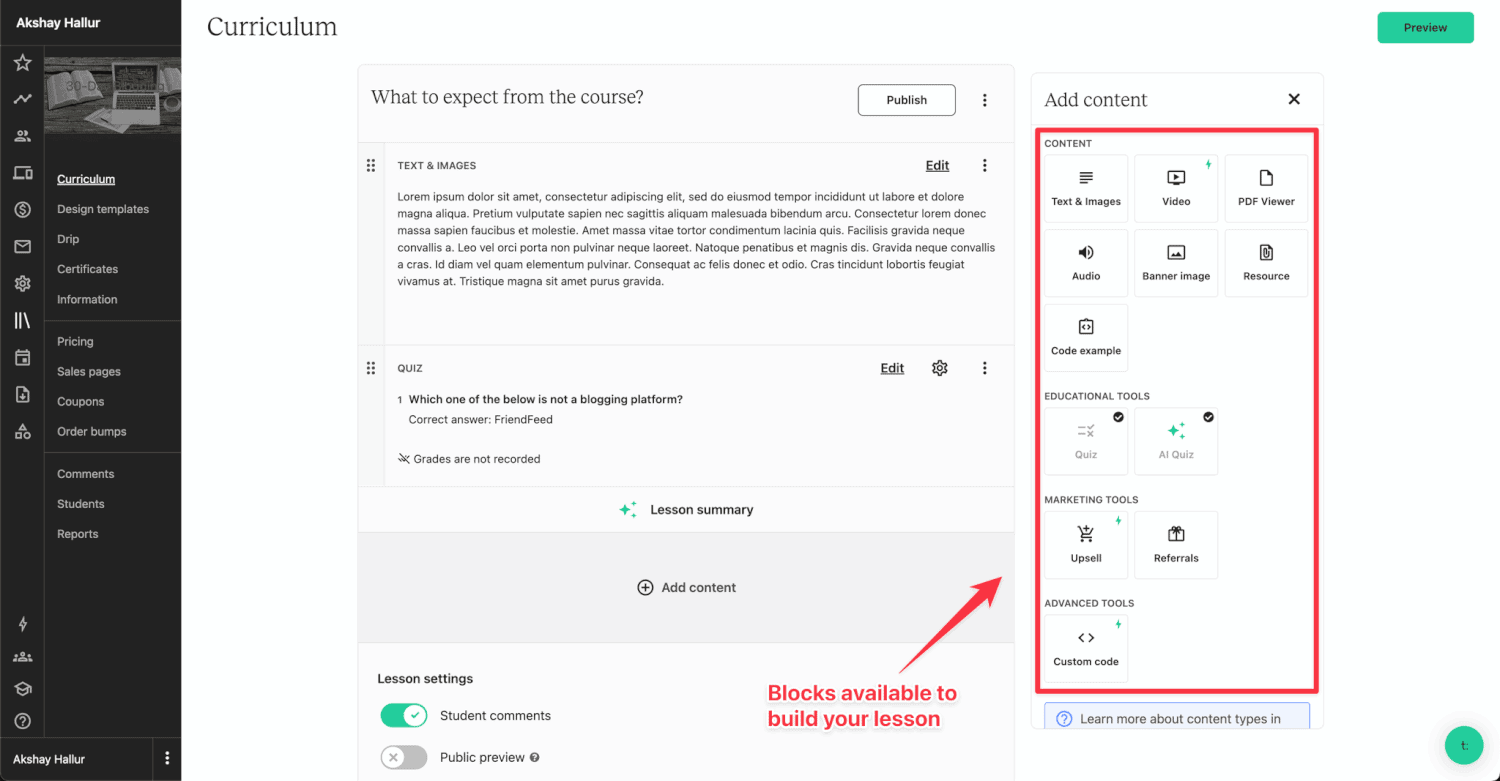
And also inside any lesson, you can add various content formats.
ONE LESSON = MULTIPLE TYPES OF CONTENT
👍 The ability to add upsells and custom code within the lesson content is impressive.
With Thinkific, you get different lesson “types”.
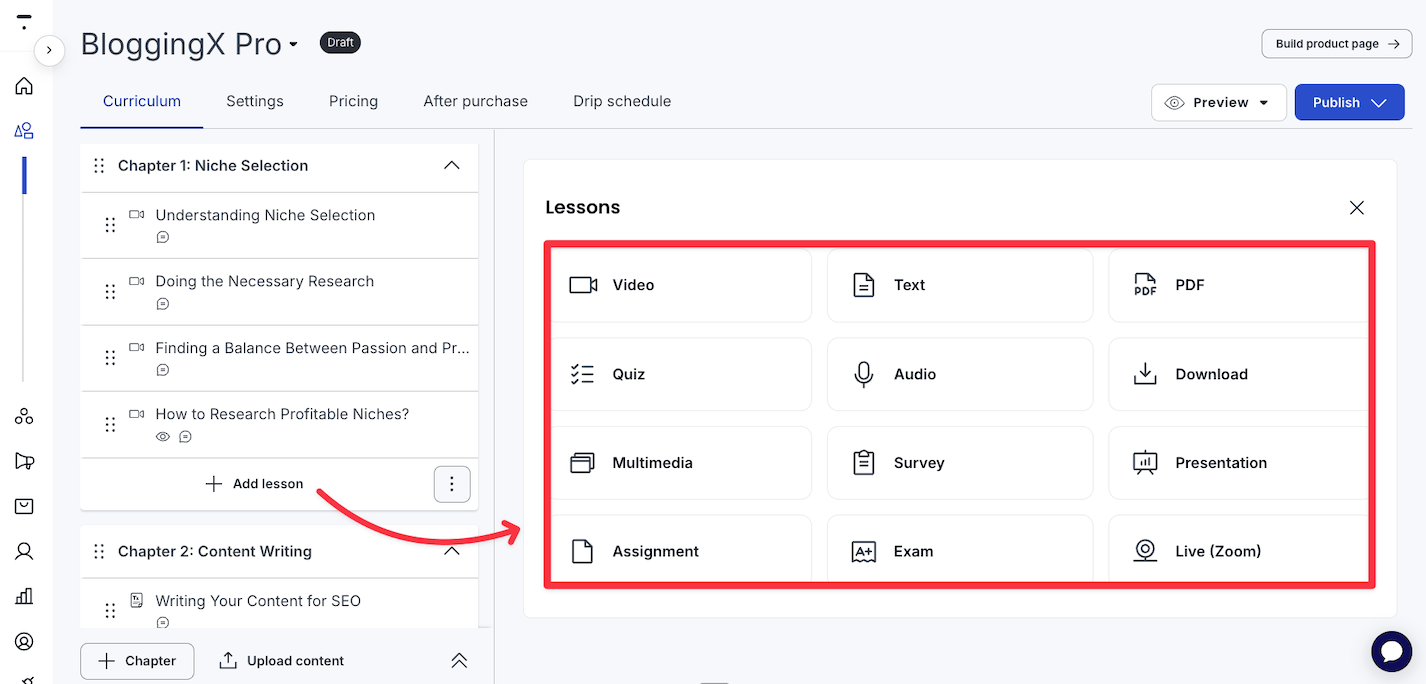
It supports some unique lesson types like:
- Audio lessons
- Presentations
- Live sessions
- Surveys
- Exams
After all, Thinkific was started with academic use cases in mind.
But.
Here are the 3 main advantages of Teachable 👍:
- Cloud storage: Directly upload content from storage platforms like say Google Drive or Dropbox to Teachable.
- Coaching and live classes: Provide personal coaching and live classes alongside training courses.
- Upsells inside lessons!: You can include upsells within lesson content to increase revenue. This is my most favorite feature!
Apart from this, let’s talk about course compliance.
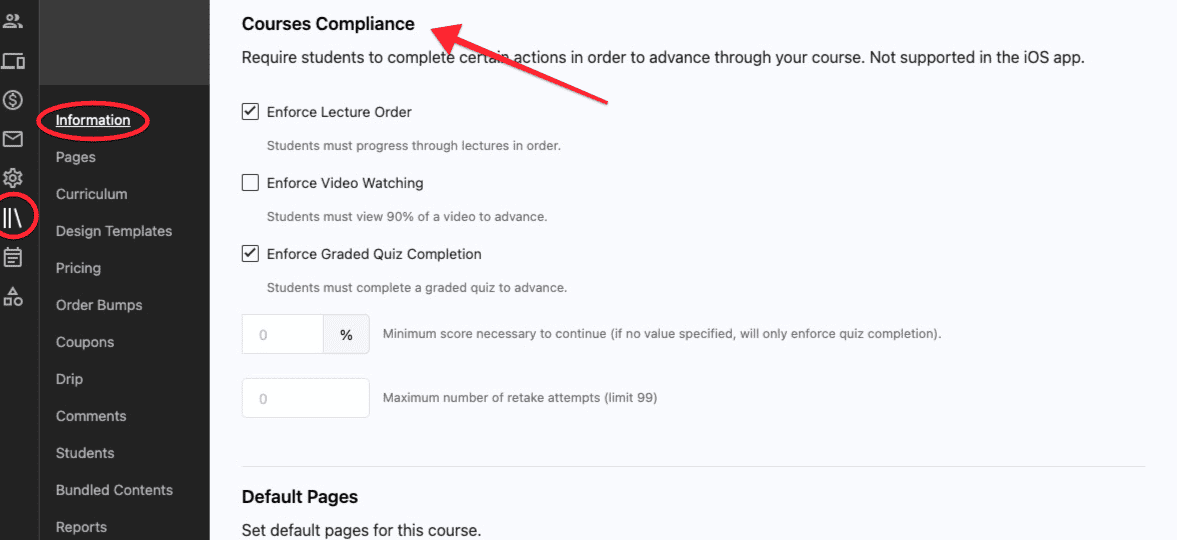
BOTH of them come with the ability to:
- Enforce lecture order
- Enforce video watching (requiring watch duration)
- Enforce quiz completion (set passing grade)
Both platforms auto-track course completion, so certificates can be issued without requiring students to manually mark lessons complete.
🏆 Winner: Both are a tie.
Assessments (Thinkific has an edge)
Both Thinkific and Teachable has assessment features like quizzes (with passing grades) and asking open-ended questions for student submissions.
However, Thinkific offers unique features here like:
- Exams (integration with Brillium)
- Surveys for getting student feedback
🏆 Winner: Thinkific
Communities – Both of them are limited
Both Thinkific and Teachable have basic community features.
Here’s how Thinkific community looks like:
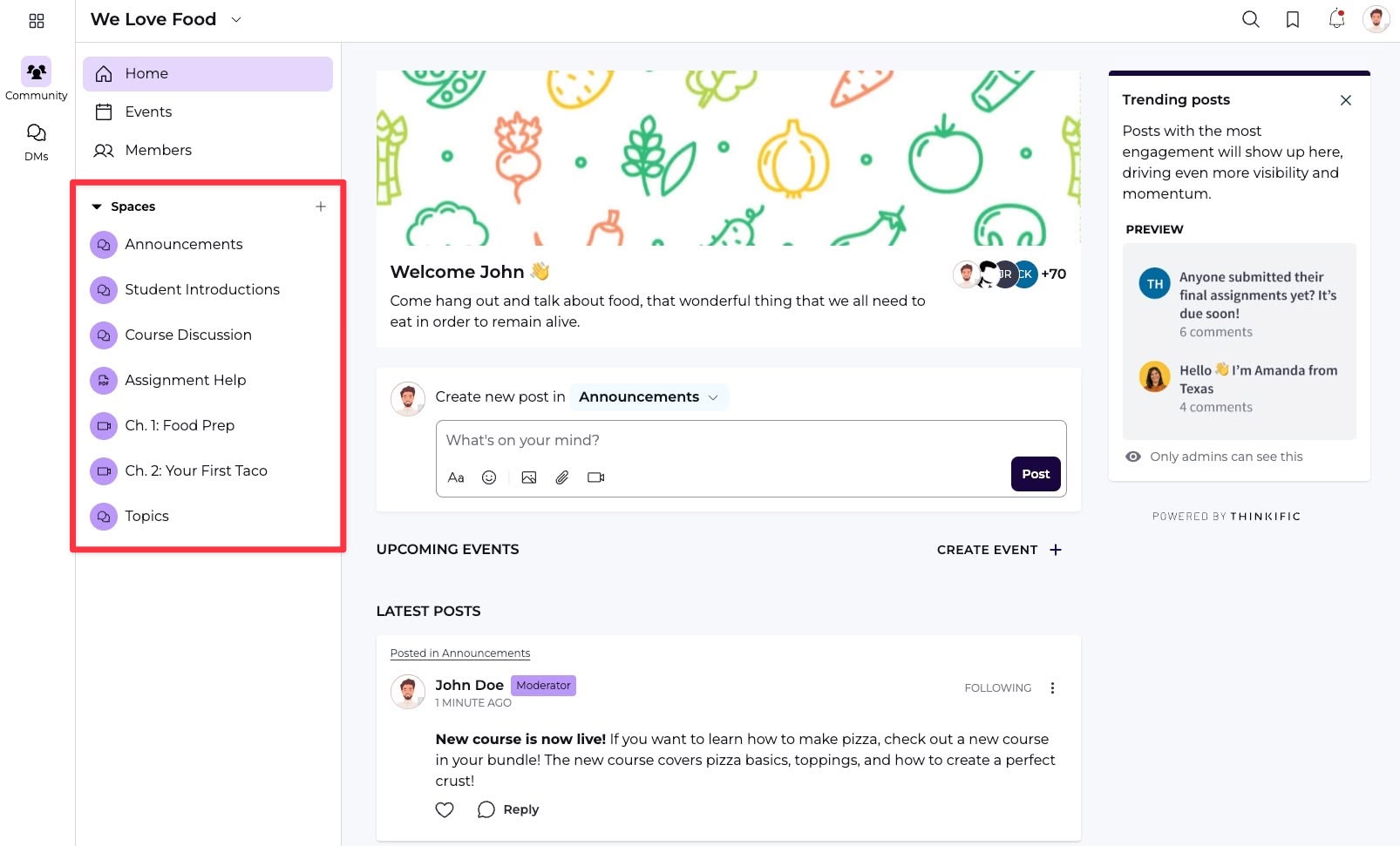
When it comes to the actual community, you can organize it based on different spaces.
Now over to Teachable:
Conventionally, Teachable lacked a community feature.
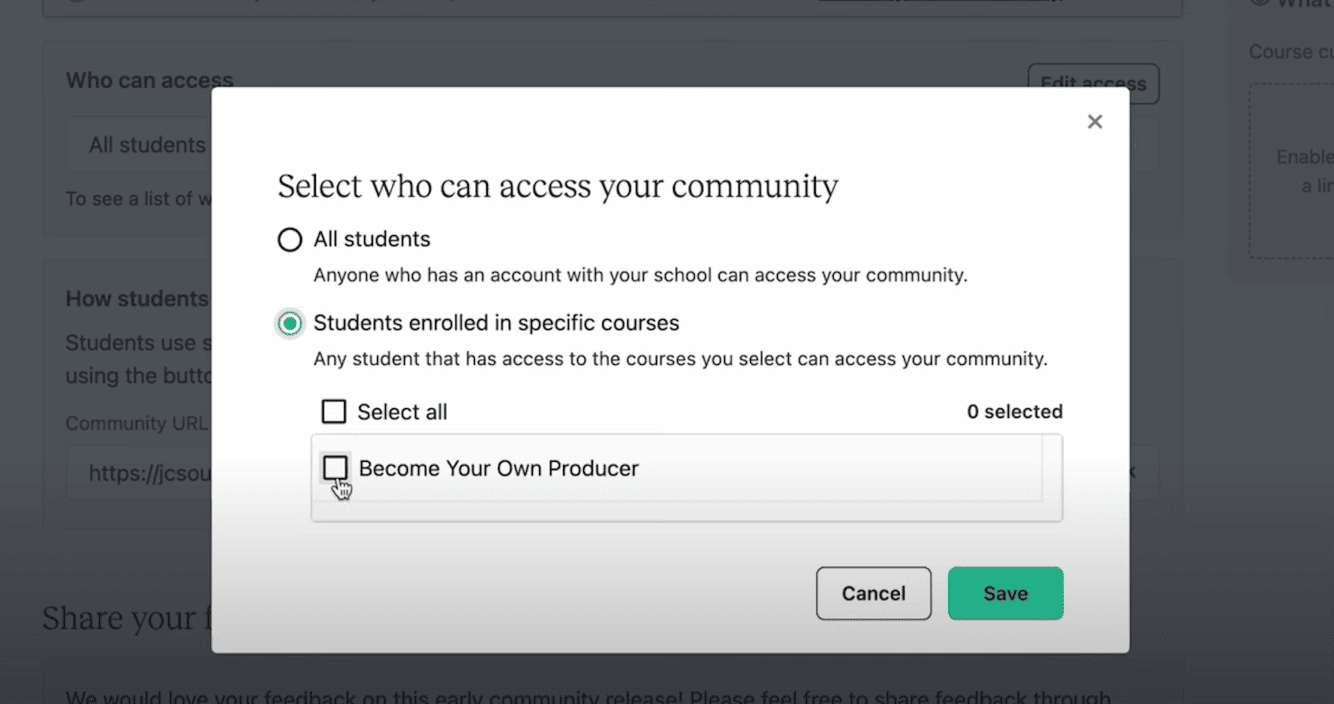
However, they recently rolled out a community feature where you can create a community and potentially restrict access to only certain students enrolled in a specific training course.
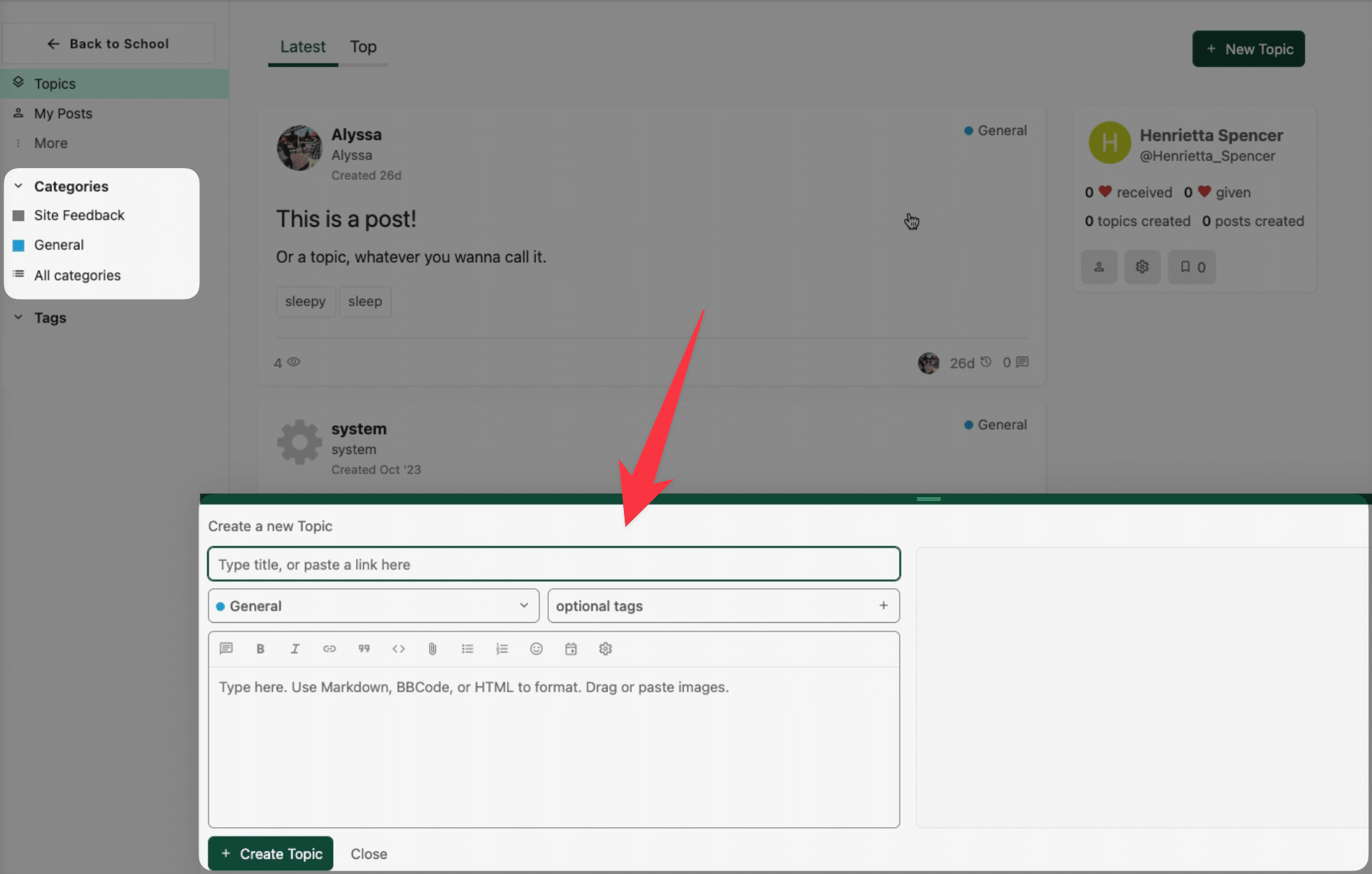
You can create various categories and tags for your community to categorize the content.
Beyond this, there is nothing more. Their community feature is quite basic, without any advanced or gamification features.
🏆 Winner: Both of these platforms come with really limited community features, but Teachable’s community feels quite modern as it’s a new rollout. But, none of these can replace a dedicated community platform with gamification features.
Design and customization – Thinkific is better
Teachable provides templates for designing your course interface and sales pages (product pages, sales pages, checkout pages, and thank you pages).
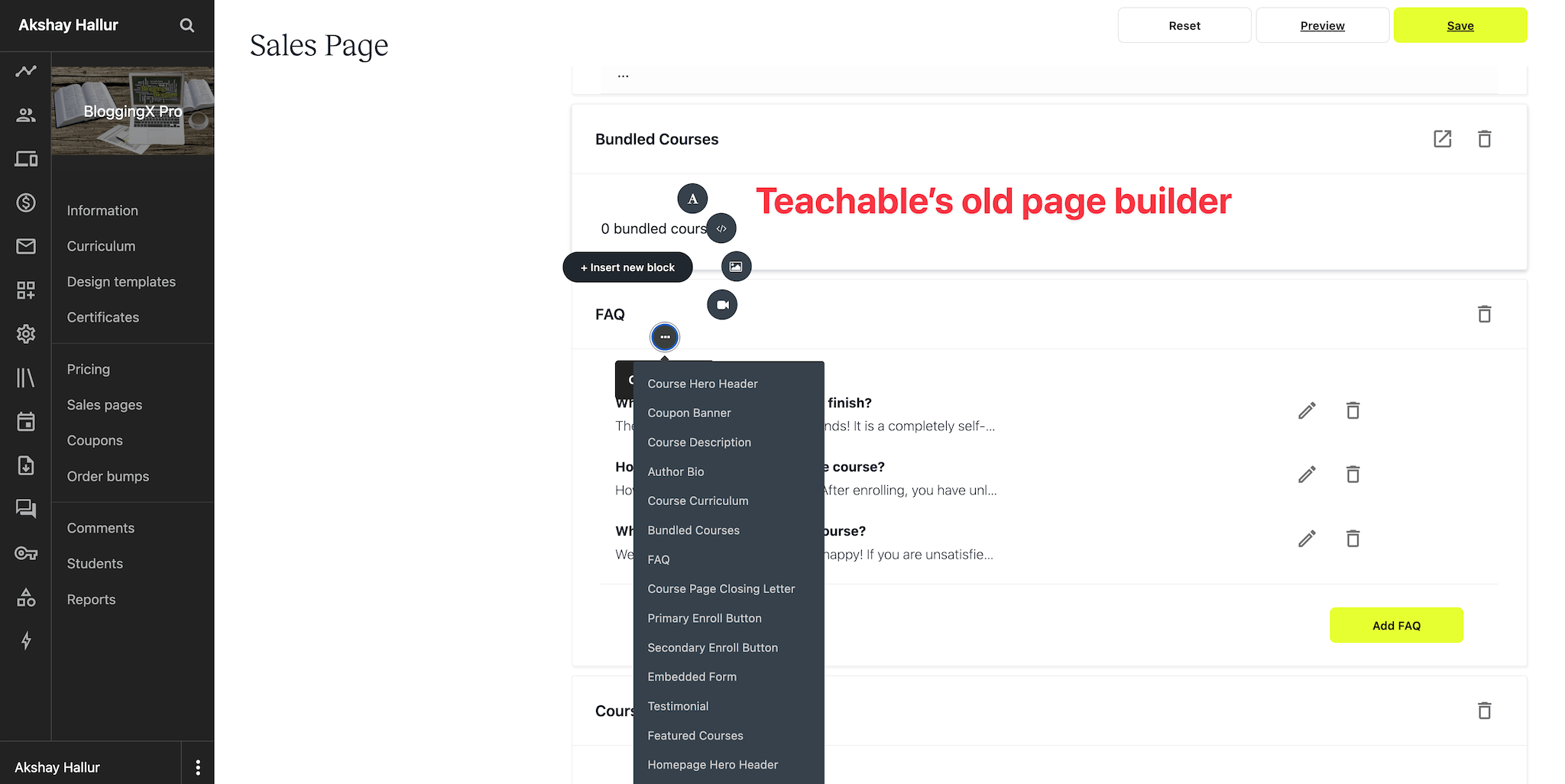
Their original editor was quite basic – you could only edit essential content with limited customization options.
However, Teachable recently introduced a more visual page builder with building blocks:
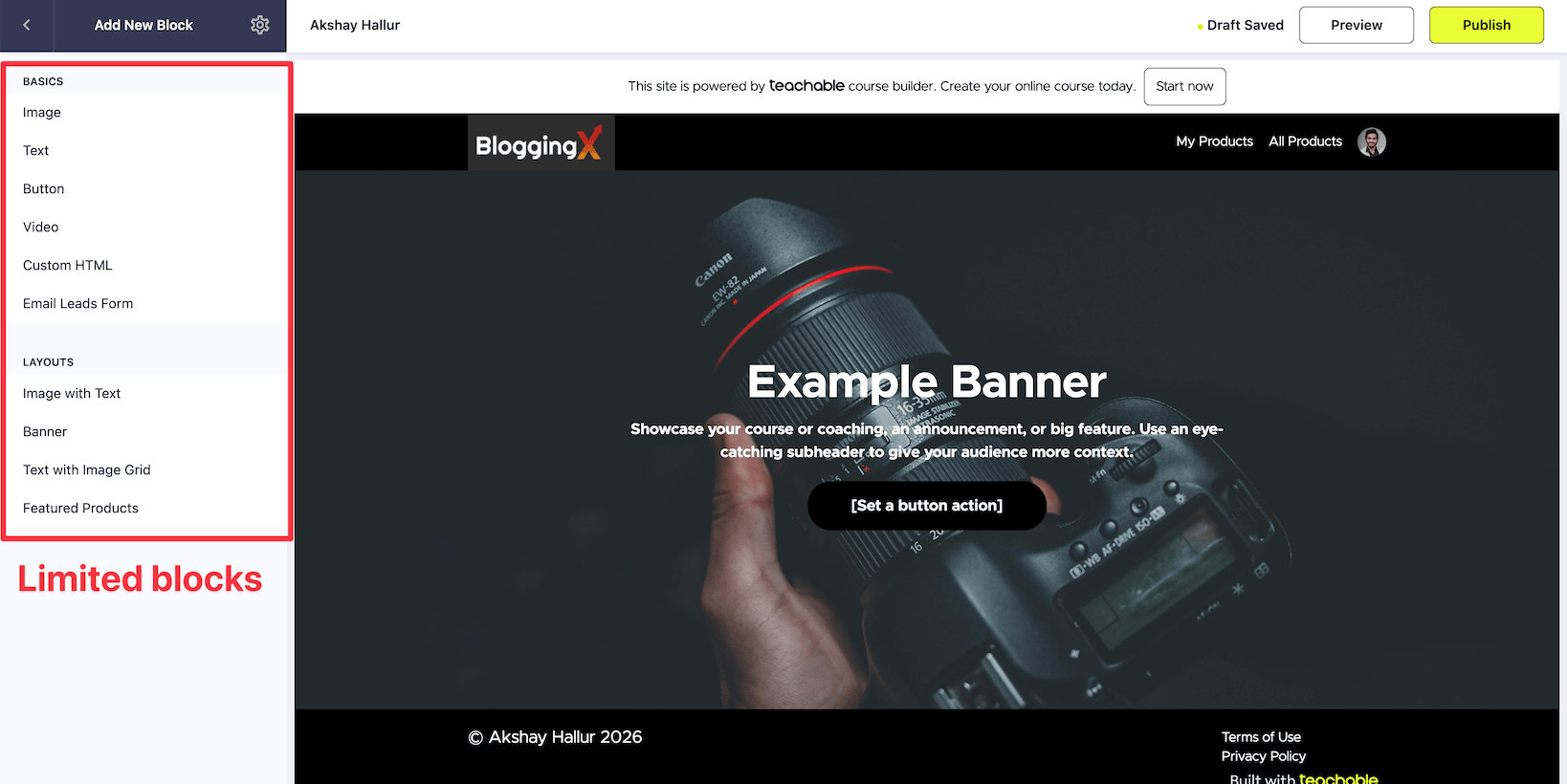
While it’s an improvement over their old editor, the number of building blocks is quite limited compared to dedicated page builders like Elementor or ClickFunnels.
Thinkific takes a different approach with three distinct themes to build your entire website.
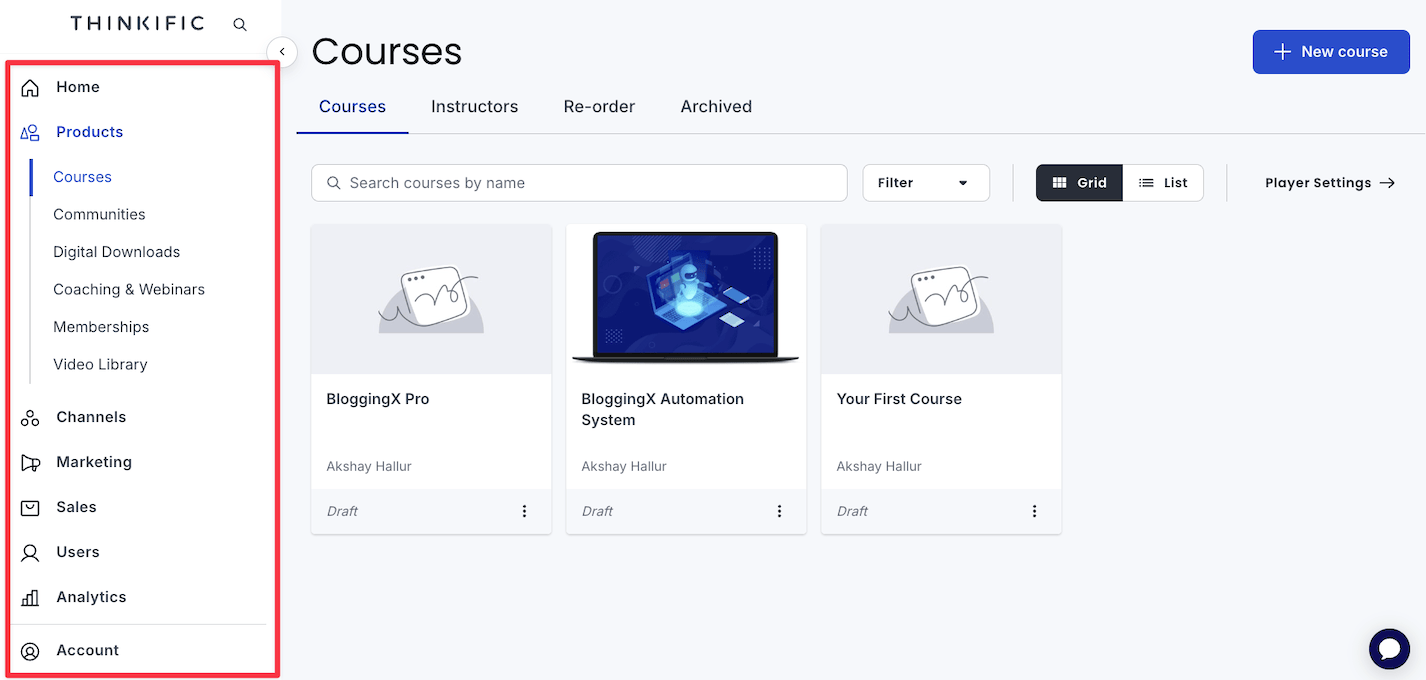
When you select a theme, Thinkific automatically creates all essential pages:
- Home page
- About page
- Checkout page
- Course pages
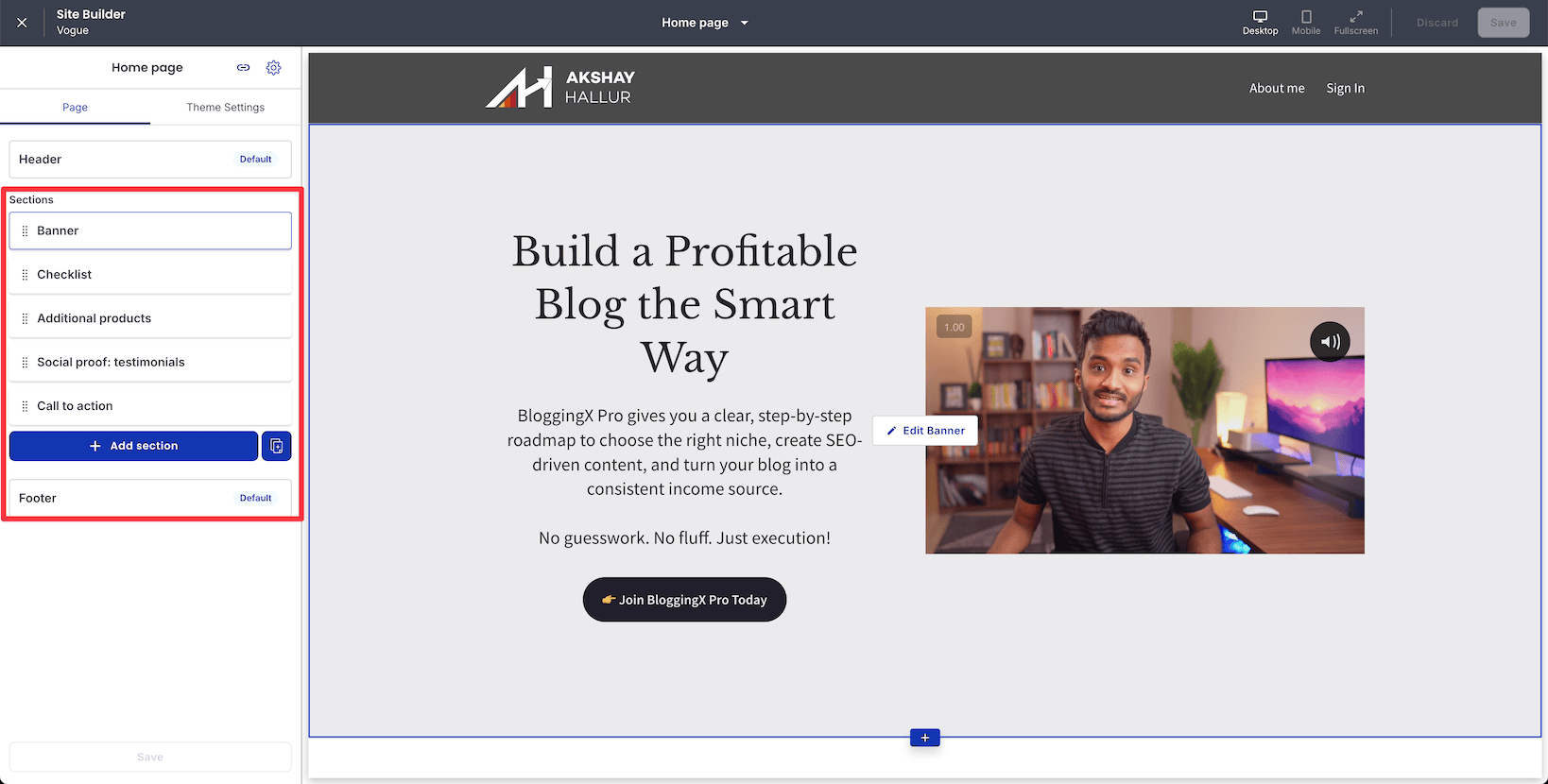
Their visual page builder is more intuitive than Teachable’s:
- Various sections available: Banners, checklists, testimonials, and more that you can add to any page
- Live editing: Click on any section and edit content in the sidebar – changes appear instantly
- Better visual feedback: More WYSIWYG (What You See Is What You Get) compared to Teachable
You can customize each section by clicking on it and editing properties in the sidebar, making it easier to create a cohesive brand experience across your entire course website.
🏆 Winner: Thinkific. Their theme-based system with a more intuitive visual page builder offers better design flexibility and easier customization.
Affiliate management – Thinkific kills your time
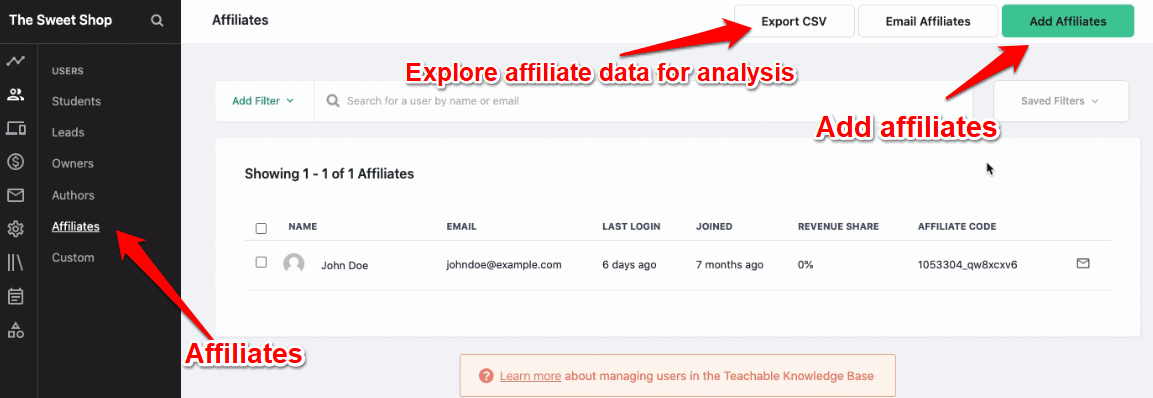
Both Thinkific and Teachable support affiliate features, and provide comprehensive control and visibility into the performance of your affiliates.
Here’s Teachable:
And Thinkific:
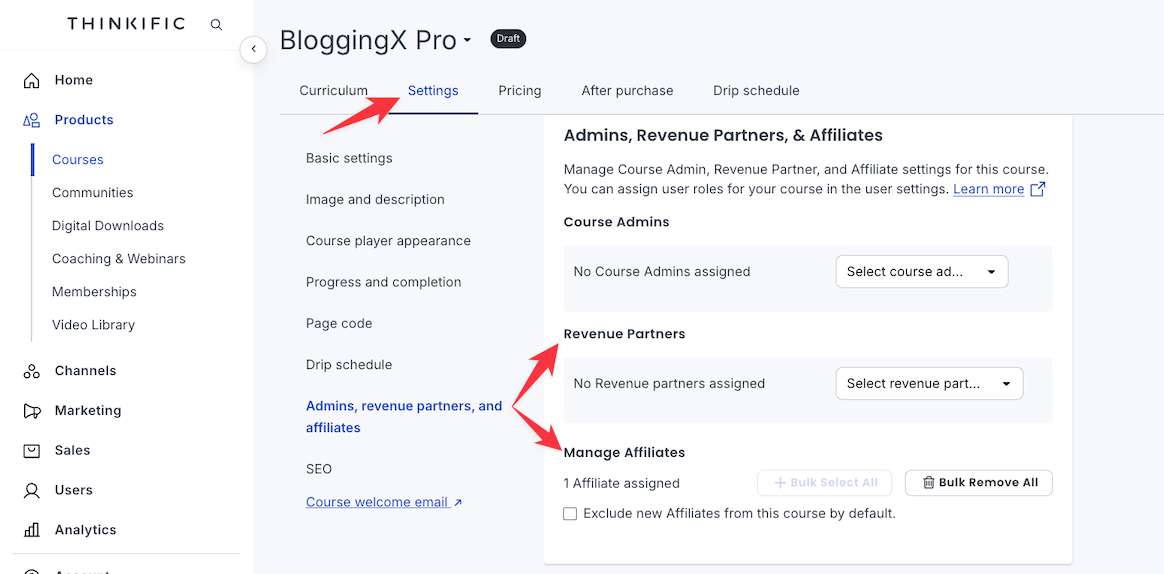
On top of affiliate features, Thinkific offers what’s known as revenue partners. Where if you’re co-creating a course with someone, you can split the revenue with them.
👎 Thinkific’s affiliate system requires significant manual work. You cannot bulk import affiliates, commission payouts need individual manual approval, and the tracking dashboard lacks depth. These limitations caused engagement drops and reduced affiliate-driven revenue for many course creators who scaled their programs.
🏆 Winner: Teachable.
Mobile apps
Both Teachable and Thinkific offer mobile apps for iOS and Android, allowing students to access courses on the go.
However, users have reported several issues including app crashes, playback problems, and general stability concerns especially with Thinkific’s app
🏆 Winner: Teachable has a slight edge here.
Final verdict
Teachable and Thinkific are both solid course platforms, but they serve different needs.
- If you prioritize features like advanced assessments, exams, and surveys, go with Thinkific. You also get unlimited courses and zero transaction fees even on their $49/month basic plan.
- If marketing and revenue optimization matter most, consider Teachable for their in-course upsells and checkout builder. However, be aware that since Hotmart’s acquisition, they’ve removed unlimited courses from lower plans and increased transaction fees.
However, neither of these platform offers robust community features that modern course creators need.
Their basic forums and discussion boards simply don’t cut it anymore!
If community engagement is essential to your course business, consider these alternatives:
- Kajabi – Combines courses with built-in community features and gamification
- Circle – Founded by Teachable’s original creators, specifically designed for community-first learning experiences
- Other dedicated community platforms – Can be integrated alongside your course platform for the best of both worlds
Your best choice ultimately depends on whether you prioritize course features, pricing structure, or community engagement in your long-term strategy.