As someone who’s into course creation and instructional design, I have tried and tested dozens of different course platforms over the years.
The ONE all-in-one platform that truly stands out for me is Podia!
It offers many features and is a great alternative to other platforms like say Kajabi for a much lower price.
But after using Podia for 3 years, I’m rethinking my views in 2026.
Let’s dive into this updated review of Podia!
Here’s a quick overview
| Features | Podia |
| Type | Online product selling platform |
| Starting price 💲 | The lowest plan costs $49/mo. |
| Best for selling | Courses, digital products, coachings, website builder, and communities |
| Mobile app 📱 available? | No |
| Podia examples | 👀 See 12 live examples |
| Competitors 🏹 | Kajabi, Teachable, and Thinkific |
Quick decision
👍 What do I like about Podia?
- Clean and simple design: Listen, I’ve tried tons of course platforms, and Podia’s interface is a breath of fresh air. No clutter, no confusion.
- Email marketing built right in: You get a solid email system that handles broadcasts, campaigns, and automation. Pretty handy to have everything in one place.
- Embeddable checkouts: Want to sell on your WordPress site? No problem. You can embed checkouts and even set up upsells wherever you want.
- Chat with customers: There’s a live chat feature built in. You can save some cash on those pricey chat tools!
👎 What bugs me about Podia?
- No mobile app (a big bummer): This one’s a real head-scratcher. It’s 2026, and they still don’t have a mobile app. Not even in the works! This is the ONE reason why I’m rethinking.
- Limited community features: The community feature is pretty basic. No gamification, no real customization – just the basics.
- Missing course features: Want different types of quizzes. detailed student analytics, and certificates? Yeah… you won’t find those here.
Latest updates
Podia is rolling out a lot of features to their platform.
- Podia has added Apple Pay, Google Pay, and global tax support to their checkout flow
- Podia has launched a blogging feature, allowing users to host and manage blogs on the platform.
- Podia is working on improving their website builder. They have introduced more options for colors, fonts, background images, and also multiple starter templates for easily creating websites.
Upfront bottomline ✨
Let me be straight with you – Podia is an all-in-one platform where you can sell courses, digital products, and run communities.
Pretty simple, right?
Here’s the thing though – it’s a jack of all trades, master of none.
The website builder?
Basic. It can be called a storefront builder!
But nevertheless, all these years, I’ve been using WordPress for all my landing page needs.
Also, their course creation and communities feature are quite basic compared to other alternatives like Teachable and Kajabi.
Here’s my biggest gripe – there’s no mobile app 🛑.
In 2026, that’s kind of a big deal.
With platforms like Skool or Circle making big noise, Podia needs to learn from them.
This is the ONE reason why I am re-thinking the platform that I need to use.
But if you need a platform that is cheaper than any other course platforms, just to host your training courses and digital products, Podia got you!
Overview

Podia is a New York based all-in-one digital selling platform that was founded in 2014 by Spencer Fry and has been profitable since 2019.
It initially started as an online course platform.
And later, down the line, it transformed into an all-in-one digital selling platform.

Try Podia Free for 30 Days!
Start selling courses and digital products today. No credit card needed.
Verified
Interface
Now speaking of the product itself, it has a polished, intuitive interface with intricate attention to detail.
The interface of Podia is one of the most refined that I have ever seen in an LMS platform.

Now, with Podia you can sell products like:
- Courses
- Coachings
- Digital downloads
- Communities
To call it as an all-in-one platform, it also includes email marketing features (with broadcasts and sequences)
Additionally, it provides a website builder for customizing your website and a live chat functionality to convert prospects well.
Let’s review these one by one.
Online courses
Content structuring
Podia has a course builder, where the curriculum is divided into sections and lessons.
It supports different lesson types like text, files, quizzes (basic multiple choice), embeds, and coaching.
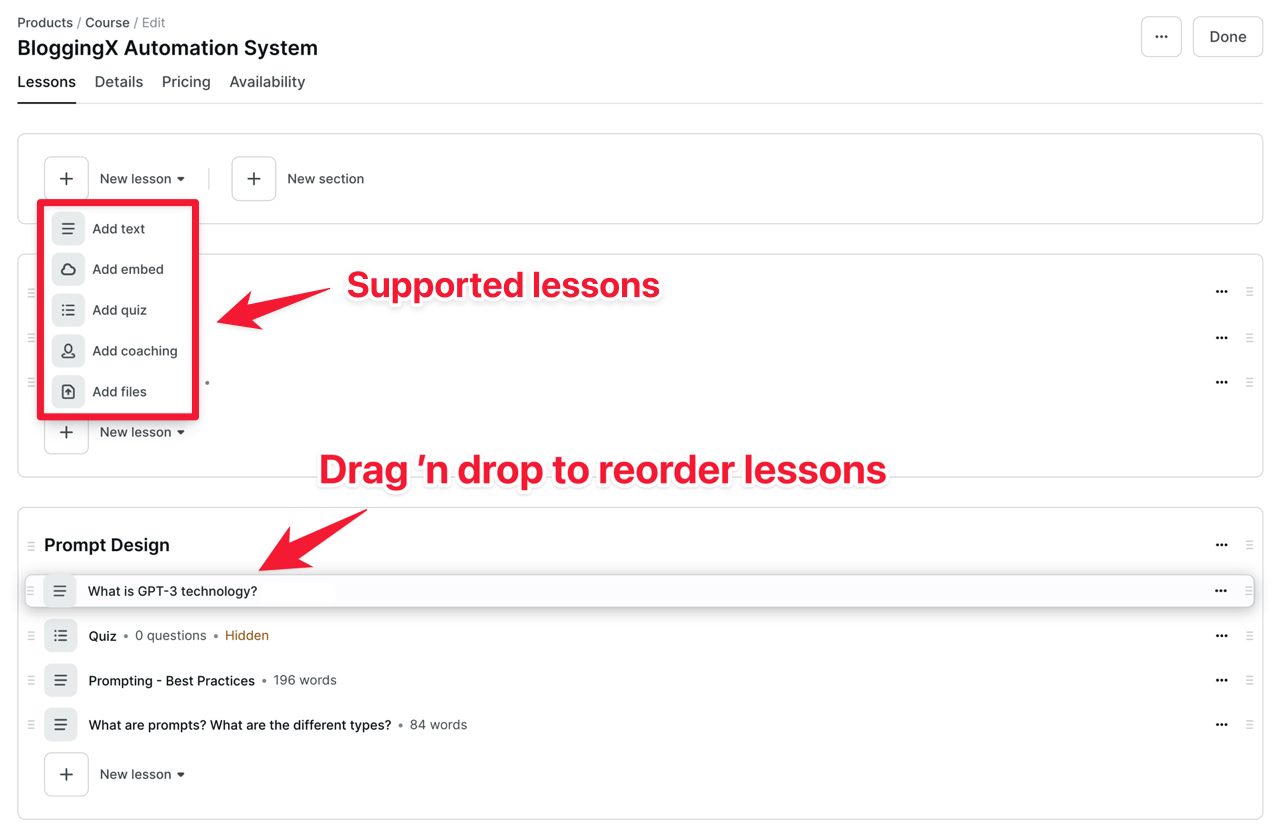
👍 Podia lets you add coaching lessons directly to the course curriculum. Students can book paid coaching classes with you by scheduling a calendar slot (more details later).
However, there are some downsides with their course creation workflow 👎:
- You can’t add multiple content types inside the same lesson (say quiz along with video file).
- Doesn’t support custom codes inside the lessons.
- It doesn’t support cloud uploading (like Drive or Dropbox)
Due to these restrictions, when I create courses on Podia, most of the time, I end up creating text lessons.
When creating text-based lessons, there are various building blocks available, similar to those in Notion.
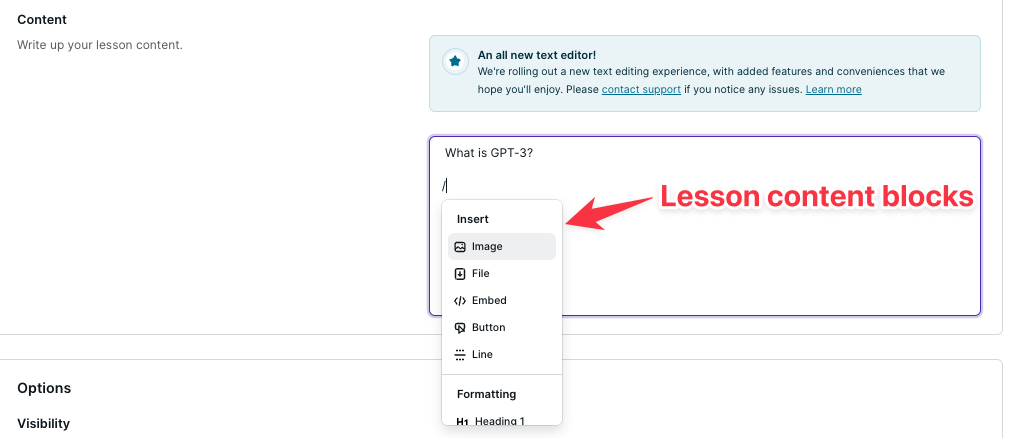
However, the building blocks available here when you type in the “/” command are very limited. I hope they add more blocks like quizzes, coaching, and others in the same lesson.
👉 Bottomline: Podia’s lesson editor keeps things simple but lacks advanced content blocks. Great for basic content, limiting for complex interactive lessons.
Quizzes
When creating your course, you can also set “Quiz” as a lesson type in Podia.
This feature allows you to provide multiple-choice questions for your students to answer.
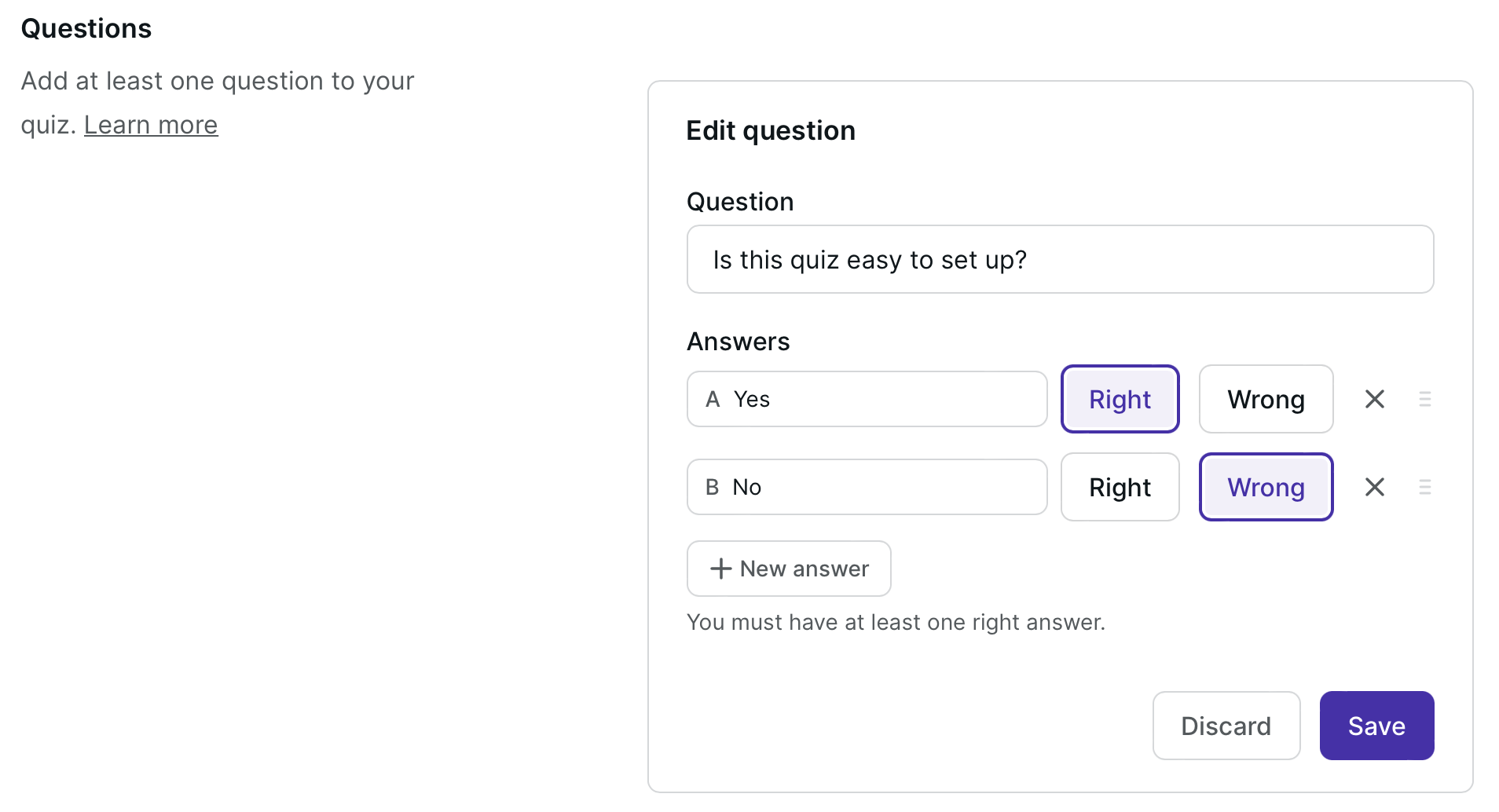
Podia only offers a basic multiple-choice quiz feature.
It lacks advanced features such as assessments, question banks, grading, and other functionalities found in platforms like Kajabi or Thinkific.
👉 Bottomline: Podia keeps the quiz stuff super basic. You only get multiple-choice questions. Nothing fancy like grading and assessments, what you’d find in other platforms.
Content compliance
Want your students to finish your course?
Course compliance features help make that happen.
Podia keeps it simple with drip content. This lets you release course content gradually over time instead of dumping everything at once.

The cool part? It automatically sends personalized emails when new content drops.
This works great for say 30-day challenges where you want to nurture leads into sales.
But here’s the catch.
You can only set delays after enrollment. You can’t set specific dates to unlock modules.
This is a bummer if you’re running a seasonal challenge and need content to release on exact calendar dates.
👎 Other than this, it lacks other course compliance features like course locking, enforcing video watch duration, lesson completion, and order/quiz completion (often helpful in academic contexts).
👉 Bottomline: Podia doesn’t come with advanced course compliance features. While you get basic drip content, it lacks essential features like enforced video watching and lesson completion tracking that you’ll find in other platforms.
Student analytics and certification
How do you know if students are going through your content?
You need solid analytics.
And here’s where Podia falls short.
Unlike Teachable, Podia can’t automatically track student progress.
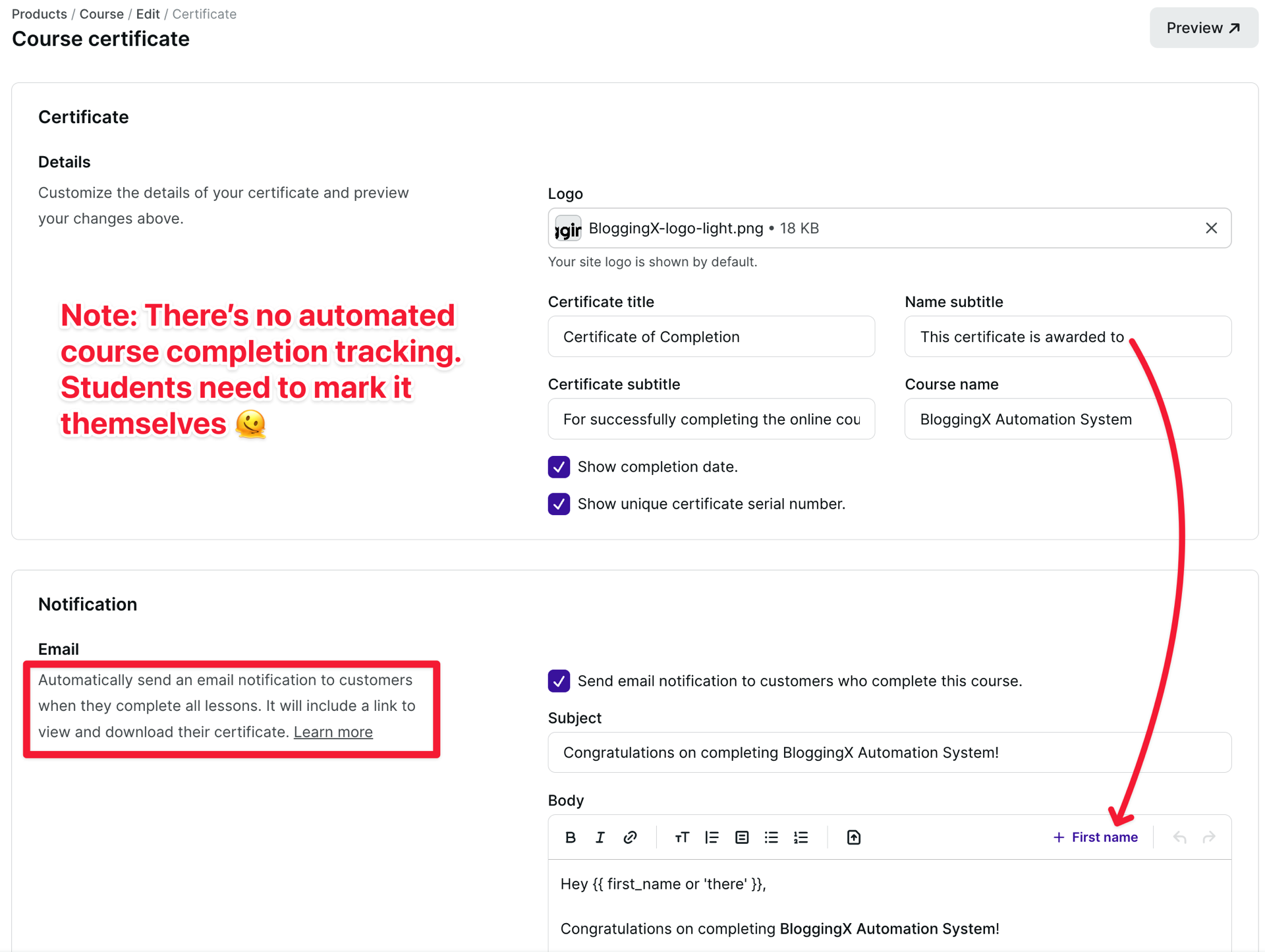
Students have to manually click a “complete” button to mark their progress.
Not ideal, right?
However, for course compliance, Podia does provide course completion certificates, but these are only available in its Shaker plan, which costs $99/month.
👉 Bottomline: With Podia, you get simple completion tracking (that students have to mark themselves) and basic certificates in higher plans. It doesn’t come with detailed analytics or automated progress tracking.
Frontend experience for students
Let me walk you through what it’s like to actually take a course on Podia.
The student interface?
Super clean and easy to use.
No confusing menus or complicated navigation here.
Everything you need – your sections, lessons, all that stuff – sits right there in a sidebar.
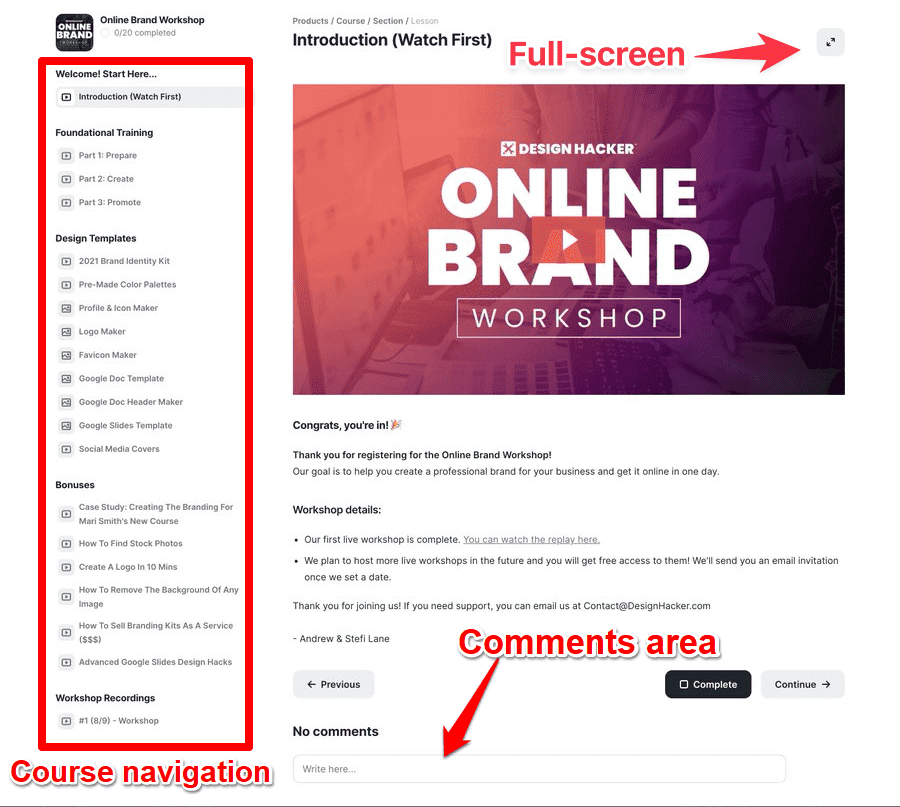
There’s a full-screen button in the top-right corner that hides the sidebar when you want to focus.
In full-screen mode, you get handy previous and next lesson buttons to move through lessons one by one.
Way better than scrolling through that big sidebar menu.
Each lesson has its own comments section where students can chat, reply to each other, and mark favorite comments.
👉 Bottomline: Podia’s student interface keeps things straightforward with a clean design, easy navigation, and basic interaction features like comments. It does exactly what students need in a simple way.
Coachings
Podia offers a coaching feature that allows you to conduct 121 or group sessions.
This feature is only available in the Shaker plan.
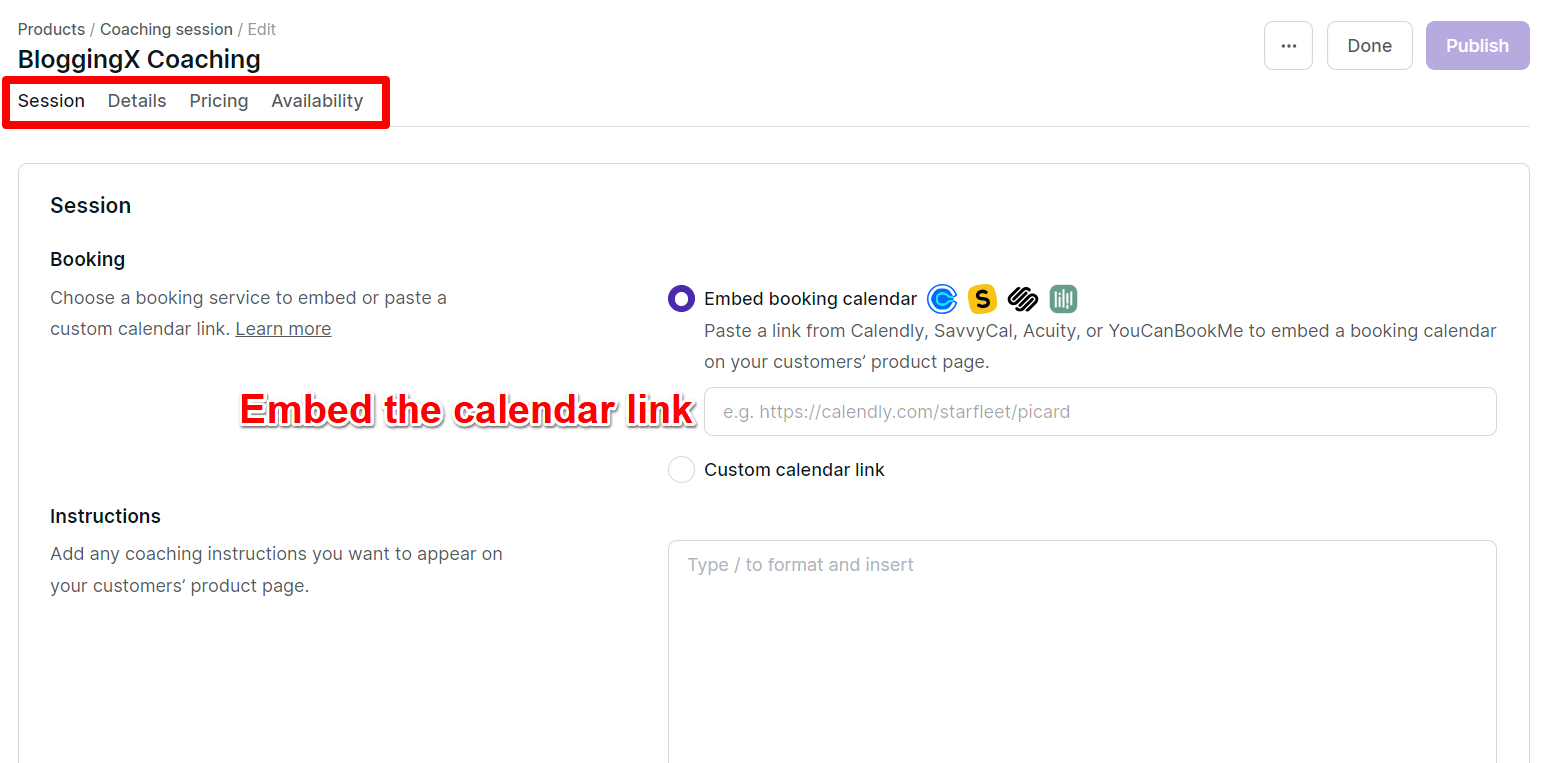
To help users book the sessions easily, it gives integrations with SavvyCal, Acuity, or YouCanBookMe.
You must embed these on your service page or add a custom calendar link.
🚨 Quick heads up: Once you book a coaching session, you’ll need to hop into your calendar app (like Calendly) to manage your bookings. Took me a while to figure this out when I first started using Podia!
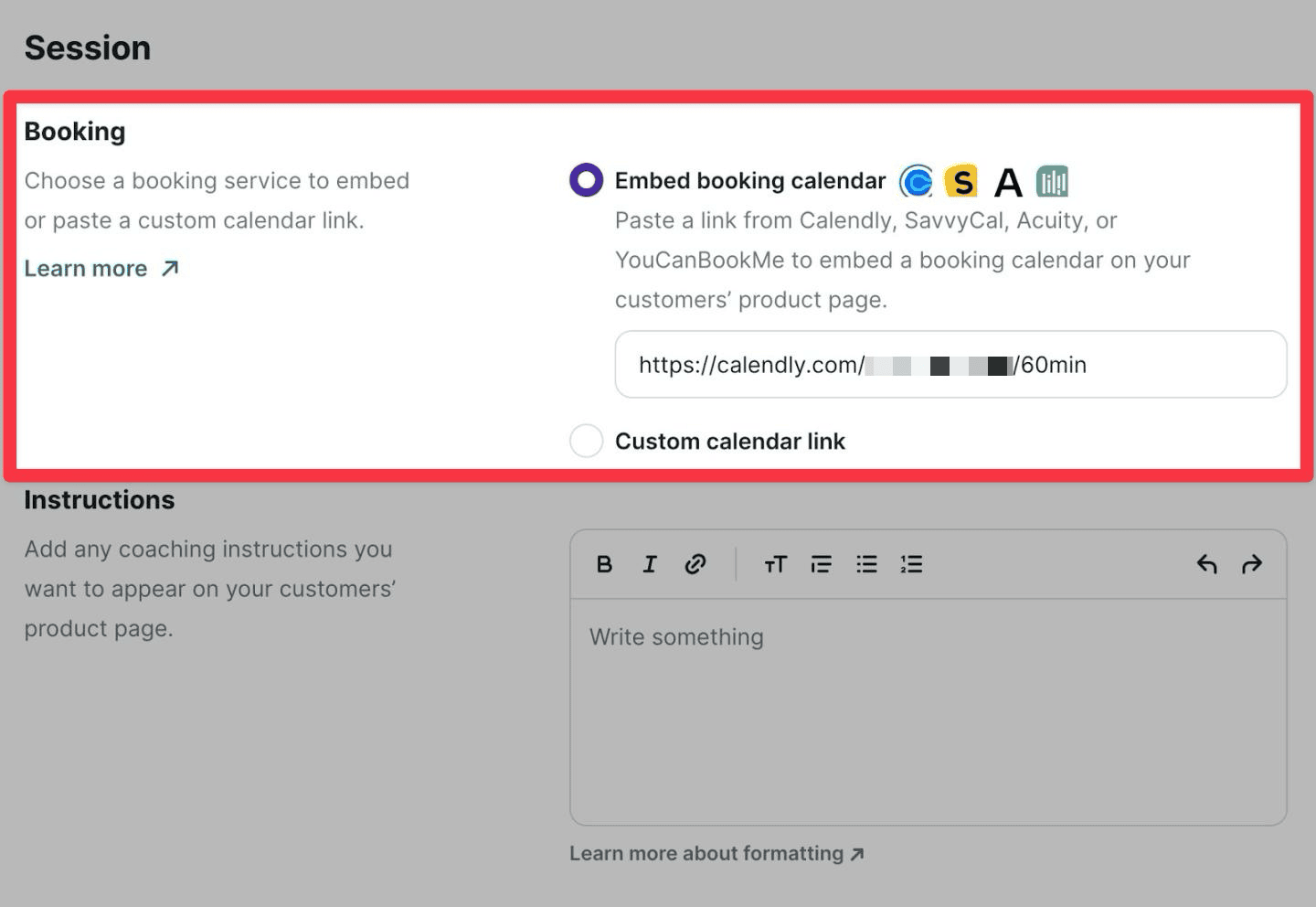
For every coaching product, you can set signup limits, access durations, and program start dates to encourage users to book sessions early.
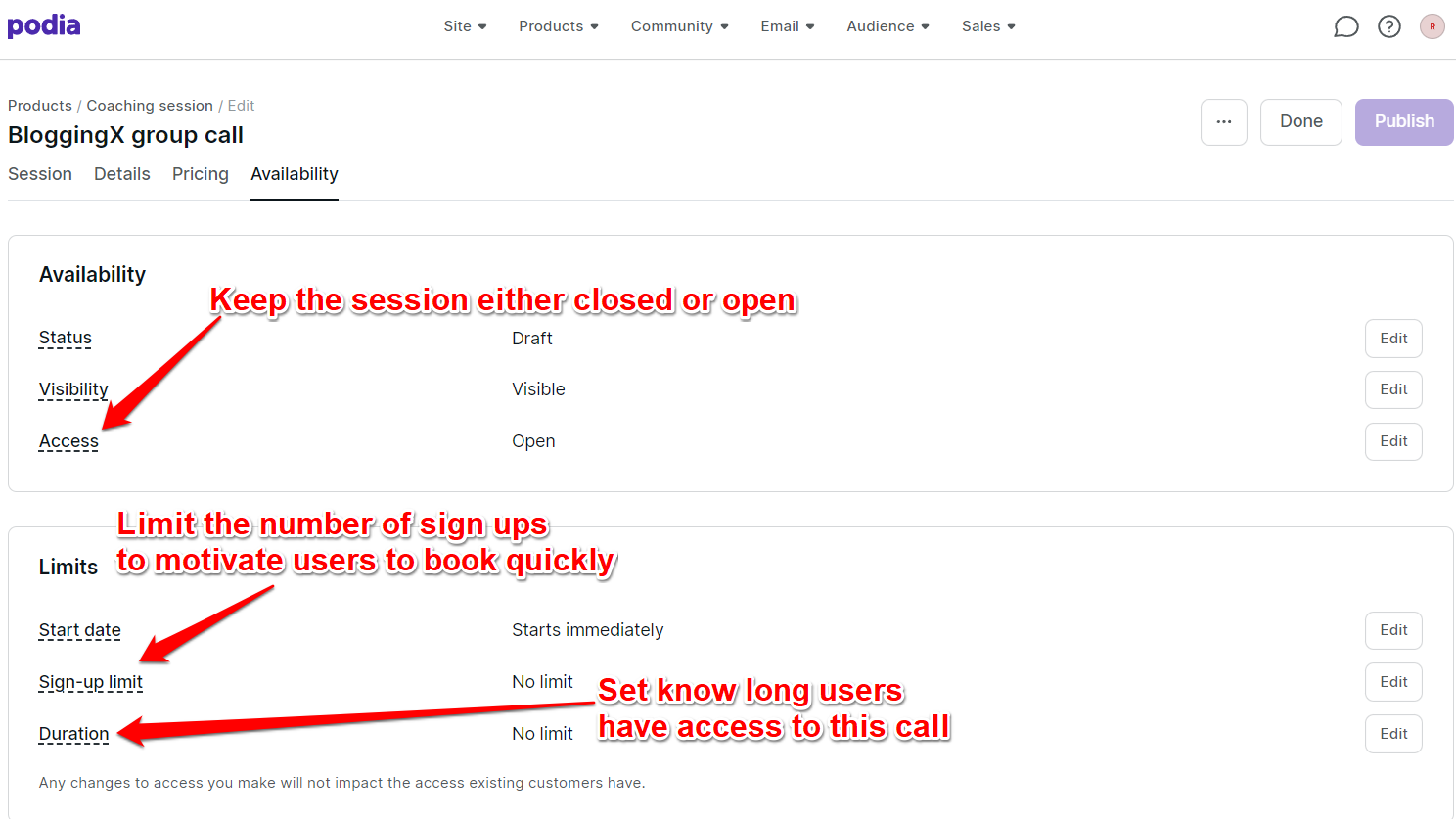
These features help drive early bookings.
Each coaching session is a separate product, which lets you bundle them with other offerings or use as upsells.
However, different packages (like 3-month or 6-month) require separate products and sales pages.
👉 Bottomline: Podia’s coaching feature keeps it simple – you can sell 1-on-1 or group sessions, integrate with booking tools, and bundle coaching with other products.
Digital product selling
With Podia, you can sell a variety of digital products such as templates, prints, workbooks, and more.
You don’t need to again make use of platforms like Gumroad to sell digital products.
When creating a new downloadable product, you can upload all the relevant files in the “files” section.

You can also add these files under different sections, which is especially useful if you are offering multiple files.
Also, you have the embed code for every product that you create, so you can use it on your WordPress site.
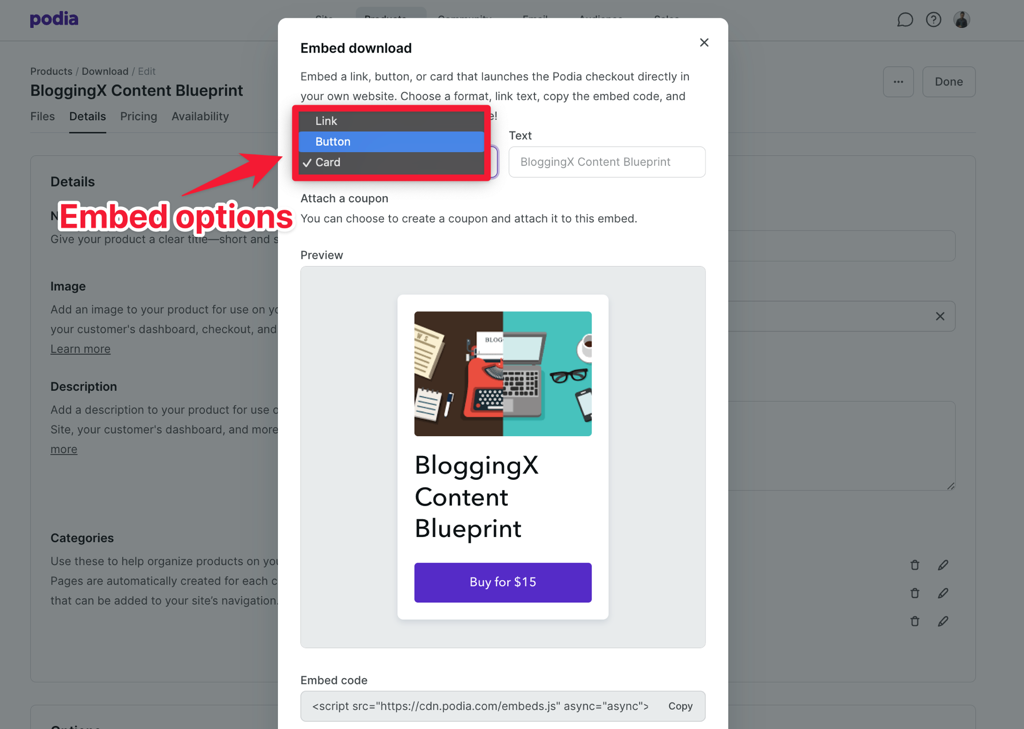
For example, you can easily embed digital products directly into your blog posts to maximize just-in-time sales.
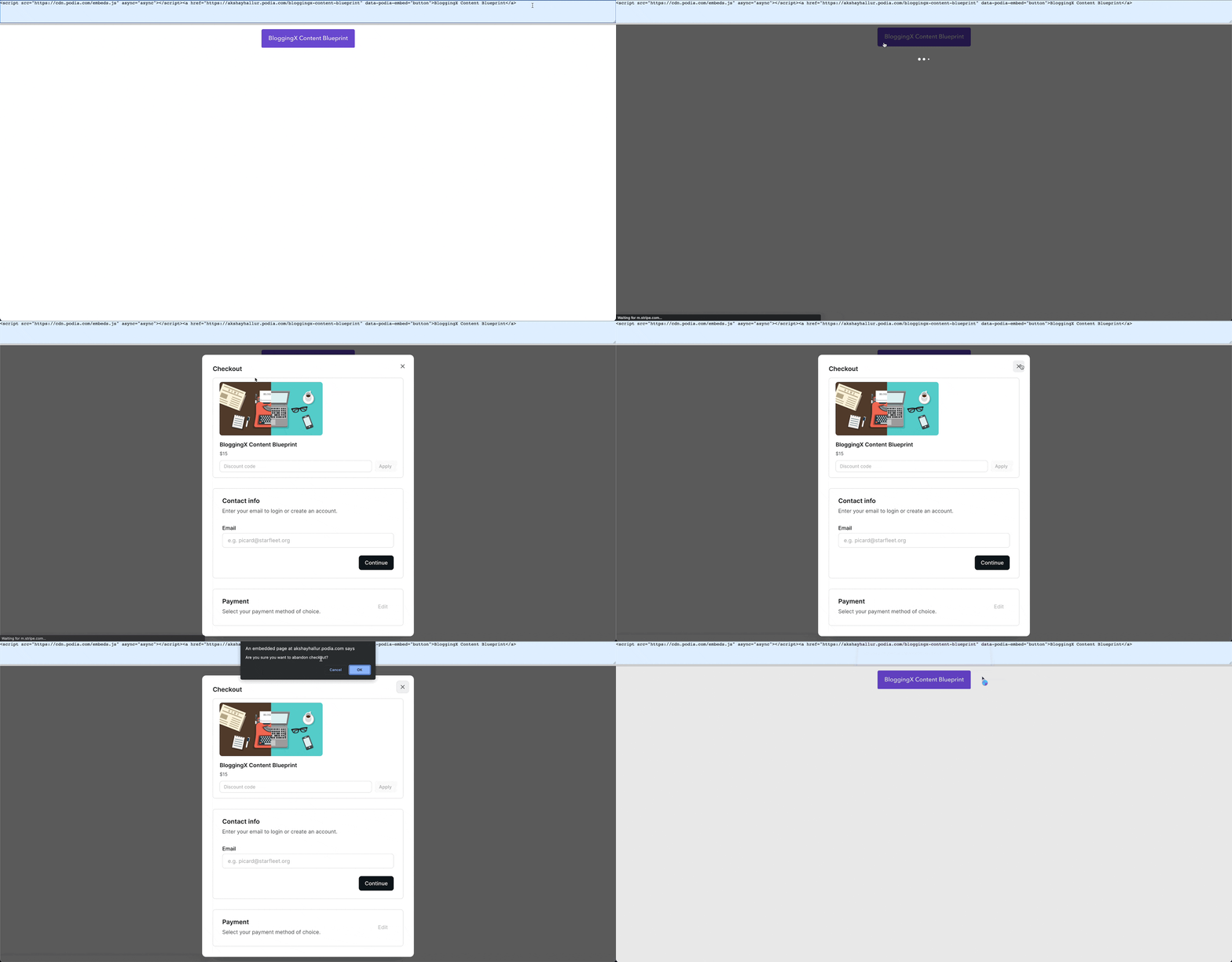
You’ll likely use Podia’s embed feature, especially when using external platforms like WordPress, as Podia has limited website building capabilities.
👉 Bottomline: I really like the ability to organize downloadable content into different sections. Additionally, I appreciate the feature that allows embedding the checkout process on third-party platforms using embed code and checkout links.
Communities and memberships in Podia
Podia just have basic community features.
It supports members, posts, topics, and likes/comments.
That’s it.
Though Podia’s community cannot replace dedicated community tools, it gets the job done.
You can create a community and organize topics within it.
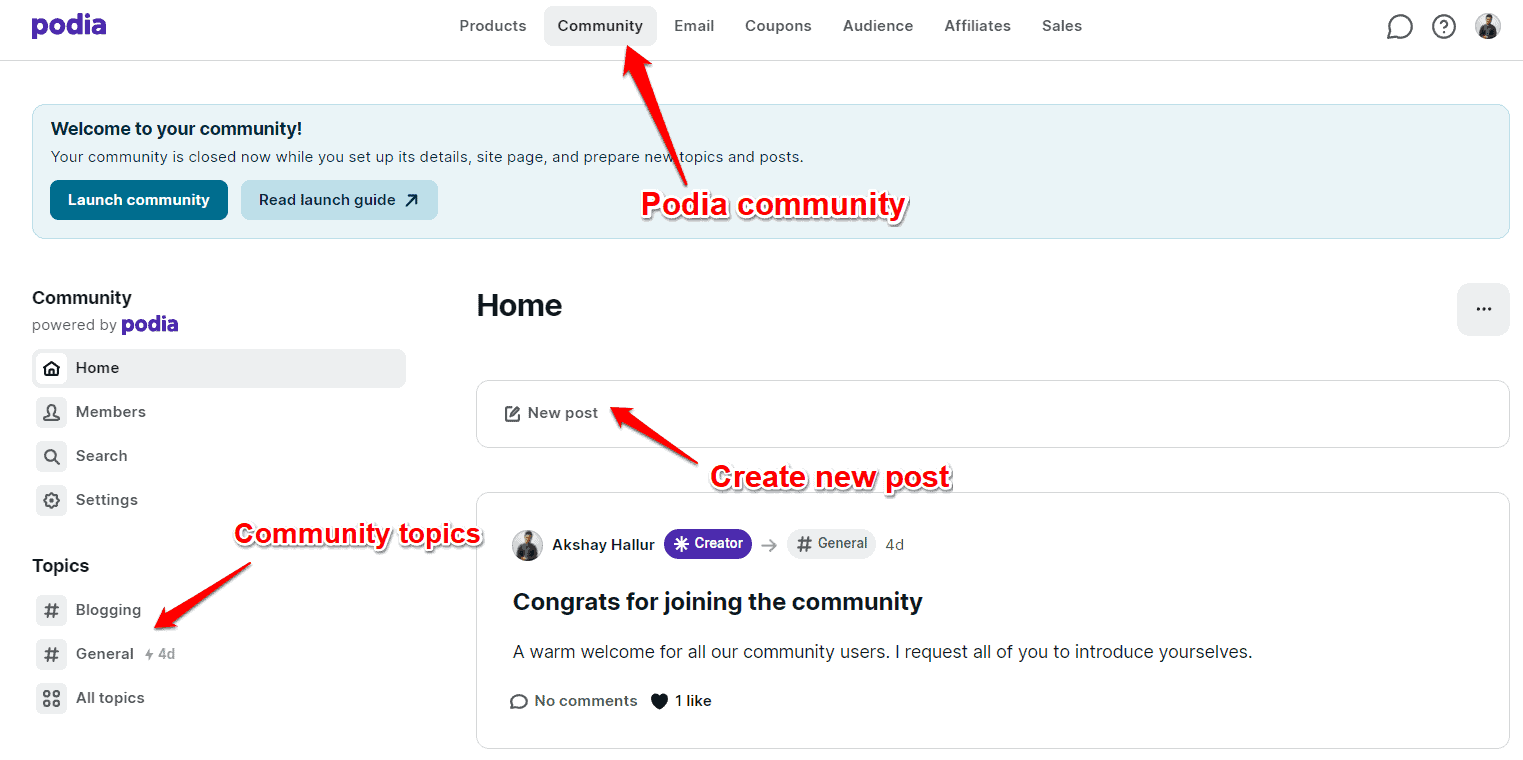
Each topic can contain relevant content such as posts created by members of your community.
What if you want to restrict access to certain topics/products only to people in a specific membership level?
For this, you need to setup multiple plans under Community settings.
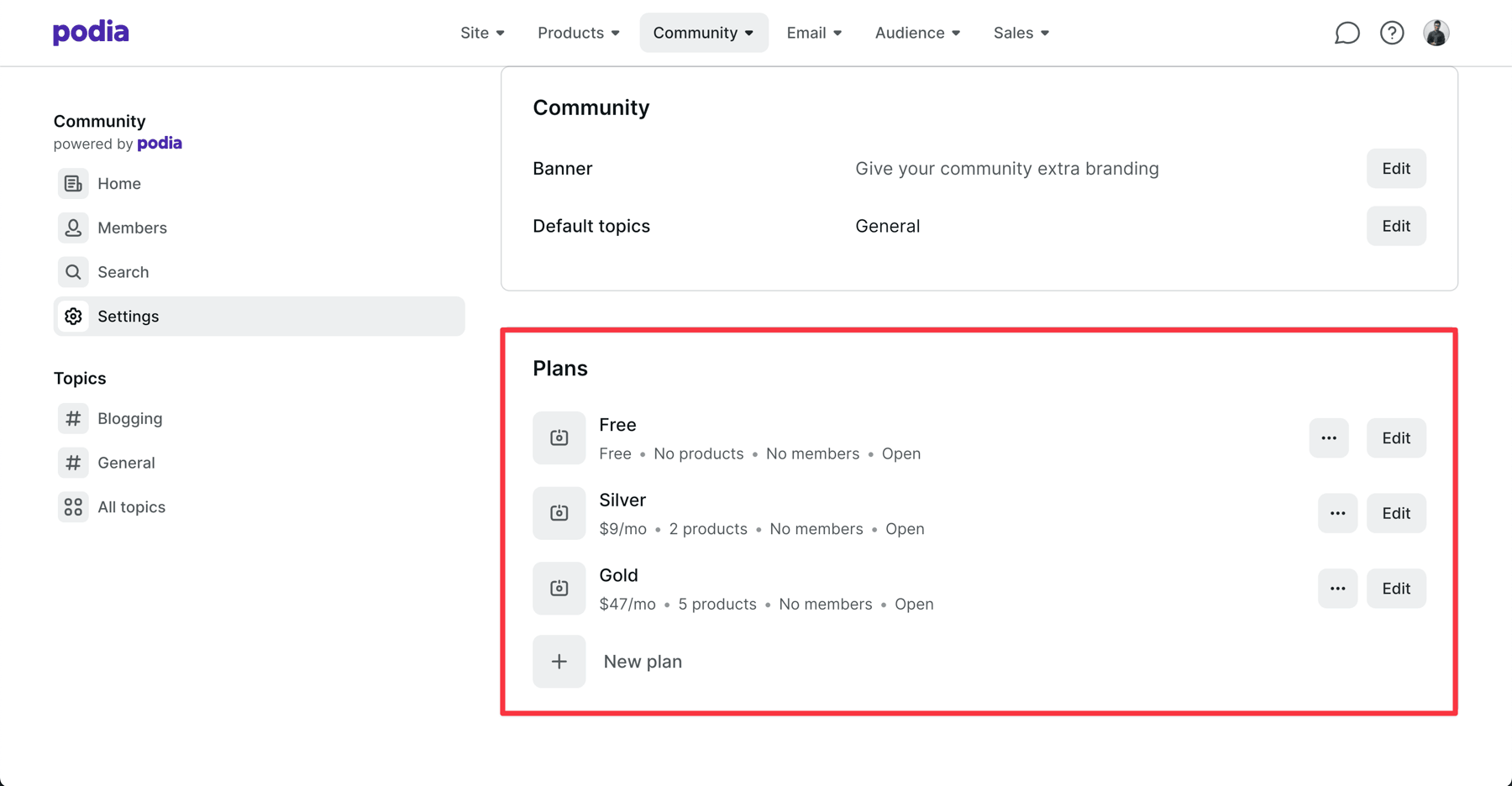
This allows you to set up various subscription levels to restrict content access.
Additionally, you can create multiple topics or channels to group the discussions in your community.

As you can see in the below screenshot, you can create exclusive topics to certain plan owners.
For example, the topic or community space – “Mastermind” is only accessible to people who subscribe to the “Gold” plan.
👉 Bottomline: Podia doesn’t come with fully-fledged community features. For example, it lacks gamification features such as points, rewards, leaderboards, badges, rankings, etc. You’ll be stuck with topics and posts. If you want to build a thriving online community with features like live-streaming and gamification, you can consider going with dedicated community platforms.
Webinars
Unlike other platforms, such as Kajabi, Podia does not have native streaming capabilities.
However, it does integrate with Zoom and YouTube Live.
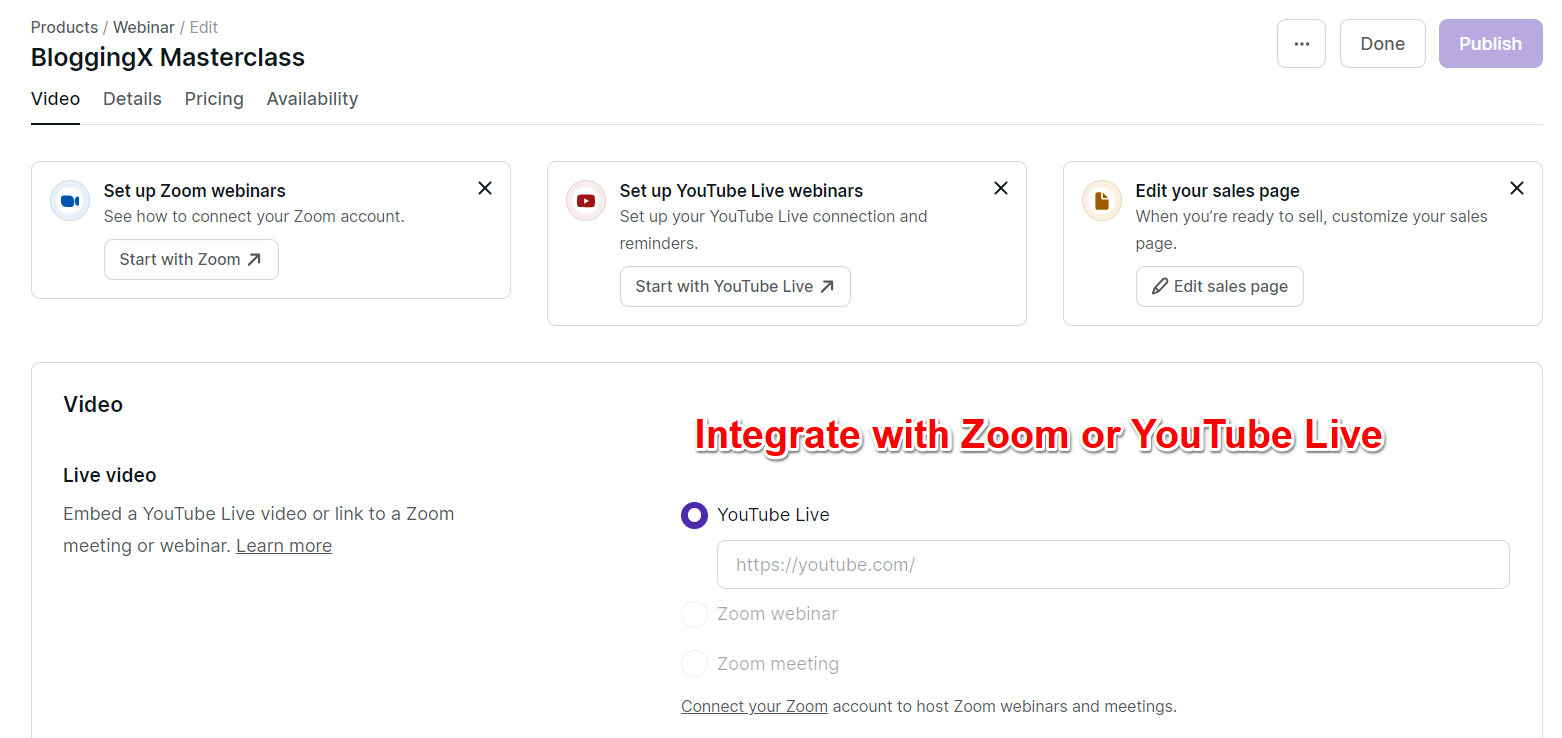
You can sell tickets to live events, masterclasses, and webinars through Podia by connecting Zoom or YouTube Live.
After the event, you can upload recordings as “Webinar Replays” for those who missed it.

👎 Since Podia lacks built-in webinar streaming, it can’t auto-send event reminders. You’ll need to manually set up email broadcasts for 24 hours before, 1 hour before, and at event start.
👉 Bottomline: Podia’s webinar feature keeps it simple – integrate with Zoom or YouTube Live, sell tickets, and offer replays. While it lacks built-in streaming and automated reminders, it covers the basics for hosting and selling online events.
Email marketing and automation
Podia comes with both one-off-email broadcasts and campaigns (sequences) that can be triggered based on conditions.
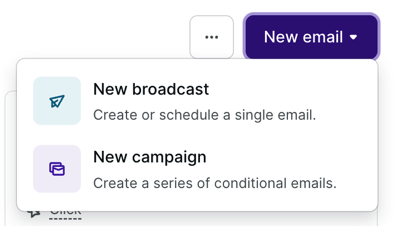
For example, when people enroll in my training course on the BloggingX Automation System, they should be immediately sent a welcome campaign.
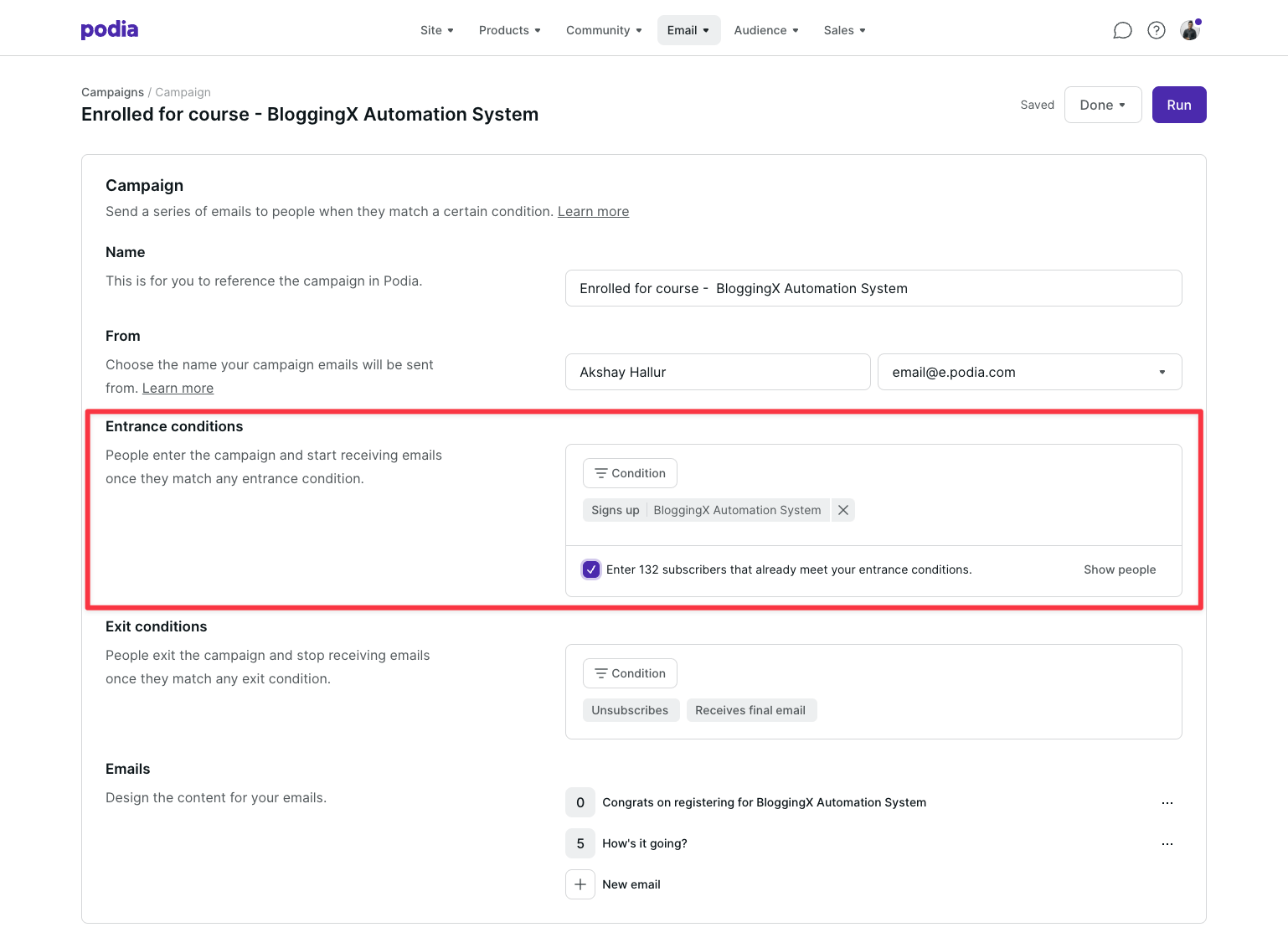
You receive a welcome email immediately, followed by a check-in a week later.
The email builder recently got upgraded with better design control and 10+ templates for quick starts.
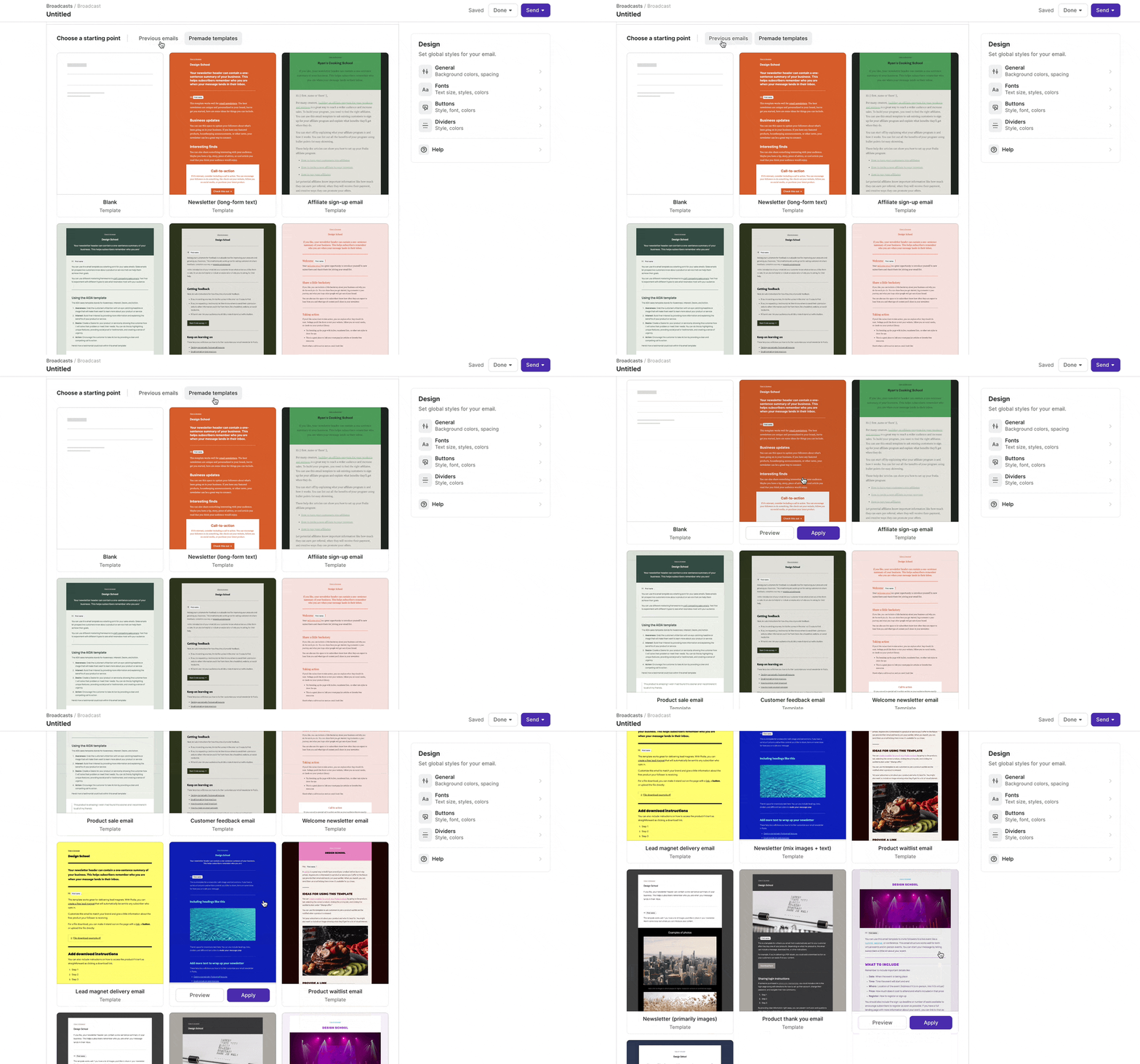
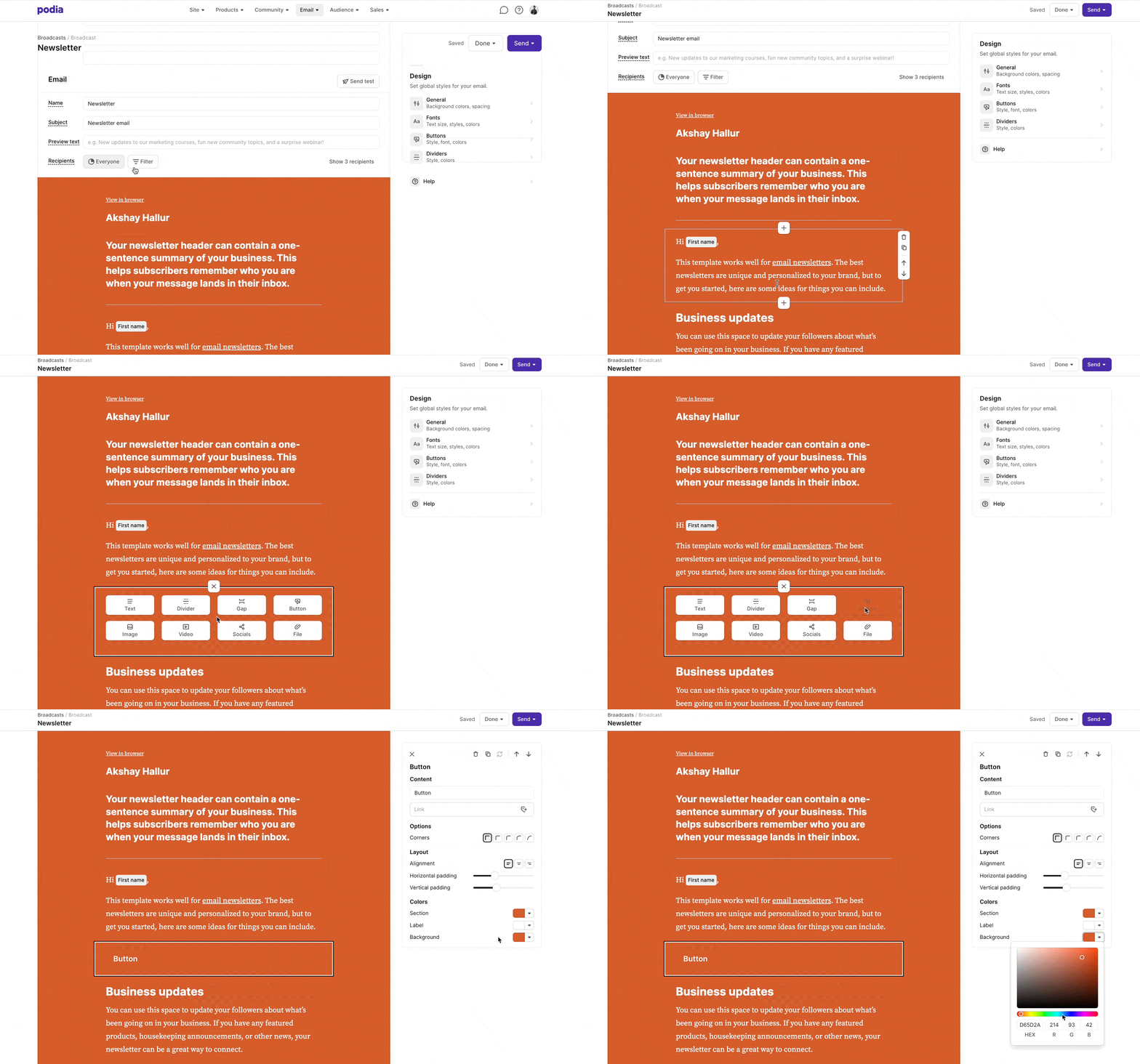
They also have this drag and drop builder that lets you add images, change forms, adjust colors, or even insert buttons.
Along with that, Podia has introduced audience filtering and segmentation options.
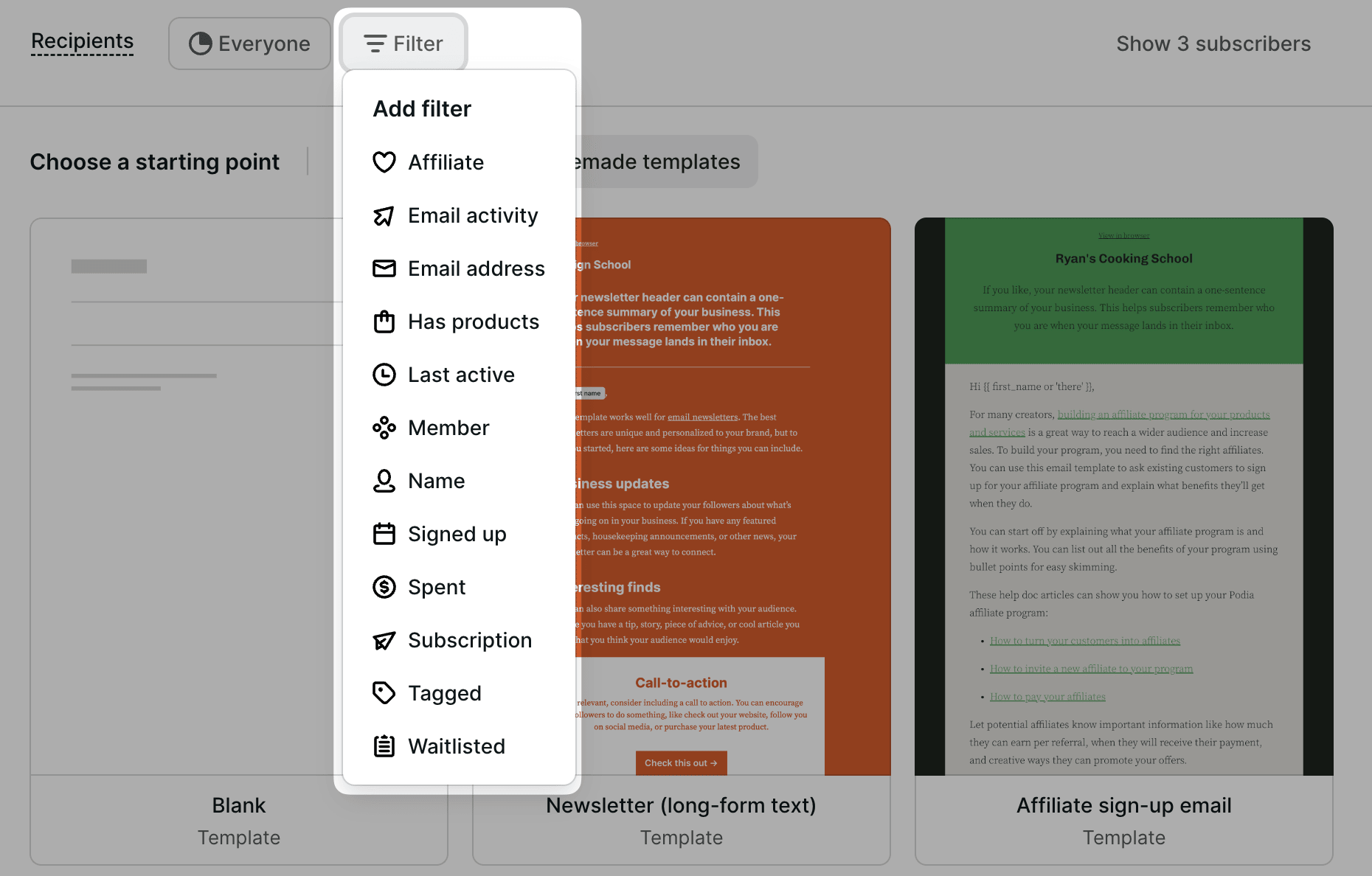
So, when you are sending a broadcast, you can effectively segment the audience based on their tags, products that they have purchased, memberships, revenue, and more.
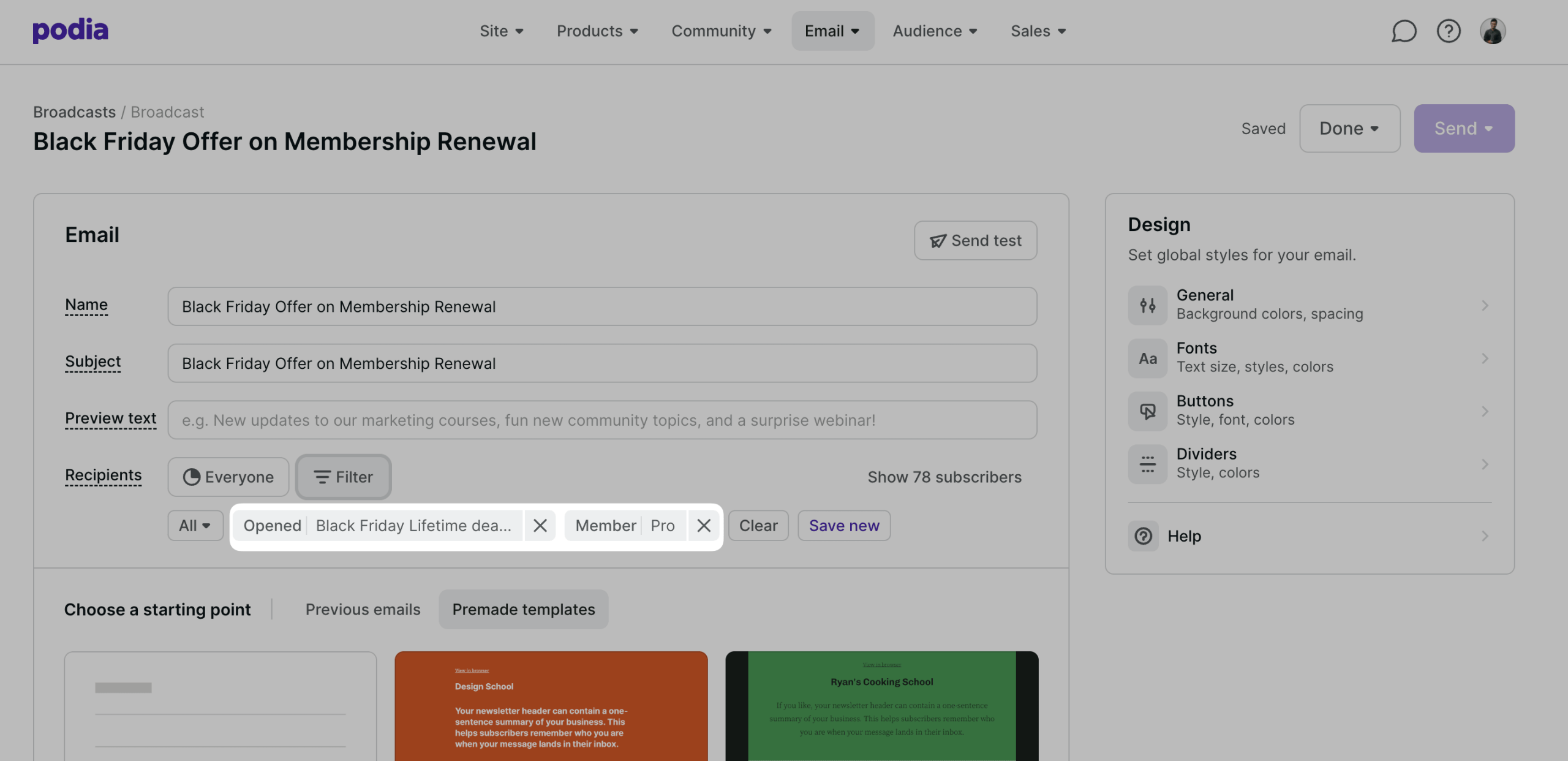
Here I’m targeting “Pro” members who opened my Black Friday emails – a smart way to send targeted discounts.
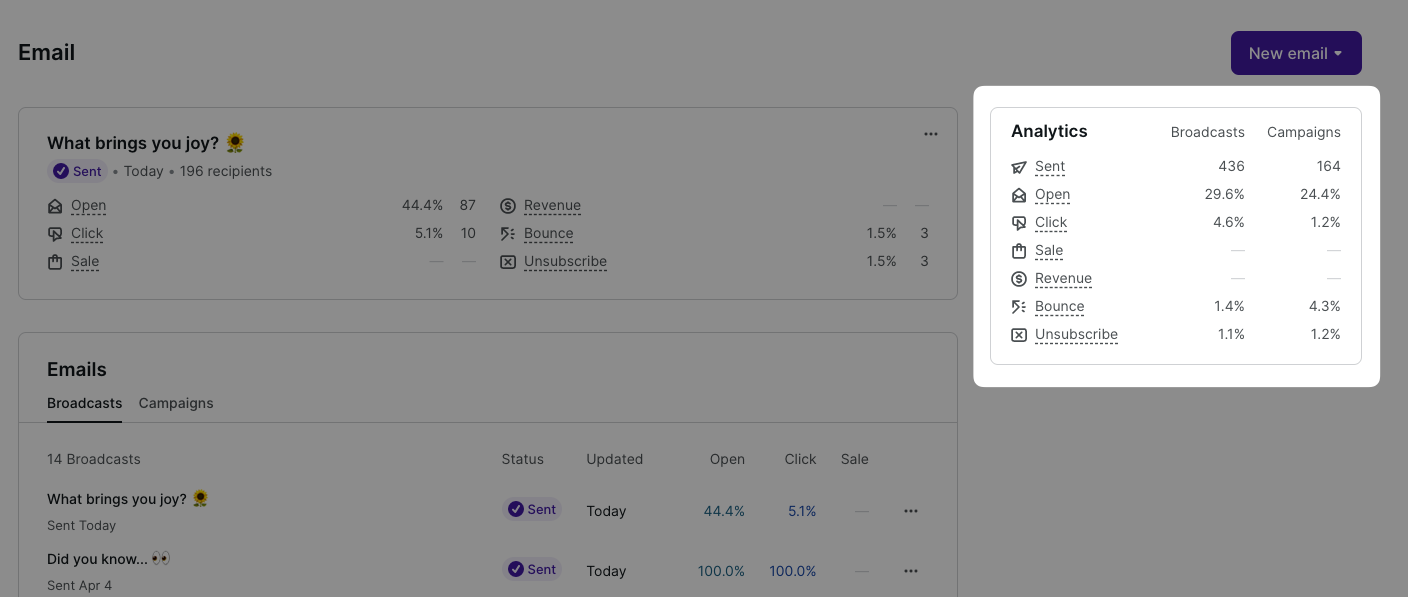
Previously, Podia Email was sold separately as an add-on based on the number of subscribers you had. But with the latest pricing structure, email subscriber limits are now included inside Podia’s core plans.
This makes the email feature feel more tightly integrated into Podia’s all-in-one positioning. But if you have a larger list, you’ll need to keep an eye on the subscriber limits and any additional email pricing.
👉 Bottomline: Podia has a pretty good email builder and automation features. Although it lacks advanced features like A/B split testing, site tracking, and other advanced features, it does the job well!
Website and customization features
Podia’s website builder is basic – it covers websites, landing pages, product pages, and checkout.
Some find it too simple, but if you prefer clean and minimal, you’ll like it.
Getting started is easy. You need to just pick from their templates for email landing pages, link pages, and full websites.
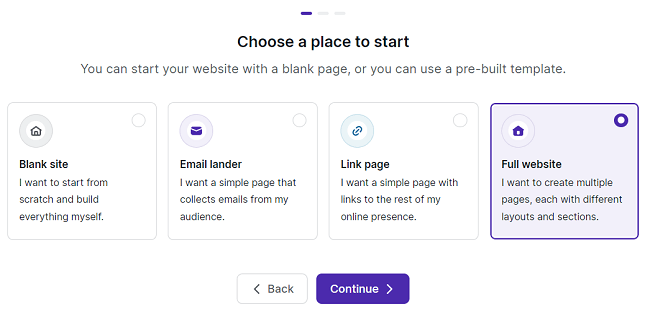
When you choose a full website template, and Podia will generate essential pages for you, such as Home, About, Service, and ToS.
When it comes to the actual builder, these are the blocks available to design the pages. (Refer to the screenshot below)
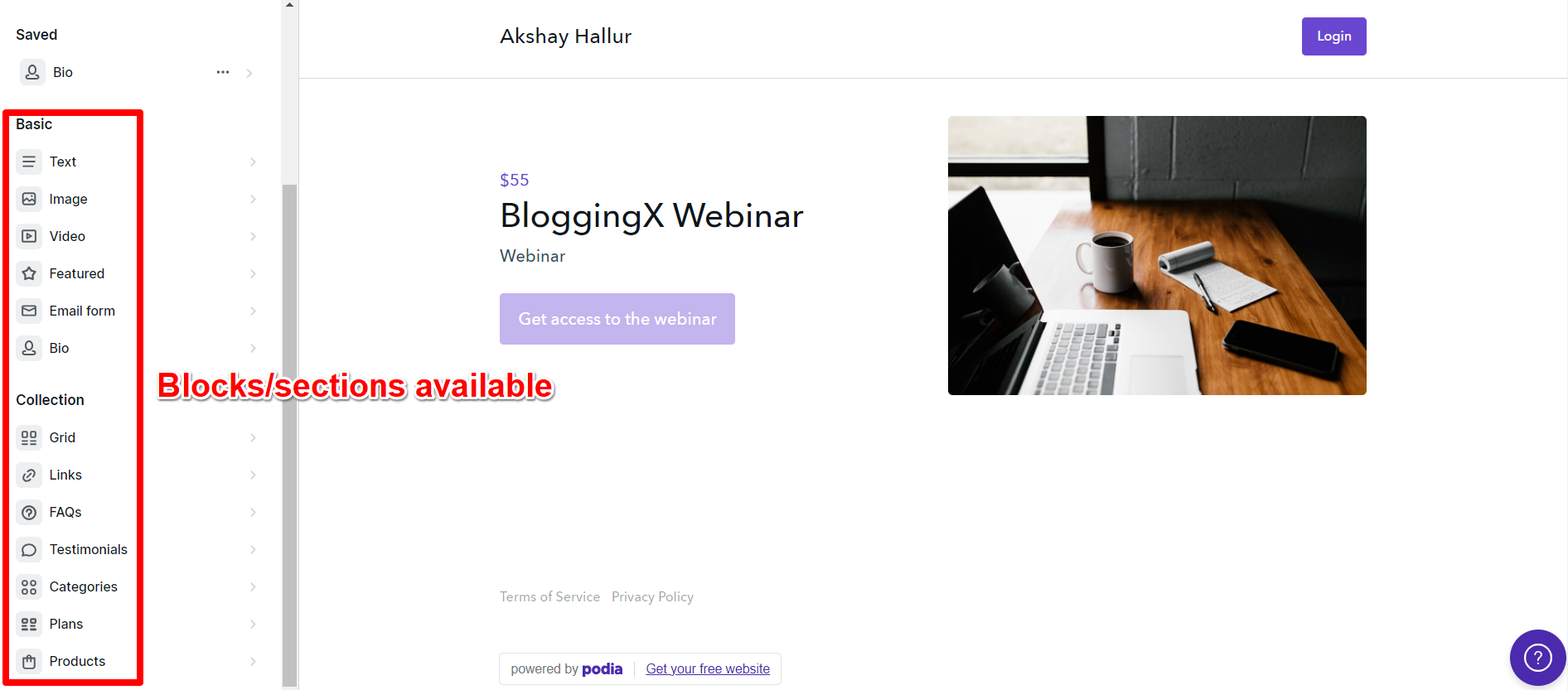
Each block in Podia becomes a section. They now even offer pre-made templates to speed up design.
The builder is basic – no container sections for multiple blocks.
Overall, customization is limited – no spacing controls or custom CSS, even on premium plans.
🙃 I think options are kept to minimal so that the underlying complexity is hidden, which can be both good and bad for power users.
For more ideas, see this demo site.
🏆 Bottom line: Personally, for me, Podia can be considered just as a storefront builder, not as a complete website builder. If you are using Podia, you would still need to use a dedicated page builder like WordPress or Leadpages to complement it.
Checkout embeds
But fortunately, Podia offers good embed options for your products.
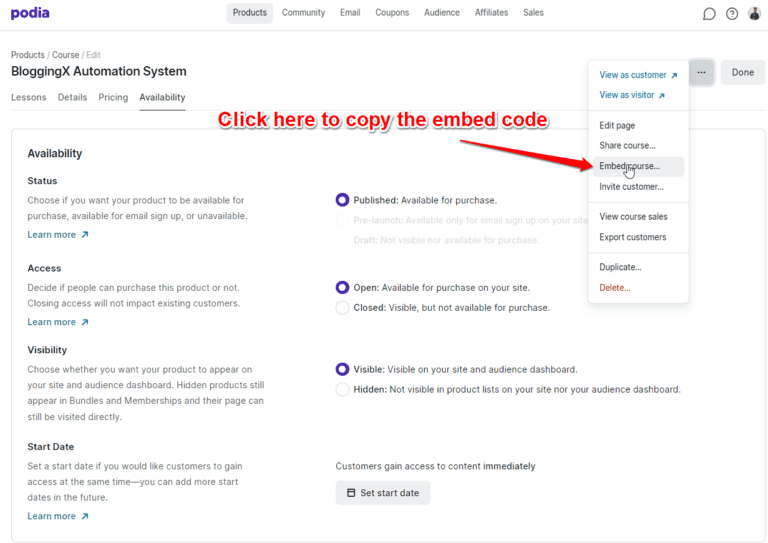
You can embed Podia products on your website easily.
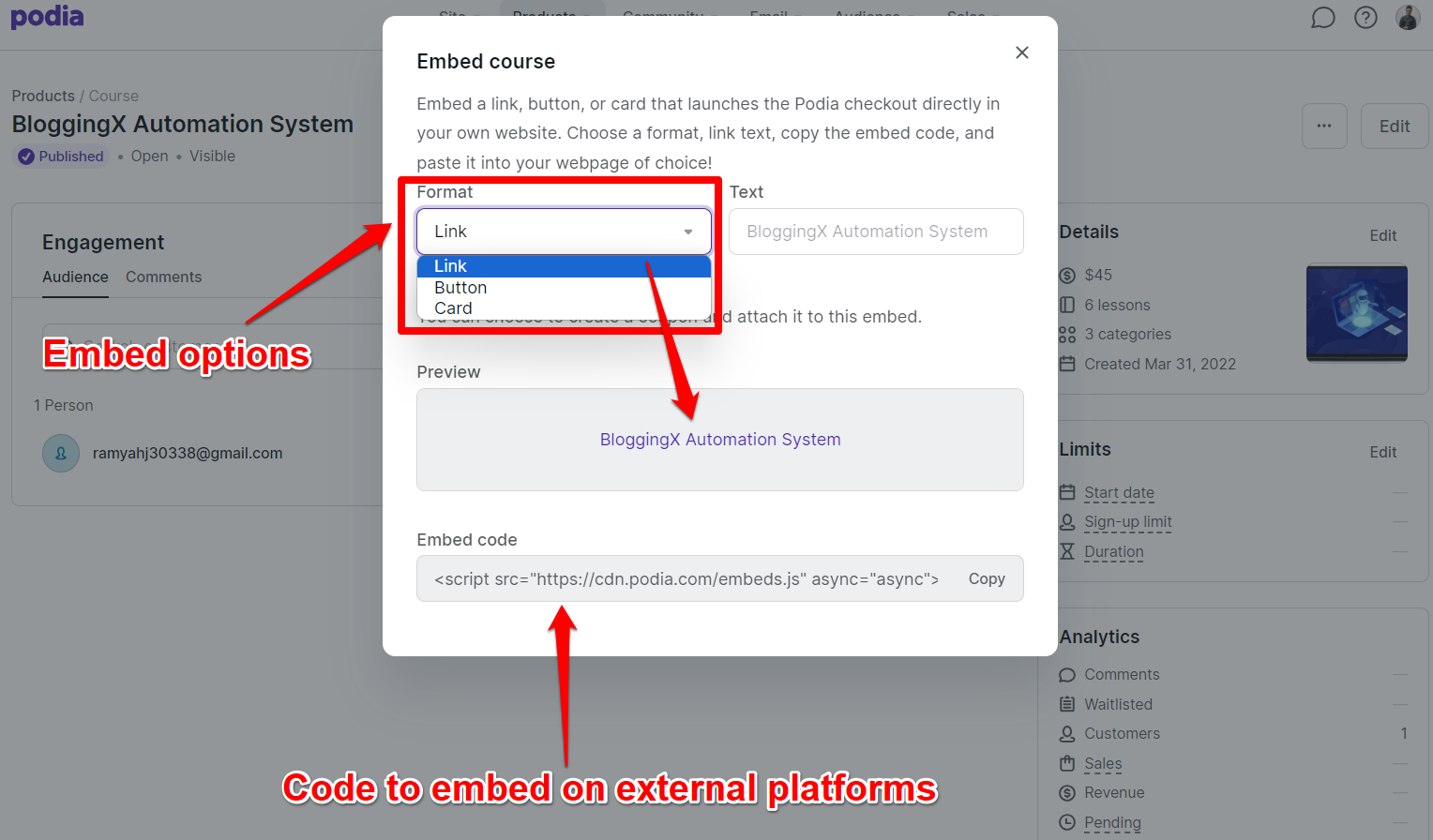
To do so, simply copy the embed code from your product and paste it as custom HTML on the page where you want it to appear.
In the below example, I have selected the embed code format as “Link”.
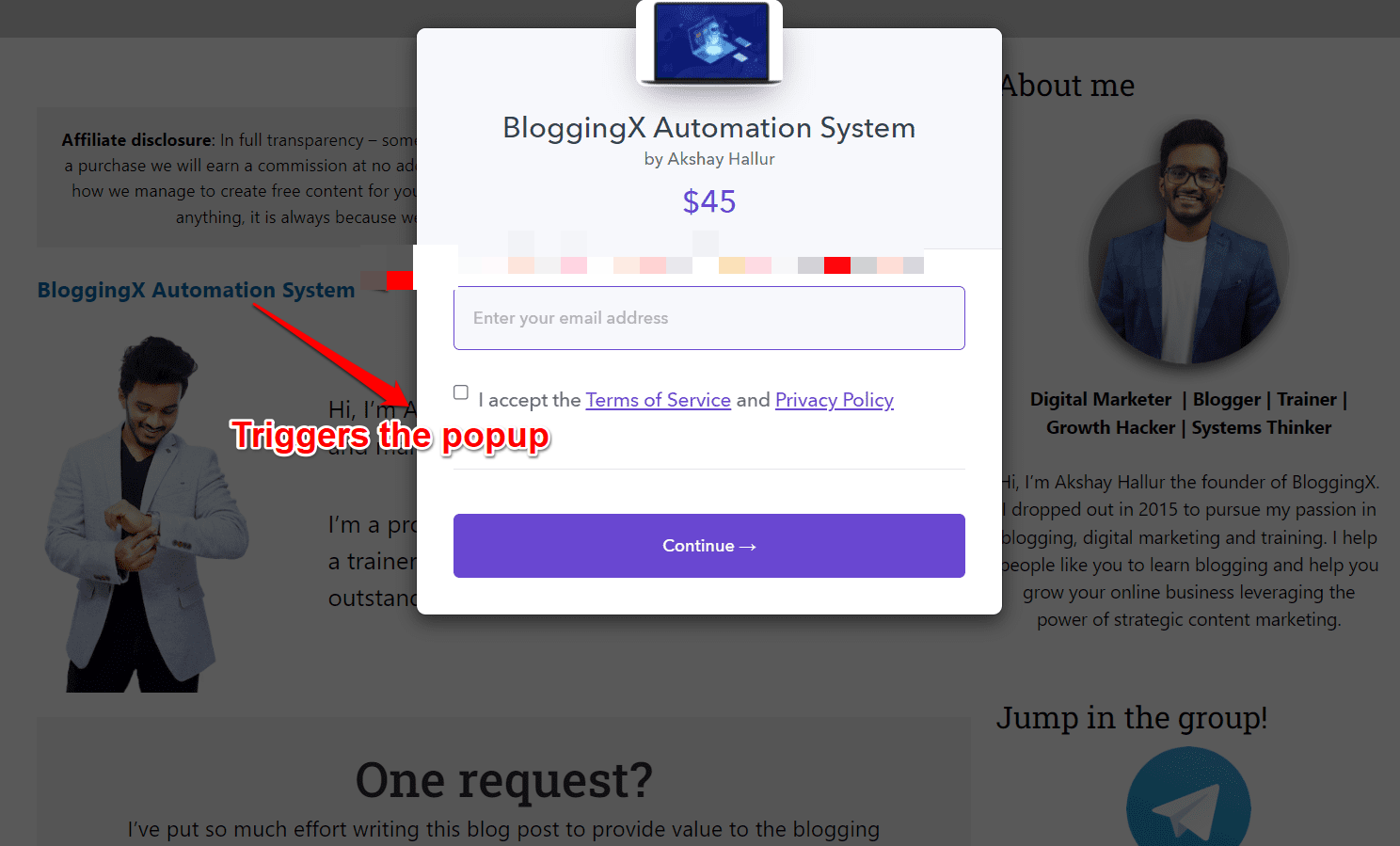
Now I can include the embed code on my WordPress site. This way, when people click on the link, a modal will be triggered, allowing them to quickly purchase the product.
👍 Podia offers excellent embed features for easy checkout on external websites. This is ideal if you already have a website hosted elsewhere or if you find Podia’s design features too limiting.
👉 Bottomline: Podia has limited options for page design blocks and does not offer the ability to customize with HTML or custom CSS. While power users may complain about this limitation, fortunately, Podia provides good website embed functionalities for those who want to use say WordPress.
Sales and marketing features
Prelaunch
Podia allows you to set up pre-launch waitlists for your digital products.
By pre-launching your course, you can build hype and interest before the launch date and even pre-sell your course to students at a discounted rate.
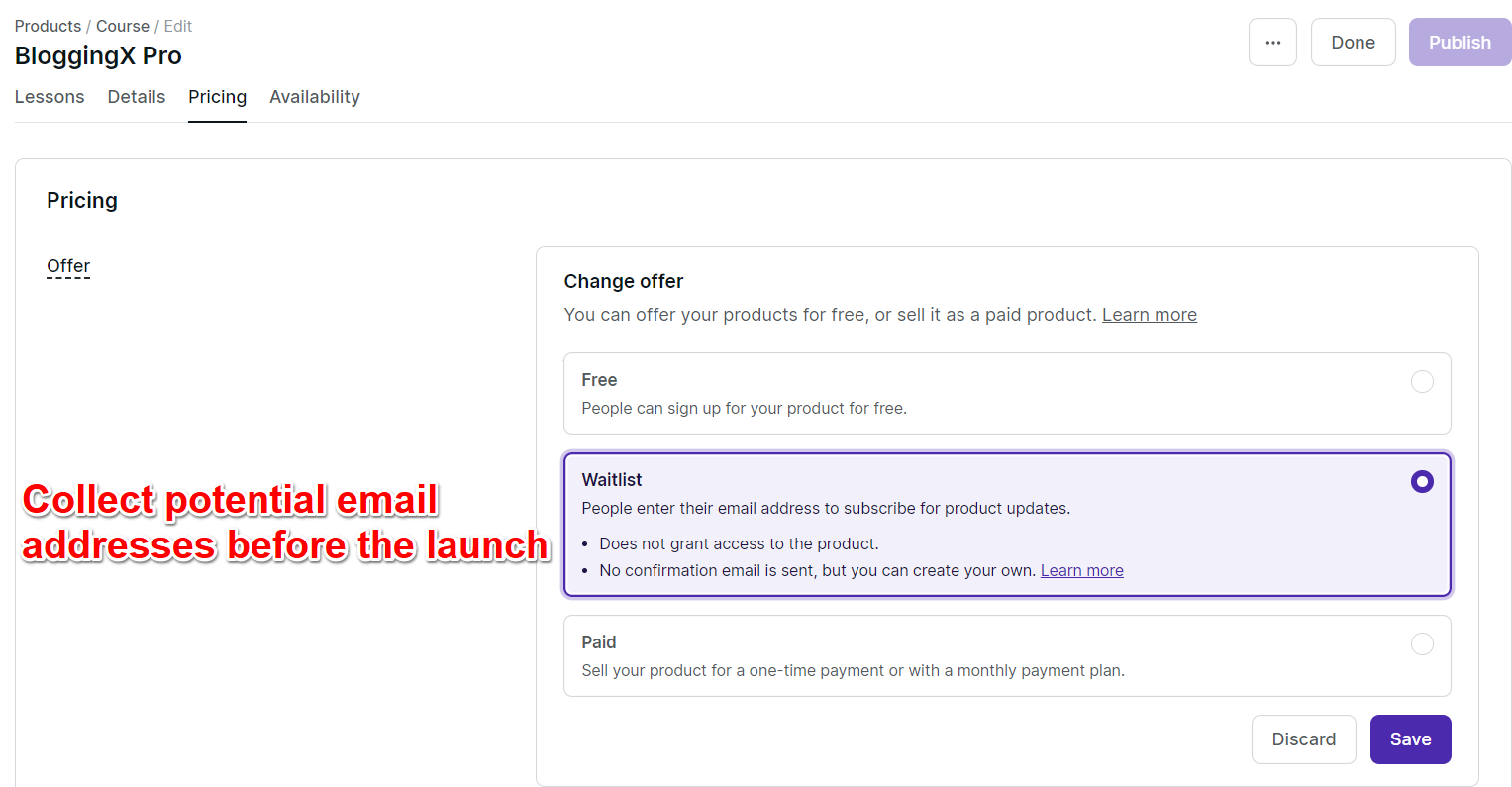
This validation process ensures that your course idea resonates with your audience, and you can even earn revenue before the course content is completed.
For example, John D. Saunders pre-sold his course on Podia, earning $10,000 on launch day.
Upsells or order bumps
In the products pricing section when you scroll down, you can also specify the products to upsells
However, these are not traditional upsells.
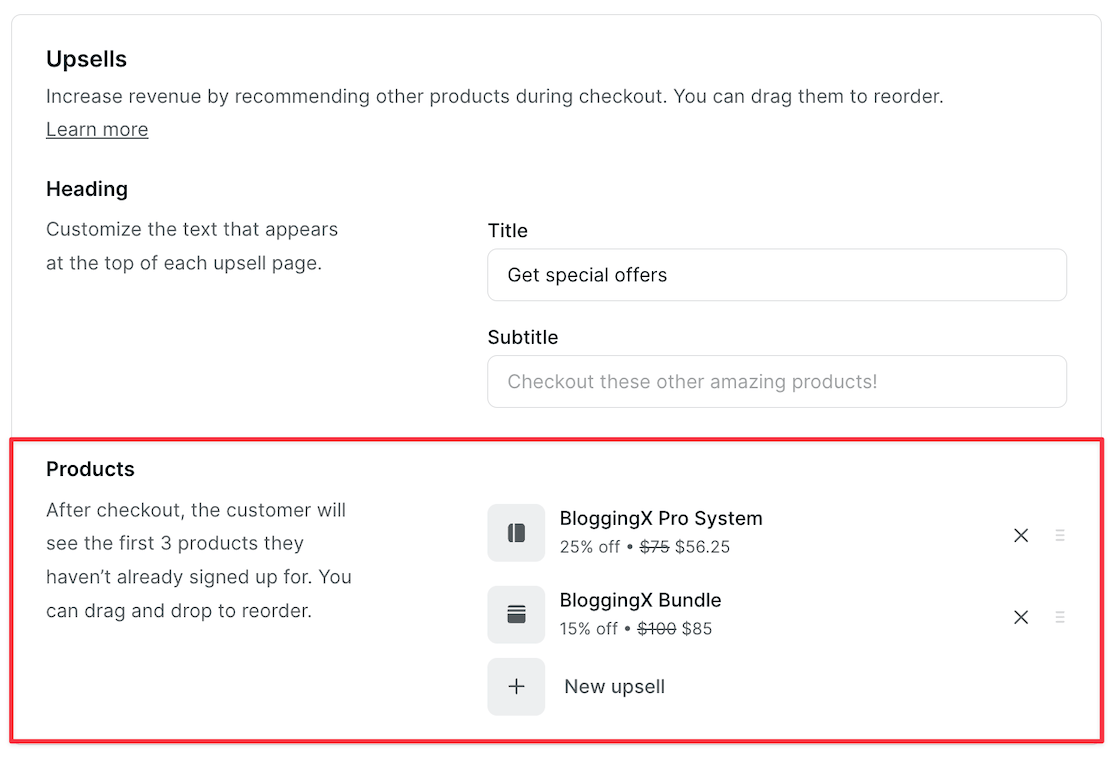
Instead, these are order bumps (which they call upsells) that are presented on the checkout page, allowing customers to purchase additional products that they have not previously enrolled in.
For instance, when selling a training course, you can upsell customers with coaching products, e-books, and other items to increase the total value of their cart.
Product bundles
Product bundles are considered as a product type in Podia.
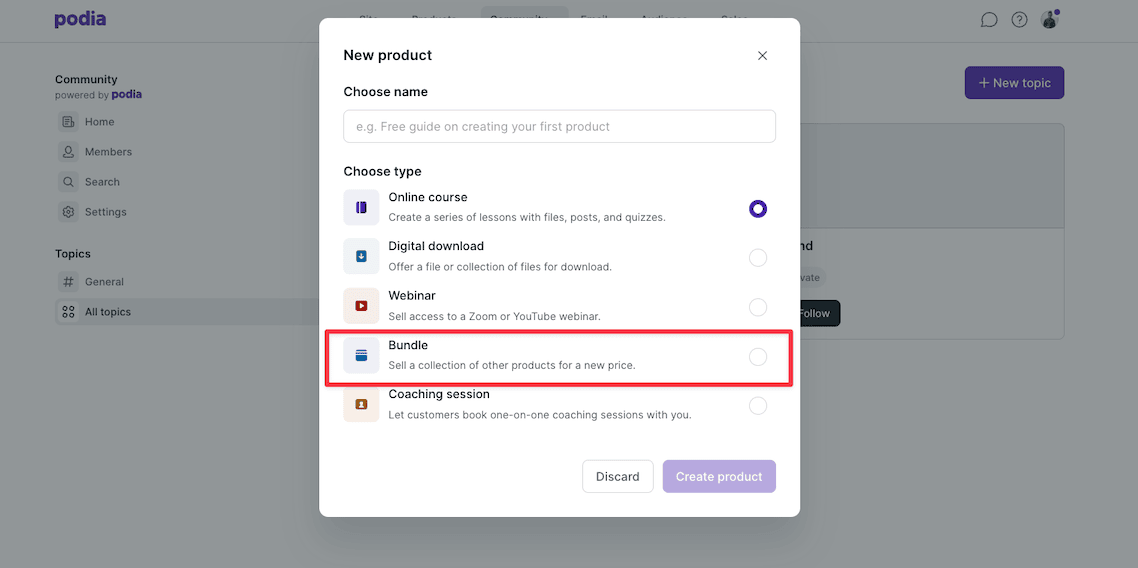
This means that all the options available for course products, such as pricing, embedding, and customization, will also be available for bundles.
This is a good thing!
When creating a product bundle, you need to associate various products that you want to sell together with that bundle.
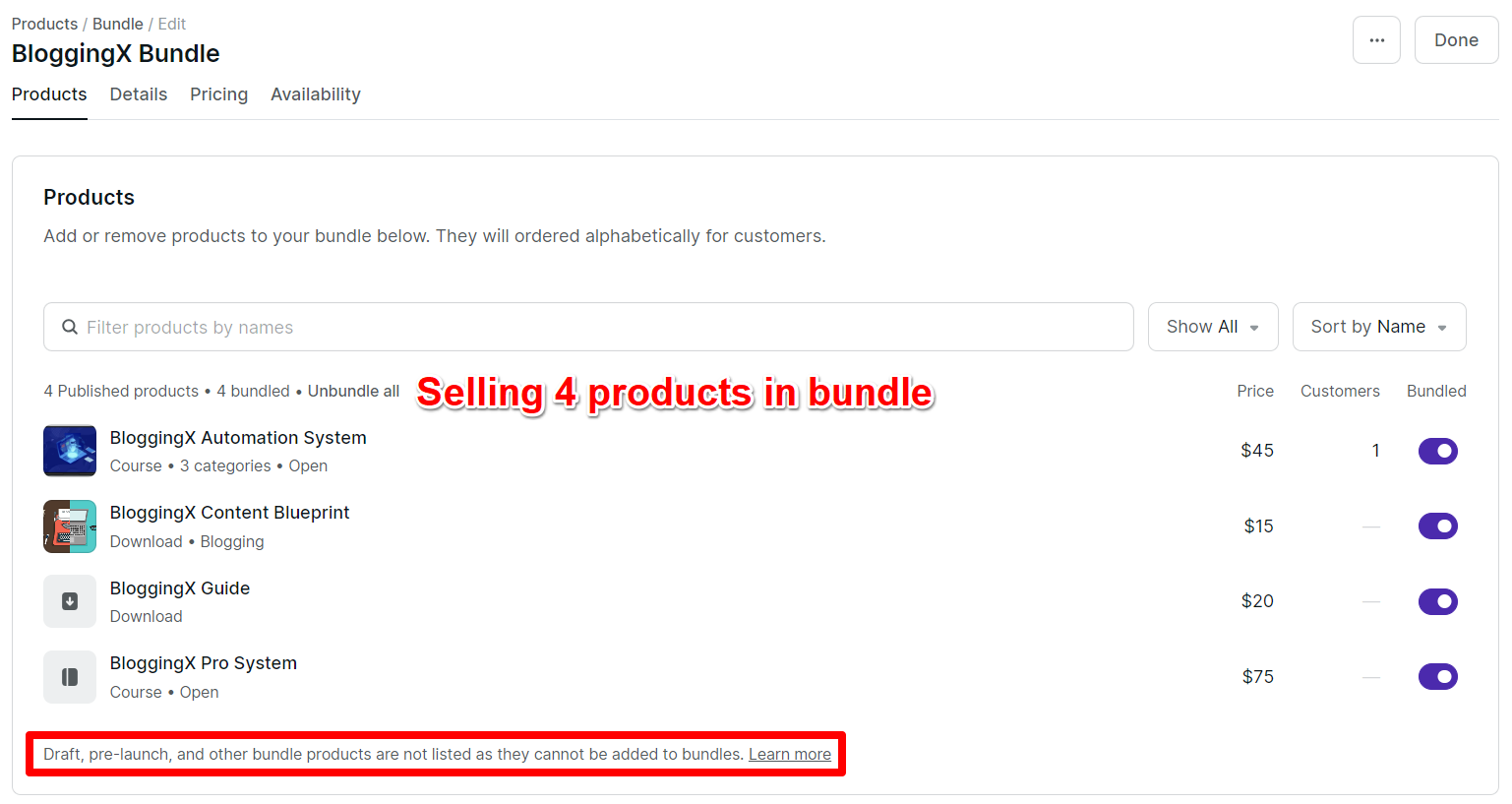
Let me show you some super effective ways to use product bundles:
- Bundle multiple products together at a lower price than buying them separately. This simple trick boosts your average order value (AOV).
- Make bundles that match different types of customers. Think blogger bundle, LMS bundle, course creator bundle – you get the idea.
- Use bundles to level up your membership plans. When members see premium bundles in higher tiers, they’re more likely to upgrade.
💡 Pro tip: combine these bundles with upsells and watch your cart values go up.
Coupons
And when you sell product bundles, it’s really important for you to sell it at a discounted price . What’s the incentive for people to buy the bundle, right?
Podia supports coupons.
You can limit the coupon use and add the expiry date as well.
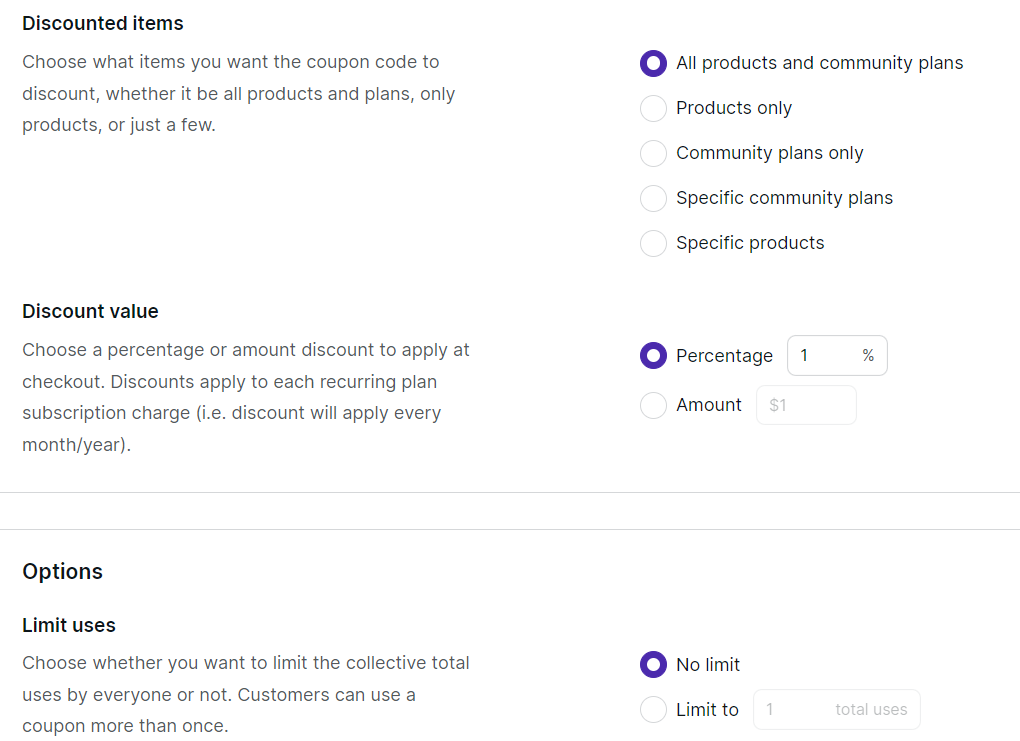
I really like how they support both “Amount” and “Percentage” based discount values.
Personally, I prefer to use percentage-based discount values. This would be the recommended option unless you are specifically involved in e-commerce.
Affiliates
You can let others promote your products for a sales commission.
Set up your affiliate program and fans can share your products.
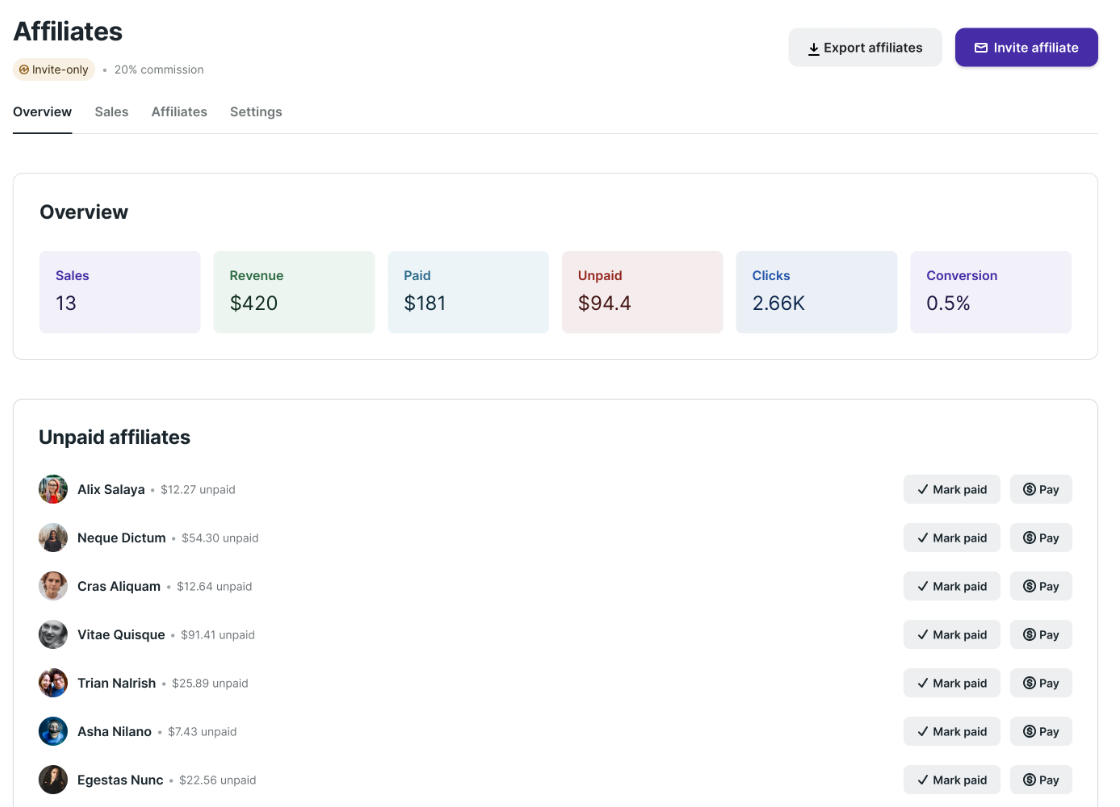
You can share your affiliate signup links so promoters can access their portal and begin promoting.
You can choose between open enrollment, invite-only, or a hybrid approach.
Although, you can set different commission rates per product, Podia doesn’t support affiliate-specific rates or multiple commission tiers.
👉 Bottomline: Podia just has basic marketing features. If you need tools like funnels, advanced email marketing, automations, mobile apps, etc. Kajabi would be the best choice. Even though it costs 4x that of Podia, it is worth the money you spend.
Payment processing
Podia integrates with PayPal, Stripe, Credit Cards, Apple Pay, and Google Pay, and also iDEAL for payments.
It has a streamlined, single-page checkout experience.
👍 Note: Podia supports EU/VAT tax calculation. You don’t have to remit the taxes if your students are from Europe.
👉 Bottomline: With Podia, you are not only limited to PayPal and Stripe. Also, it handles global tax effectively
Podia integrations
Podia keeps things simple with built-in connections to payment systems, email tools, and calendar apps.
While Podia has its own email marketing features with basic automation, it plays nice with most other email platforms too.
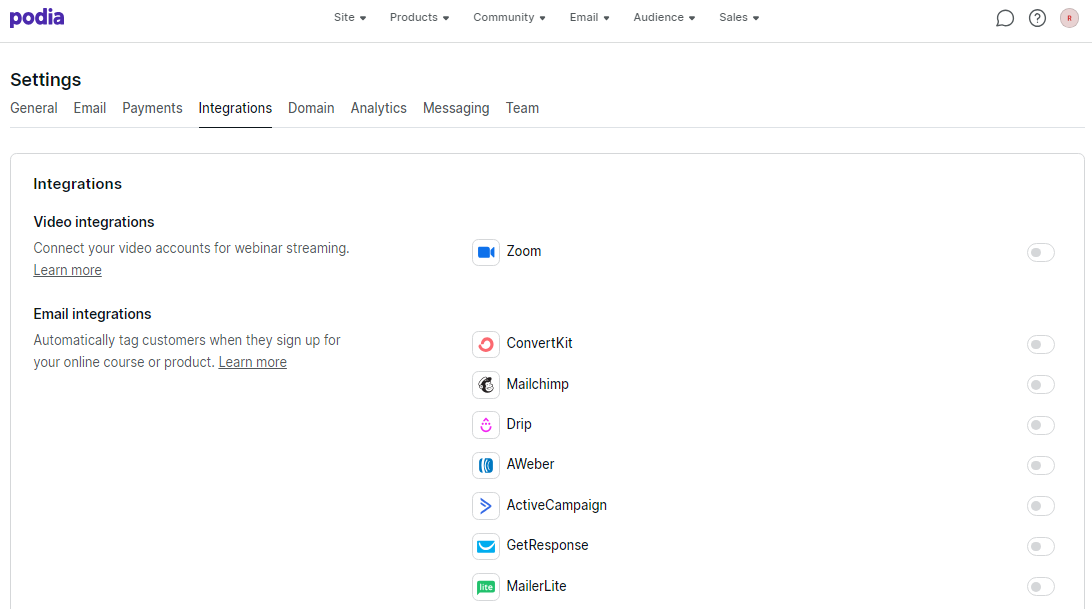
If your email marketing platform is not on this list, you can utilize their Zapier integration.
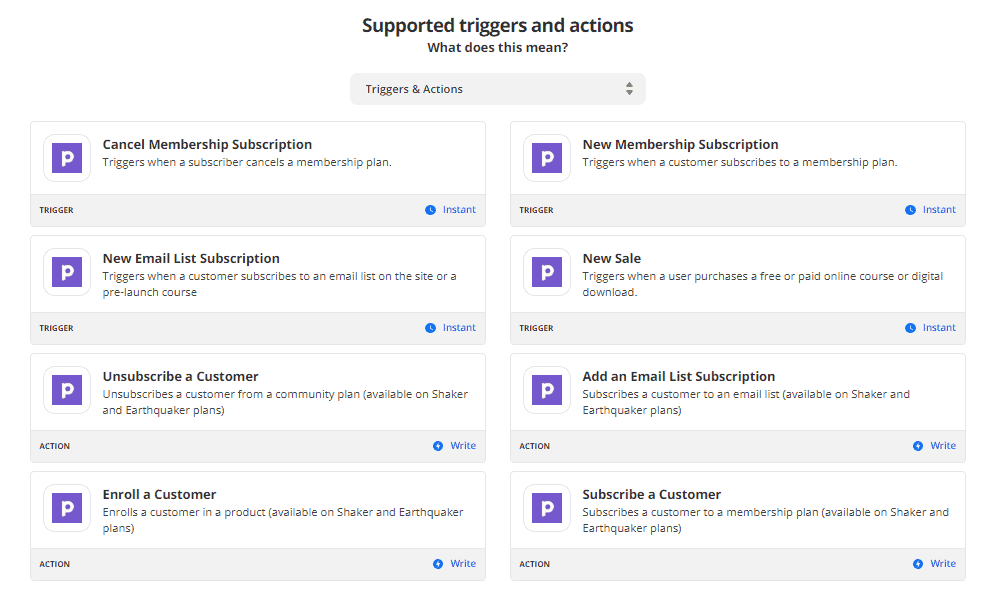
🙁 But it doesn’t integrate with Make.com (a much more powerful and affordable Zapier alternative, i.e the daily automation driver).
🔑 Quick note: Zapier and PayPal are included only on the Shaker and Earthquaker plans.
👉 Bottomline: They are adding integrations rapidly. As of now, they have integrations with the major email marketing providers, Zapier and also PayPal.
Pricing and support
When it comes to pricing, Podia offers 3 different plans: Mover, Shaker and Earthquaker.
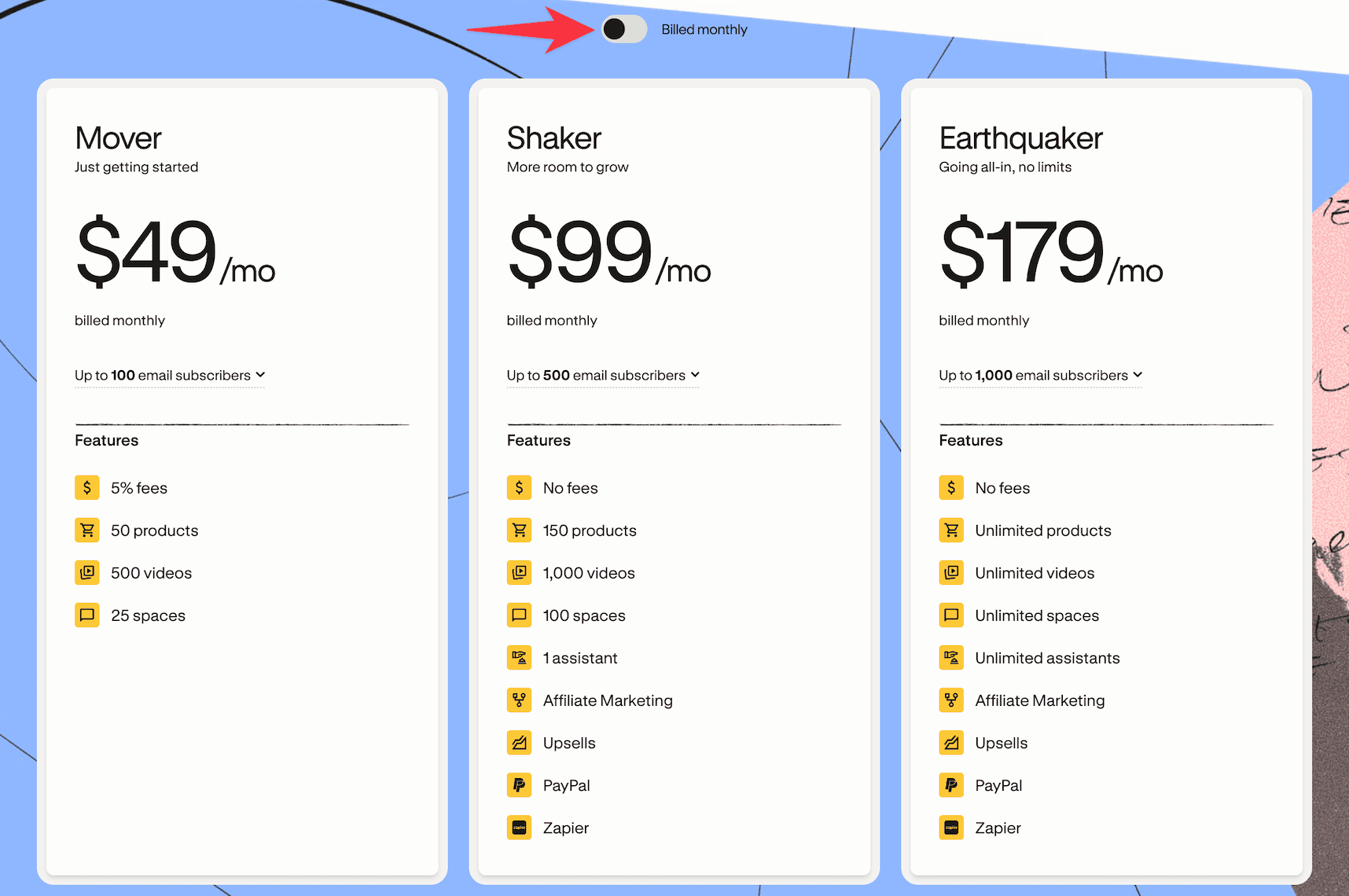
- Mover ($49/mo): Ideal for beginners selling a few products. Includes 50 products, 500 videos, 25 spaces, and up to 100 email subscribers. You need to pay a 5% transaction fee on every sale.
- Shaker ($99/mo): Best for creators selling consistently and wanting zero transaction fees. You get 150 products, 1,000 videos, 100 spaces, and up to 500 email subscribers.
- Earthquaker ($179/mo): For serious creators and teams who hate limits. You get unlimited products, videos, spaces, and assistants, plus zero transaction fees and up to 1,000 email subscribers.
Even though Podia’s email features are pretty basic, creators still love using them.
And now that email subscribers are included inside the core plans, it feels even more convenient for beginners who don’t want to pay separately for another email tool.
It just makes life easier having everything in one place – your courses, community, and email marketing.
And support?
Many users report slow response times, heavy reliance on automated or AI replies, limited availability outside US business hours, and poor handling of urgent issues like locked accounts, billing problems, or site shutdowns.
👉 Bottomline: Podia’s pricing is straightforward. The 5% transaction fee on the Mover plan ($49/month) is a bummer, and the email subscriber limits can feel tight if you’re building a serious newsletter.
If you’re planning to get Podia, it’s worth checking their Black Friday deal before subscribing, as that’s usually when you can save the most on annual plans.
How Podia compares to competitors?
Throughout this blog post, I reviewed Podia.
Let me break down how Podia stacks up against other platforms.
- Podia vs. Kajabi: Here’s the deal – Podia is yours if you want something simple and budget-friendly for selling digital products. Kajabi? It’s for folks who need fancy marketing tools and don’t mind paying more for them.
- Podia vs. Teachable: Teachable focuses purely on course creation with more advanced features like custom certificates and detailed student analytics. Podia is broader – you get courses plus communities, coaching, and digital downloads all in one place. Pick Teachable if courses are your only focus, choose Podia if you want an all-in-one solution.
- Podia vs. Gumroad: Think of Gumroad as Podia’s simpler cousin (close enough). It’s great for basic digital product sales, and their Discover feature can get you some organic sales. But if you’re big on marketing, you might find it a bit basic.
- Podia vs. ThriveCart: ThriveCart is a powerhouse for both physical and digital products. Their “Thrive Learn” tool handles courses well, and they’ve got some serious marketing features with sales funnels, order bumps, and split testing.
- Podia vs. Patreon: Here’s the thing – Podia is your all-in-one shop for digital products, courses, and community building. Patreon? It’s more about getting recurring support from fans. Great for steady income, but not so hot on the course creation and marketing side.
FAQs on Podia
- What is Podia for? With Podia, you can sell courses and digital products like webinars, bundles, coachings, or any other digital files.
- Does Podia have a mobile app? No, Podia doesn’t have a native mobile app for creators or students. Everything needs to be accessed through a web browser, which can be limiting for on-the-go course management.
- Can I migrate my existing courses to Podia? Yes, Podia makes it relatively easy to migrate courses from other platforms. You can upload your course materials, videos, and content, though you’ll need to manually set up the structure and lessons.
- Does Podia charge transaction fees? The Mover plan ($49/month) includes a 5% transaction fee on all sales. The Shaker plan ($99/month) and the Earthquaker plan ($179/mo) have zero transaction fees, making them more cost-effective if you’re making regular sales.
Is Podia really for you? 🏆
Looking for a budget-friendly all-in-one digital selling platform? Podia might be what you need.
Here’s the thing though – Podia tries to do everything, but doesn’t excel at any one thing. The features are pretty basic. In that regard, although Kajabi costs premium, it has good depth to its features.
In this regard:
If you’re mainly interested in creating courses, check out Teachable or Thinkific. They’ve got more specialized course creation tools that’ll serve you better.
That said, Podia gives you good bang for your buck with its features.
One big drawback? No mobile app.
That’s a real pain point for me.
That wraps up my review on Podia.