If you ask me, which is my favorite on-page SEO technique – it’s “internal linking”.
Yes, you heard it right.
It’s my favorite for a reason.
It works like a charm.
It doesn’t matter if your website is old or new.
It simply works.
Google’s helpful content update and E-E-A-T signals have made one thing clear: topical authority matters more than ever.
Strategic internal linking is your secret weapon here. When you connect related content properly, you’re not just helping users navigate – you’re showing Google that you have comprehensive coverage of topics.
In this post, I will help you step-by-step on laying out a proper internal linking strategy for your website.
What is internal linking?
Simply said, internal linking is the process of internally linking relevant pages on your website together.

On your blog, the links between related posts are called internal links.
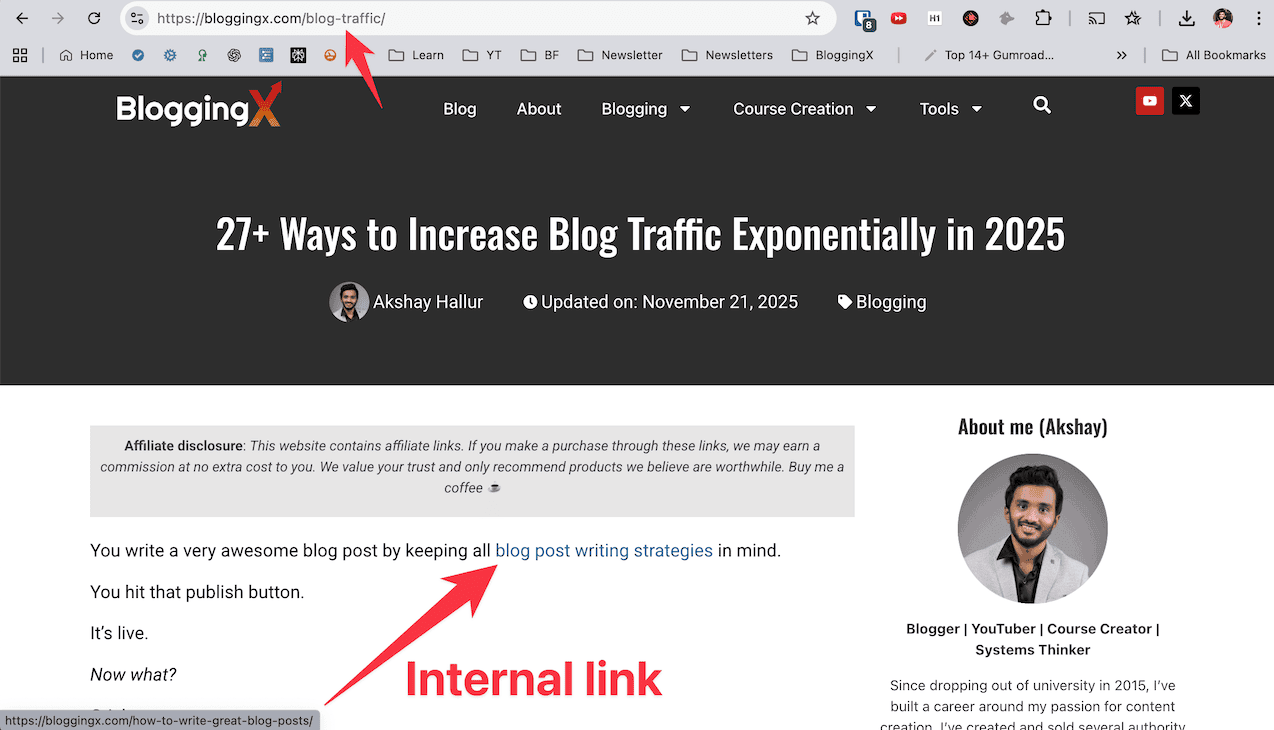
The posts that you interlink to should be relevant to the post you are writing on.
It’s not just about linking blog posts together.
These are certain strategies and processes that you need to keep in mind before starting internally linking relevant content on your website/blog.
Benefits of internal linking

Why do websites add internal links to their related content? Because there are real benefits.
Here are the key benefits of internal linking:
- Better user experience: Internal links help people find relevant content easily. They discover related articles while reading, making your site more useful and keeping them engaged longer. Smart internal linking also contributes to Core Web Vitals by reducing navigation friction, which Google considers as part of page experience signals.
- Improves user engagement: When users click internal links and spend more time on your site, bounce rates drop. Google sees this as quality content and rewards you with better rankings.
- Clear website structure: A proper internal linking structure creates clear website hierarchy. This makes it easier for search engines to understand your site and improves your SEO performance.
- Link juice distribution: Internal links spread authority across your site uniformly. Links at the top pass more juice, so add your most important links in the first paragraphs of content.
- Effective crawling: Search engines crawl your site better and understand topic relationships. After publishing new content, link to it from old posts to speed up indexation (most people miss this).
How to do internal linking for SEO?
Listen.
There are various ways to add internal links.
You can add the links to your content using HTML, manually using the hyperlinking feature, using auto-linking plugins or using the related posts plugin.

You need to do this internal linking process:
- While writing any blog post, internally link to any of your posts as needed and when relevant.
- After publishing a new blog post, head over to old blog posts and link to it for speeding up the new blog post’s indexation.
I highly suggest you do manual interlinking, as you’ll have more control when it comes to link placement, anchor text, and also creating a context.
People typically follow either of these techniques while doing internal linking:
- Keyword-based internal linking
- Topical-based internal linking
Keyword-based internal linking
This is the most straightforward process of internal linking. I recommend it for most of the people to get a great boost in their search traffic.
In this guide, I assume that you already have a site with content on it. How you need to add internal links to it.
In order to find the blog posts where you can add internal links, you need to make use of Google’s site modifier.
For an example, let me consider that I have a blog post on “LSI keywords”. Now I need to find other blog posts, where I can add links to my above post.

As you can see, I’ve used the query – “site:example.com” with the keyword in front of it, to return all the other blog posts on my site which mention the term LSI in it. So now, I can go ahead to those blog posts and interlink to my blog post on “LSI keywords”.
👉 Note: You can also use your site’s functionality for this, but I prefer Google search as it also matches synonymous keywords (keywords with the same meaning) too. So, it covers more internal linking opportunities.
Topic-based internal linking structure
If you need to implement proper internal link structure on your site, you need to first have a proper topical structure for your site.
In this kind of internal linking, you need to create clusters of topically relevant articles on your blog, then only you’ll be able to create a good internal linking structure.

You need to have a pillar/silo pages around each of the topic your website deals with. Under these silo pages, you need to have a cluster of topically relevant articles.
Suppose if you have a website on fitness, you can create silos around:
- Crossfit
- Nutrition
- Workouts
- Yoga
- So on.
And create supportive articles under each of these above topics/silos.
The silo page should internally link to all the cluster of articles that comes under it. The articles under a cluster should internally link to each other.
The articles of one cluster should not link to articles of another cluster/topic, no matter how strong the context turns out to be.

Here the majority of the backlinks you build will be to silo/pillar pages, and then the link juice from these flow to the internal cluster posts under them.
👉 Refer this guide: Silo Structure for SEO in WordPress: The Best Guide on the Internet!
Keyword research for anchor texts in internal links

The anchor texts that you use for internal links should be natural to the readers to click on for exploring more on your blog.
The Google Penguin algorithm is strict when it comes to usage of exact-match anchor texts when it comes to backlinks. However, many webmasters confused it to be for internal links.
You can use exact keyword in your anchor texts when it comes to internal links.
Sometimes, when an exact match is not possible, you can also use LSI keywords in the anchor texts of the internal links.
Suppose if the keyword is around travel pillows, you can use these kinds of variations in anchor texts.
- Best travel pillows
- Best pillows for travelling
- Travel-friendly pillows
- Pillows for travel
- Pillows for commuting
- Pillows for journeys
So how to find these kinds of keywords?
Just Google your seed keyword.

The Google suggests you some of the related search queries, and these are called related or LSI keywords.
Google can easily identify these above terms mean the same, and in most of the cases give you the same benefit as if you have used exact match keyword anchor text in internal links.
You can also make use of tools like Semrush for this.

These are some of the related or LSI terms you can include in anchor texts of your internal links, to help your content rank for a wider range of related search queries.
Use AI for internal linking
Here’s something that’ll save you tons of time: let AI handle your internal linking workflow.
When you write new articles, feed your sitemap to an AI tool and ask it to analyze your existing content. It’ll suggest relevant internal linking opportunities you might miss manually.
We use Notion AI for this.

It scans our sitemap/content database, suggests relevant links based on topic relevance.
This cuts internal linking time in half while keeping quality and context intact.
Nofollow vs dofollow for internal links
You should always dofollow the internal links. If you nofollow affiliate links, it’s like signaling Google to not flow the link juice and follow your internal pages.
Topical relevance between your related posts will not be built when it comes to nofollowing internal links.
If you have the habit nofollowing internal links in your blog posts, none of the internal linking benefits I mention in this blog post are applicable to you.
However, in some cases, if you are linking to pages like your contact page, terms, privacy policy page, you need to nofollow the links. Because, you are not willing to rank these pages on Google, right?

In WordPress block editor, you can easily do it by adding the following rel=”nofollow” code in the code editor.

Also, it’s very important to open the internal links in new tab, to prevent the readers from being distracted reading the current blog post when they click on them.
Location of the internal links

- In-content: Contextual links within blog posts are the strongest for SEO. Google can accurately understand the linking context. Include LSI keywords in the text surrounding internal links to boost topical relevance and signal related content connections.
- Navigation bar: Link to your most important pages like about, contact, and key content pages. But don’t overdo it.
- Footer bar: Include links to privacy policy, contact, and terms pages. These utility pages can be dofollowed without issues.
- Sidebar: Include popular posts or recent posts widgets. Adding a recent posts widget speeds up new post indexation. It helps search engines discover and crawl new content faster through internal linking from established pages.
👉 In the same time, you need to also remember that in order to flow the link juice uniformly throughout your website, no page on your website should be three hops away from each other. This was explained by Rand Fishkin at Whiteboard Friday.
How many internal links?

There’s no rule that you need to have “this” many number of internal links.
However, going overboard when it comes to internal linking can hurt user-experience and engagement – they would feel overwhelmed.
My rule is to add 1 internal link every 100 words of my content.
However, if you don’t have enough posts on your blog, it may differ. But, I would avoid going beyond this number.
Instead of asking “How many internal links for SEO?” you need to ask – “How many internal links, if I add in this post, will enhance user-experience?”.
Add the internal links only where you feel that users need some other resource to explore further or fill the missing content gap.
Sending link juice to money pages

Many novice bloggers ask me, “What’s the best way to build backlinks to money pages?”.
No one would link to commercial pages.
Then how to fix it?
It is by internally linking to money pages through your highly-backlinked pages.
Let me explain this to you.
First, you need to plug in your site’s URL in Semrush and pick the posts with most backlinks.

Now, you need to download the list of your highly backlinked articles.
If you don’t have access to Semrush, you can make use of your Google search console.

After getting the list of highly backlinked articles, you need to make a list of money posts that you want to rank for.
Now print out the highly backlinked articles and also money posts you want to rank. Put them side-by-side for analysis.
If any of these blog posts are relevant, you can straightaway add the internal links to money posts.
In some cases, you need to create contexts in those popular pages to link to money pages. You can create this context by adding a new section to your most backlinked pages that make internal linking to money posts natural.
How to improve existing internal links?
Are there any changes I can recommend to your existing internal links?
Of course.
These are the 2 changes you can make.
- Optimize the internal links’ anchor text for SEO
- Optimize them for more clicks
But first, you need an easy way to figure out what internal links to optimize by checking the clicks they are receiving and also the presence of keywords.
To track clicks on your internal links, you can use Google Tag Manager.

If you’re new to this tool, check out this helpful tutorial that walks you through the setup process step by step.
For a comprehensive internal linking audit, tools like Screaming Frog and Semrush Site Audit are excellent. They crawl your entire site and show you internal linking patterns, orphaned pages, and opportunities you might have missed manually.
Now you need to determine which of your internal links are getting less clicks.
You need to head over to those internal links, and consider optimizing the anchor texts to get more clicks by changing the position, changing the text around it, provoking curiosity, etc.
You can also consider tweaking the anchor texts of some internal links to include the keyword in it. For this, you also may need to tweak the text around it to make the anchor text natural.
Wrapping up
Internal linking is one of the most underutilized technique when it comes to onpage SEO.
Tracking properly how your internal links are performing, what posts are linking to what posts, anchor texts, and optimizing them periodically is very important.
Don’t go blindly behind SEO when it comes to internal linking, keep user experience also in mind.
Once you implement proper internal linking structure on your blog, you can’t expect the search traffic boost to happen overnight or in a couple days.
It’s essential for you to wait for at least 2-3 months to notice the increase in organic traffic.
Hope you guys found this post on internal links for SEO useful.