You hit publish.
You share the post.
You wait.
And inside Google Search Console, your new URL just sits there in “Discovered – currently not indexed” or “Crawled – currently not indexed”.
If this keeps happening, it is tempting to blame the latest core update or Google’s AI experiments.
But in most cases, the reasons are much more ordinary: Google has more content to crawl than ever, your site is sending mixed signals about what really matters, and your new posts are either hard to discover or not compelling enough to keep in the index.
In this guide, we’ll walk through a modern, non‑spammy way to help genuinely useful blog posts get discovered, crawled and indexed faster.
How Google indexing really works today
Before you touch settings or workflows, it helps to understand what’s happening under the hood.
Every new URL you publish goes through a few broad stages.
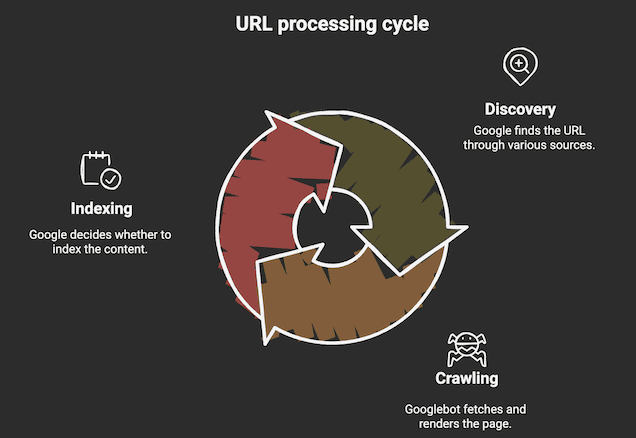
- Discovery: Google has to discover it. That can happen through XML sitemaps, internal links, external links or from previous crawls if the URL has existed before.
- Crawling: Once the URL is known, Googlebot needs to crawl it, which means actually fetching the HTML and, when needed, rendering the page.
- Indexing: After crawling, Google decides whether to index that piece of content.
This is where questions like “Is this unique?”, “Is it thin or substantial?”, and “Does it overlap heavily with something else on this site?” start to matter.
Finally, for relevant queries, indexed pages become candidates to serve in the search results.
Most of the issues bloggers complain about as “indexing problems” actually live in the discovery and decision phases.
Either Google struggles to find the URL in a clear way, OR it crawls the page and quietly decides that this particular post isn’t worth keeping in the index right now.
You’ll often hear people talk about crawl budget.
Crawl budget is the number of pages Googlebot will crawl on your site within a given timeframe. It’s determined by two factors: how fast your server can handle requests (crawl rate limit) and how much Google thinks it’s worth crawling your site (crawl demand).
🔑 Sites with fewer pages, faster load times, and consistently valuable content typically get crawled more frequently.
For huge sites like think marketplaces and massive e‑commerce stores, crawl budget can be a hard constraint.
For a typical blog, it behaves more like an earned privilege.
Remember these:
- The clearer and faster your site is, the more confidently Google can crawl it.
- The more consistently you publish and refresh real content, the more often Googlebot comes back.
- The more your site keeps delivering useful answers for searchers, the more URLs Google is happy to keep around.
If your site is slow, messy and full of thin pages, you are essentially telling Google to be picky.
Your job with every new post is to make that URL easy to discover, easy to crawl and clearly valuable within your niche.
Set up your site once for faster indexing
You can’t brute‑force your way out of a weak foundation.
If Search Console is a mess, your XML sitemaps are noisy and your robots.txt file is blocking important areas, no amount of promotion will make indexing feel predictable.
Start by treating Google Search Console and Google Analytics as your control room.

Make sure you’ve added and verified your domain properly in Search Console.
The domain property usually gives the cleanest overall picture, and you want all versions (www/non‑www, HTTP/HTTPS) funnelled under that.
Search Console is where you see whether URLs are discovered, crawled or indexed.

It’s also where the URL Inspection tool lives, and where the Pages report (previously called Coverage) explains why certain URLs are not indexed.
👉 If you still feel shaky on SEO fundamentals in general, it’s worth fixing that first. Refer my guide on how to learn SEO that actually works.
Next, clean up your XML sitemap and robots.txt so they work in your favour instead of against you.
Your sitemap should list the canonical URLs you actually want to rank with. It shouldn’t be bloated with test URLs, endless parameter variations, tag archives and auto‑generated thin pages.

Once you’re happy with the sitemap, submit it in Search Console and check that the number of discovered URLs roughly matches what you expected.

Then open your robots.txt file in the browser and check it.
You want to make sure you’re not accidentally blocking key paths where content or critical assets live.
In WordPress, for example, it’s common to see people block folders that contain JavaScript and CSS that Googlebot actually needs to render the page properly.
👉 A healthy combination of a clean sitemap and a non‑destructive robots.txt file essentially tells Google that “Here are the important URLs. Nothing critical is hidden from you. Crawl freely.”
On top of that, fix obvious technical issues that waste crawl effort.
For example, fix:
- Long redirect chains from old URLs that still hop through multiple 301s.
- A bunch of 404s from deleted or renamed posts without proper redirects.
- Duplicate content across categories, tags and parameter URLs all exposing the same article.
Publish new posts in a way that helps indexing
👉 If you want help structuring individual posts and pages in a way that’s easy for both humans and search engines to understand, you can use the frameworks I share in my guides on blog post outlining and blog post structure.
Once your foundation is in place, most of the indexing battle is won or lost around the time you publish a new post.
Google doesn’t look at your article in isolation. It tries to understand how that URL fits into the topical map of your site.

That’s why random, isolated posts on random topics often struggle to get indexed, while tightly connected clusters tend to perform better.
Before you publish, decide which pillar or hub the new post supports.
If you have a core article on blog promotion, for example, a piece about faster indexing is a natural supporting asset because promotion and indexing are tightly related.
Inside that cluster, each piece can link to the others in a way that feels natural to readers and makes sense to Google.
👉 If you don’t yet have a clear way of planning clusters and outlines, start with the process I share in my long‑form guide on silo and also blog post outlining. It will help you design posts that fit into a bigger structure instead of publishing stand‑alone content that Google doesn’t know where to file.
Once you hit publish, internal links are your main lever for faster indexing.
Go into relevant posts that are already indexed and add contextual links to your new article wherever it genuinely helps the reader.
For example, inside your traffic-focused pillar where you teach people how to grow their audience, you can add a line like: “If your posts are struggling to even make it into the index, follow this indexing guide before you worry about rankings.”
Then naturally link the phrase “this indexing guide” to the article you’re reading now.
The pattern here is simple.
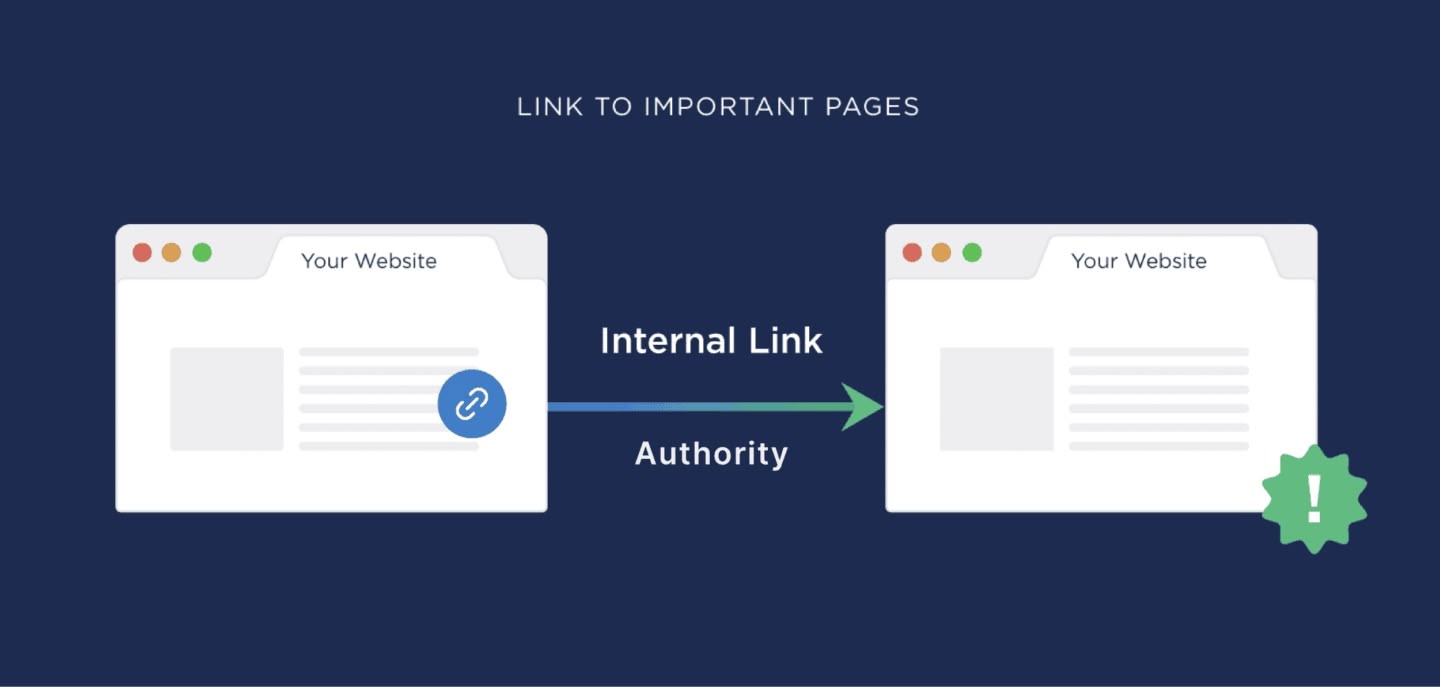
Your strongest, most trusted posts vouch for new URLs through internal links. That makes it easier for Google to discover them quickly, understand where they belong, and justify spending crawl resources on them.
At this point, the URL Inspection tool becomes a helpful companion rather than a crutch.

Use it when you publish a particularly important piece or when you want to double‑check that Google can access and render the page.
If the foundations and internal links are solid, you don’t need to spam “Request indexing” on every minor change.
Promote new posts in ways that support indexing
Indexing isn’t only influenced by what happens inside your site. Outside signals matter too.
When real people discover your new article, spend time on it, share it and sometimes link back to it, those behaviors feed into how often Google wants to revisit your site and how much trust it places in new URLs.
The key is to send real users, not fake signals.
Instead of pushing links into long‑dead bookmarking sites and generic directories, focus on channels where you already have some trust and attention.
Promote content on:
- Social media: On platforms like X and LinkedIn, don’t just drop a bare link. Share a short thread walking through the exact situation many bloggers are in – sitting for weeks in “crawled – currently not indexed” – and then invite people to read the full breakdown.
- Email newsletter: Email your list with a short story about why you wrote this guide and what changed in your own indexing workflow.
- Communities and groups: In relevant communities and groups, show up with helpful answers first, then share the guide when it truly fits the discussion.
If you want more ideas for this side of the equation, I share over 27 promotion plays in my in‑depth post on increasing blog traffic.
Many of those tactics naturally support faster indexing because they send qualified, engaged visitors to your content.
You can also use AI tools as a research assistant to keep your content and examples fresh.
When you’re planning to update this guide next year, you could use the workflows I shared in my posts on finding trending content ideas with AI and on my favourite Perplexity research hacks to see how creators are currently talking about indexing problems.
🔑 The point is not to chase a one‑day spike. It’s to keep your site active, your content fresh and your audience engaged so Google has every reason to keep crawling and indexing what you publish.
Troubleshoot posts that refuse to index
Even if you do all of this, you’ll still have a handful of URLs that drag their feet.
That’s normal.
What matters is how you debug them.

Your first stop is the Pages report in Search Console.
Find the problem URL and look at how Google is classifying it.
- Discovered – currently not indexed: Google knows the URL exists but hasn’t crawled it yet. That often points to weak discovery signals to a site where Google is being a bit conservative with how much it crawls at once.
- Crawled – currently not indexed: Googlebot has seen the content but has decided not to keep it in the index. That usually signals a quality or duplication issue rather than a technical bug.
- Duplicate, Google chose different canonical: Google thinks another URL on your site is a better representative of that content.
For each non-indexed article, ask yourself the following questions:
- Is this post easy to find from relevant, high‑value pages on my site, or is it buried?
- Does it genuinely add something new, or is it repeating what three other posts on my blog already say?
- Is there another URL that covers almost the same topic, which could be confusing Google’s canonical choice?
If the honest answer is that the content itself is weak, the fix isn’t another request for indexing. It’s an upgrade.
Re‑outline the piece, add specific examples, screenshots and stories from your own experiments.
When AI gets involved, the quality bar shoots up even higher.
In my data‑backed study on AI content and SEO, I show how lazy AI rewrites usually fail, while edited, opinionated AI-assisted articles can still work well.
Use that thinking when you’re deciding whether to fix a stubborn URL or merge it into a stronger, more complete guide.
A quick checklist before you hit publish
Before you publish any new post, run through this simple checklist:
- Assign a topical home: Decide which hub or topic cluster this post belongs to so it’s not a random one-off Google won’t know where to file.
- Check discoverability: Make sure your XML sitemap and robots.txt aren’t quietly working against you, and that this new URL will actually be listed and crawlable there.
- Add 3-5 internal links: Right after publishing, go into existing, relevant posts and add short, contextual references that genuinely help the reader, pointing to your new guide.
- Use URL Inspection once for key posts: If this piece is important, inspect the URL in Search Console and request indexing once, mainly as a confirmation that Google can access and render it.
- Share your article: Send it to your email list and post it on your main platforms. Then watch how fast it goes from “Discovered” to actually indexed.
Final words
Indexing delays aren’t a personal attack from Google.
They’re just a side effect of a web overflowing with AI-generated content, combined with crawl systems that have to be more selective than before.
The good news? You don’t need hacks to fix this.
If you fix your foundations once, publish inside clear topical clusters, use internal links strategically, and ship content that genuinely adds something new, you’ll notice your new posts getting discovered, crawled, and indexed more predictably.
For your next article, don’t just hit publish and hope.