Nowadays, network-thinking note-taking apps are all the rage.
Obsidian is popular among them.
But it has its downsides:
- Lack of outlining features (for Roam fans out there!)
- Lack of features in Android and iOS apps
- Difficult to take quick notes on the go.
- Only offline support (a pro if you think in security terms though)
Now to its alternatives.
Logseq – Outliner’s choice

I know people who are looking for Obsidian alternatives are here for security and future-proofing their notes. That’s why I featured Logseq over Roam Research.
Logseq is an outliner app by heart. Rather than asking if what app is right for you, you need to ask – “Am I looking for an outliner app or a pure note-taking app? How I would like the app I use to shape me?”.
For me, the answer was both.
That’s why I use Logseq and Obsidian together.
- Just link both of them to a singular master vault.
- Set the same default date format in both of the apps
- Set “Folder to create new notes in” to “pages” in Obsidian. Logseq is religious about it, so.
- Turn use [[Wikilinks]] to off in Obsidian
- Set “New Link Format” to “Relative path to file” in Obsidian
- Set new attachments folder to “assets” in Obsidian
- Set new daily notes location to “journal” in Obsidian
If you’re sure that you value long form note-taking over outlining style, Obsidian may be the best bet. Because it has got better graph view, better community plugin support, Obsidian Publish feature, bug-free software (yes, Logseq crashes sometimes) and mobile apps.
Anyhow, you can make use of Obsidian’s Outliner and Zoom plugin to bring outlining functionality to it.
❓ Did you know? Obsidian is from the same developers of Dynalist (a leading outlining tool that I’ve been using for blog outlines before Notion from 2017). There should be a solid reason why didn’t bring the best of Dynalist to Obsidian.
If you love Roam for outlining features and Obsidian for privacy, and wish they had a baby 👶, Logseq would be the best bet.
Whatever app you decide in the future, with some refactoring, your vaults are future-proof.
Roam Research – Cloud-based outliner

It is a cloud-based note-taking application that has a similar structure to Obsidian. However, it is not as private as Obsidian and Logseq since it is stored on their servers. Nevertheless, it offers regular features like bi-directional links, daily pages, and transclusion.
If you value having access to your notes from anywhere, right inside of your browser, you love Roam Research.
And also as it’s a SaaS-based solution, it doesn’t need maintenance. With solutions like Obsidian or Logseq I need to setup syncing, scheduled backups, and also periodic note refactoring if things don’t work as intended.
Along with these features, Roam’s block level backlinking is really impressive.
As Niles Wyler outlined in this post:
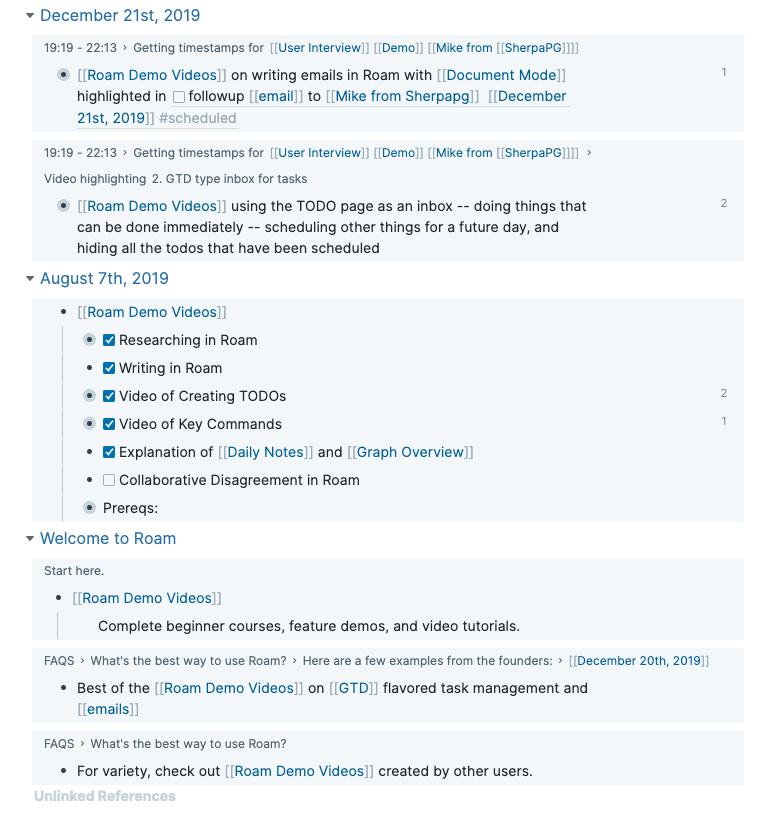
“When you create links between pages, the nested blocks are also automatically shown in Roam along with the breadcrumb, block-level links that lead up to the selected block of interest. This provides additional context between pages, but also allows for impressive, block-level filtering capabilities.”
This block-based organizational structure with Roam Research made him switch from Obsidian to Roam.
But, there are far more number of people migrating off Roam to Obsidian (more recently Ali Abdaal thinking of it).
These are their reasons:
- With Roam you won’t own your data.
- Your data is stored in sort of a database in proprietary format.
- The launch time of the app is painfully slow. For jotting down your fleeting ideas, it introduces a lot of friction.
- Roam is an outliner app, not a note-taking app.
Notion

Notion is a project management app at heart. Its organization is database-driven.
Obsidian or Logseq, on the other hand, is a note-taking app that uses backlinks and tagging for organizations. It follows networked-thought principles and is built for people who want to generate ideas through their writing.
Although you can manage your knowledge in Notion, it’s not as effective as Obsidian because of its design difference, lack of powerful backlinking feature, and slowness.
Obsidian is also local-first, meaning it’s blazing fast. Notion, while being a cloud application, still has some loading issues. Also, the offline support in their apps is long pending.
When it comes to the target audience, Obsidian is geared towards people who love markdown and appreciate privacy. Notion, on the other hand, is for people who value aesthetics in their work management tools.
People who need a cloud-based solution, but are not ready to go with Roam Research and who feel like Obsidian is too geeky for them, tend to settle with Notion for PKM (even if it means it’s not a specialist app). Or people like me use Notion for team knowledge management but for PKM use Obsidian.
👉 If you’re managing your entire life in Notion, it may make logical sense for you to manage your personal knowledge as well in Notion. With this, you’ll be able to reap the benefits of systemic emergence. But do you value this kind of emergence over other features you’ll be missing out on like superior backlinking and graph view?
Remnote

Remnote definitely has some advantages over say Obsidian. The biggest one is probably its spaced repetition feature, which is very well implemented. It tries to be both a spaced repetition and PKM (personal knowledge management) app, but it doesn’t really excel at either.
In contrast, Obsidian is strictly a PKM tool and does a much better job at it. If you need spaced repetition, you can anyhow use a separate app (like Anki) or an Obsidian plugin.
Additionally, Obsidian just looks and feels better to use. It’s more customizable and has a thriving community of users who create themes and plugins. All in all, Obsidian is the better choice for most people.
Remnote is a paid app (whose target market also happens to be students!) while Obsidian is free. This alone makes Obsidian a much more attractive option.
Other Obsidian alternatives
- Mem.ai: Super fast for “spotlight-style” capture, so you can dump ideas without friction and keep moving. It also leans into AI (artificial intelligence) to resurface the right notes at the right time. They’ve launched Mem X for team-style “second brain” workflows, and they’ve raised $5.6M in funding.
- Athens Research: An open-source Roam-style app built by Jeff Tang. It’s Y Combinator-backed, and right now they’re focused on building out team features.
- Hypernotes: Part of the Zenkit suite, so it plugs into their other tools and runs on a shared data platform. It’s mostly aimed at enterprise users, but compared to Obsidian it can feel limiting, and the graph view can get laggy as you scale.
- Foam: If you already live in VS Code, Foam can be a solid fit because it works right inside your editor. The trade-off is the learning curve, especially if you’re not already comfortable with coding and markdown.