Black Friday is here.
And Veed just dropped their biggest discount of the year.
If you’ve been waiting to upgrade your video editing game, this is it.
Up to 45% off on all pricing plans.
AI subtitles, instant resizing, clean audio – all in your browser.
Veed Black Friday Bundle - 45% OFF!
Get 45% off annual Pro plans or 25% off first 3 months on monthly plans. Plus get an exclusive AI Video Guide emailed after subscription. Limited time offer ending Nov 30!Veed Black Friday Bundle - 45% OFF!
Get 45% off annual Pro plans or 25% off first 3 months on monthly plans. Plus get an exclusive AI Video Guide emailed after subscription. Limited time offer ending Nov 30!No downloads. No complexity. Just fast, professional videos.
Let me show you what’s inside.
Veed Black Friday offer
Veed’s Black Friday 2025 bundle is live right now.
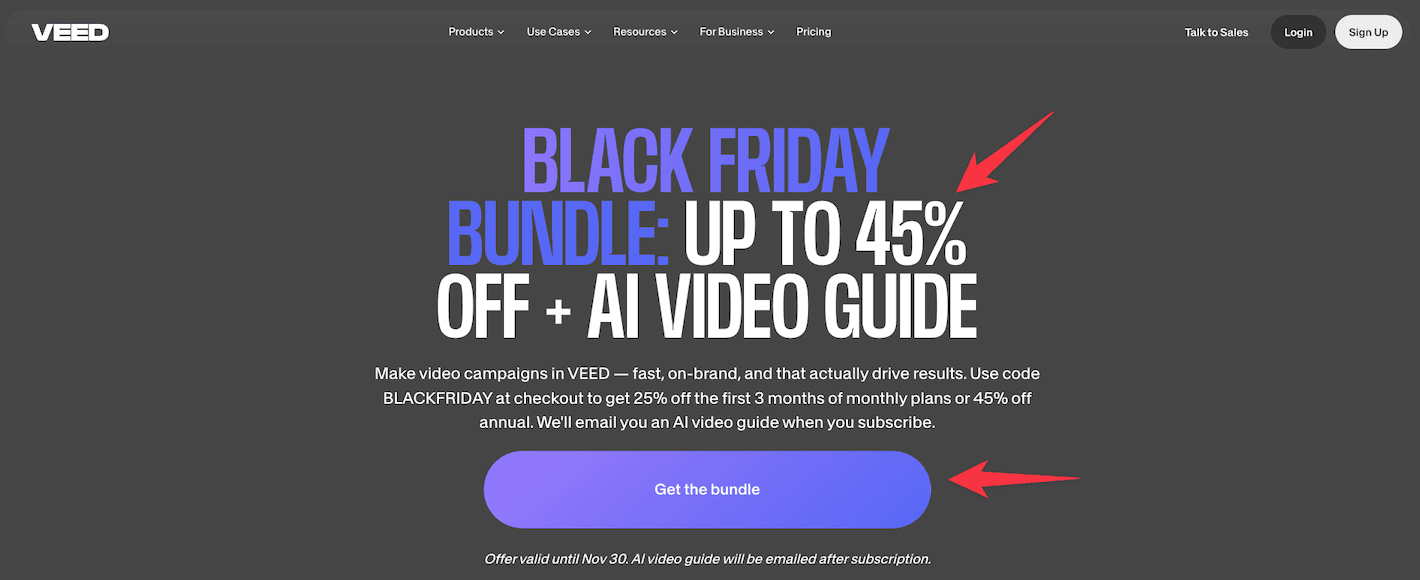
Here’s what you get:
- Monthly Pro Plans: 25% off for the first 3 months
- Annual Pro Plans: 45% off (best value!)
- Bonus: AI Video Guide emailed after subscription
To claim this deal, click on this exclusive link and hit the “Get the Bundle” button.
Select the plan that works for you.
At checkout, enter the code “BLACKFRIDAY” and make sure the discount applies. Then complete your payment.
This bundle unlocks Veed’s full feature set at the lowest price of the year.
You get AI subtitle generation, brand kits, auto-resizing tools, and premium export options. Plus that exclusive AI video guide to help you create campaigns that actually get results.
Perfect timing if you’re planning to scale video content in 2025.
Claim Veed Black Friday discount
What is Veed?

Veed is an online video editing platform built for speed, simplicity, and automation.
Unlike heavy desktop software, Veed runs entirely in your browser – no downloads, no learning curve, and no crashes.
Its loaded with features that help content creators, marketers, coaches, and small teams:
- Edit videos quickly
- Add subtitles with a single click
- Resize for every platform (YouTube, TikTok, Instagram, LinkedIn)
- Brand everything with custom logos, fonts, and templates
- Collaborate across teams with shared workspaces and review links
At its core, Veed is designed for fast content creation.
Want to film a course? Record reels in batches? Turn boring Zoom calls into polished clips?
Veed handles it all.
And here’s the best part!
AI is now baked into core features like transcription, cleanup, and content repurposing. This means you can produce more content with way less effort.
If you’re creating video content regularly but hate dealing with complex editing tools, Veed gives you that sweet spot between power and ease.
Features of Veed

Veed gives you a complete, browser-based video editing experience designed to move fast without giving up quality.
Here’s what you get:
- Screen and webcam recording: It lets you record your screen, webcam, or both right inside Veed. Great for tutorials, product demos, and talking-head videos.
- Clean audio with one click: It removes background noise and balances your audio instantly with AI. Perfect for making video calls, voiceovers, or casual recordings sound professional.
- AI-powered subtitles: You can generate subtitles in seconds, then style them to match your brand. This boosts engagement, especially when people watch your videos on mute.
- Auto-transcription and translation: You can turn your audio into accurate captions automatically. Then translate into multiple languages with a single click.
- Instant resizing for social media: You can switch between vertical, square, and landscape formats in seconds. This makes it easy to share one video across multiple platforms.
- Templates and branding: You get to save your fonts, colors, and logos in Veed’s brand kit. Apply them across all your videos with just a few clicks for a consistent look.
- Collaboration tools: You get to share review links, get timestamped feedback, and manage team workflows all in one place.
- Fast cloud rendering: It exports videos quickly without slowing down your device, thanks to Veed’s cloud-based processing.
Whether you’re making TikToks in batches or editing weekly YouTube content, Veed gives you speed, clarity, and flexibility without overwhelming you.
Veed vs other competitors
Let’s compare Veed with other video tools out there.
- CapCut: CapCut works great for quick phone edits, especially TikToks. But it falls short on team features, brand control, and browser-based workflows. Veed gives you more options and professional tools right in your browser.
- Descript: Descript excels at audio and podcast editing. Yes, it has video features too. But many find the interface confusing. Veed is more straightforward and focuses on visuals, subtitles, and content that’s ready for social media.
- Canva video: Canva’s video tools are improving but still basic. It’s better for simple animations or basic cuts. Veed offers stronger audio tools, better transcription, and more flexible video editing options.
- Adobe Express video: Adobe Express has good templates and branding options, but often feels slow and complicated. Veed stays quick, responsive, and beginner-friendly without sacrificing quality.
If you need to edit fast, keep your branding consistent, and publish across different platforms without complex timelines, Veed is one of the most practical all-in-one tools out there.
Pros and Cons of Veed
Pros 👍
- User-friendly interface: You get a web-based layout that’s dead simple to use. Both beginners and pros can trim videos and edit timelines with almost no learning curve.
- Free testing option: You can try the core features before upgrading. Perfect for testing if Veed works for your needs.
- Ready-made templates: You get thousands of templates you can customize with simple drag-and-drop. This speeds up your video creation process dramatically.
- AI-powered automation: You save tons of time with auto-subtitles, AI dubbing, Magic Cut (which removes those awkward silences and filler words automatically), and eye contact correction. These features are game-changers for busy creators and marketers.
- One-click audio enhancement: Click once and boom – your audio sounds crisp and clear without any background noise.
- Content creation shortcuts: You can just type your script and Veed converts it into videos. You can even use AI avatars. This makes content production super quick for social media, marketing, and training videos.
- Content repurposing tools: The AI Clips tool lets you create highlight reels and short-form content from your longer videos. No more manual cutting and pasting.
- Global audience reach: You can turn your English video into multiple languages instantly. The AI can even clone your voice or use avatars. Great for reaching global audiences without extra work.
Cons 👎
- Pricing for pro features: You’ll need to pay up if you want those cool AI tools and premium templates. Same goes for high-quality exports.
- Performance issues: You might experience lagging, buffering, or rare crashes if you’re using the free version or editing big files, especially when using heavy AI features.
- Sluggish uploads: You can expect larger files to take a while to upload, especially during busy periods when many people are using the platform.
- Limited granular controls: Templates are convenient, but you’ll find that deep customization still takes time and manual effort. It’s not as flexible as advanced editing software.
- Occasional AI editing errors: The automated edits (subtitles, dubbing, background removal) aren’t always perfect. You might need to review and fix things manually.
- Not for studio-grade editing: It’s great for quick content, but you won’t find it replacing Premiere Pro or DaVinci Resolve if you’re working on high-budget productions.
Final thoughts
Veed’s Black Friday 2025 deals give you up to 45% off. That makes professional video editing way more affordable.
You get AI-powered features like auto-subtitles, audio cleanup, and instant resizing. This means you can create polished content faster and easier.
If you’re a creator, marketer, or entrepreneur, this is your chance to upgrade your video workflow at the year’s best price.
These exclusive offers end November 30th.