You’ve probably heard the hype about Semrush.
But does it actually deliver?
Or is it just another overpriced SEO tool that promises the world and gives you half-truths?
And I won’t sugarcoat it.
Some parts are brilliant. Others? Not so much.
In this Semrush review, I’m putting Semrush through 3 real accuracy tests using my own site data, comparing it against Google Search Console, and breaking down what’s actually worth your money.
Let’s get into it.
What is Semrush?
Semrush is an all-in-one digital marketing platform that combines SEO, content marketing, competitive research, PPC, and social media tools.
With access to over 27 billion keywords and comprehensive site auditing capabilities, it’s designed for marketers, agencies, and businesses looking to improve their online visibility.
The platform offers deep competitor analysis, keyword research, backlink tracking, and AI-powered insights.
While it has a steep learning curve and premium pricing, Semrush remains one of the most powerful marketing suites available, particularly for users who need integrated data across multiple channels in one dashboard.
👍 What I like about Semrush
- The all-in-one approach: You get SEO, content, competitive research, advertising, and social media tools in one platform. Everything connects, which saves a ton of time.
- Keyword Magic Tool is unmatched: With access to over 27 billion keywords, AI-powered clustering, and intent analysis, it’s one of the best keyword research tools out there.
- Competitive intelligence is top-tier: If you want to know what your competitors are doing, Semrush gives you everything. Top pages, traffic sources, ad strategies, backlink profiles. It’s all there, and it’s one of the strongest parts of the platform.
- AI visibility tracking: Most SEO tools aren’t even attempting to track ChatGPT, Perplexity, or Google AI Overviews yet. Semrush is making an early move here, and while it’s not perfect, it shows where the platform is heading.
- The new design is actually better. The June 2025 interface update made navigation cleaner, added visual keyword clusters, and improved reporting. It’s easier to find what you need without getting lost in menus.
- On-page SEO recommendations: The feedback is specific, practical, and well-integrated with the rest of the platform. You’re not just getting isolated suggestions. Everything connects back to your keyword data and competitor analysis.
👎 What I don’t like about Semrush
- Traffic estimates are often way of: Here’s where people yell, Elementor sucks! My own site showed a 43% underestimate when I compared Semrush to Google Search Console. If you’re relying on these numbers to make decisions, you’ll be misled. Always cross-check with your own Analytics or Search Console data.
- The learning curve is steep: The platform has a wide array of features that can feel overwhelming for beginners. Even people switching from other SEO tools told me it took a few weeks to feel comfortable. If you’re new to SEO entirely, expect a learning period.
- Pricing can be high: Especially for advanced plans aimed at agencies and larger businesses. The Pro plan starts at around $140/month, and if you need historical data, advanced features, or multi-user access, you’re looking at Guru or Business plans that get expensive fast.
- Some features feel limited on lower tiers: AI features, historical data, and advanced content tools are restricted to higher plans. If you’re on Pro, you might feel like you’re missing out on some of the best parts of the platform.
Upfront bottomline – Semrush review
So, does Semrush suck?
No. But it’s not perfect either.
If you’re serious about SEO and need a full marketing suite, Semrush is one of the best options out there. The Keyword Magic Tool, competitive research, and all-in-one approach make it incredibly powerful once you get past the learning curve.
But here’s the reality: traffic estimates will be off (especially for smaller sites), search volume data lags behind trends, and you’ll pay a premium for the advanced features.
Is it worth it?
If you’re managing multiple sites, running an agency, or need deep competitive intelligence, yes.
The time you save by having everything in one platform justifies the cost.
If you’re a solo blogger or just starting out, you might want to begin with a simpler tool and upgrade to Semrush once you’re ready to scale.

Try Semrush Free for 14 Days!
Test all Semrush features with a 14-day trial and see if it fits your workflow.
Verified
New design
Semrush rolled out a major interface update in June 2025, and honestly, it’s one of the better redesigns I’ve seen from an SEO platform.

The new dashboard is cleaner. Better navigation and visual keyword clusters make it easier to spot opportunities at a glance.
For anyone who’s been using Semrush for a while, these updates make the platform noticeably faster to navigate. The old interface could feel cluttered.
Now, the layout is more streamlined.

You’ve got dashboards for keyword research, site audits, position tracking, competitor analysis, content optimization, and backlink monitoring.
Semrush toolkits
One of the reasons Semrush stands out is its range of specialized toolkits.
Here’s what you get:
- SEO toolkit: Keyword research, position tracking, site audits, competitor analysis, and content gaps.
- Content marketing toolkit: Topic research, SEO writing assistant, content audits, and post tracking with Google Docs and WordPress integration.
- Competitive research toolkit: Competitor top pages, traffic sources, keyword rankings, ad strategies, and backlink profiles.
- Advertising toolkit: PPC research, ad copy analysis, high-intent keywords, and competitor ad spend tracking.
- Social media toolkit: Schedule posts, track engagement, and analyze performance across platforms.
- Agency toolkit: White-label reporting, client management, and multi-project tracking with customizable branding.
- AI toolkit: Track visibility in AI search results (ChatGPT, Perplexity, Google AI Overviews) with keyword clustering and trend analysis.
Overall, the range of toolkits is impressive.
You’re not just getting an SEO tool. You’re getting a full marketing suite that covers search, content, ads, social, and competitive intelligence.
The downside is that it can feel like overkill if you only need one or two of these areas.
Keyword magic tool (Accuracy is unreliable)
This is one of Semrush’s most powerful features, and honestly, it’s a big reason why people stick with the platform.
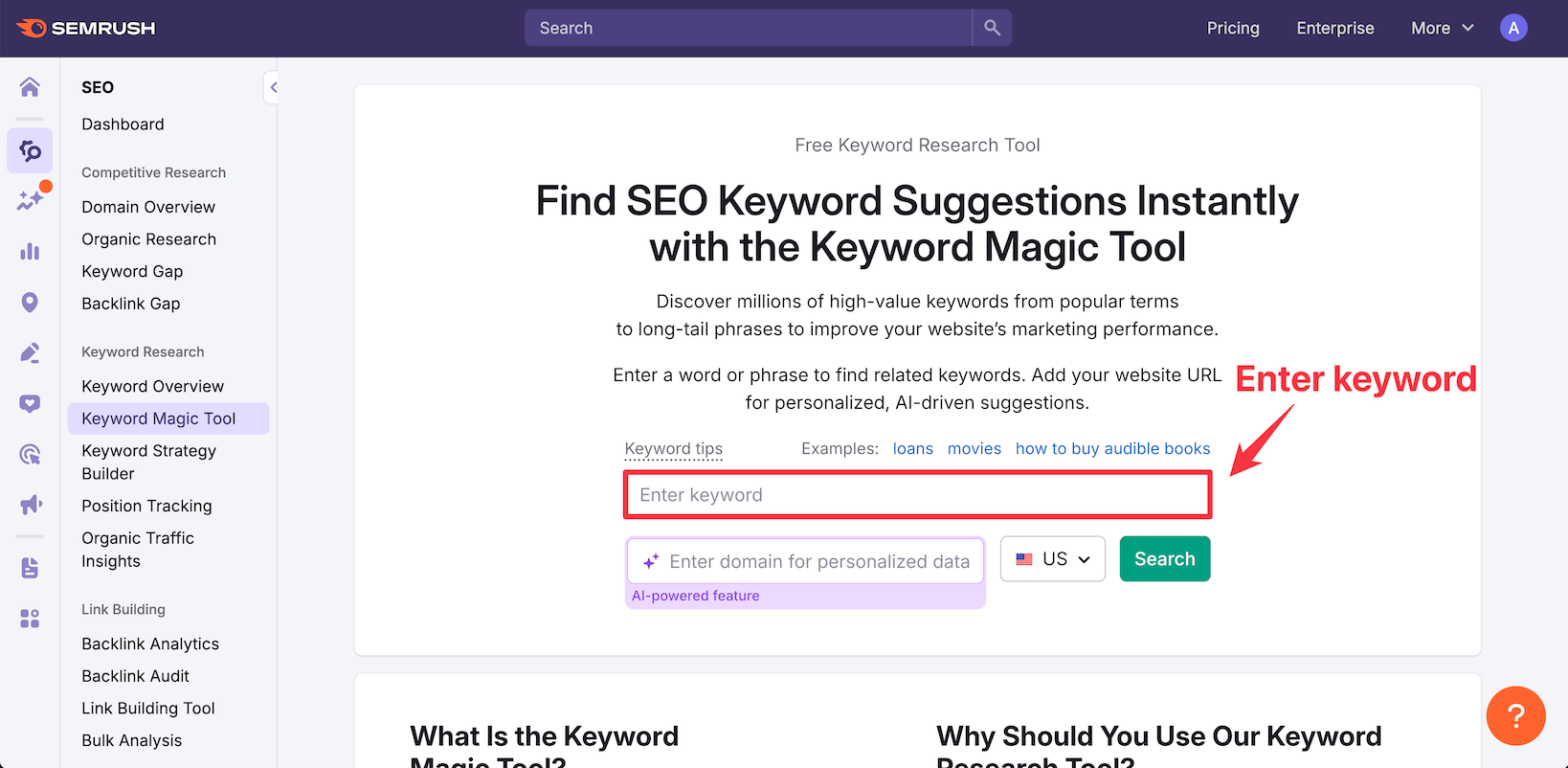
The Keyword Magic Tool gives you access to over 27 billion keywords across different countries and languages.
You can start with a seed keyword and instantly see hundreds or thousands of related terms, along with metrics like search volume, keyword difficulty, CPC, and search intent.

What makes it stand out is the AI-powered clustering and intent analysis.
Instead of just dumping a massive list of keywords on you, it groups them by topic and intent. This makes it way easier to plan content or build PPC campaigns around themes instead of isolated keywords.

When you enter any keyword, it returns all relevant keywords with essential filters to analyze what matters most. I especially liked the search features filter, which lets me target keywords with featured snippets to inform my content planning.
But here’s where accuracy comes in.
Semrush uses 12-month averages for its search volume estimates. That means the number you see is smoothed out across the past year.
In stable niches, this works fine.
But if you’re covering fast-moving topics like AI tools, software reviews, or tech updates, the data often lags behind reality. A keyword that’s surging right now might still show a low volume in Semrush because the tool is averaging it against months when interest was lower.
I’ve seen this firsthand with my own site.
👉 Over the past few months, I’ve shifted toward more content around AI reviews and search-related topics. These keywords are seeing rising interest. But since Semrush averages out the past 12 months, it doesn’t reflect that recent surge. So even if a keyword now has high search demand, it might still show a low volume.
Now let’s talk about keyword difficulty (KD).

Semrush assigns a KD score based on the authority and backlink profiles of the top-ranking pages.
In theory, it shows how hard it would be to rank.
But in practice, I’ve noticed the scores can sometimes be off, especially for newer topics or keywords with mixed SERP intent. The tool is generally reliable for core SEO tasks like backlink and keyword research.
But I treat KD as a rough guide, not something I fully rely on. You still need to look at the SERP, check who’s ranking, and judge for yourself.
Then there’s CPC (cost-per-click). This metric comes from Google Ads data and gives an idea of commercial intent. Generally, I’ve found Semrush’s CPC estimates to be directionally useful.
But for long-tail or niche queries, the numbers are often zero, even when we know there’s ad activity happening.
👉 Bottomline: Despite these limitations, the Keyword Magic Tool is one of the best keyword research tools out there. The sheer volume of data, combined with clustering and export features, makes it incredibly powerful. Just keep in mind that you might need a learning period to use it efficiently. Some users find it overwhelming at first because of how much data you can pull.
Website analysis (Accuracy is way off!)
Semrush’s website analysis tools give you detailed insights into your own site and your competitors. You can run comprehensive site audits, track competitive performance, and get on-page SEO recommendations all from one dashboard.
The platform is praised for its detailed reporting and ability to track multiple metrics across domains. You can see technical issues, content gaps, backlink profiles, and ranking changes in one place.
But here’s where I need to be honest about accuracy.
Traffic estimates can be significantly off, especially for smaller sites.
Let me show you what I found when I tested this with my own site.

My site gets 3.71k clicks per month in Google Search Console.

That’s a nearly 43% underestimate.
This part sucks. Because you buy Semrush mainly for competitor traffic analysis. And this may dishearten you.
And I’m not alone.
I’ve seen this pattern across multiple sites I manage, and the research backs it up.
One Reddit user put it bluntly: “Traffic analysis if not connected to GSC or analytics is wrong af. Was telling my website… 16k visits per month while… it is only 4k/month.”
Here’s why this happens:
Semrush doesn’t pull data directly from your Google Analytics or Search Console. Instead, it uses a mix of clickstream data, CTR models, and its own crawling systems to estimate traffic.
So what does this mean for you?
| Tool | Small sites (<10k/mo) | Mid sites (10k-100k/mo) | Large sites (100k+/mo) |
| Semrush | Underestimates ~40-60% | Underestimates ~30-45% | Underestimates ~30% |
| Similarweb | Similar bias | Slightly better accuracy | Comparable to Semrush |
| Ahrefs | Highly inconsistent | Unpredictable | Same volatility |
- Small sites (under 10k visits/month): Expect Semrush to underestimate by 40-60%. Your 3.7k could show up as 2k or less.
- Mid-sized sites (10k-100k visits/month): The underestimate drops to around 30-45%.
- Large sites (100k+ visits/month): Semrush gets closer, typically underestimating by about 30%.
Bottom line?
Semrush is fine for spotting directional trends and competitive benchmarks. If traffic is up or down in Semrush, it’s usually a real shift, even if the exact numbers are off.
But for actual traffic numbers, especially on smaller sites, it sucks! Always refer to your own Google Analytics or Search Console data.
One limitation worth noting: the analysis is restricted to Google data, and global search volume estimates aren’t always available. Reporting limits and historical data access are also restricted to higher-tier plans.
Top pages
One area where Semrush does excel is identifying top-performing pages for any domain.
You can see which pages are driving the most organic traffic, which keywords they rank for, and how their performance changes over time. This is incredibly useful for competitive analysis and for finding content gaps on your own site.
For this example, let me take Macy’s.

Suppose if you have an e-commerce shop, you can easily get to know what are all the top pages which are getting traffic on Macy’s website.
The data is generally accurate for these purposes. You can quickly spot what’s working for competitors and reverse-engineer their strategy.
But again, keep in mind that the tool may underestimate traffic for smaller sites, and keyword rankings can be less reliable for sites with very niche or fluctuating traffic.
Top keywords
Semrush also shows you the top keywords any domain ranks for, along with their positions, search volumes, and traffic estimates.

And also when you drill in any keyword, you will get to know the position history for a keyword to help you know the fluctuations in positions.
As usual, you can filter by position, search volume, or keyword difficulty to find quick wins.
Traffic generation channels
Semrush tracks organic, paid, and referral traffic channels, giving you actionable insights into where traffic is coming from and how to optimize campaigns.
You can see the split between direct, organic search, paid search, social, referral, and email traffic. This helps you understand which channels are worth investing in.
However, data for paid search and social media channels is less accurate than for organic search. For these channels, specialized tools may be preferable. The organic search data tends to be the most reliable part of Semrush’s traffic analysis.
AI visibility analysis
This is one of Semrush’s newest features, and it’s a big deal if you’re paying attention to where search is heading.
The AI visibility tools help you monitor how your content shows up in AI-generated search results like ChatGPT, Perplexity, Google AI Overviews, and Copilot. As more people start using AI tools to find information, tracking your visibility in these platforms becomes just as important as tracking your Google rankings.
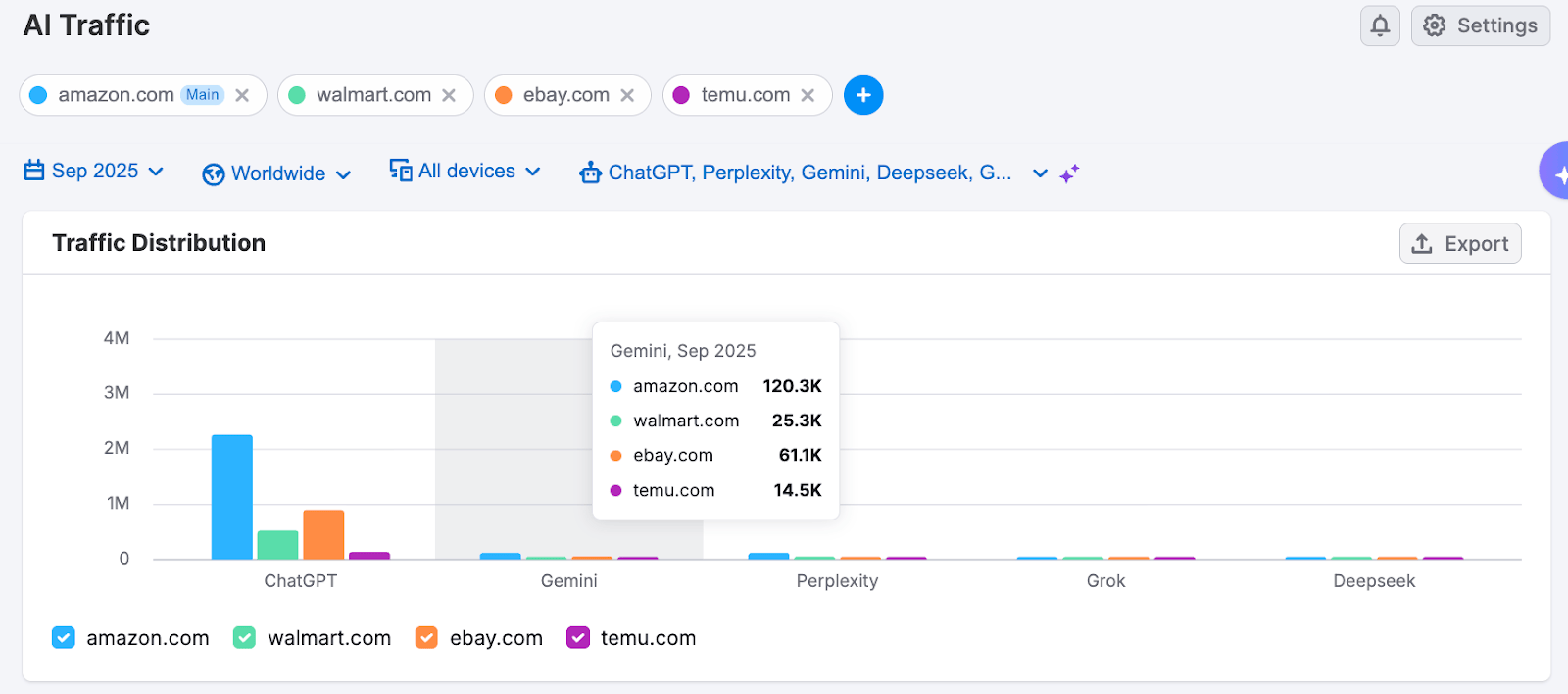
Semrush gives you an AI Traffic Dashboard that estimates how much traffic your site might be getting from AI-based sources. It shows you:
- How much of your traffic might be coming from generative AI tools
- How those numbers compare month-over-month
- What percentage of traffic is AI versus traditional organic
I really liked the report where you can add multiple websites and compare their AI visibility.
For the below example, I have added some popular e-commerce websites and you can see how their traffic compares when it comes to different AI search engine visibility.
Now, how accurate is this AI traffic data?
From what I’ve seen so far, the dashboard gives a broad estimate. It’s definitely helpful for spotting early signals and trends.
But I wouldn’t call it precise.
There’s no direct referrer data from these tools yet. Which means Semrush is mostly using models and detection patterns like content snippets used in responses, prompt-matching, and estimated visibility to guess where AI traffic might be landing.
And keep in mind that these AI features are only available on higher-tier plans, which can be expensive if you need multi-user access.
Content toolkit
If you’re creating content regularly, Semrush’s Content Toolkit gives you a solid set of tools to plan, write, and optimize.
Here’s what you get:
- Topic research helps you find content ideas based on what’s already ranking and what questions people are asking. You can see trending topics, headlines that perform well, and subtopics you should cover.
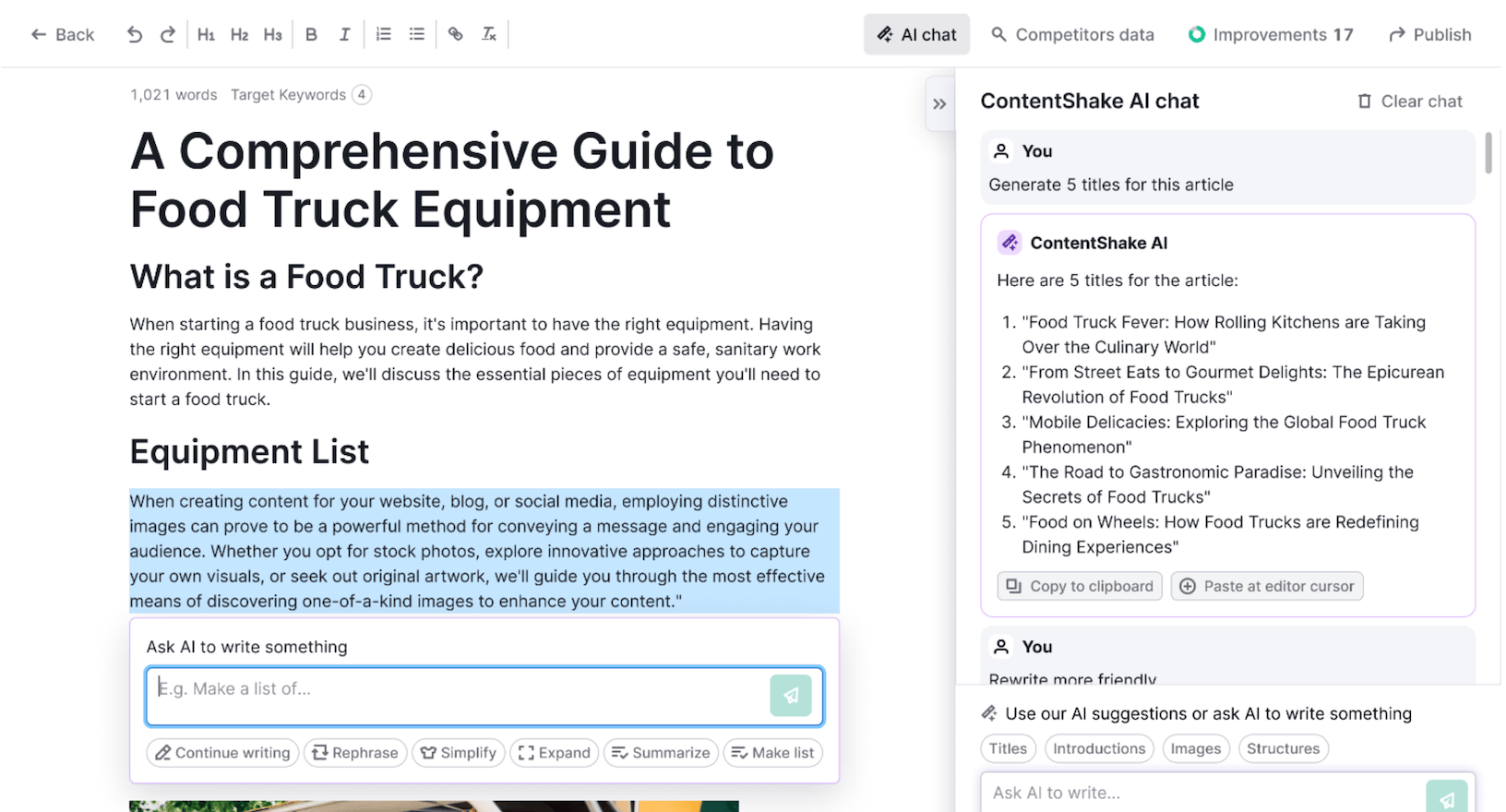
- SEO Writing Assistant integrates with Google Docs and WordPress, giving you real-time feedback as you write. It checks readability, keyword usage, tone of voice, and originality. You can see your SEO score update live, which makes optimization feel less like guesswork.
- Content audit lets you review your existing content to see what’s working, what’s outdated, and what needs a refresh. It tracks engagement, rankings, and backlinks for each piece, so you can prioritize updates that will actually move the needle.
- Post tracking monitors how your published content performs over time, including rankings, traffic, and social shares.
The toolkit provides suggestions for optimization, readability analysis, and topic research. It integrates well with keyword research and helps you create targeted, SEO-friendly content.
Is it as powerful as standalone tools like Clearscope or Surfer?
No. Those tools are more specialized and often give deeper recommendations.
But for most use cases, Semrush’s content toolkit is solid enough. Especially if you want everything in one platform instead of juggling multiple subscriptions.
The downside? Some users report that the suggestions can be generic, and advanced content features are only available on higher-tier plans. If you’re on the Pro plan, you might find the toolkit a bit limited.
On-page SEO tool
Semrush’s on-page SEO tool gives you detailed recommendations for optimizing page elements, meta tags, and content structure.
You enter a target keyword and URL, and it analyzes your page against the top-ranking competitors. Then it tells you what to fix.

You’ll get actionable feedback on:
- Title tags and meta descriptions
- Header structure and keyword placement
- Content length and depth
- Internal linking opportunities
- Technical issues like page speed or mobile usability
- Semantic keywords to include
The recommendations are highly regarded for being practical and well-integrated with other Semrush features. You’re not just getting isolated suggestions. The tool connects back to your keyword data, site audit findings, and competitor analysis.
This is one of the areas where Semrush really shines.
That said, some users report that the recommendations can be repetitive or less tailored to specific industries. The tool’s effectiveness depends on the quality of the input content. If your page is too far off from what’s ranking, the suggestions might feel generic.
But overall, it’s a strong tool for on-page optimization, especially if you’re working on a lot of pages and need a systematic way to improve them.
Wrap up
Semrush is a powerful all-in-one SEO platform with excellent competitive research and keyword tools. However, traffic estimates can be significantly off for smaller sites, and the learning curve is steep.
If you’re managing multiple sites or running an agency, it’s worth the investment.
Solo bloggers might find better value elsewhere like with Mangools.
Try the free trial of Semrush to see if it fits your needs before committing.