Here’s the fact:
Building communities is the future of creator economy.
No?
When it comes to community platforms, Circle and Mighty Networks are the two of the most popular community platforms out there.
So which one should you pick?
First, here’s a quick comparison table to get us started:
| Features | Mighty Networks | Circle.so |
| 💲 Starting price | $95/mo | $89/mo (billed annually) |
| 💸 Transaction fees | 0% | Hidden transaction fees not shown on pricing |
| 📱 Mobile apps | Apps for iOS, Android and also completely whitelabel app (Called Mighty Pro) | Has both iOS and Android apps with whitelabel option |
| 📚 Courses | Yes. But it lacks certificates, course compliance, video retention graphs, etc. | Yes. But lacks course certificates, compliance, video retention graphs, etc. |
| 📷 Has native live streaming? | Yes | Yes |
| Integrations | Poor at native integrations. You need to use Zapier. It surprisingly lacks API! | Offers native integrations with over 10 apps and Zapier. |
| Explore 👉 | 🔗 Explore Mighty Networks | 🔗 Explore Circle |
Quick decision
What do we like about Mighty Networks over Circle.so 👍?
- Extra features: You get events, a calendar, and location-based matchmaking
- Group messaging: Members can chat in groups up to 9 people (but why? this might create small cliques you may not like)
- Events calendar: See all your upcoming events and live sessions in one place
- No transaction fees: You keep all your money – no extra fees on any plan
What do we like about Circle.so over Mighty Networks 👍?
- Simple to use: Circle feels like Slack – clean and easy to use.
- All in one tool: Circle is aiming to be an all-in-one tool. It even comes with email marketing abilities and rolling out a lot of features.
- Automation workflows: With Circle’s Business plan, you can automate tasks using triggers and actions
- Better community control: Circle blocks bad words and spam – perfect for big communities. Don’t try public communities with Mighty Networks!
- Embed widget: Put your Circle community right on your WordPress site or other platforms
- Better gamification features: Circle offers badges, leaderboards, and achievement systems to increase engagement. While Mighty Networks has recently added basic gamification like streaks and profile recognition, Circle’s system is still more comprehensive (remember your KPI = Community engagement)
Upfront Bottomline ✨
Let me be clear: Circle wins this comparison.
It’s just easier to use than Mighty Networks.
Plus, Circle keeps getting better, fast.
They focus on what matters: automation, connecting with other tools, and marketing features.
But Mighty Networks?
While they’ve recently improved their interface (it’s much cleaner now), they still fall short in critical areas.
Here’s the big issue: to get access to integrations and API, you need to go with their Scale plan at $215/month. That’s a steep price just to connect your community with other tools.
Circle, on the other hand, offers better integrations at lower price points.
In essence, Circle is the clear choice. It works better, keeps improving faster, and doesn’t lock essential features behind expensive paywalls.
Overview

Circle started in 2019.
The founders came from Teachable – Sid Yadav (first designer), Andrew Guttormsen (VP of growth), and Rudy Santino (head of design).
Here’s something interesting:
Ankur Nagpal, who started Teachable, became one of Circle’s early investors and provided strategic guidance.

Get Started with Circle
Create engaging communities with Circle's simple, powerful platform. Try it free.
Verified

Mighty Networks started in 2017.
Gina Bianchini created it after working at Ning (which sold for $150 million in 2011). Ning was huge – it served over 100 million people.
She wanted to help creators build engaged communities (as an alternative to FB groups).

Try Mighty Networks Free
Build your community with courses, events, and memberships in one place.
Verified
👉 First, both platforms were just community tools you could add to other systems. Now they do everything you need.
Interface
These platforms look quite different.
Circle keeps things clean and simple, like Slack.

The spaces sit neatly in the sidebar, just like channels in Slack.
If you’ve used Slack before, you’ll feel right at home with Circle. It works like a mix between Slack and forums – simple and familiar.
Let me show you something cool:
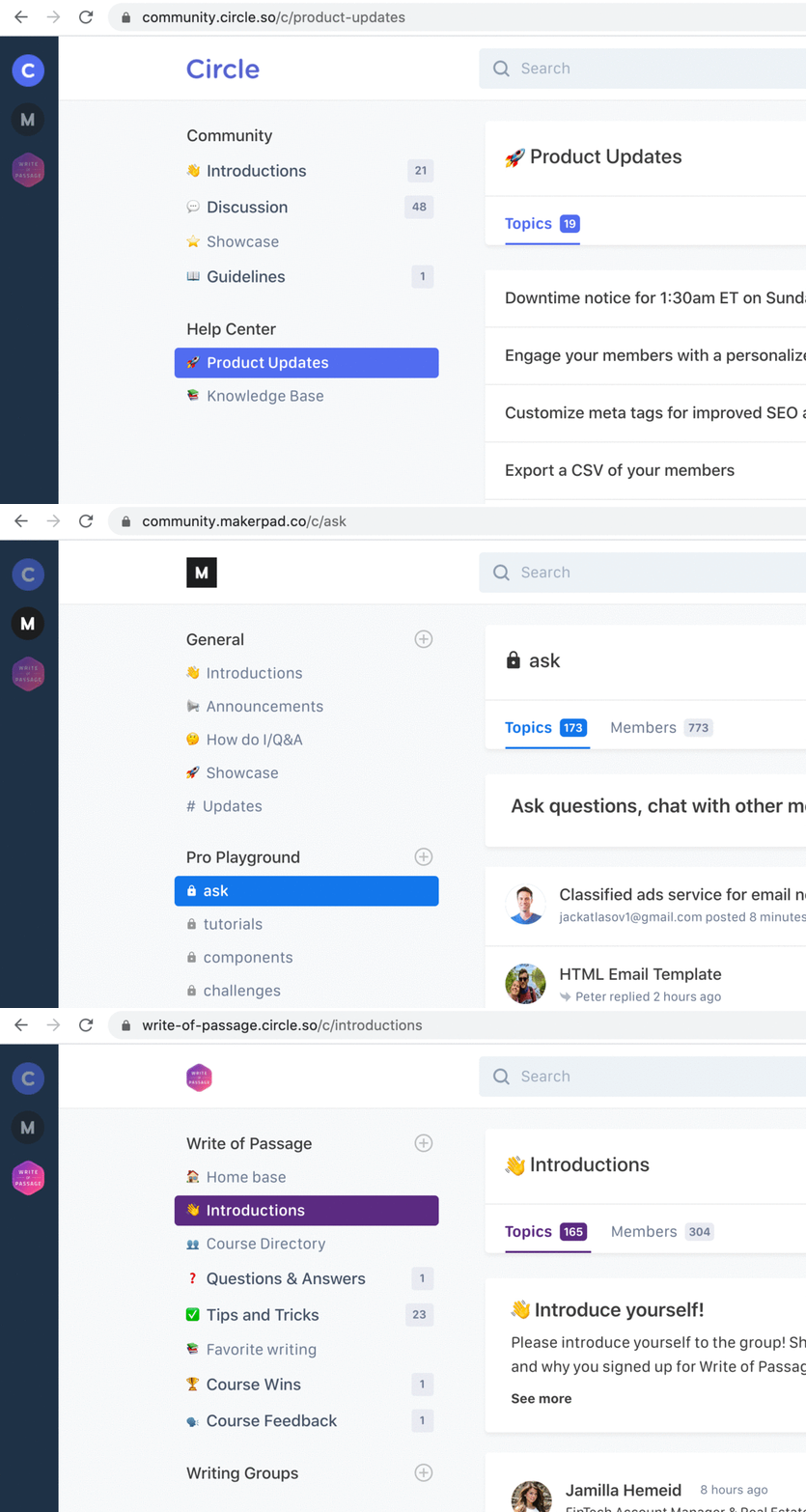
Circle.so has a community switcher tool.
Just one click and you can jump between different spaces or communities.
No need to keep logging in again and again.
Now Mighty Networks:
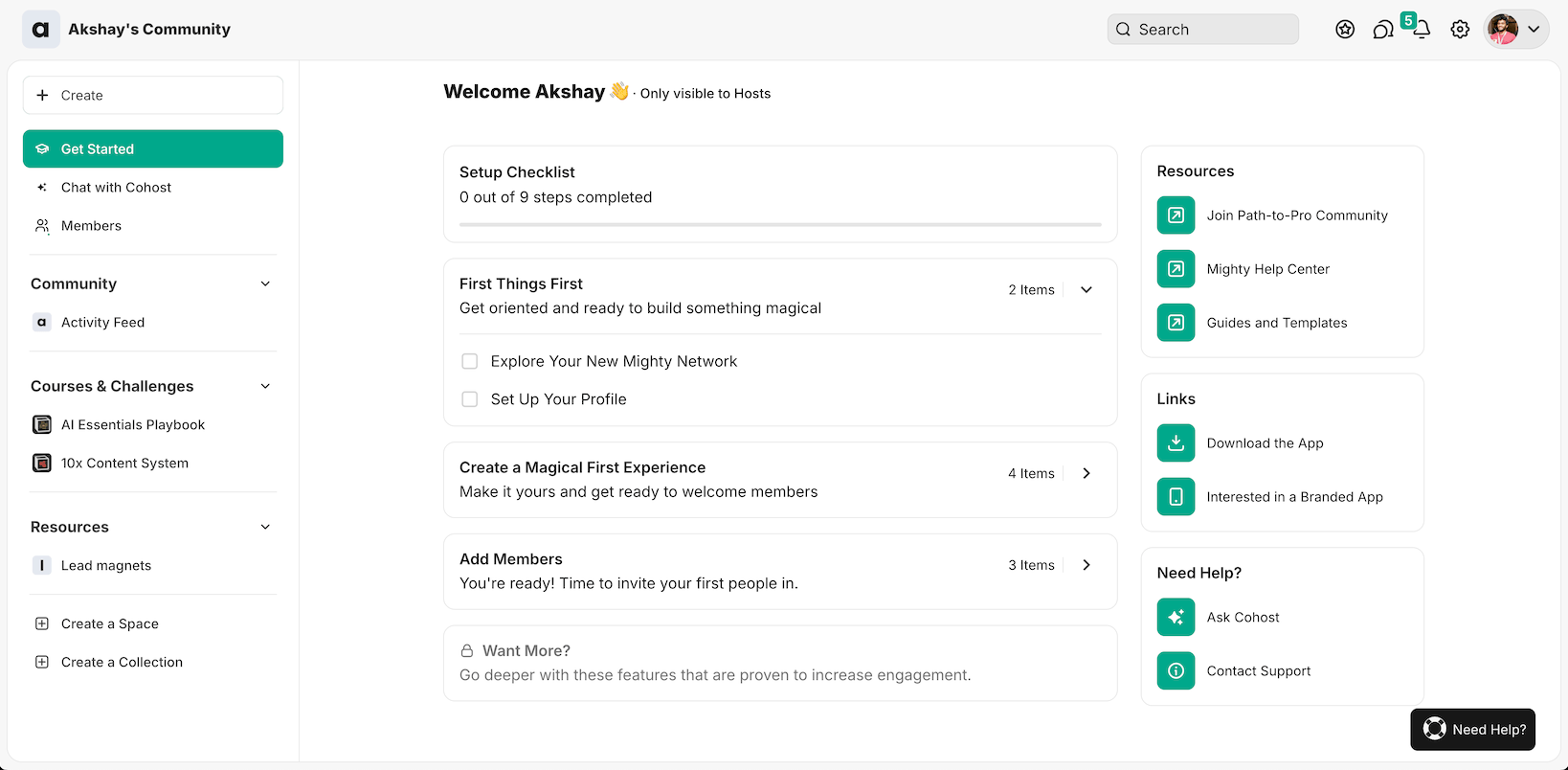
Mighty Networks used to feel clunky and bloated. The interface had oversized elements that made everything hard to navigate.
That was my biggest gripe with the platform.
But here’s the good news:
They’ve cleaned things up significantly. The UI is now much more polished and streamlined.
Navigation feels smoother, and managing your community doesn’t feel like a chore anymore.
It’s still not perfect, but the improvements are noticeable enough that I’m comfortable recommending it again.
🏆 Winner: Circle takes the lead here. Its clean, Slack-like interface is more intuitive and easier to navigate. The community switcher feature is particularly valuable for users managing multiple communities. While Mighty Networks has improved significantly, Circle’s streamlined design makes it the better choice for user experience.
Understanding the organization
Let’s look at how these platforms organize things.
With both of them, you have:
- Groups (you can put multiple spaces in one group)
- Spaces (think of these like Slack channels or WhatsApp groups)
You can make separate groups for each training course in your community.

Let me show you the different types of spaces in Circle:
- Posts: A simple way to share content with your community members
- Events: Set up and run live events when you need to
- Chat: Talk with your members in real-time
- Course: Share your knowledge through online courses
Here’s something important: In Circle, each space can only have one type of content
One more thing about Circle – you can also pick how each space looks by changing its layout.
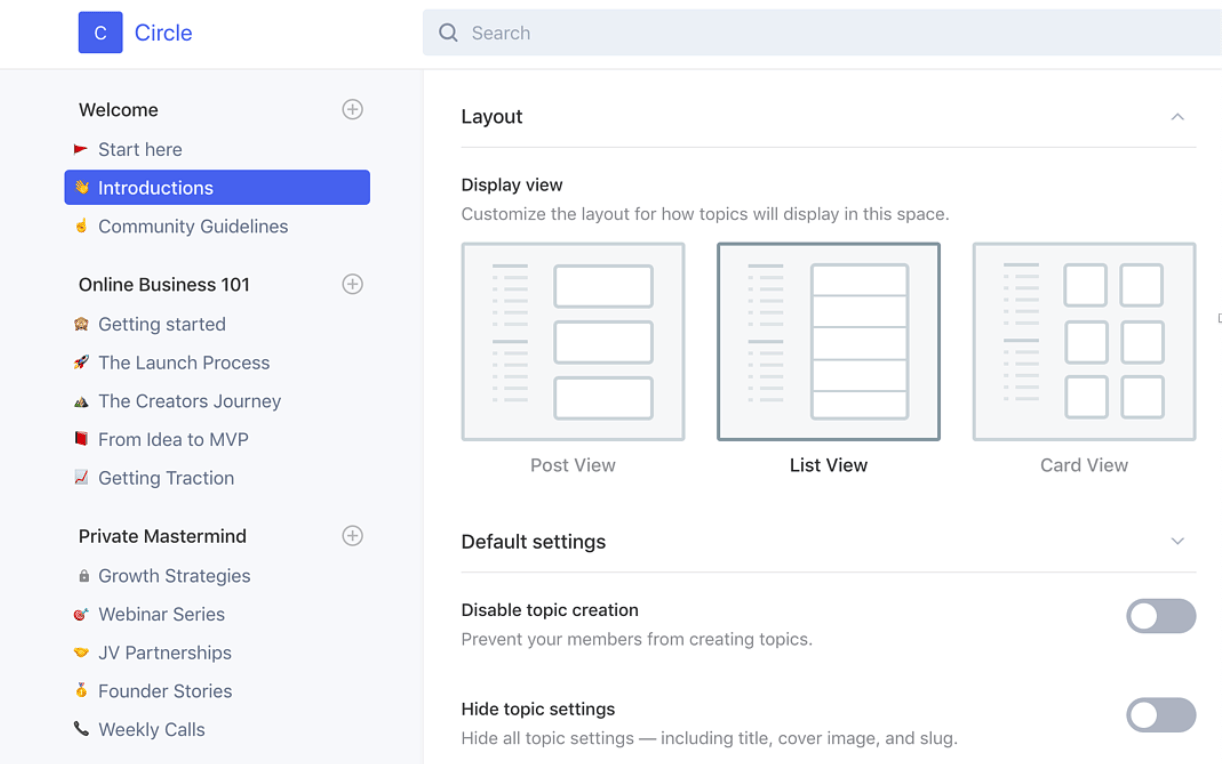
Circle gives you three simple layout options to organize your content:
- Feed: Shows your posts in a scrolling list – great for active discussions
- List: Shows just the basics – title, when it was last updated, and how many likes and comments
- Card: Displays posts in a grid with cover images – perfect for visual content
The feed view works best for most communities.
👉 Circle aims to be like Lego blocks – simple pieces you can put together to build your community. Their founder says they’re trying to be like Notion in this way. They keep it simple: “Circle gives you the building blocks to bring your vision to life”.
Now, Mighty Networks does things differently:
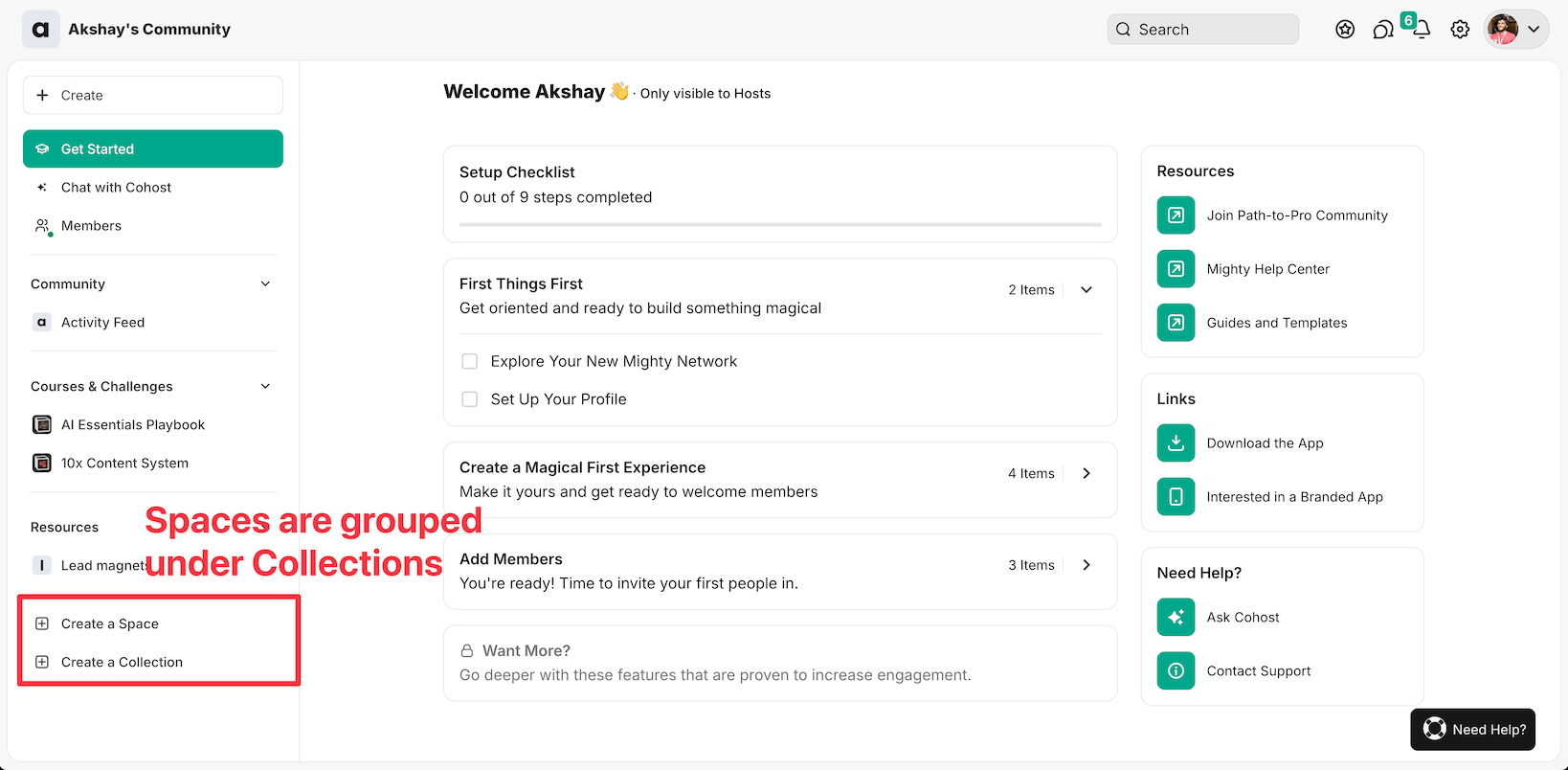
You can create different spaces under collections.
You can turn on multiple features in one space as well.:

- Feed: Share updates and news with everyone
- Events: Run webinars and workshops when needed
- Course: Create courses with lessons and modules
- Discovery: Help members find content and connect
- Members: See who’s who in your community
- Chat: Let members talk to each other
🏆 Winner: Tie. But Circle feels more cleaner.
Content and posts
After setting up your community, it’s time to start posting content.
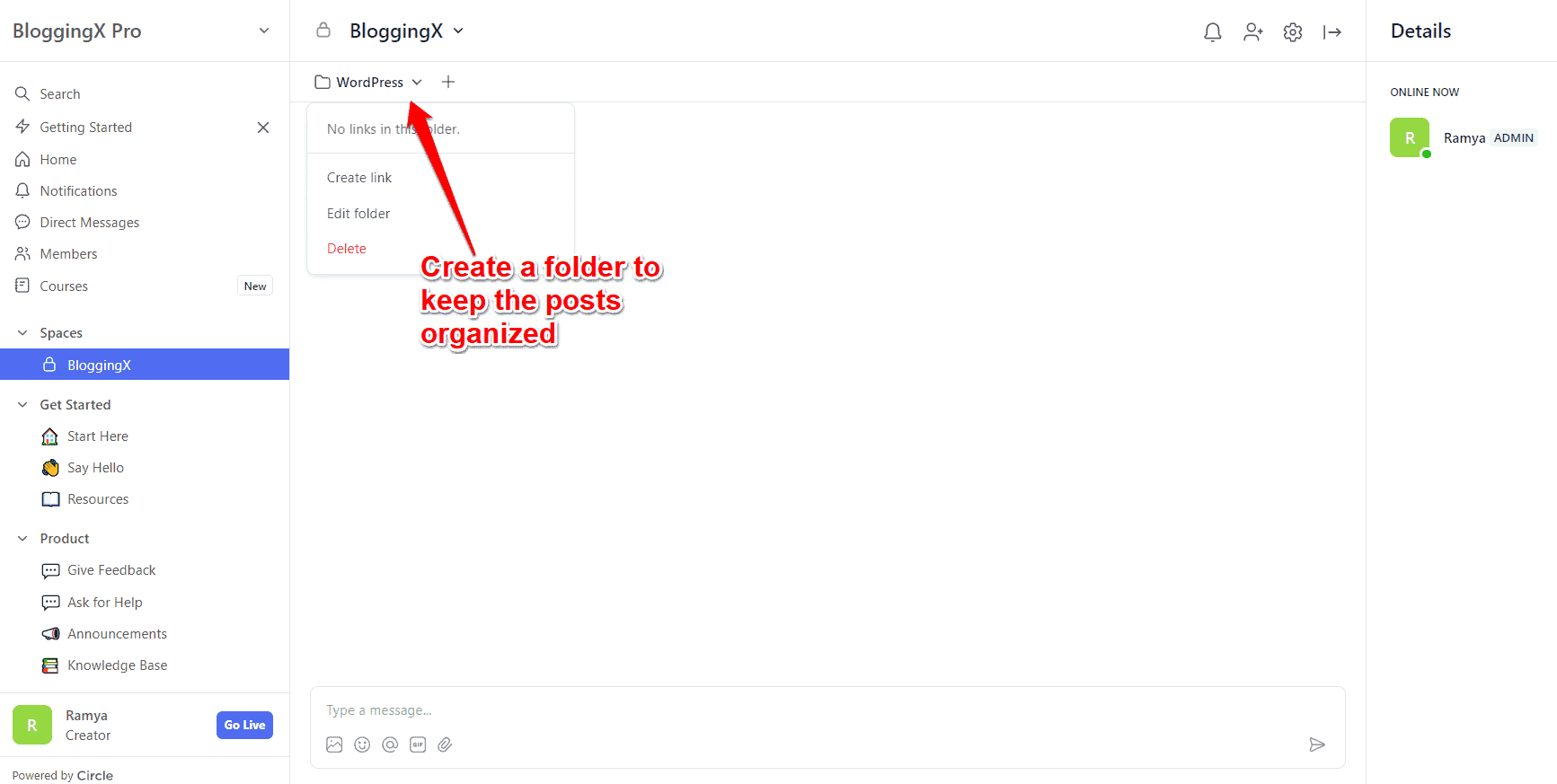
Both platforms let you organize your posts neatly.
You can make folders or collections in each space to keep everything tidy.
Here’s how posting works in each platform:

Circle gives you a really nice editor for making posts.
It works just like Notion – you can add text, pictures, files to download, and even stuff from other websites.
But what about Mighty Networks?
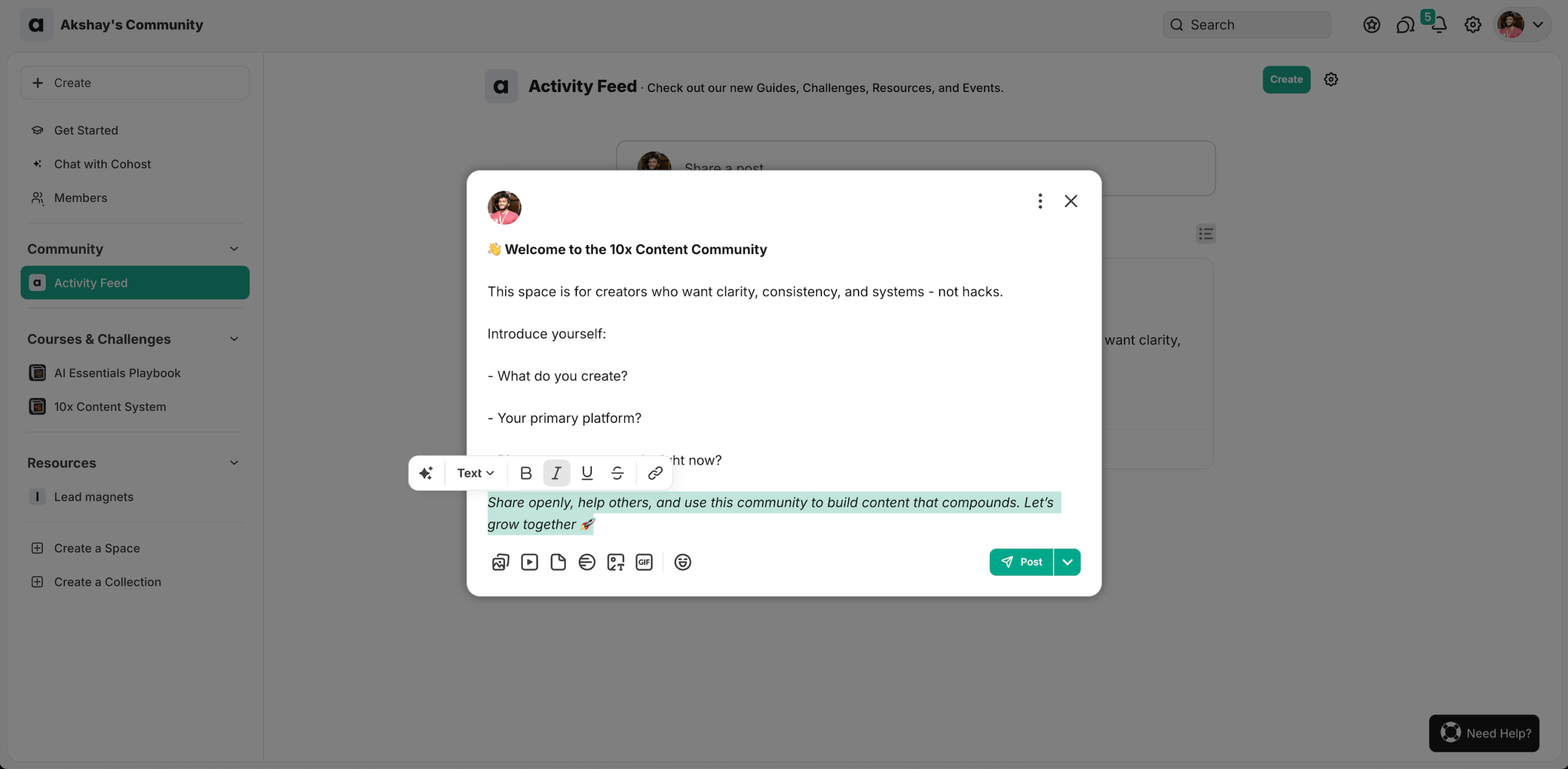
They also have a pretty feature rich post editor, but compared to Circle, it still has some more room for improvement.
🏆 Winner: Circle. Their editor has more features, and their AI helper (with custom prompts) makes posting much easier.
Course builder 📚
Both platforms let you build courses.
You can make self-paced courses or run live classes.
In Circle, first pick “Course” as your space type.
You get three ways to run your course:
- Self-paced: Students get everything right away and learn at their own speed
- Structured: Content comes out bit by bit after students join. Each person gets new sections based on when they started
- Scheduled: Everyone gets new sections on specific dates you set

Each course has sections and lessons inside it.
Circle gives you plenty of ways to build your lessons.
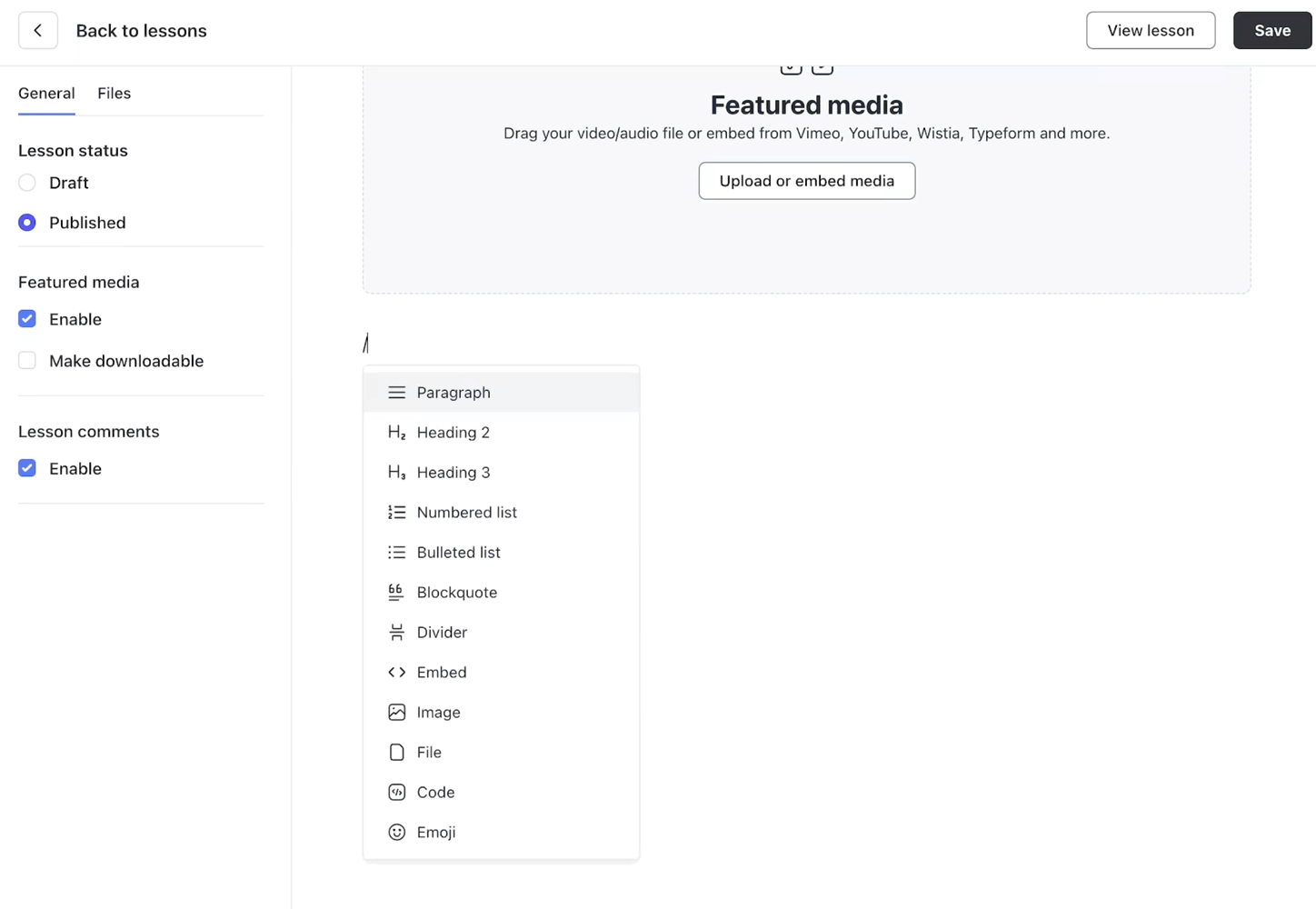
You can add text, videos, audio files, images, and downloadable files – all the basics you need.
Each lesson comes with simple building blocks that help you create your content just the way you want it.

Here’s something cool – you can drip out your lessons over time to keep students from rushing through everything at once.
Plus, students can leave comments on each lesson to share their thoughts.
Let me tell you about Mighty Networks.
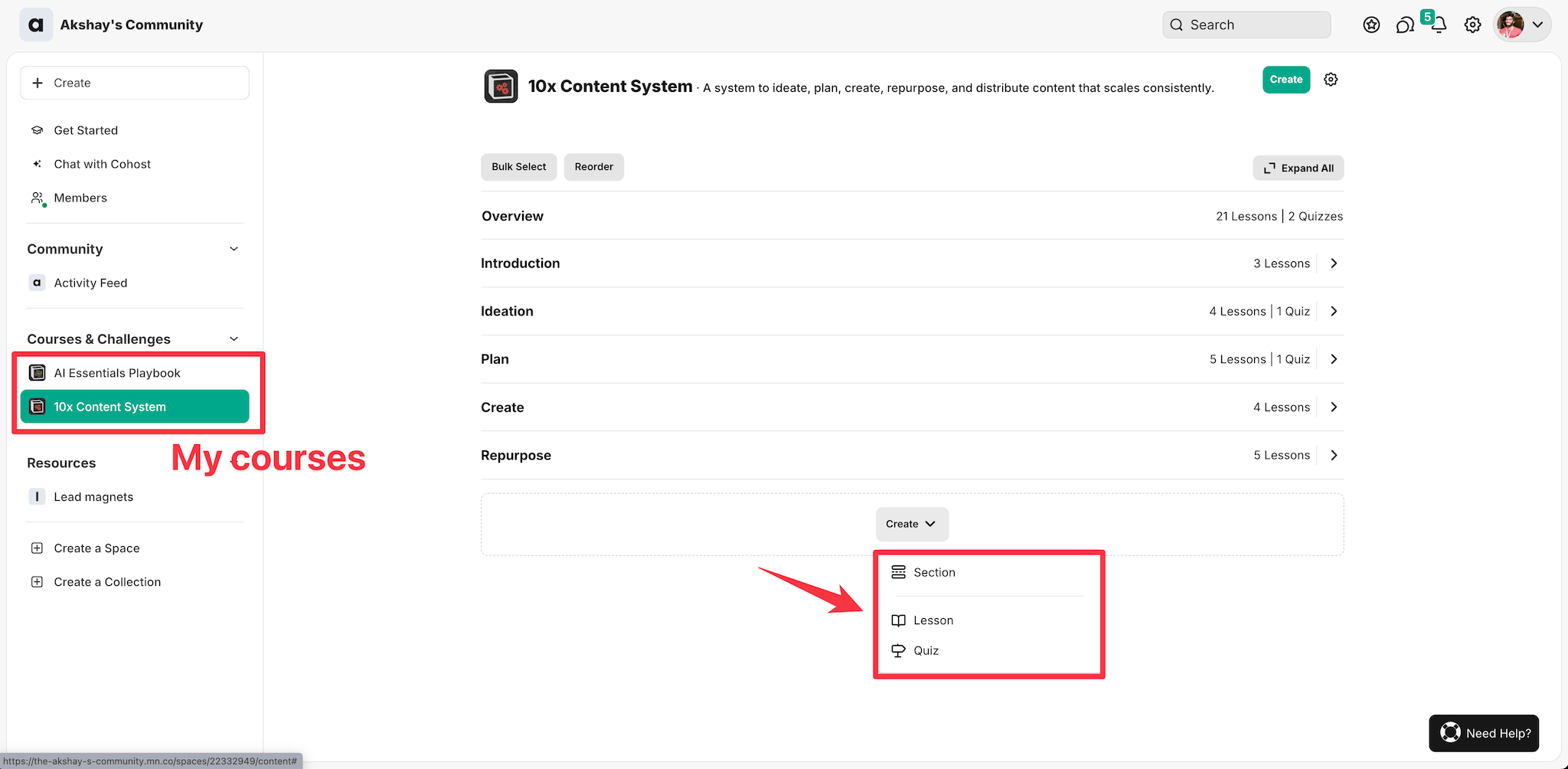
It’s pretty simple – you can make different sections and add lessons or quizzes under each one.
Just like Circle, you can drip feed your content.
There are 3 different types you can unlock the courses:
- Sequential
- Timed
- Scheduled
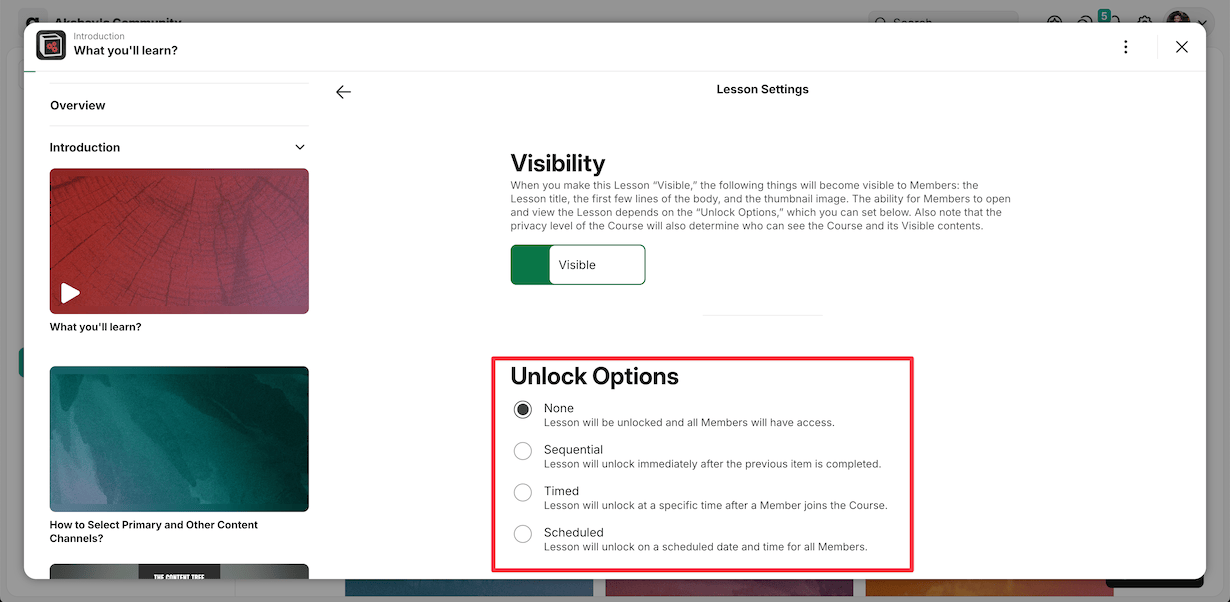
You can require quiz completion before students progress, and the system tracks completion rates and scores to monitor their performance.
🏆 Winner: Tie. But Circle has better course interface.
Community access
Both platforms give you several ways to add members to your community.
You can add members in three ways:
- Type in their email addresses
- Upload a CSV file with contacts
- Share an invite link
Let’s start with Circle.

Here’s something you’ll love – Circle lets you put up paywalls.
This means you can control who gets to see your content and charge money for access.
It’s pretty simple – just set your spaces to private or secret first.
Then set up your paywall.
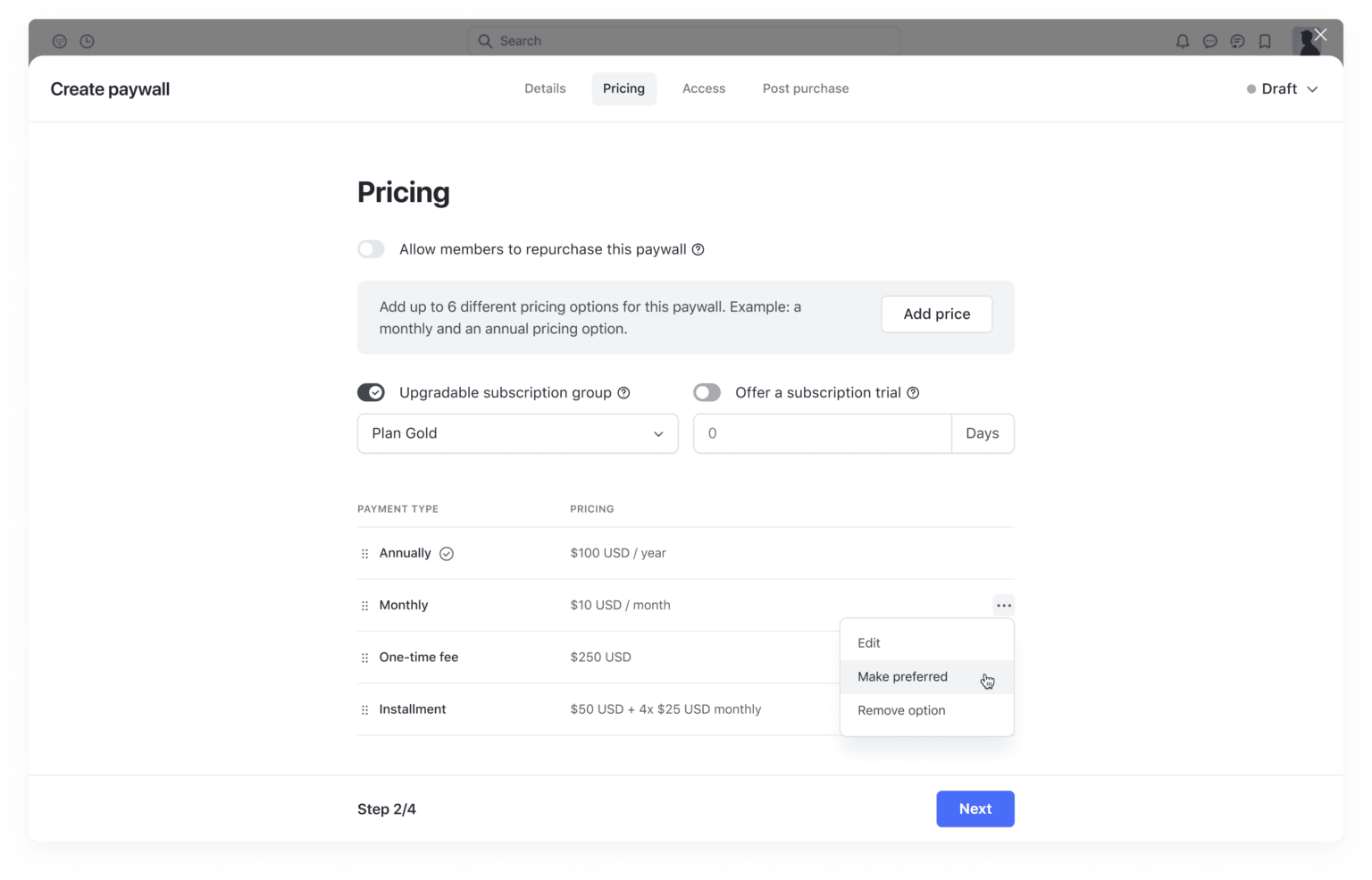
Setting up memberships is pretty simple.
You can set the price, pick which Spaces members can access, and fill in all the membership details.
You can make the after-purchase experience better by:
- Creating a custom thank you page
- Sending them to any URL you want
- Writing your own thank you email
Mighty Networks works similarly – you can make each Space public, private, or paid.

I recommend keeping your Mighty Networks community private rather than public, as it lacks the moderation features that Circle offers.
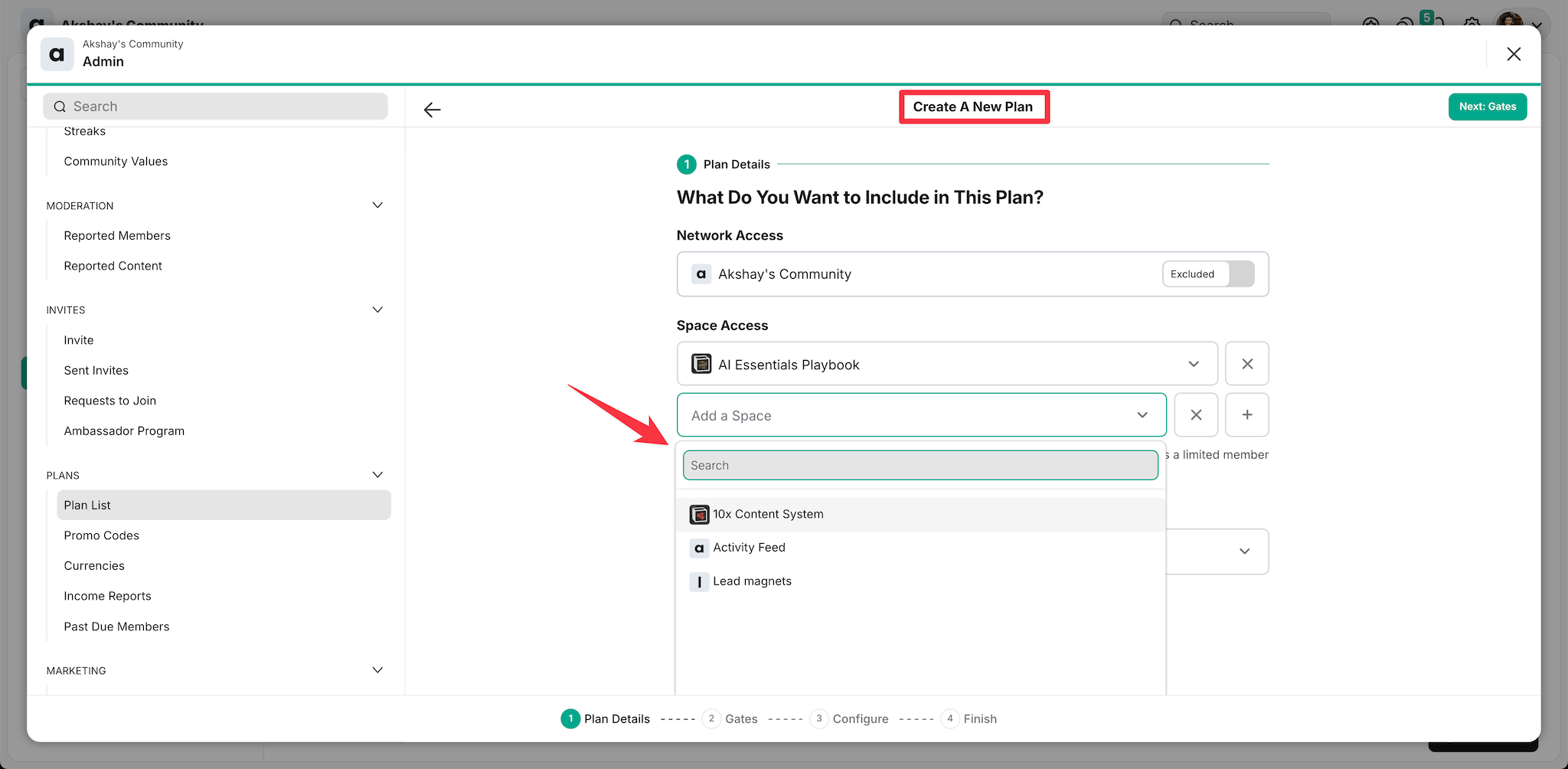
Just like Circle, Mighty Networks lets you set up different plans and control which spaces members can access based on their plan.
👎 But there’s a catch – Mighty Networks doesn’t have a customizable login screen to show content to users who don’t have space access.
🏆 Winner: Circle’s intuitive community access controls and customizable lock screens provide a superior experience. Their new Circle Payments system offers more flexibility for monetization compared to Mighty Networks’ more basic access controls.
Design and customization options ⚙️
Circle lets you easily customize your community’s look and feel. You can change basic things like your community name, URL, logo, and brand colors without any coding knowledge.

Need to build landing pages?
Circle 3.0 gives you a solid landing page builder with pre-made templates across different niches.

After picking a template, you can customize sections using their block-based editor.
If you’ve used WordPress before, you’ll feel right at home with their “sections” approach.
They also have global style controls that save you tons of time – update one element and it changes everywhere it’s used.
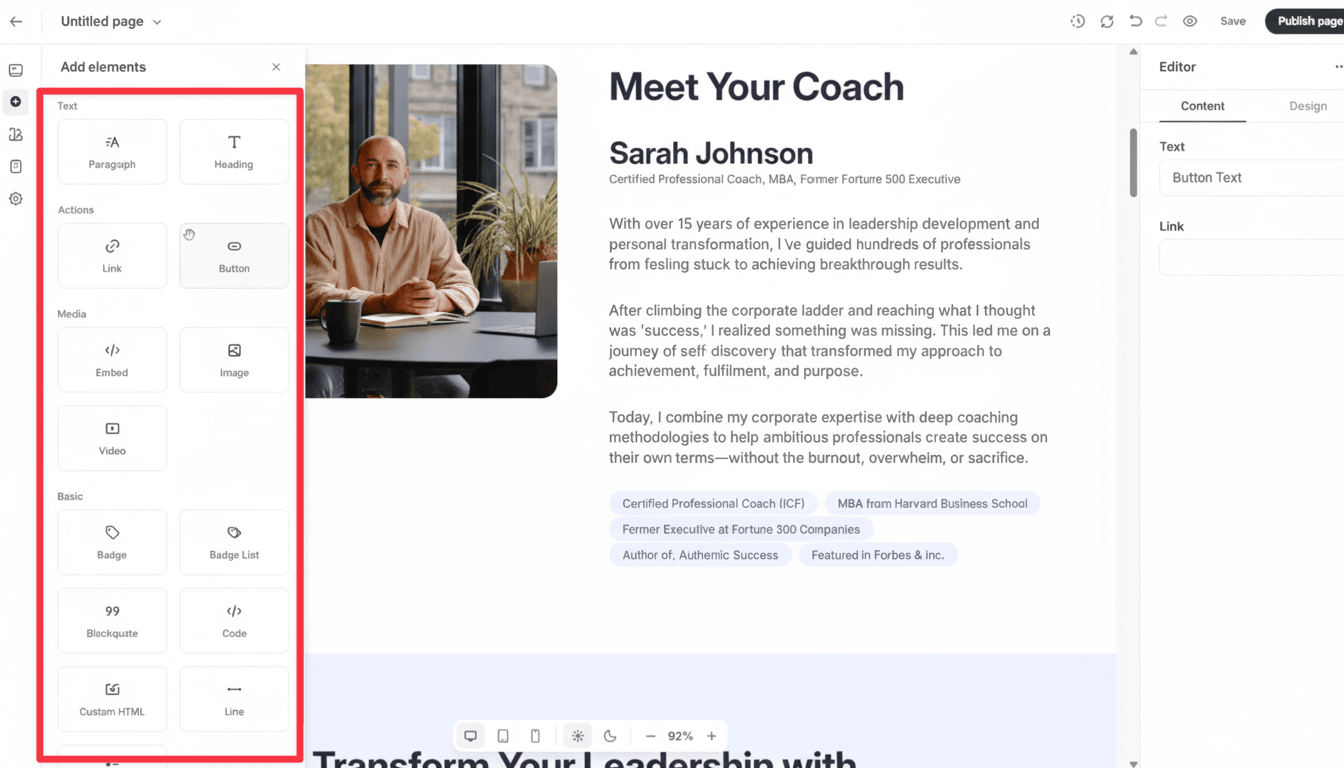
The builder includes basic elements like paragraphs, headings, buttons and links.
👉 For really fancy stuff like parallax effects, you’ll still need specialized tools like WordPress with Elementor.
Mighty Networks has recently rolled out an all-new landing page builder with various sections for headings, media, and story blocks, plus responsive design options.
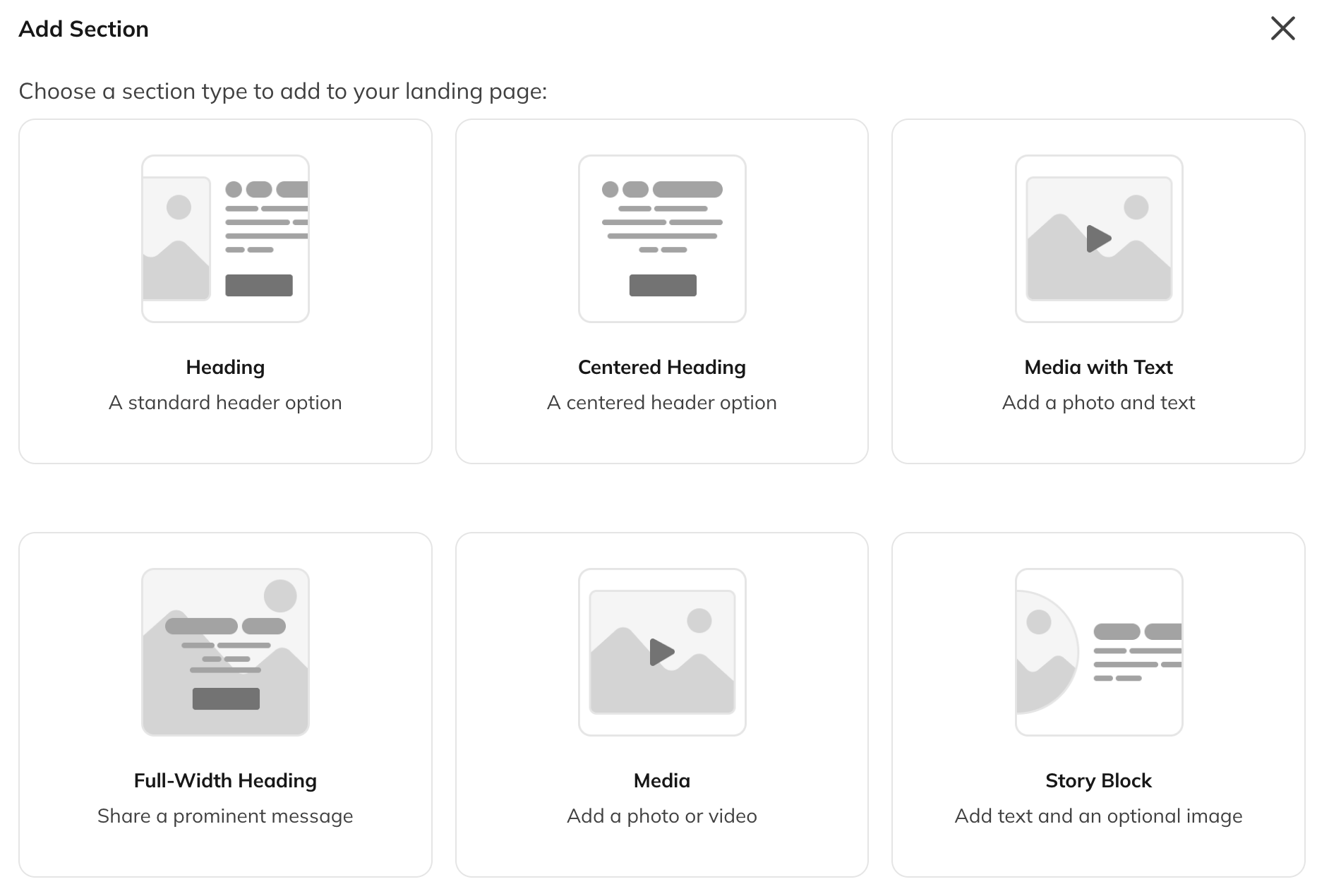
Compared to that of Circle, this feels quite lightweight.
You still require to use WordPress or landing page builder with Mighty.
🏆 Winner: Circle wins with its robust landing page builder featuring templates and block-based editing.
Gamification and engagement features
Both platforms offer member engagement features, but Circle excels with its comprehensive gamification system.
Circle members earn points for:
- Creating posts
- Commenting and reacting
- Attending events
- Regular logins
This point system drives healthy competition and participation.
Achievement badges provide visual recognition for member accomplishments.
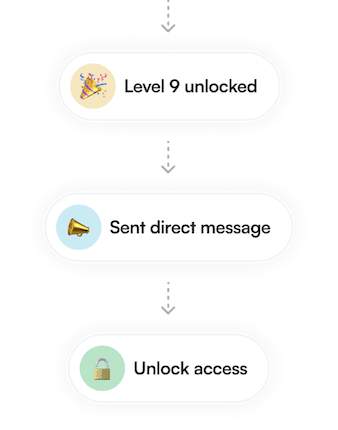
Members get these virtual rewards when they reach milestones or complete specific actions.
These badges work like status symbols and give immediate recognition.
Circle also has these helpful engagement boosters:
- Activity score: Shows how active members are with a simple number.
- Leaderboard: Highlights your most active members based on their scores.
- Weekly digests: Sends summaries of community activity to keep everyone in the loop.
- Member tags: Gives you an easy way to organize and label your members.
Also, Circle gives every member an activity score based on how they interact with your community.

This score looks at things like how often they show up, what they post, and how they connect with others.
Mighty Networks has recently added basic gamification features.
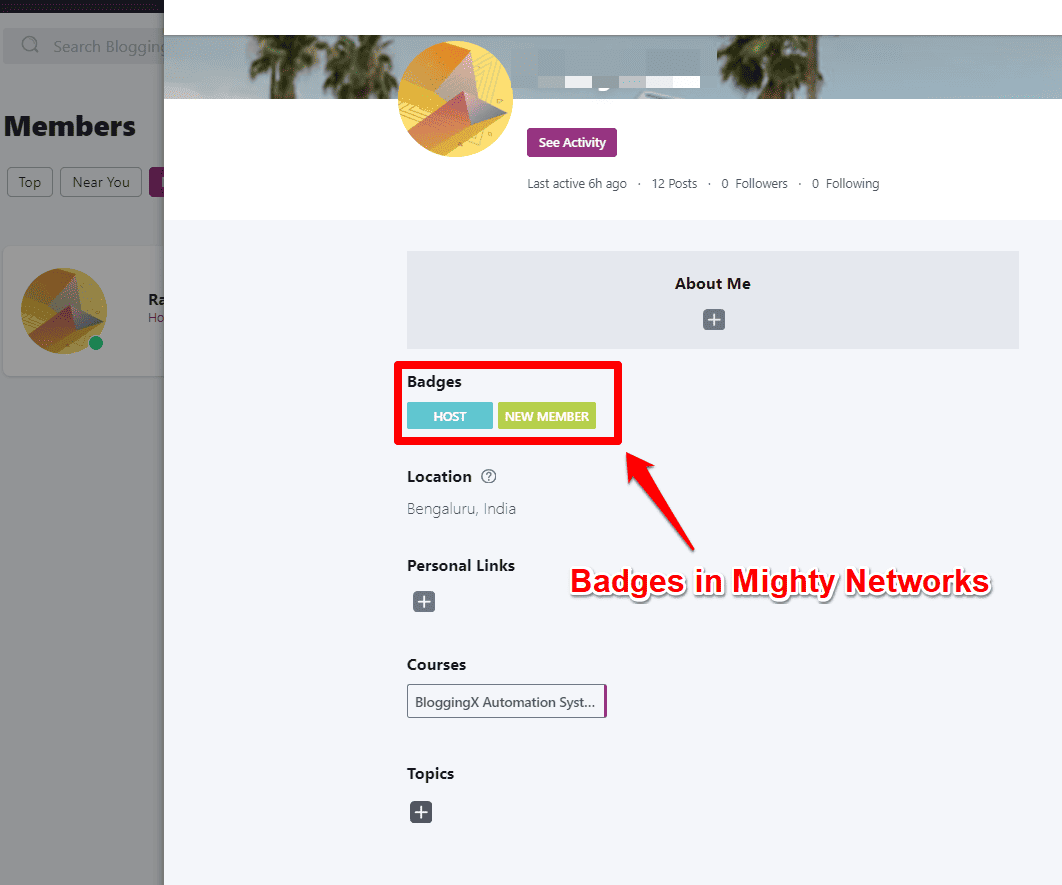
They now offer streaks and stake milestones where members can earn points based on community activity and display recognition on their public profiles. Members also get badges when they finish courses.
They’ve also added Challenge and Habit Tracker templates to help community builders create structured engagement programs.
And also see this:
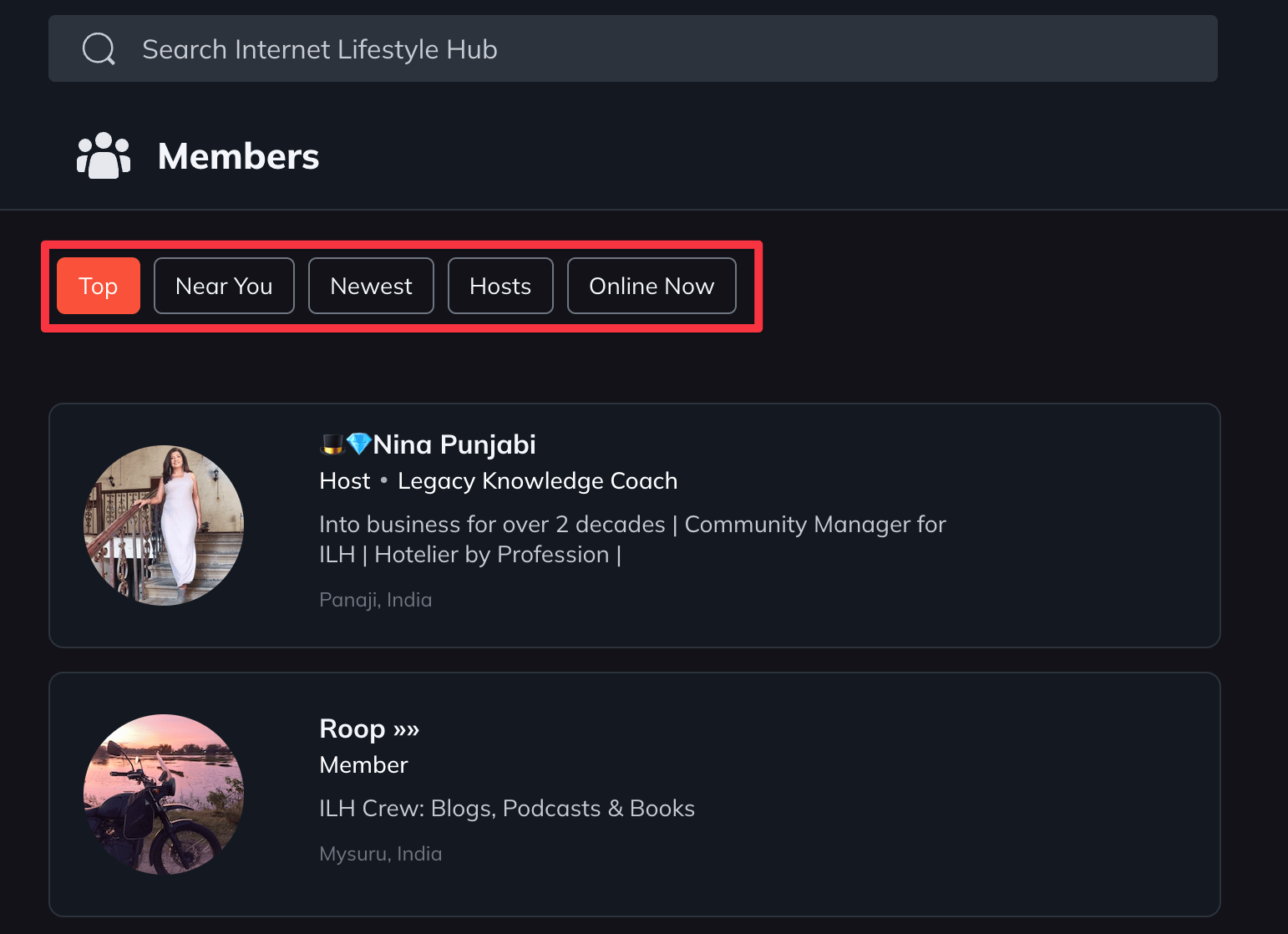
There’s also a neat feature that helps members find others who share similar interests.
When you look through your member list, you can easily find people based on how active they are, where they’re from, and if they’re online right now.
🏆 Winner: Circle takes the edge in engagement features with its activity scoring, member tagging, and new gamification system that encourages active participation and healthy competition.
Workflow automation
Circle added a new feature called workflows (only available in their $200/month Business plan).
It works like the automation rules in Kajabi.
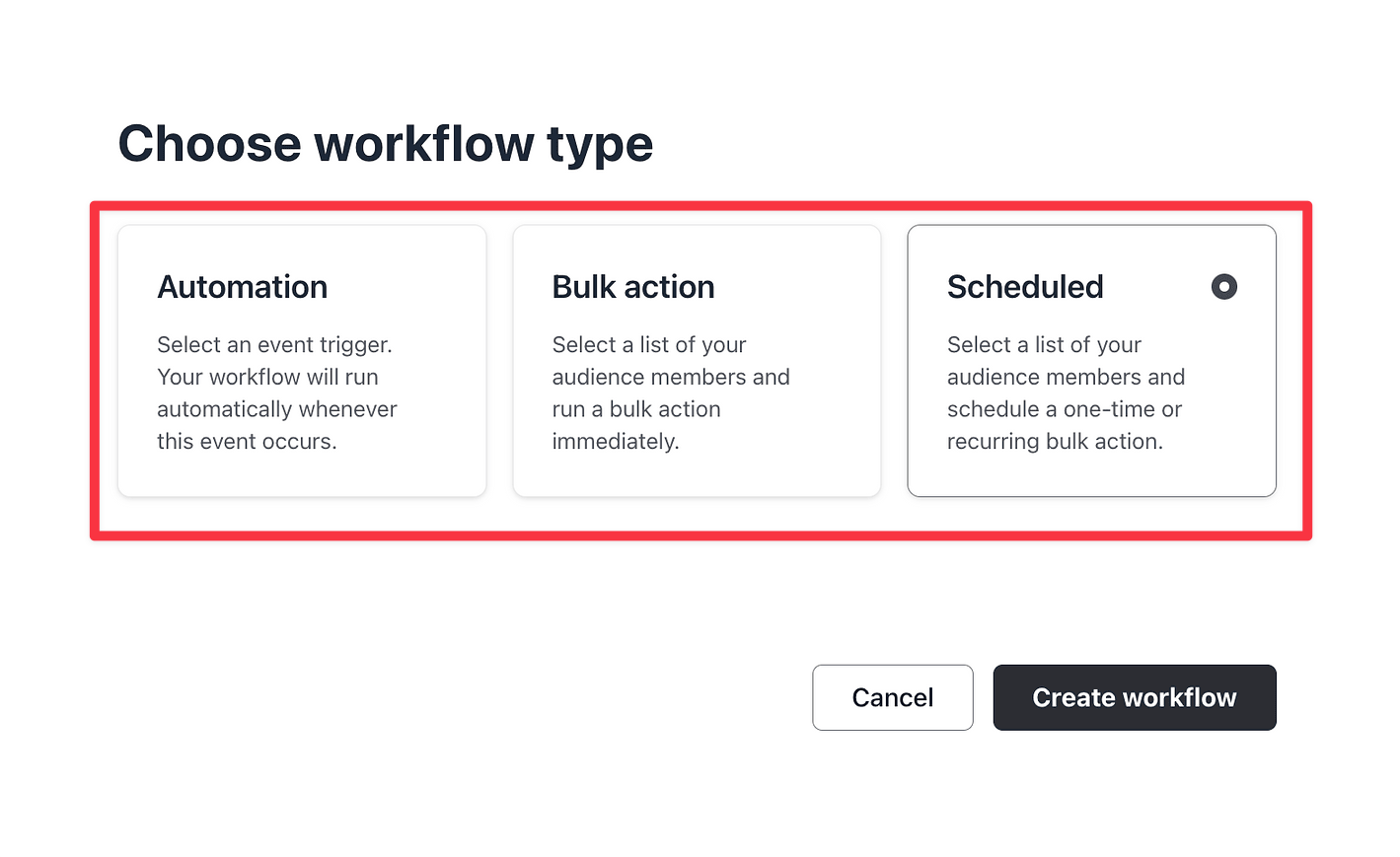
Here are the different types of workflows:
- Automation Workflow: Makes tasks happen automatically when certain things happen
- Bulk Action Workflow: Lets you do many things at once to save time
- Scheduled Workflow: Sets up bulk actions to happen on a schedule
Here’s what you can do with Automation Workflow:
- Send a welcome message when new members join 💌
- Add tags to new members 🏷️
- Send event reminders ⏰
- Add tags when someone pays for access 💰
- Send congratulations when someone finishes a course 🎉
You can also choose exactly who gets these automated actions.

This means you can run automations for specific groups of people in your community.
The Bulk Action feature helps you save time by doing things for many members at once.
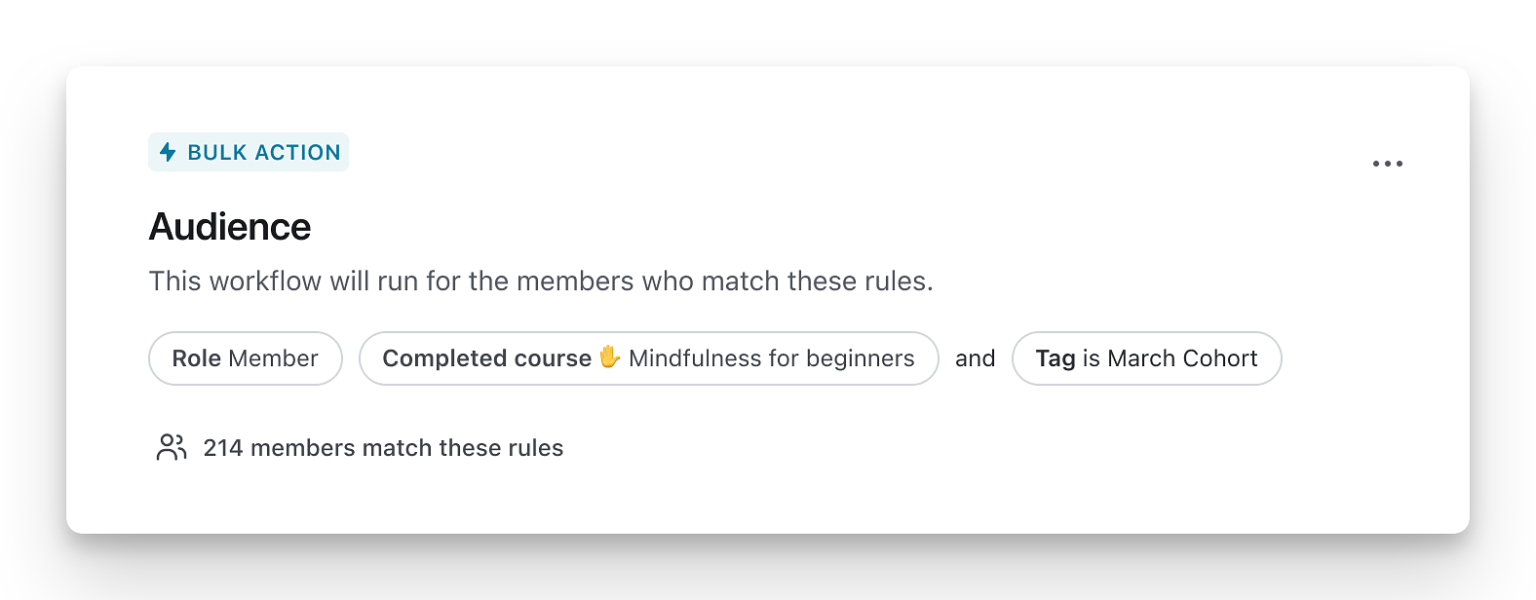
Here’s what you can do with bulk actions:
- Copy members from one space to another 🔄
- Send messages to everyone in a space 📨
- Add tags to all space members 🏷️
- Group similar members together 🧩
- Message members who share things in common (like interests or location) 💌
Want to learn more about workflows? Check out this link.
👎 Mighty Networks doesn’t have these automation features. You’ll need to use Zapier if you want to set up automations.
🏆 Winner: Circle outperforms Mighty Networks with its comprehensive workflow automation capabilities, offering time-saving features that Mighty Networks simply doesn’t provide without third-party tools.
Mobile app 📲

Both Mighty Networks and Circle have mobile apps that work on iPhone and Android.
These apps are easy to use and pack all the important features you need.

You can do quite a lot with these apps – run group coaching calls, host live events, and send push notifications to your members.
Want your own branded app?
Both platforms offer this through Circle Plus and Mighty Pro.
You can create and launch your own custom apps on Google Play and Apple App stores.
🏆 Winner: Both platforms offer excellent mobile apps with comparable features, though Circle’s cleaner interface and more intuitive navigation provide a slightly better user experience.
Affiliate program
Circle’s affiliate program gives you real tracking and payment capabilities.
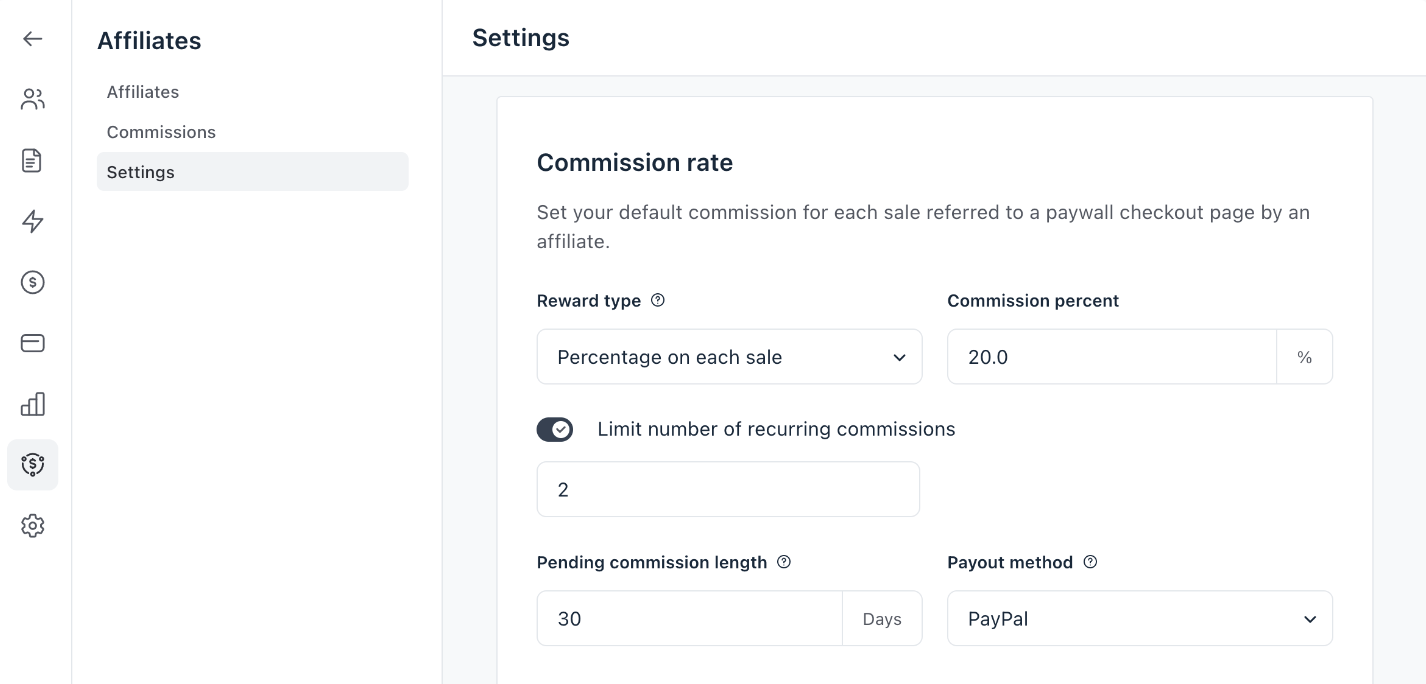
You can connect it to different payment options in your community and set custom commission rates.
If a sale doesn’t automatically link to an affiliate, you can manually assign it to the right person.
The downside?
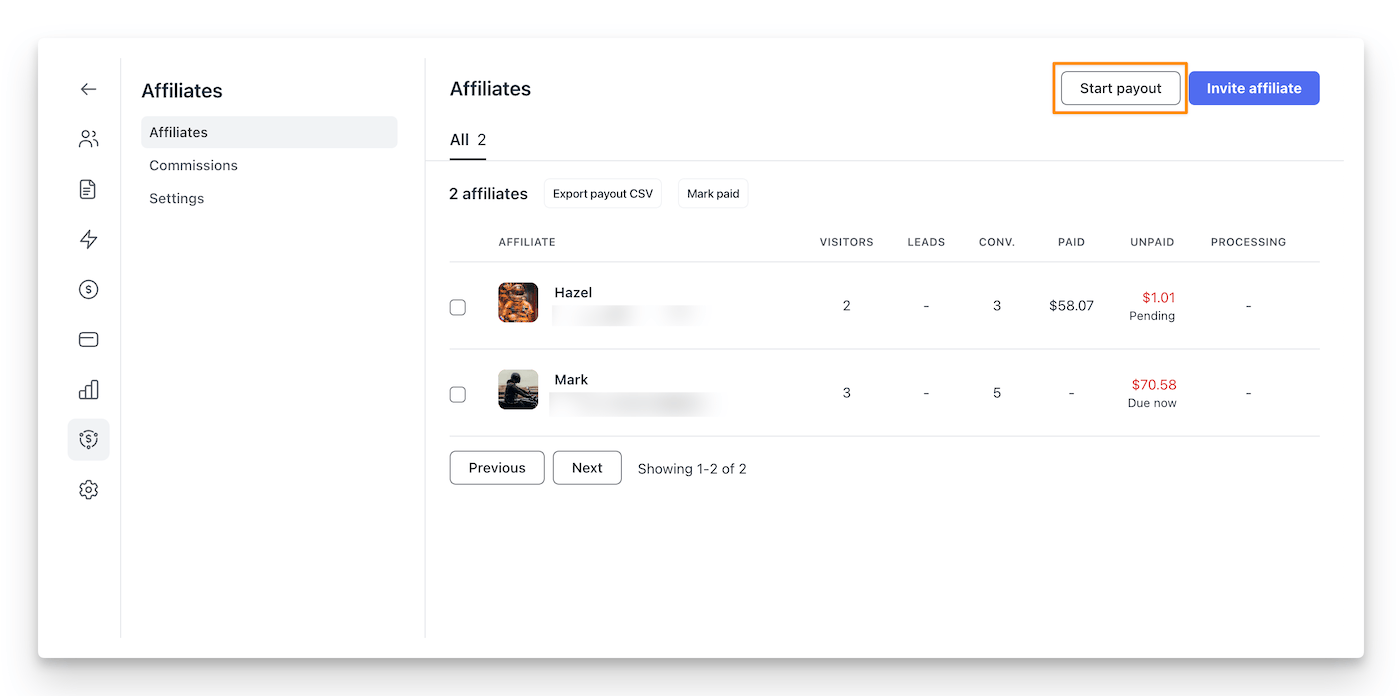
You’ll need to manually start affiliate payments by clicking ‘start payout’ in your dashboard – there’s no automatic payment system yet.
Now about Mighty:
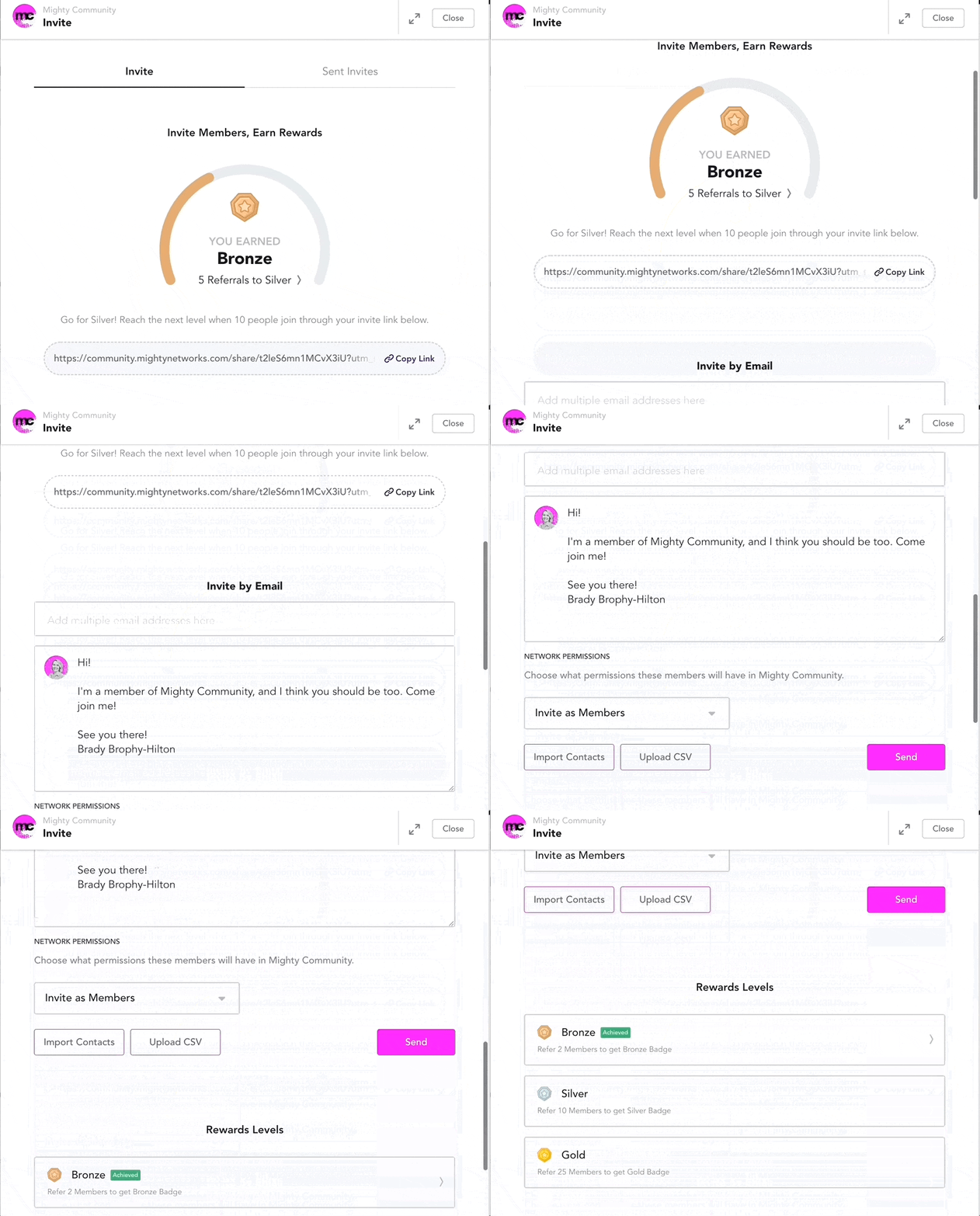
Mighty Networks offers an ambassador program instead of a true affiliate system.
On Community or Business plans, members can become ambassadors and move through levels (Bronze, Silver, Gold) as they bring in more people.
The catch? You can’t track sales or handle payments through it – it’s more of a referral system than a real affiliate program.
🏆 Winner: Circle provides a more robust affiliate program with real tracking and payment capabilities, while Mighty Networks only offers a basic ambassador system without monetary compensation.
Integrations
Mighty Networks requires you to upgrade to their Scale plan ($215/mo) to access their limited native integrations and API capabilities.
This means you’ll need to contact their sales team and pay a premium just to connect your community with other tools.
Circle takes a different approach. They’ve prioritized integrations from the start.
Plus, Circle’s workflow automation system lets you build custom integrations without coding knowledge.
This makes Circle more flexible and cost-effective if you need to connect your community with other platforms in your tech stack.
🏆 Winner: Circle provides more comprehensive integration capabilities with its API access and workflow automations, giving users greater flexibility to connect with external tools and services.
Pricing and discount 💰
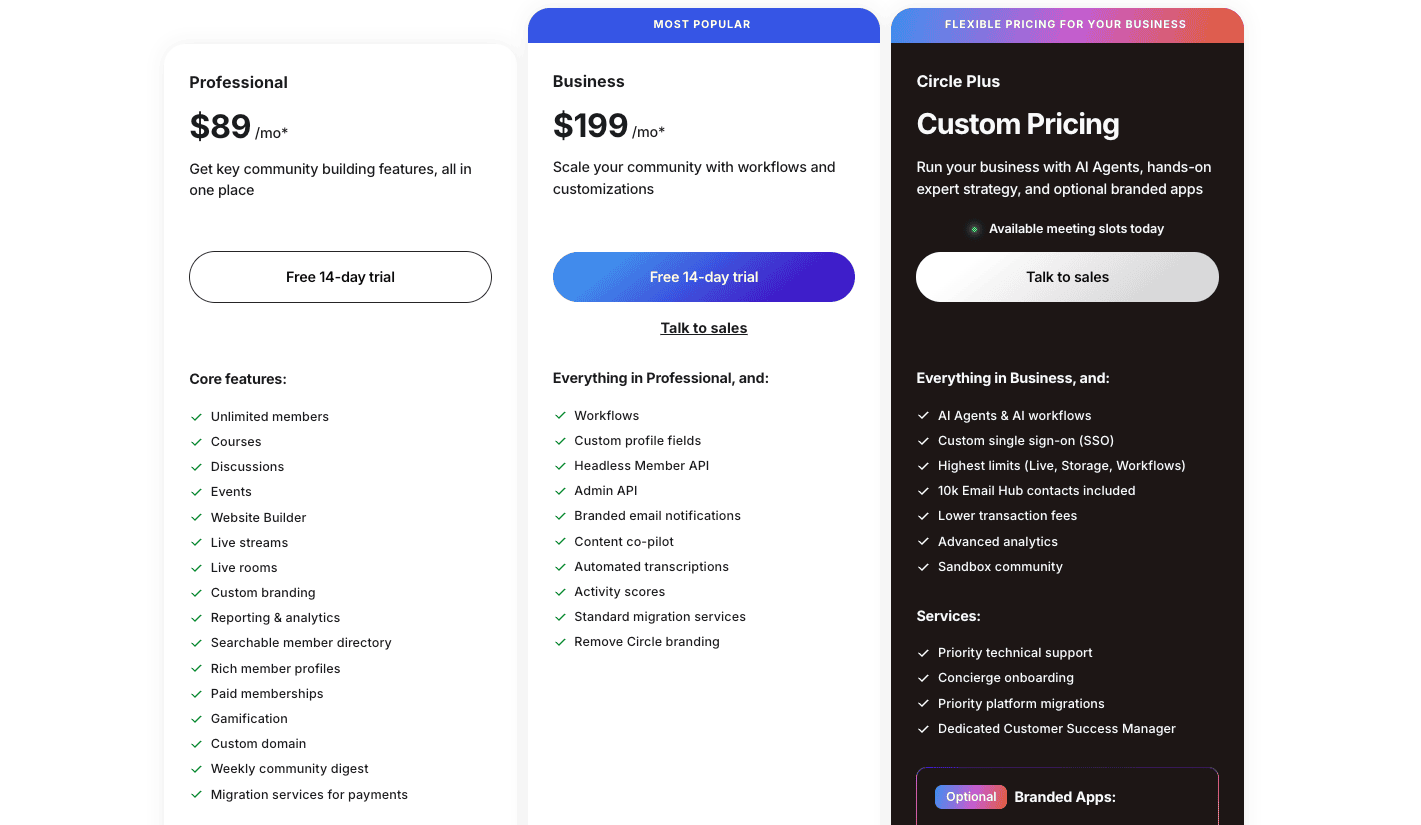
Circle’s pricing starts at $89/month.
Want all the good stuff?
Get the $199 Business plan – you’ll get workflows and API access.
3 shady things 🤫:
- All their plans are billed annually (see the asterisk *)
- The transaction fee is not disclosed in the pricing page.
- They don’t clearly mention how many workflows you actually get with their Business plan.
Now Mighty:

Most people end up going with the Scale plan (at $215/mo) to get access to automations and the ability to integrate it with various other apps and more features.
For your own branded mobile apps, look at Mighty Pro – but you’ll need to ask support about the price.
🏆 Winner: Tie.
Wrap up
After comparing both platforms, Circle is the stronger choice for most community builders.
Its superior workflow automation, robust engagement tools, comprehensive API access, and true affiliate program make it more versatile and scalable.
While Mighty Networks excels in course creation and offers solid community features, Circle’s modern interface and powerful automation capabilities provide better long-term value.