Looking for a Submagic promo code?
You’re in the right place.
Submagic is offering 10% OFF on all monthly and annual plans with my exclusive promo code.
Claim Your Submagic 10% Discount!
Use the coupon code to get 10% OFF on all monthly and annual Submagic plans.Claim Your Submagic 10% Discount!
Use the coupon code to get 10% OFF on all monthly and annual Submagic plans.If you create YouTube Shorts, Instagram Reels, or TikToks regularly, Submagic can save you a lot of editing time by helping you add AI captions, hooks, b-roll, templates, and other short-form video elements, without editing everything from scratch.
Now, let me show you how to claim the discount.
How to avail this offer?
To claim the Submagic discount, first click this link and choose monthly or yearly billing based on how long you plan to use the tool.
If you just want to test Submagic for a few videos, the monthly plan offers more flexibility. But if you’re serious about creating shorts consistently, the annual plan can save you more because you get 41% OFF their yearly pricing.
Next, select the plan that fits your needs.
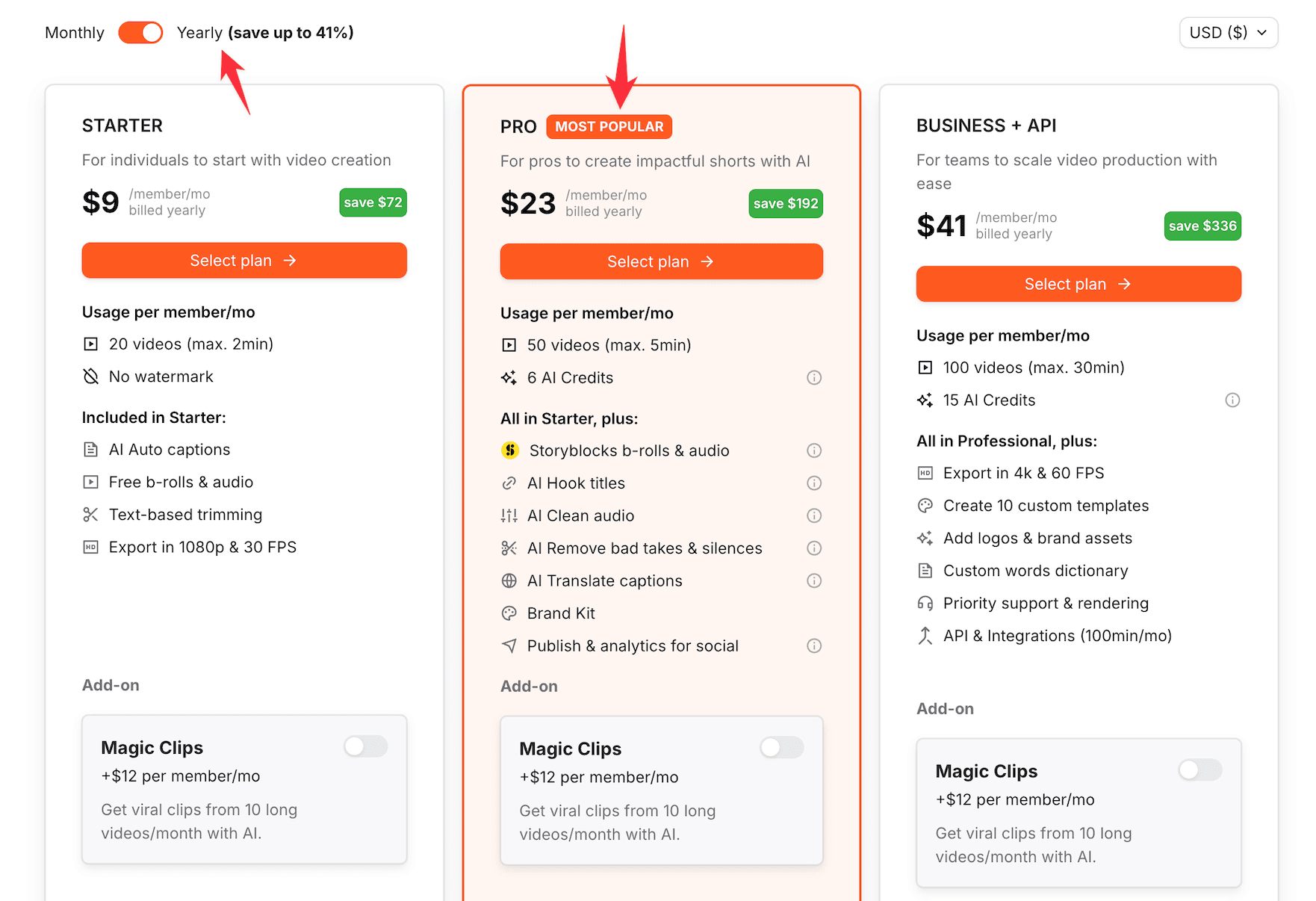
The Starter plan is a good choice if you’re just getting started with short-form video creation.
But if you’re creating content regularly for YouTube Shorts, Instagram Reels, or TikTok, the Pro plan makes more sense because it includes more video credits, longer video limits, premium b-roll, AI auto zooms, clean audio, and brand kit features.
After you choose a plan, you’ll be taken to the checkout page.
Claim Your Submagic 10% Discount!
Use the coupon code to get 10% OFF on all monthly and annual Submagic plans.Claim Your Submagic 10% Discount!
Use the coupon code to get 10% OFF on all monthly and annual Submagic plans.Enter the above mentioned promo code in the promotion code field.
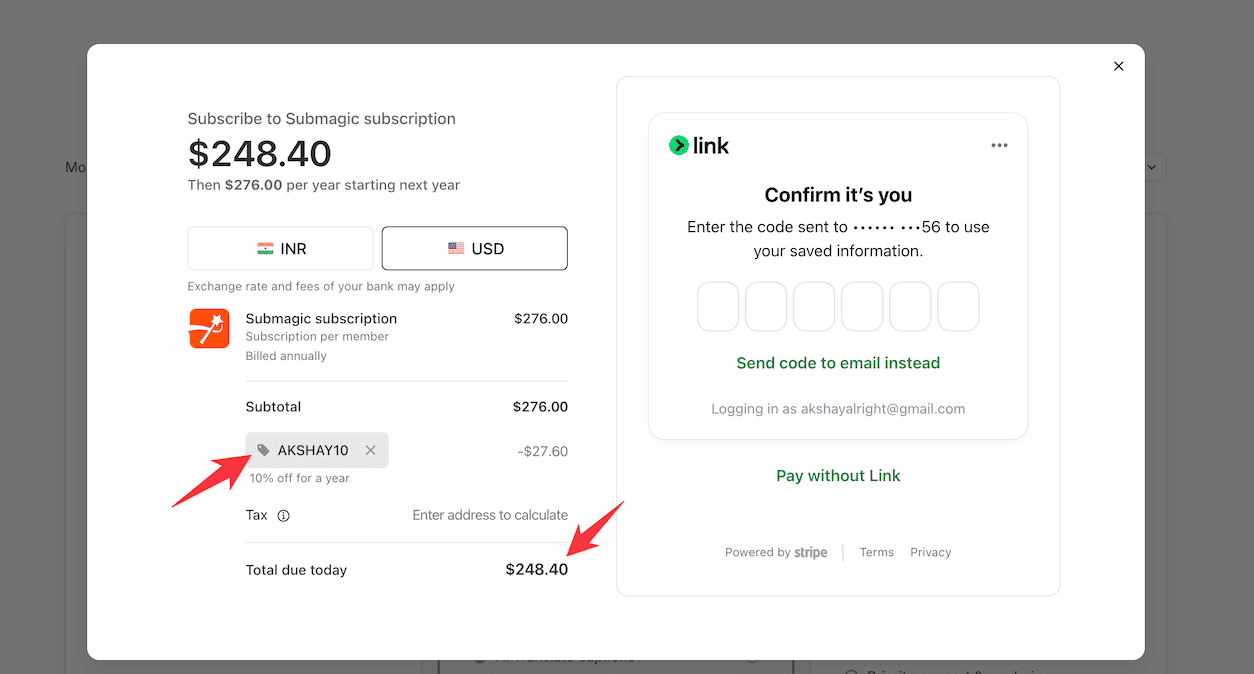
After applying it, you should see the 10% discount reflected in your final price.
That’s it. Complete your payment, and you’ll get access to Submagic based on the plan you selected.
Submagic pricing and discount
Submagic comes with 3 main plans: Starter, Pro, and Business + API.
They also have a Custom plan if you need higher limits, more members, custom API usage, or advanced security features.
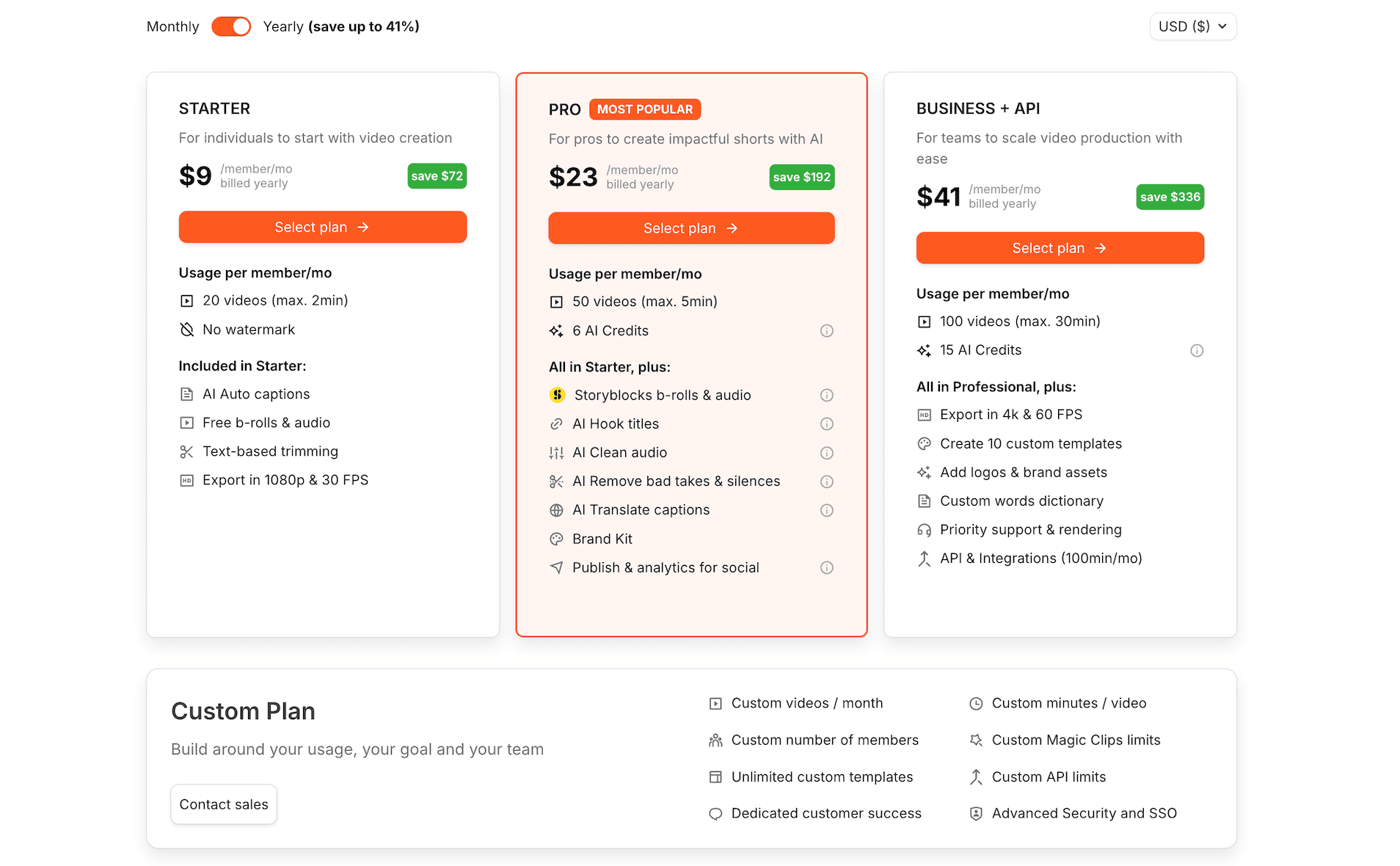
The good thing is that Submagic already gives you up to 41% OFF when you choose annual billing.
| Plan | Monthly pricing | Yearly pricing | Best for |
| Starter | $15/member/month | $9/member/month | Beginners who want to create short-form videos with captions, b-roll, and basic AI editing features. |
| Pro | $39/member/month | $23/member/month | Creators who publish shorts regularly and need more video limits, premium b-roll, AI auto zooms, clean audio, and brand kit. |
| Business + API | $69/member/month | $41/member/month | Teams, agencies, and businesses that need 4K exports, longer videos, custom templates, priority support, and API access. |
| Custom | Custom pricing | Custom pricing | Larger teams that need custom video limits, members, API limits, security, and dedicated support. |
And with my exclusive coupon code, you can get an extra 10% OFF on your Submagic purchase.
So, if you’re creating shorts casually, Starter is enough.
But if short-form content is part of your actual content strategy, Pro gives you the best balance between price and features.
What is Submagic?
Overview

Submagic is an AI-powered video editing tool for creating short-form videos faster.
It helps you add captions, hooks, b-roll, zooms, templates, and other engaging elements to your YouTube Shorts, Instagram Reels, TikToks, LinkedIn videos, and podcast clips.
Features of Submagic
Here are some key Submagic features that make short-form video creation faster, easier, and more engaging.
- AI auto captions: Submagic automatically transcribes your video and adds styled captions, helping people follow your content even when they watch with the sound off.
- AI hook titles: It suggests attention-grabbing hook titles for your videos, making it easier to stop the scroll and get people to watch longer.
- Text-based trimming: You can edit your video through the transcript instead of dragging clips on a timeline, which makes cleaning up talking-head videos faster.
- AI cleanup tools: Submagic can remove silences, bad takes, and filler parts from your video, so you don’t need to manually cut every awkward pause.
- B-roll and audio: You can add b-rolls, sound effects, and audio to make your short videos more engaging, polished, and ready for social platforms.
- Brand kit and templates: Higher plans let you use brand kits, custom templates, logos, and fonts, so your videos look consistent across all platforms.
- Social publishing: Submagic supports publishing and analytics for social platforms, helping you create, polish, and publish shorts without jumping between multiple tools.
Pros and Cons of Submagic
Pros 👍
- It’s fast for short-form editing: Submagic helps you create Shorts, Reels, and TikToks faster by handling captions, trimming, b-roll, hooks, and other editing elements.
- Great caption styles: Its AI captions look modern and social-media friendly, which can help your videos feel more polished and easier to watch.
- It has AI tools: Features like auto zooms, clean audio, hook titles, and silence removal can save a lot of manual editing time.
- Good for creators and teams: Whether you’re a solo creator or an agency, Submagic has plans that scale based on your video volume and workflow.
Cons 👎
- Starter plan has limits: The Starter plan only supports shorter videos, so serious creators may quickly need to upgrade to Pro or Business. Advanced features like premium b-roll, brand kit, publishing, analytics, and 4K exports are available only on higher plans.
- It’s not a full video editor: Submagic is great for short-form edits, but it may not replace advanced editing tools for complex video projects.
- Add-ons can increase cost: Features like Magic Clips are available as add-ons, so your final monthly cost can increase depending on usage.
FAQs on Submagic
- What is the Submagic promo code? The Submagic promo code is AKSHAY10. You can use it to get 10% OFF on all monthly and annual Submagic plans.
- How much discount do I get? You get 10% OFF on your Submagic purchase when you apply the promo code AKSHAY10 at checkout.
- Does AKSHAY10 work on both monthly and annual plans? Yes. The coupon code works on both Submagic’s monthly and annual plans, so you can get 10% OFF no matter which billing option you choose.
- Is there a Submagic free trial? Submagic lets you try the tool with 3 free videos. You don’t need a credit card to get started.
- Which Submagic plan is best? For most creators, the Pro plan gives the best value because it includes higher video limits, premium b-roll, AI tools, brand kit, publishing, and analytics.
- Is Submagic worth it? Yes, if you create short-form videos regularly. It can save you editing time and help your videos look more polished.
Verdict
Submagic is a really useful tool if short-form video is part of your content workflow.
It saves you time on captions, trimming, b-roll, hooks, zooms, and other small editing tasks that usually slow you down.
If you’re just testing the tool, the Starter plan is enough.
But if you’re publishing Shorts, Reels, or TikToks consistently, I feel the Pro plan gives the best value because it unlocks more video limits, premium b-roll, AI cleanup tools, brand kit, publishing, and analytics.
And with my exclusive promo code AKSHAY10, you can get 10% OFF on all monthly and annual Submagic plans.
So if you were planning to try Submagic, this is a good time to grab the discount and start creating better short-form videos faster.