Webflow helps you build custom websites visually without wrestling with code.
Their Black Friday 2026 deal is not live yet.
Last year Webflow offered up to 50% off on annual plans.
The details below are based on last year's deal, so you can get a clear idea of what they may offer this year.
I'll update this post once the official 2026 deal goes live.
Webflow Black Friday offer
⌛ 2026 deal update: Webflow Black Friday 2026 deal is not live yet. The pricing and offer details below are from last year’s (2025) Black Friday deal.
Webflow is a visual website builder for creating responsive sites, CMS pages, stores, and advanced landing pages without code.
They are offering an incredible opportunity to save big on their powerful website builder platform.
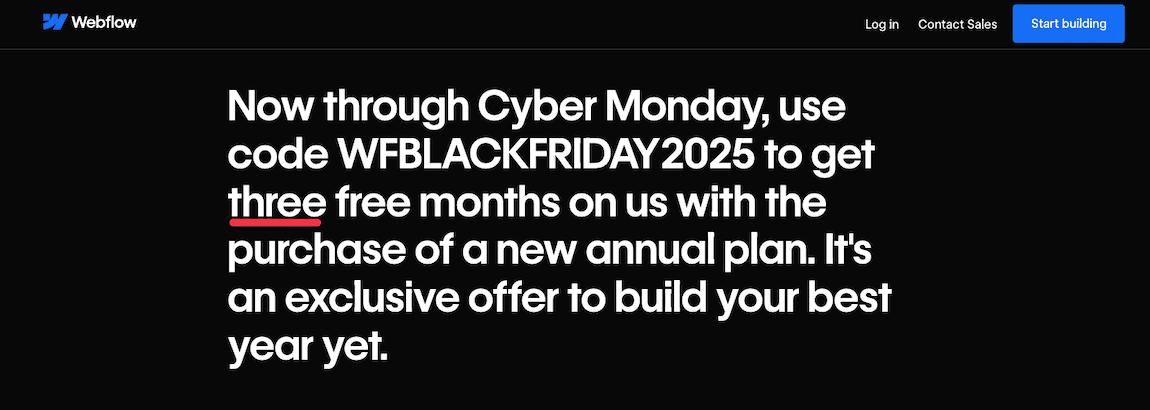
This year's deal gets you 3 months completely free when you buy any new annual Site or Workspace plan. You pay for just 9 months and get a full year of service.
You'll save up to 50% on Workspace plans and 42% on Site plans. This is your chance to invest in a professional website builder that gives you complete design control without writing code.
This deal runs from November 17 through December 2.
To redeem your discount, click on this exclusive link and choose your annual plan. Pick any Site or Workspace plan that fits your needs.
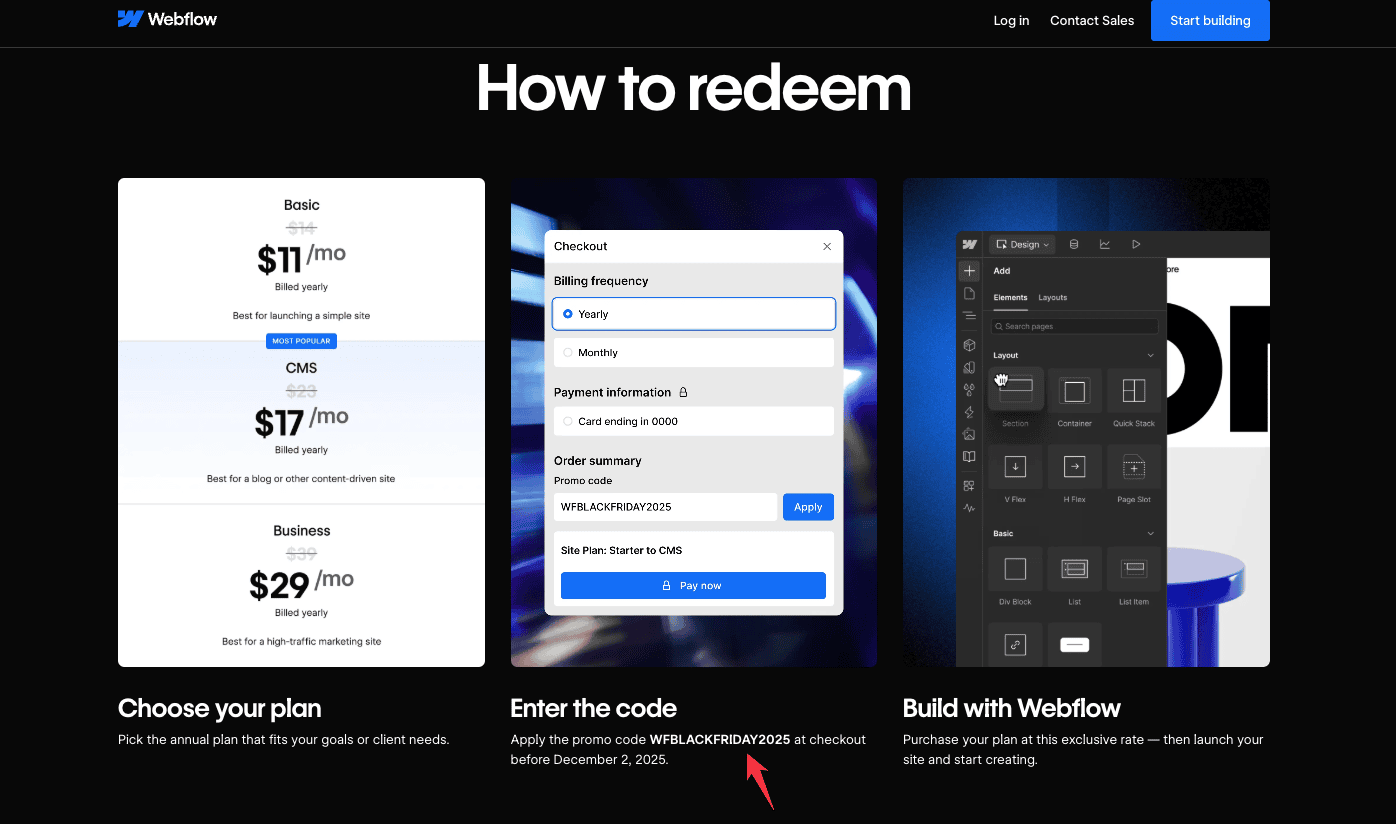
Then enter WFBLACKFRIDAY2025 at checkout before December 2nd.
Finally, complete your purchase and you'll get 3 months free automatically.
👉 Important: This deal only works for new annual plans. You can't apply it to existing subscriptions, and add-ons like Analyze, Optimize, and Localization aren't included.
Claim Webflow Black Friday deal
Who should choose Webflow?
Webflow works best for designers, developers, and agencies who want full control over every detail of their site without writing code from scratch.
It's perfect if you need custom animations, complex interactions, or advanced CMS features that simple drag-and-drop builders can't handle.
But if you're new to building websites, working with a tight budget, or just need something basic up and running fast, Webflow might feel like overkill.
The learning curve is real, and you'll need to invest time getting comfortable with the platform.
What's new in Webflow?
Webflow continues to evolve with powerful new features that make website building faster and more intuitive.
Here are the latest updates that set Webflow apart from other website builders:
- AI Assistant with code generation: Your intelligent design partner that handles complex tasks and creates custom code through simple conversations.
- Real-time collaboration: Work simultaneously with multiple team members on the same page without conflicts or version issues.
- Enhanced CMS Collection access control: Get enterprise-level content collaboration with detailed permissions for team workflows.
- Webflow Cloud with storage: Host full-stack web applications alongside your site with SQLite databases, key-value storage, and object storage.
- Form-level spam protection: Filter unwanted submissions automatically with the new spam inbox and advanced form settings.
- Advanced MCP server integration: Connect AI tools like Cursor and Claude directly with your Webflow site structure and content.
Webflow overview

Webflow gives you visual design tools paired with professional web development features, so you can build custom websites without writing code while keeping complete control over your design.
Here are the key features that make Webflow stand out:
- Visual designer with code control: You can design your website on a visual canvas while Webflow handles the HTML, CSS, and JavaScript code automatically in the background.
- Responsive design system: Your designs will look great on any device with breakpoint controls and flexible layouts that adapt to different screen sizes.
- Custom interactions and animations: You can add smooth animations, hover effects, and page transitions without needing to write JavaScript.
- Built-in hosting and CDN: Your site comes with fast, secure hosting, a global content delivery network, and SSL certificates included in all plans.
- SEO optimization built-in: You get automatic sitemaps, meta tag controls, 301 redirects, and clean URLs without needing extra plugins.
- Advanced CMS capabilities: You can manage dynamic content with custom fields, collections, and relationships for your blogs, portfolios, and complex sites.
- eCommerce without plugins: You can create online stores with product management, payment processing, and inventory tracking built right into the platform.
- AI-powered workflows: You get a built-in AI Assistant that helps with design tasks, content creation, and custom code generation through simple conversations.
- Team collaboration tools: You can work together with your team using real-time editing, user permissions, and client billing features built for agencies and design teams.
Pros and Cons of Webflow
Pros 👍
- 150+ professional templates: You can choose from a huge variety that covers all industries and use cases
- AI-powered design capabilities: You get a built-in AI Assistant that speeds up your workflow and creates custom code through simple conversations – no technical skills needed
- Native SEO tools: It gives you built-in optimization features without needing extra plugins like WordPress requires
- Real-time team collaboration: You can work at the same time with your team members on the same project without any conflicts
- Advanced hosting with web apps: You can run full-stack applications with Webflow Cloud that includes database storage options
- Enterprise-grade security: You get enhanced controls and collaboration features built for professional teams
Cons 👎
- Steeper learning curve: Webflow takes more time to learn than simple builders like Wix or Squarespace
- Higher pricing: Costs more than competitors, especially if you need eCommerce features
- Template limitations: Switching templates mid-project is harder than on other platforms
Webflow vs. competitors
Webflow offers more design control than Wix/Squarespace but requires more learning than WordPress alternatives.
- WordPress: It has self-hosted flexibility with plugins but requires more technical setup and maintenance than Webflow’s hosted solution
- Squarespace: Offers beautiful templates with easier setup but limited design flexibility compared to Webflow’s visual development tools
- Wix: Simpler drag-and-drop interface for beginners but offers less design control and customization than Webflow
- Shopify: It has superior eCommerce features and app ecosystem but lacks Webflow’s advanced design capabilities for custom layouts
FAQs on Webflow Black Friday
- Is the Webflow Black Friday 2026 deal live yet? No, Webflow's Black Friday 2026 deal is not live yet. Once Webflow confirms the offer, I'll update this page with the exact discount, coupon code, and dates.
- What was Webflow's Black Friday deal last year? Last year, Webflow offered 3 months free on new annual Site and Workspace plans. You had to use the code WFBLACKFRIDAY2025 before the deadline.
- When will Webflow Black Friday 2026 start? The 2026 dates are not confirmed yet. Based on last year's offer, expect Webflow to run the deal around mid-to-late November and possibly through Cyber Monday.
- Will Webflow offer 3 months free again in 2026? It's possible, but not confirmed. Last year's 3-month-free offer is a useful reference, but Webflow may change the discount, coupon code, or dates for 2026.
- Will I need a Webflow coupon code for Black Friday 2026? We don't know yet. In 2025, Webflow required the code WFBLACKFRIDAY2025, so keep an eye on this page for the updated 2026 code if they release one.
- Which Webflow plans usually get Black Friday discounts? Last year, the deal applied to new annual Site and Workspace plans. Add-ons like Analyze, Optimize, and Localization were excluded, so wait for the 2026 terms before buying.
- Is it worth waiting for Webflow Black Friday 2026? Yes, if you're planning to buy an annual Webflow plan and don't need it immediately. Last year's offer saved up to 3 months, so waiting could be worth it.
Conclusion
If you want to create a fully customized website with a visual builder, Webflow is still a strong pick.
Its powerful customization options make it a favorite among developers, agencies, and designers.
It has native SEO tools built right in and comes with powerful animations, hosting, and domain services. This makes it one of the best site builders available today.
The Webflow Black Friday 2026 deal is not live yet, so bookmark this page and check back closer to Black Friday and Cyber Monday.
For now, last year's offer gives you a good idea of what to expect – 3 months free with code WFBLACKFRIDAY2025 on new Webflow annual plans.